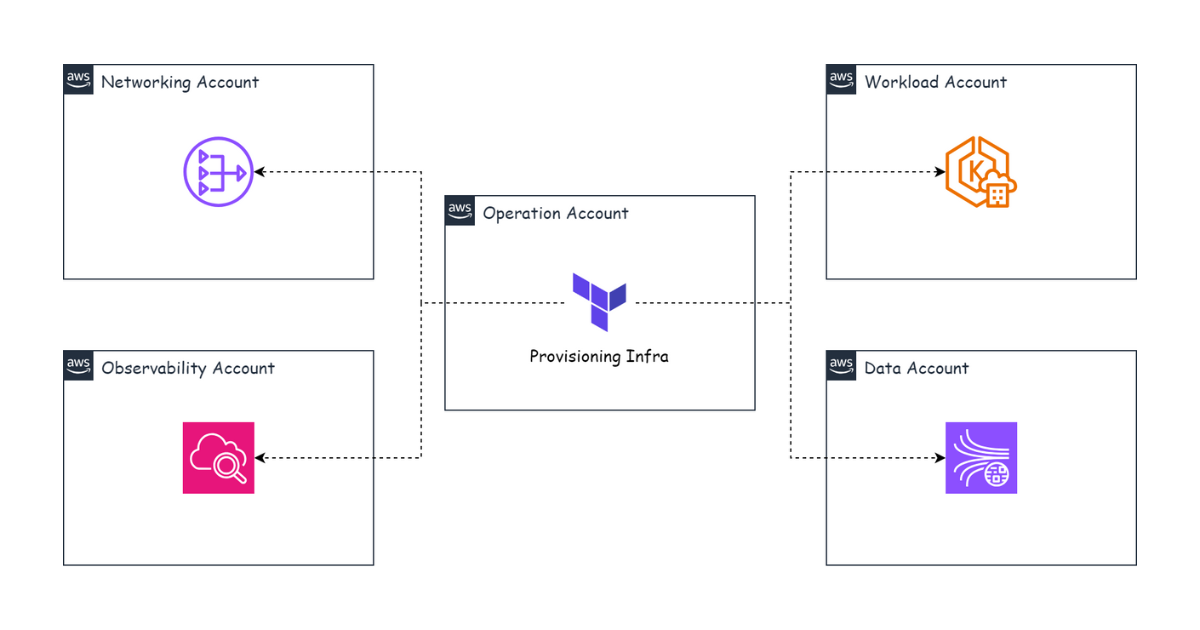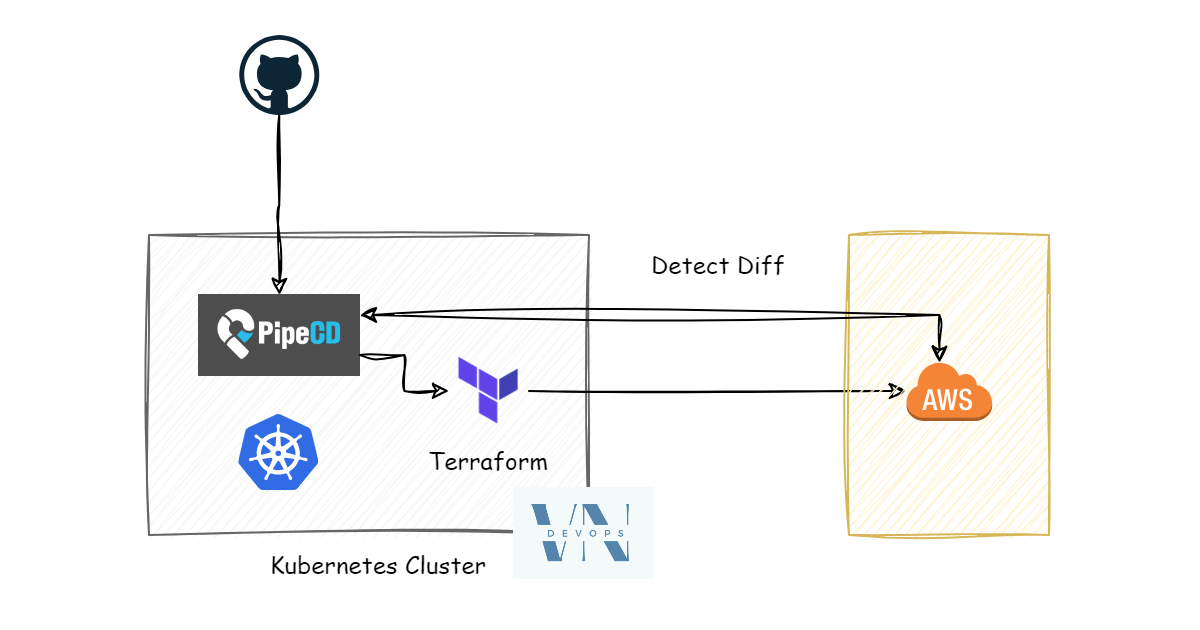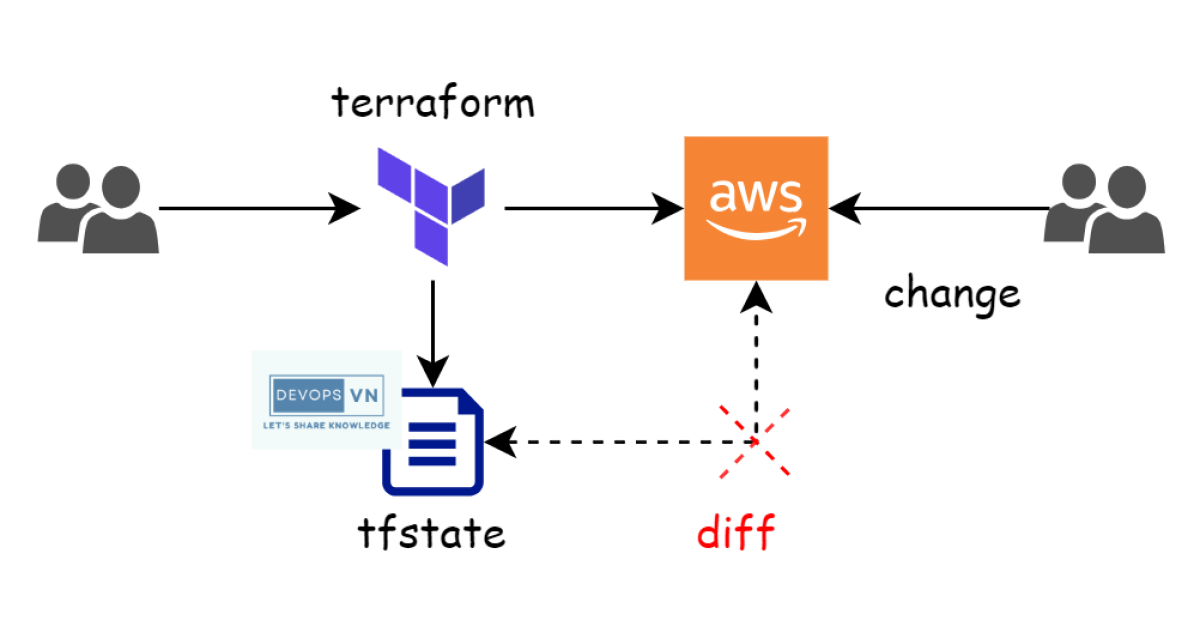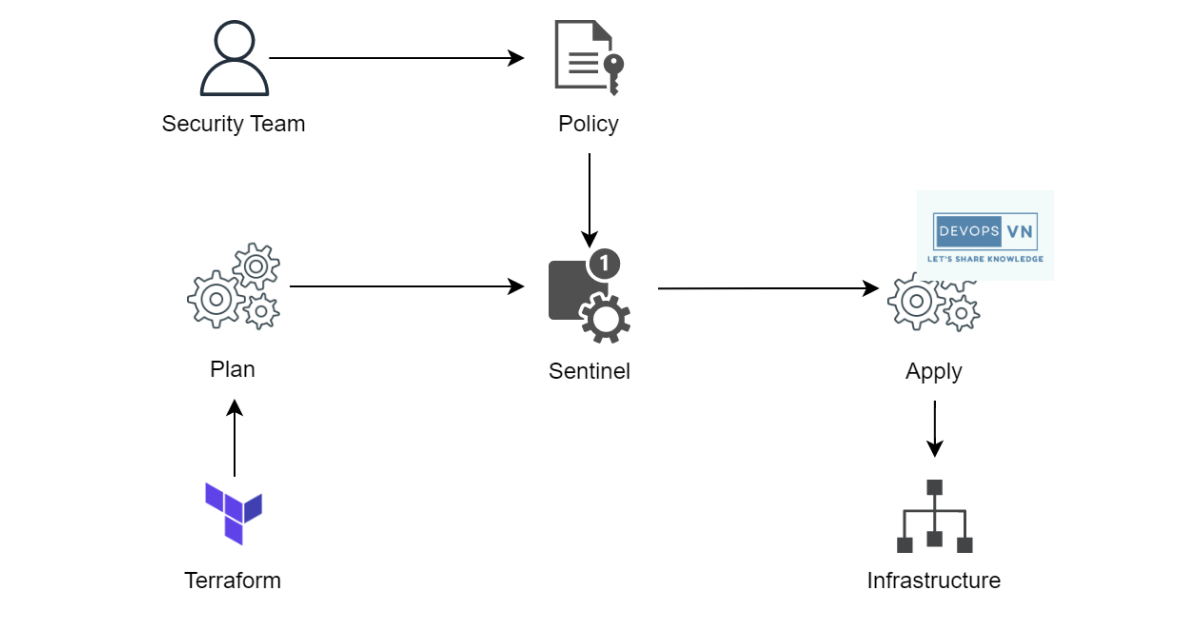
In the previous part we learned about Blue/Green Deployment. In this part we’ll learn about the next deployment method: A/B Testing Deployment with CloudFront and S3.
A/B Testing Deployment
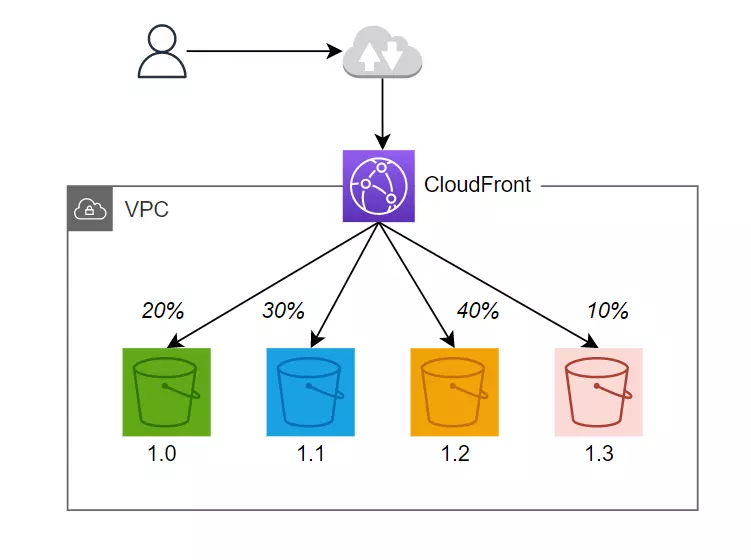
This is a deployment method that lets our application have multiple versions at the same time, and users are routed to a specific version we designate. It can be based on some variable we configure in the browser’s cookies, or depending on the user’s location we route them to the version we designate.
CloudFront and Lambda@Edge
In this part we’ll use CloudFront and Lambda@Edge to perform A/B Testing Deployment for a Single Page Application.
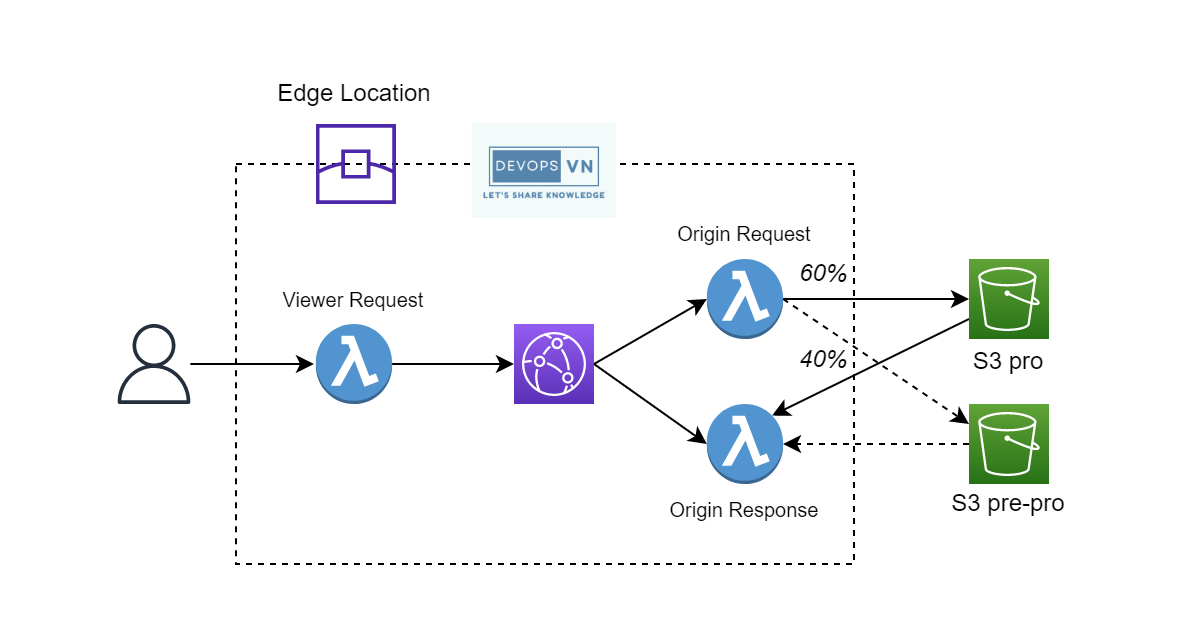
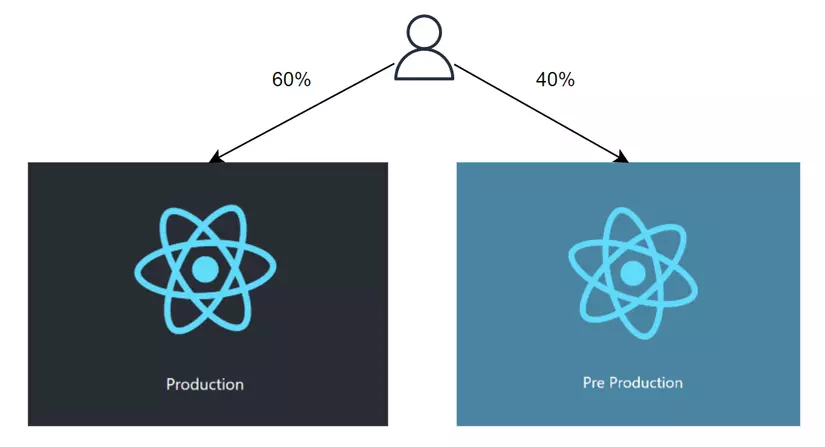
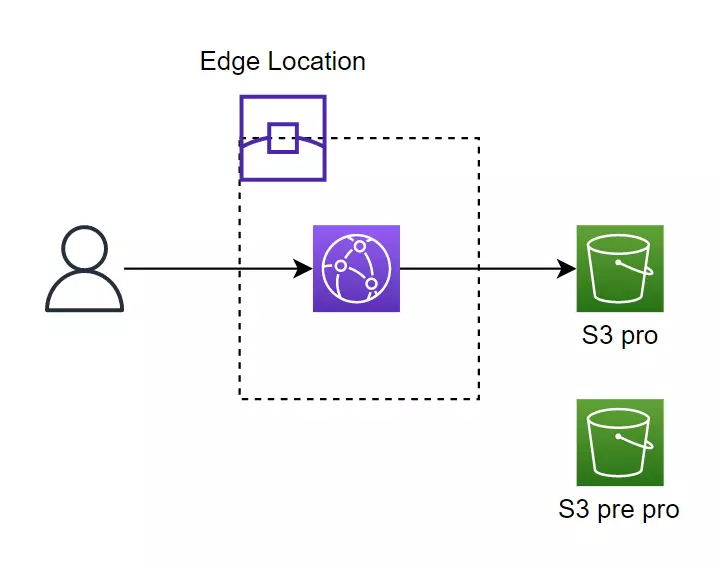
Our SPA is hosted on an S3 bucket and cached by the CloudFront DNS. Now we’ll host another new version of the SPA on a different S3 bucket. We call the old S3 “Pro” and the new S3 “Pre Pro”. We configure 60% of requests to go to S3 Pro and 40% to S3 Pre Pro.
To route the percentage of client requests, we’ll use Lambda@Edge.
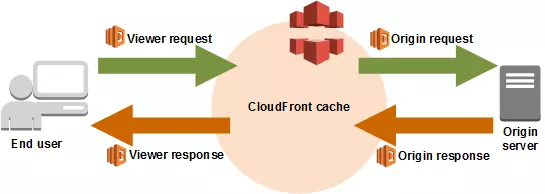
There are 4 events at which CloudFront executes Lambda@Edge:
- CloudFront Viewer Request: Lambda@Edge is called when CloudFront receives a request from the client
- CloudFront Origin Request: Lambda@Edge is called when CloudFront sends a request to the origin behind it
- CloudFront Origin Response: Lambda@Edge is called when CloudFront receives a response from the origin
- CloudFront Viewer Response: Lambda@Edge is called before CloudFront returns a response to the client
And in Lambda@Edge we modify the client’s request so it routes to the S3 we designate.
Execution
Base structure
Our system will be as follows.
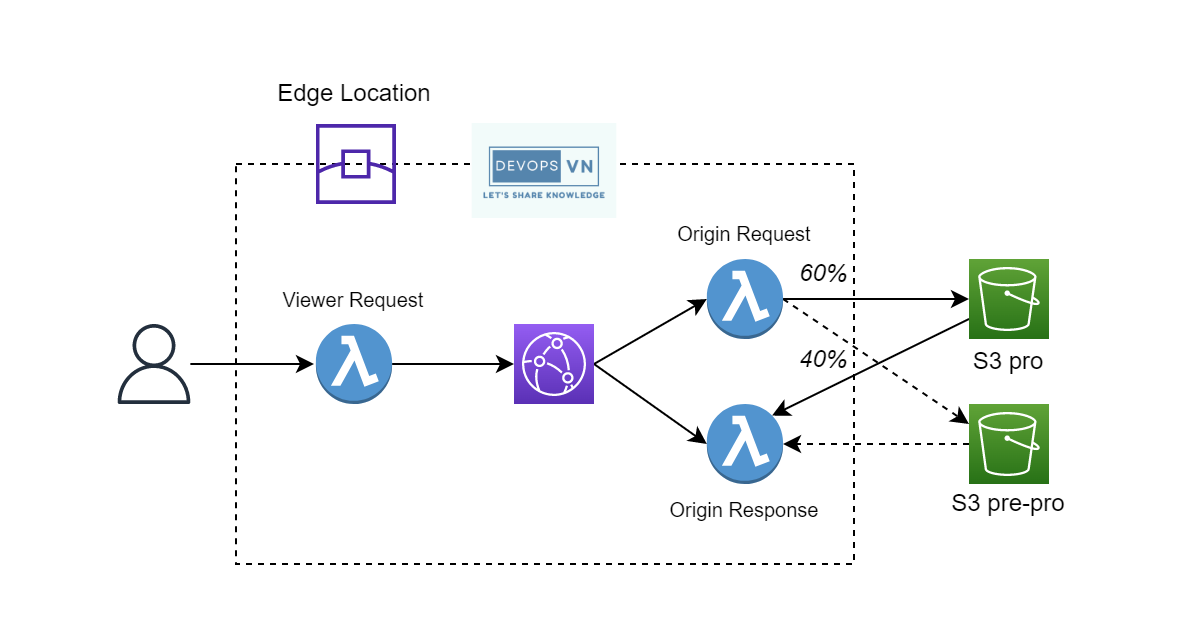
I’ll explain each part in detail. First we create CloudFront and the S3 Bucket Pro; create 3 files: main.tf, s3.tf, cloudfront.tf.
terraform {
  required_version = ">= 1.9"

  required_providers {
    aws = {
      source  = "hashicorp/aws"
      version = "~> 6.0"
    }
    archive = {
      source  = "hashicorp/archive"
      version = "~> 2.4"
    }
  }
}

provider "aws" {
  region = "us-west-2"
}

output "dns" {
  value = aws_cloudfront_distribution.s3_distribution.domain_name
}
The S3 code. Modern S3 disables ACLs, so instead of aws_s3_bucket_acl we keep the bucket private and block all public access; CloudFront reaches it through the Origin Access Identity.
resource "aws_s3_bucket" "s3_pro" {
  bucket        = "terraform-serries-s3-pro"
  force_destroy = true
}

resource "aws_s3_bucket_public_access_block" "s3_pro" {
  bucket = aws_s3_bucket.s3_pro.id

  block_public_acls       = true
  block_public_policy     = true
  ignore_public_acls      = true
  restrict_public_buckets = true
}

resource "aws_s3_bucket_website_configuration" "s3_pro" {
  bucket = aws_s3_bucket.s3_pro.id

  index_document {
    suffix = "index.html"
  }

  error_document {
    key = "error.html"
  }
}

data "aws_iam_policy_document" "s3_pro" {
  statement {
    actions   = ["s3:GetObject"]
    resources = ["${aws_s3_bucket.s3_pro.arn}/*"]

    principals {
      type        = "AWS"
      identifiers = [aws_cloudfront_origin_access_identity.origin_access_identity.iam_arn]
    }
  }
}

resource "aws_s3_bucket_policy" "s3_pro" {
  bucket = aws_s3_bucket.s3_pro.id
  policy = data.aws_iam_policy_document.s3_pro.json
}
The CloudFront code.
locals {
  s3_origin_id         = "access-identity-s3-pro"
  s3_origin_staging_id = "access-identity-s3-pre-pro"
}

resource "aws_cloudfront_origin_access_identity" "origin_access_identity" {
  comment = local.s3_origin_id
}

resource "aws_cloudfront_distribution" "s3_distribution" {

  origin {
    domain_name = aws_s3_bucket.s3_pro.bucket_regional_domain_name
    origin_id   = local.s3_origin_id

    s3_origin_config {
      origin_access_identity = aws_cloudfront_origin_access_identity.origin_access_identity.cloudfront_access_identity_path
    }
  }

  enabled             = true
  is_ipv6_enabled     = true
  default_root_object = "index.html"

  default_cache_behavior {
    allowed_methods  = ["DELETE", "GET", "HEAD", "OPTIONS", "PATCH", "POST", "PUT"]
    cached_methods   = ["GET", "HEAD"]
    target_origin_id = local.s3_origin_id

    forwarded_values {
      query_string            = true
      query_string_cache_keys = ["index"]

      cookies {
        forward = "all" // none or all
      }
    }

    viewer_protocol_policy = "allow-all"
    min_ttl                = 0
    default_ttl            = 3600
    max_ttl                = 86400
  }

  restrictions {
    geo_restriction {
      restriction_type = "none"
    }
  }

  viewer_certificate {
    cloudfront_default_certificate = true
  }
}
Then we run apply to create the resources.
$ terraform apply -auto-approve
...
Plan: 6 to add, 0 to change, 0 to destroy
...
Apply complete! Resources: 6 added, 0 changed, 0 destroyed.

Outputs:

dns = "d2qm7woq264bw9.cloudfront.net"
After Terraform finishes, it displays the CloudFront URL. If during the run there’s an error because the S3 bucket name is taken, change the S3 bucket name. Our system after running Terraform.
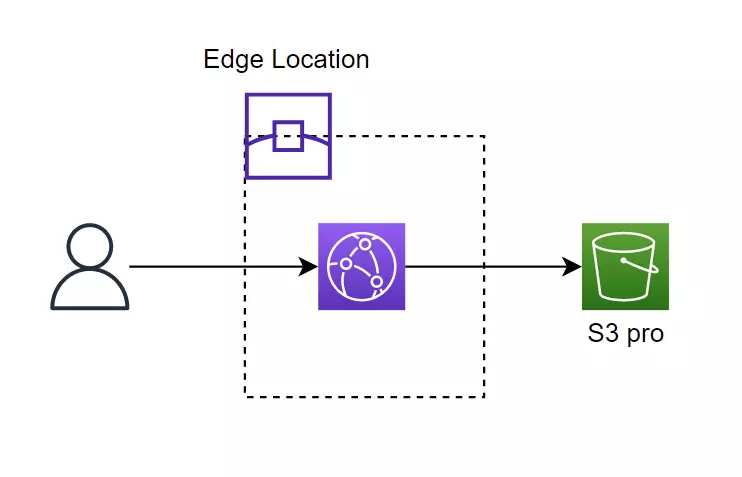
Next we’ll upload code to the S3 Bucket Pro. Download the SPA code from this repo: Terraform Series, then open the bai-11 folder — you’ll see two folders, s3-pro and s3-pre-pro. Let’s work with the s3-pro folder first.
Go into the s3-pro folder and run the following commands.
npm install
npm run build
After running build, you’ll see it outputs a build folder; we upload this folder to S3 Pro.
aws s3 cp build s3://terraform-serries-s3-pro/ --recursive
Now visit the CloudFront URL https://d2qm7woq264bw9.cloudfront.net/.
The Pre Pro environment
Next we’ll create the S3 Bucket Pre Pro; create a file named s3_pre_pro.tf.
resource "aws_s3_bucket" "s3_pre_pro" {
  bucket        = "terraform-serries-s3-pre-pro"
  force_destroy = true
}

resource "aws_s3_bucket_public_access_block" "s3_pre_pro" {
  bucket = aws_s3_bucket.s3_pre_pro.id

  block_public_acls       = true
  block_public_policy     = true
  ignore_public_acls      = true
  restrict_public_buckets = true
}

resource "aws_s3_bucket_website_configuration" "s3_pre_pro" {
  bucket = aws_s3_bucket.s3_pre_pro.id

  index_document {
    suffix = "index.html"
  }

  error_document {
    key = "error.html"
  }
}

data "aws_iam_policy_document" "s3_pre_pro" {
  statement {
    actions   = ["s3:GetObject"]
    resources = ["${aws_s3_bucket.s3_pre_pro.arn}/*"]

    principals {
      type        = "AWS"
      identifiers = [aws_cloudfront_origin_access_identity.origin_access_identity.iam_arn]
    }
  }
}

resource "aws_s3_bucket_policy" "s3_pre_pro" {
  bucket = aws_s3_bucket.s3_pre_pro.id
  policy = data.aws_iam_policy_document.s3_pre_pro.json
}
And update the main.tf file, adding the following output.
...
output "s3" {
  value = {
    pro     = aws_s3_bucket.s3_pro.bucket_domain_name
    pre_pro = aws_s3_bucket.s3_pre_pro.bucket_domain_name
  }
}
Run apply to create the new resources.
$ terraform apply -auto-approve
...
Plan: 4 to add, 0 to change, 0 to destroy.
...
Apply complete! Resources: 4 added, 0 changed, 0 destroyed.

Outputs:

dns = "d2qm7woq264bw9.cloudfront.net"
s3 = {
  "pre_pro" = "terraform-serries-s3-pre-pro.s3.amazonaws.com"
  "pro" = "terraform-serries-s3-pro.s3.amazonaws.com"
}
Then open the s3-pre-pro folder and do the same as before to upload the code to S3.
npm install & npm run build
aws s3 cp build s3://terraform-serries-s3-pre-pro/ --recursive
Our system now.
Configuring Lambda@Edge
Now we’ll do the most important part: configuring Lambda@Edge to route users to the S3 bucket we want. We do this by embedding a cookie in the user’s browser. The cookie we embed has the value X-Redirect-Flag=Pro or X-Redirect-Flag=Pre-Pro.
Then we check: if the user’s request has a cookie with the value X-Redirect-Flag=Pro, we send it to S3 Pro, or vice versa.
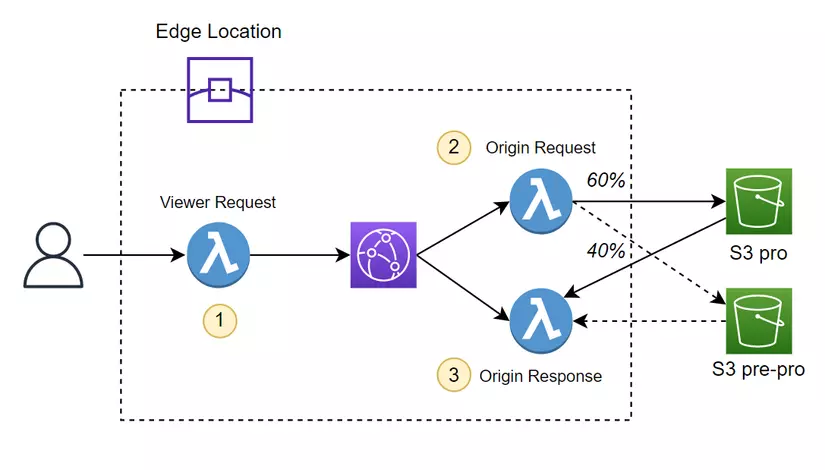
The logic we implement in function 1:
- Check whether the headers already have the cookie we need; if so, let the request continue normally.
- If the headers don’t have the cookie we need, we randomly embed into 60% of requests’ headers the cookie
X-Redirect-Flag=Pro, and into 40% of requests the cookieX-Redirect-Flag=Pre-Pro.
The logic we implement in function 2:
- Check whether the user’s request contains the cookie
X-Redirect-Flag=Pro; if so, route to S3 Bucket Pro. - Check whether the user’s request contains the cookie
X-Redirect-Flag=Pre-Pro; if so, route to S3 Bucket Pre Pro.
The logic we implement in function 3:
- After we return the response to the user, we further check: if the headers have the cookie
X-Redirect-Flag=ProorX-Redirect-Flag=Pre-Pro, we set that cookie for the user’s browser, so that next time they send a request they have that cookie.
In the terraform folder we add another folder, function, then create 3 files named viewer-request.js, origin-request.js, origin-response.js.
├── cloudfront.tf
├── function
│   ├── origin_request.js
│   ├── origin_response.js
│   └── viewer_request.js
├── main.tf
├── s3.tf
├── s3_pre_pro.tf
└── terraform.tfstate
The viewer-request.js file.
exports.handler = (event, context, callback) => {
  const request = event.Records[0].cf.request;
  const headers = request.headers;

  // Look for cookie
  if (headers.cookie) {
    for (let i = 0; i < headers.cookie.length; i++) {
      if (headers.cookie[i].value.indexOf("X-Redirect-Flag") >= 0) {
        console.log("Source cookie found. Forwarding request as-is");
        // Forward request as-is
        callback(null, request);
        return;
      }
    }
  }

  // Add Source cookie
  const cookie = Math.random() < 0.6 ? "X-Redirect-Flag=Pro" : "X-Redirect-Flag=Pre-Pro";
  headers.cookie = headers.cookie || [];
  headers.cookie.push({ key: "Cookie", value: cookie });

  // Forwarding request
  callback(null, request);
};
The origin-request.js file.
exports.handler = async (event, context, callback) => {
  const request = event.Records[0].cf.request;
  const headers = request.headers;

  if (headers.cookie) {
    for (let i = 0; i < headers.cookie.length; i++) {
      if (headers.cookie[i].value.indexOf("X-Redirect-Flag=Pro") >= 0) {
        request.origin = {
          s3: {
            authMethod: "origin-access-identity",
            domainName: "terraform-serries-s3-pro.s3.amazonaws.com",
            region: "us-west-2",
            path: "",
          },
        };

        headers["host"] = [
          {
            key: "host",
            value: "terraform-serries-s3-pro.s3.amazonaws.com",
          },
        ];
        break;
      }

      if (headers.cookie[i].value.indexOf("X-Redirect-Flag=Pre-Pro") >= 0) {
        request.origin = {
          s3: {
            authMethod: "origin-access-identity",
            domainName: "terraform-serries-s3-pre-pro.s3.amazonaws.com",
            region: "us-west-2",
            path: "",
          },
        };

        headers["host"] = [
          {
            key: "host",
            value: "terraform-serries-s3-pre-pro.s3.amazonaws.com",
          },
        ];
        break;
      }
    }
  }

  callback(null, request);
};
The origin-response.js file.
exports.handler = (event, context, callback) => {
  const request = event.Records[0].cf.request;
  const requestHeaders = request.headers;
  const response = event.Records[0].cf.response;

  // Look for cookie
  if (requestHeaders.cookie) {
    for (let i = 0; i < requestHeaders.cookie.length; i++) {
      if (requestHeaders.cookie[i].value.indexOf("X-Redirect-Flag=Pro") >= 0) {
        response.headers["set-cookie"] = [{ key: "Set-Cookie", value: `X-Redirect-Flag=Pro; Path=/` }];
        callback(null, response);
        return;
      }

      if (requestHeaders.cookie[i].value.indexOf("X-Redirect-Flag=Pre-Pro") >= 0) {
        response.headers["set-cookie"] = [{ key: "Set-Cookie", value: `X-Redirect-Flag=Pre-Pro; Path=/` }];
        callback(null, response);
        return;
      }
    }
  }

  // If request contains no Source cookie, do nothing and forward the response as-is
  callback(null, response);
};
Now we’ll use Terraform to create the Lambda functions and configure Lambda@Edge for CloudFront; create two files named iam_role.tf and lambda.tf.
resource "aws_iam_role" "lambda_edge" {
  name = "AWSLambdaEdgeRole"
  path = "/service-role/"
  assume_role_policy = jsonencode({
    "Version" : "2012-10-17",
    "Statement" : [
      {
        "Effect" : "Allow",
        "Principal" : {
          "Service" : [
            "edgelambda.amazonaws.com",
            "lambda.amazonaws.com",
          ]
        },
        "Action" : "sts:AssumeRole",
      }
    ]
  })
}

# The inline_policy block on aws_iam_role is deprecated; use a separate resource.
resource "aws_iam_role_policy" "lambda_edge" {
  name = "AWSLambdaEdgeInlinePolicy"
  role = aws_iam_role.lambda_edge.id

  policy = jsonencode({
    Version = "2012-10-17"
    Statement = [
      {
        Effect = "Allow"
        Action = [
          "logs:CreateLogGroup",
          "logs:CreateLogStream",
          "logs:PutLogEvents"
        ]
        Resource = ["arn:aws:logs:*:*:*"]
      }
    ]
  })
}
We create an IAM Role for Lambda so it has permission to write logs to CloudWatch. Then we create 3 Zip files for our 3 functions above.
data "archive_file" "zip_file_for_lambda_viewer_request" {
  type        = "zip"
  source_file = "function/viewer-request.js"
  output_path = "function/viewer-request.zip"
}

data "archive_file" "zip_file_for_lambda_origin_request" {
  type        = "zip"
  source_file = "function/origin-request.js"
  output_path = "function/origin-request.zip"
}

data "archive_file" "zip_file_for_lambda_origin_response" {
  type        = "zip"
  source_file = "function/origin-response.js"
  output_path = "function/origin-response.zip"
}
Run init again since we’ve added a new provider, archive_file.
terraform init
Then run apply.
$ terraform apply -auto-approve
...
Apply complete! Resources: 1 added, 0 changed, 0 destroyed.

Outputs:

dns = "d2qm7woq264bw9.cloudfront.net"
s3 = {
  "pre_pro" = "terraform-serries-s3-pre-pro.s3.amazonaws.com"
  "pro" = "terraform-serries-s3-pro.s3.amazonaws.com"
}
Now we’ll see 3 Zip files for the 3 functions.
├── cloudfront.tf
├── function
│   ├── origin-request.js
│   ├── origin-request.zip
│   ├── origin-response.js
│   ├── origin-response.zip
│   ├── viewer-request.js
│   └── viewer-request.zip
├── iam_role.tf
├── lambda.tf
├── main.tf
├── s3.tf
├── s3_pre_pro.tf
└── terraform.tfstate
Next we create the Lambda functions; update the lambda.tf file.
...
provider "aws" {
  region = "us-east-1"
  alias  = "us_east_1"
}

resource "aws_lambda_function" "viewer_request_function" {
  provider = aws.us_east_1

  function_name = "viewer-request-ab-testing"
  role          = aws_iam_role.lambda_edge.arn
  publish       = true

  handler          = "viewer-request.handler"
  runtime          = "nodejs20.x"
  filename         = data.archive_file.zip_file_for_lambda_viewer_request.output_path
  source_code_hash = data.archive_file.zip_file_for_lambda_viewer_request.output_base64sha256
}

resource "aws_lambda_function" "origin_request_function" {
  provider = aws.us_east_1

  function_name = "origin-request-ab-testing"
  role          = aws_iam_role.lambda_edge.arn
  publish       = true

  handler          = "origin-request.handler"
  runtime          = "nodejs20.x"
  filename         = data.archive_file.zip_file_for_lambda_origin_request.output_path
  source_code_hash = data.archive_file.zip_file_for_lambda_origin_request.output_base64sha256
}

resource "aws_lambda_function" "origin_response_function" {
  provider = aws.us_east_1

  function_name = "origin-response-ab-testing"
  role          = aws_iam_role.lambda_edge.arn
  publish       = true

  handler          = "origin-response.handler"
  runtime          = "nodejs20.x"
  filename         = data.archive_file.zip_file_for_lambda_origin_response.output_path
  source_code_hash = data.archive_file.zip_file_for_lambda_origin_response.output_base64sha256
}
We use nodejs20.x here — Node.js 14 is long past end-of-life, and Lambda no longer accepts it. Currently AWS only supports Lambdas created in the us-east-1 region being deployed as Lambda@Edge, so we must create the Lambdas in us-east-1. In Terraform, if we want to create a resource in a different region, we add the provider field to that resource, with the provider configured with an accompanying alias field (alias names must be valid identifiers, so use us_east_1, not us-east-1) — for example, above we declare an AWS Provider for us-east-1.
provider "aws" {
  region = "us-east-1"
  alias  = "us_east_1"
}
Next we add the S3 Bucket Pre Pro to CloudFront and deploy Lambda@Edge onto CloudFront; update the cloudfront.tf file.
resource "aws_cloudfront_distribution" "s3_distribution" {

  origin {
    domain_name = aws_s3_bucket.s3_pro.bucket_regional_domain_name
    origin_id   = local.s3_origin_id

    s3_origin_config {
      origin_access_identity = aws_cloudfront_origin_access_identity.origin_access_identity.cloudfront_access_identity_path
    }
  }

  origin {
    domain_name = aws_s3_bucket.s3_pre_pro.bucket_regional_domain_name
    origin_id   = local.s3_origin_staging_id

    s3_origin_config {
      origin_access_identity = aws_cloudfront_origin_access_identity.origin_access_identity.cloudfront_access_identity_path
    }
  }

  enabled             = true
  is_ipv6_enabled     = true
  default_root_object = "index.html"

  default_cache_behavior {
    allowed_methods  = ["DELETE", "GET", "HEAD", "OPTIONS", "PATCH", "POST", "PUT"]
    cached_methods   = ["GET", "HEAD"]
    target_origin_id = local.s3_origin_id

    forwarded_values {
      query_string            = true
      query_string_cache_keys = ["index"]

      cookies {
        forward = "all" // none or all
      }
    }

    lambda_function_association {
      event_type   = "viewer-request"
      lambda_arn   = aws_lambda_function.viewer_request_function.qualified_arn
      include_body = false
    }

    lambda_function_association {
      event_type   = "origin-request"
      lambda_arn   = aws_lambda_function.origin_request_function.qualified_arn
      include_body = false
    }

    lambda_function_association {
      event_type   = "origin-response"
      lambda_arn   = aws_lambda_function.origin_response_function.qualified_arn
      include_body = false
    }

    viewer_protocol_policy = "allow-all"
    min_ttl                = 0
    default_ttl            = 3600
    max_ttl                = 86400
  }

  restrictions {
    geo_restriction {
      restriction_type = "none"
    }
  }

  viewer_certificate {
    cloudfront_default_certificate = true
  }
}
We add two pieces of code.
origin {
    domain_name = aws_s3_bucket.s3_pre_pro.bucket_regional_domain_name
    origin_id   = local.s3_origin_staging_id

    s3_origin_config {
      origin_access_identity = aws_cloudfront_origin_access_identity.origin_access_identity.cloudfront_access_identity_path
    }
 }
Here we add the S3 Bucket Pre Pro as an origin for CloudFront, and this piece:
default_cache_behavior {
    ...

    lambda_function_association {
      event_type   = "viewer-request"
      lambda_arn   = aws_lambda_function.viewer_request_function.qualified_arn
      include_body = false
    }

    lambda_function_association {
      event_type   = "origin-request"
      lambda_arn   = aws_lambda_function.origin_request_function.qualified_arn
      include_body = false
    }

    lambda_function_association {
      event_type   = "origin-response"
      lambda_arn   = aws_lambda_function.origin_response_function.qualified_arn
      include_body = false
    }

    ...
  }
Here we deploy the Lambdas as Lambda@Edge for CloudFront; run apply to create the Lambdas.
$ terraform apply -auto-approve
...
Apply complete! Resources: 3 added, 1 changed, 0 destroyed.

Outputs:

dns = "d2qm7woq264bw9.cloudfront.net"
s3 = {
  "pre_pro" = "terraform-serries-s3-pre-pro.s3.amazonaws.com"
  "pro" = "terraform-serries-s3-pro.s3.amazonaws.com"
}
After Terraform finishes, visit the CloudFront URL and check.
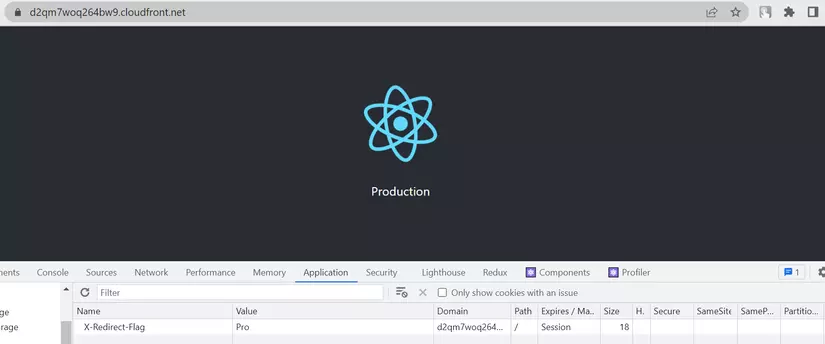
Once the page loads, open the Application section and check the cookie — you’ll see the cookie we configured for the user’s browser. To check whether we can jump to the Pre Pro page, change the cookie’s value to Pre-Pro.
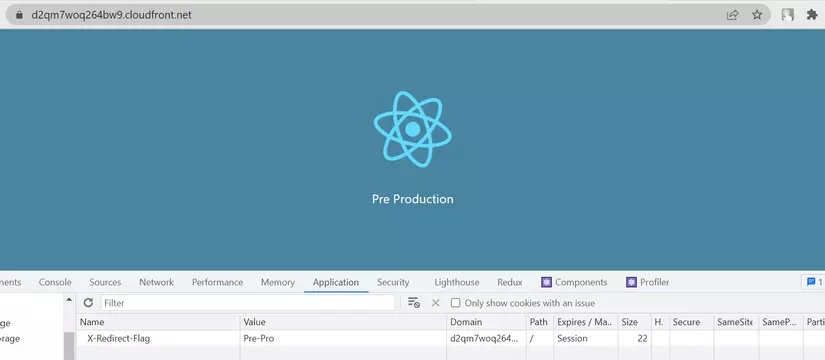
We’ve successfully performed A/B Testing Deployment.
Conclusion
So we’ve learned how to perform A/B Testing Deployment with Terraform. In this part we did code a bit, but for our DevOps role we don’t need to understand the code too deeply — we just need to know the basic syntax and be able to read simple code.