In the previous part we learned how to program in Terraform. In this part we’ll do a practical example with Terraform — deploying a website to S3 — and learn a few more simple functions.
Creating the S3
Create a new directory and a file named main.tf:
terraform {
  required_version = ">= 1.9"

  required_providers {
    aws = {
      source  = "hashicorp/aws"
      version = "~> 6.0"
    }
  }
}

provider "aws" {
  region = "us-west-2"
}

resource "aws_s3_bucket" "static" {
  bucket        = "terraform-series-bai3"
  force_destroy = true

  tags = {
    Project = "Terraform Series"
  }
}

# S3 blocks public access by default. To serve a public static site we allow a
# public *bucket policy* (ACLs stay disabled — modern S3 discourages ACLs).
resource "aws_s3_bucket_public_access_block" "static" {
  bucket = aws_s3_bucket.static.id

  block_public_acls       = true
  block_public_policy     = false
  ignore_public_acls      = true
  restrict_public_buckets = false
}

resource "aws_s3_bucket_website_configuration" "static" {
  bucket = aws_s3_bucket.static.id

  index_document {
    suffix = "index.html"
  }

  error_document {
    key = "error.html"
  }
}

data "aws_iam_policy_document" "static" {
  statement {
    sid       = "PublicReadGetObject"
    actions   = ["s3:GetObject"]
    resources = ["${aws_s3_bucket.static.arn}/*"]

    principals {
      type        = "*"
      identifiers = ["*"]
    }
  }
}

resource "aws_s3_bucket_policy" "static" {
  bucket = aws_s3_bucket.static.id
  policy = data.aws_iam_policy_document.static.json

  depends_on = [aws_s3_bucket_public_access_block.static]
}
What changed since 2022? The original code used
aws_s3_bucket_acl { acl = "public-read" }. AWS now sets Object Ownership to BucketOwnerEnforced on new buckets, which disables ACLs entirely, so that resource fails. The modern approach is to keep ACLs off and grant public read with a bucket policy, as above. For a production site you’d go one step further and put CloudFront + Origin Access Control in front of a private bucket — but this chapter focuses on the S3 website endpoint.
Run terraform init and terraform apply, then you’ll see our S3 bucket on AWS.

In the file above you’ll notice the policy section is a bit long, and since it’s a JSON string our configuration file is a bit hard to read. We can split the policy into a separate file and use a Terraform function to read it.
The file function
The file function helps us load the content of a file into Terraform. Create a file named s3_static_policy.json and copy the JSON above into it.
{
  "Version": "2012-10-17",
  "Statement": [
    {
      "Sid": "PublicReadGetObject",
      "Effect": "Allow",
      "Principal": "*",
      "Action": [
        "s3:GetObject"
      ],
      "Resource": [
        "arn:aws:s3:::terraform-series-bai3/*"
      ]
    }
  ]
}
Update main.tf.
terraform {
  required_version = ">= 1.9"

  required_providers {
    aws = {
      source  = "hashicorp/aws"
      version = "~> 6.0"
    }
  }
}

provider "aws" {
  region = "us-west-2"
}

resource "aws_s3_bucket" "static" {
  bucket        = "terraform-series-bai3"
  force_destroy = true

  tags = {
    Project = "Terraform Series"
  }
}

resource "aws_s3_bucket_public_access_block" "static" {
  bucket = aws_s3_bucket.static.id

  block_public_acls       = true
  block_public_policy     = false
  ignore_public_acls      = true
  restrict_public_buckets = false
}

resource "aws_s3_bucket_website_configuration" "static" {
  bucket = aws_s3_bucket.static.id

  index_document {
    suffix = "index.html"
  }

  error_document {
    key = "error.html"
  }
}

resource "aws_s3_bucket_policy" "static" {
  bucket = aws_s3_bucket.static.id
  policy = file("s3_static_policy.json")

  depends_on = [aws_s3_bucket_public_access_block.static]
}
As you can see, putting the policy in a separate file and using the file function to load it makes our Terraform file look much cleaner. Run terraform apply again.
terraform apply -auto-approve
When we use S3 in Static Website mode, our website’s URL has the format http://<bucket-name>.s3-website-<region>.amazonaws.com.
In this part we created a bucket named terraform-series-bai3 in the us-west-2 region, so the URL is http://terraform-series-bai3.s3-website-us-west-2.amazonaws.com. However, if you visit it now there’s nothing there, because we haven’t put any files on S3 yet.
Next we’ll upload files to the S3 bucket to host our website. Download the source code here: Static Web, and after downloading, remember to delete the .git file.
rm -rf static-web/.git
Our current directory looks like this:
.
├── main.tf
├── s3_static_policy.json
├── static-web
│   ├── README.md
│   ├── article-details.html
...
├── terraform.tfstate
To upload files to S3, we use the AWS CLI.
aws s3 cp static-web s3://terraform-series-bai3 --recursive
Now visit the URL http://terraform-series-bai3.s3-website-us-west-2.amazonaws.com and you’ll see our website.

Very simple, and in practice you should use this approach. However, since we’re currently learning Terraform, I’ll show you how to use Terraform to upload files to S3.
Uploading files to S3 with Terraform
To upload files to S3, we use the aws_s3_object resource. Update the main.tf file.
terraform {
  required_version = ">= 1.9"

  required_providers {
    aws = {
      source  = "hashicorp/aws"
      version = "~> 6.0"
    }
  }
}

provider "aws" {
  region = "us-west-2"
}

resource "aws_s3_bucket" "static" {
  bucket        = "terraform-series-bai3"
  force_destroy = true

  tags = {
    Project = "Terraform Series"
  }
}

resource "aws_s3_bucket_public_access_block" "static" {
  bucket = aws_s3_bucket.static.id

  block_public_acls       = true
  block_public_policy     = false
  ignore_public_acls      = true
  restrict_public_buckets = false
}

resource "aws_s3_bucket_website_configuration" "static" {
  bucket = aws_s3_bucket.static.id

  index_document {
    suffix = "index.html"
  }

  error_document {
    key = "error.html"
  }
}

resource "aws_s3_bucket_policy" "static" {
  bucket = aws_s3_bucket.static.id
  policy = file("s3_static_policy.json")

  depends_on = [aws_s3_bucket_public_access_block.static]
}

locals {
  mime_types = {
    html  = "text/html"
    css   = "text/css"
    ttf   = "font/ttf"
    woff  = "font/woff"
    woff2 = "font/woff2"
    js    = "application/javascript"
    map   = "application/javascript"
    json  = "application/json"
    jpg   = "image/jpeg"
    png   = "image/png"
    svg   = "image/svg+xml"
    eot   = "application/vnd.ms-fontobject"
  }
}

resource "aws_s3_object" "object" {
  for_each = fileset(path.module, "static-web/**/*")

  bucket       = aws_s3_bucket.static.id
  key          = replace(each.value, "static-web/", "")
  source       = "${path.module}/${each.value}"
  etag         = filemd5("${path.module}/${each.value}")
  content_type = lookup(local.mime_types, element(split(".", each.value), length(split(".", each.value)) - 1), "application/octet-stream")
}
For now you don’t need to fully understand the aws_s3_object code; the part I want to introduce here is the fileset function.
The fileset function
For example, suppose we have this directory:
.
├── index.html
├── index.css
When we use the function fileset(path.module, "*") we get the following data set:
{
  "index.html": "index.html",
  "index.css" : "index.css"
}
with the key and value both being the file name. Above, we use the fileset function and the aws_s3_object resource to upload all files in the static-web directory to S3.
The locals block
You’ll see another block named locals — this block lets us declare a local value in the Terraform file that can be reused many times. The syntax:
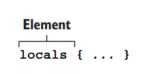
Unlike the variable block, where we need to declare a data type, in the locals block we assign the value directly. For example:
locals {
  one = 1
  two = 2
  name = "max"
  flag = true
}
To access a local value we use the syntax local.<KEY>, for example:
local.one
Those are some common syntaxes we often use when working with Terraform.
Conclusion
So we’ve learned how to use Terraform to deploy a website to S3 — as you can see, it’s fairly simple. The key takeaway from this part is that we should use the locals block to store values and reuse them many times. In the next part we’ll learn a very important topic: Modules in Terraform.