A Dockerfile is the recipe for your image. Write it well and you get small, fast, secure images. Write it poorly and you get bloated, slow builds and security vulnerabilities. Let’s learn to write good ones.
Code for this chapter. See 03-dockerfile.
The essential instructions
FROM — The base image
Every Dockerfile starts with FROM:
FROM python:3.12-slim
This sets your base image. Everything else builds on top.
Common base image choices:
- alpine — Tiny (5MB), uses musl libc. Great for Go, sometimes problematic for Python/Node due to native dependencies.
- slim — Debian-based, stripped down. Good balance of size and compatibility.
- full (no suffix) — Complete Debian/Ubuntu. Large but everything works.
- distroless — Google’s minimal images. No shell, no package manager. Maximum security, harder to debug.
WORKDIR — Set the working directory
WORKDIR /app
All subsequent commands run from this directory. If it doesn’t exist, Docker creates it.
Use WORKDIR instead of RUN mkdir && cd.
COPY and ADD — Get files into the image
COPY package.json .
COPY src/ ./src/
COPY copies files from your build context into the image. Always prefer COPY over
ADD unless you specifically need ADD’s features (extracting tarballs, fetching URLs).
# COPY is explicit
COPY app.tar.gz /app/

# ADD auto-extracts
ADD app.tar.gz /app/
RUN — Execute commands
RUN apt-get update && apt-get install -y curl
RUN pip install -r requirements.txt
Each RUN creates a new layer. Combine related commands to reduce layers:
# Bad — three layers
RUN apt-get update
RUN apt-get install -y curl
RUN apt-get clean

# Good — one layer
RUN apt-get update && \
    apt-get install -y curl && \
    apt-get clean && \
    rm -rf /var/lib/apt/lists/*
ENV — Set environment variables
ENV NODE_ENV=production
ENV PORT=3000
These persist into the running container. Override at runtime with docker run -e.
EXPOSE — Document ports
EXPOSE 3000
This doesn’t actually publish the port — it’s documentation. You still need -p 3000:3000
when running. But tools and orchestrators read this metadata.
CMD — The default command
CMD ["python", "app.py"]
This runs when the container starts (unless overridden). Use the exec form (JSON array) — it runs the command directly without a shell wrapper.
# Exec form (preferred) — PID 1 is your app
CMD ["python", "app.py"]

# Shell form — PID 1 is /bin/sh, your app is a child
CMD python app.py
The difference matters for signal handling. Exec form lets your app receive SIGTERM directly for graceful shutdown.
ENTRYPOINT — The fixed command
ENTRYPOINT ["python"]
CMD ["app.py"]
ENTRYPOINT sets the command that always runs. CMD provides default arguments.
Users can override CMD but not ENTRYPOINT (without --entrypoint).
This pattern is useful for tools:
ENTRYPOINT ["aws"]
CMD ["help"]
Now docker run my-aws-cli s3 ls runs aws s3 ls.
A complete example
Here’s a Python application Dockerfile:
FROM python:3.12-slim

WORKDIR /app

# Install dependencies first (better caching)
COPY requirements.txt .
RUN pip install --no-cache-dir -r requirements.txt

# Copy application code
COPY . .

EXPOSE 8000

CMD ["python", "app.py"]
Layer caching
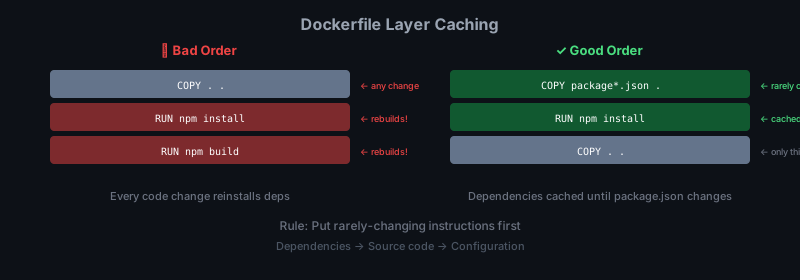
Docker caches layers. If a layer hasn’t changed, Docker reuses the cached version. Order your Dockerfile to maximize cache hits:
- Rarely changing — base image, system dependencies
- Sometimes changing — application dependencies (requirements.txt, package.json)
- Frequently changing — your application code
Bad ordering:
FROM python:3.12-slim
COPY . .                              # ← Invalidates cache on any code change
RUN pip install -r requirements.txt   # ← Re-runs every time
Good ordering:
FROM python:3.12-slim
COPY requirements.txt .               # ← Only changes when dependencies change
RUN pip install -r requirements.txt   # ← Cached until requirements.txt changes
COPY . .                              # ← Only this layer rebuilds on code change
Multi-stage builds
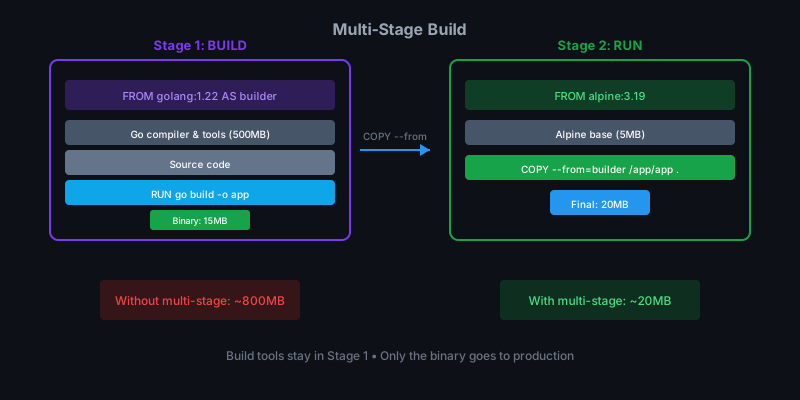
Multi-stage builds let you use one image for building and another for running. The result: smaller production images without build tools.
Here’s a Go application:
# Stage 1: Build
FROM golang:1.22-alpine AS builder
WORKDIR /app
COPY go.mod go.sum ./
RUN go mod download
COPY . .
RUN CGO_ENABLED=0 GOOS=linux go build -o server .

# Stage 2: Run
FROM alpine:3.19
RUN apk --no-cache add ca-certificates
WORKDIR /app
COPY --from=builder /app/server .
EXPOSE 8080
CMD ["./server"]
The final image only contains the compiled binary — no Go toolchain, no source code. For Go applications, this can shrink your image from 1GB to 20MB.
For Node.js:
# Stage 1: Install dependencies
FROM node:20-alpine AS deps
WORKDIR /app
COPY package*.json ./
RUN npm ci --only=production

# Stage 2: Production image
FROM node:20-alpine
WORKDIR /app
COPY --from=deps /app/node_modules ./node_modules
COPY . .
EXPOSE 3000
CMD ["node", "src/index.js"]
Security best practices
Run as non-root
By default, containers run as root. That’s dangerous — container escapes give attackers root on your host.
# Create a non-root user
RUN addgroup -g 1001 -S appgroup && \
    adduser -S appuser -u 1001 -G appgroup

# Switch to that user
USER appuser
Don’t store secrets in images
Never do this:
ENV DATABASE_PASSWORD=supersecret
COPY .env /app/
Secrets baked into images end up in registries, logs, and layer history. Pass secrets at runtime via environment variables or secret management tools.
Use specific versions
# Bad — unpredictable
FROM python:latest

# Good — reproducible
FROM python:3.12.1-slim
Pin your base images. Update deliberately, not accidentally.
Scan for vulnerabilities
docker scout cves my-image:v1
Or use tools like Trivy, Snyk, or Grype. Build this into CI.
The .dockerignore file
Keep build context small:
node_modules
.git
.gitignore
*.md
Dockerfile*
docker-compose*
.env*
__pycache__
*.pyc
.pytest_cache
.coverage
dist
build
Best practices summary
- Use specific base image tags —
python:3.12-slimnotpython:latest - Order for caching — dependencies before code
- Combine RUN commands — fewer layers, smaller images
- Multi-stage builds — keep build tools out of production
- Run as non-root — security 101
- Use .dockerignore — smaller context, faster builds
- No secrets in images — pass at runtime
Summary
FROM,WORKDIR,COPY,RUN,ENV,EXPOSE,CMD— the core instructions.- Order matters for caching. Put rarely-changing layers first.
- Multi-stage builds keep production images small.
- Run as non-root, pin versions, scan for vulnerabilities.
In the next chapter we’ll focus on running containers — logs, exec, resource limits, and lifecycle management.