A container can start cleanly, answer requests, and still have far more permission than the service needs. A process running as root can modify its application files. A compromised dependency may write a tool into the filesystem for later use. A process with an unnecessary Linux capability may perform an operation that would otherwise be denied.
These are not hypothetical concerns reserved for large platforms. A container is still a process on a host, with a filesystem, an identity, and kernel permissions. In this chapter, you will render and inspect a checked-in Docker Compose configuration that makes the common runtime permissions deliberately small. You will also learn what its settings do not protect, especially secrets and the user baked into an image.
Code for this chapter. The complete runnable configuration is in 03-container-security.
Start with the hardened runtime policy
First, render the Compose file Docker will use. From the repository root, run:
cd _resource/docker-advanced/03-container-security
docker compose config
docker compose config parses compose.yaml, resolves Compose’s shorthand fields, and prints the effective configuration. It does not pull or start the ghcr.io/acme/task-api:1.0.0 image. That makes it a useful local check even when you do not have registry access.
The output should include these settings under services.api:
cap_drop:
  - ALL
image: ghcr.io/acme/task-api:1.0.0
read_only: true
security_opt:
  - no-new-privileges:true
tmpfs:
  - /tmp
This is a runtime policy, not an image build. Compose passes these choices to the container runtime when it creates the service. Keep the command in CI as a cheap guard against a malformed YAML change; it confirms Docker can understand the declared policy before a deployment tries to start it.
What the container runtime controls
A container runtime is the software that creates and runs containers on a machine. Docker Engine is the runtime you interact with through docker and Docker Compose. Under the hood, it asks lower-level Linux features to isolate a process, give it a filesystem based on an image, and apply restrictions such as capabilities and mount options.
The runtime matters because the image is only a starting point. An image can specify a default command and user, but the runtime decides which user is actually used, whether its root filesystem is writable, which mounts exist, and which privileges reach the process. A secure image can be weakened by a permissive runtime configuration. Conversely, the settings in this chapter constrain a service even when its image contains a writable application directory.
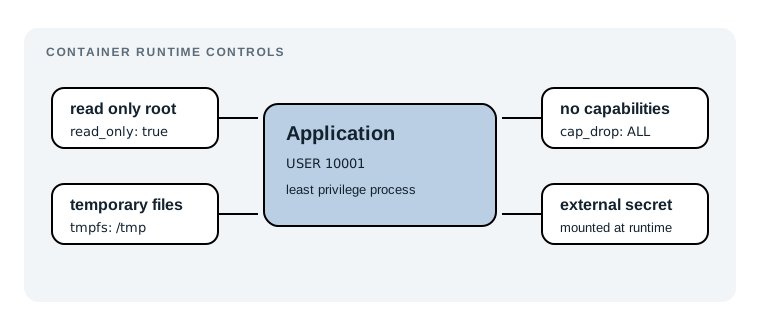
No single flag makes a container safe. The point is to give a service only what it needs, then make exceptions visible and deliberate.
Run the service as a non-root user
Root inside a container is not the same account as root in a normal host login session, but it is still a highly privileged identity within the container’s namespaces. A web service usually does not need it. Set a non-root USER in the Dockerfile that creates the image, then make it a release check.
For an image you can pull and run, inspect the configured user with:
docker image inspect ghcr.io/acme/task-api:1.0.0 \
  --format ''
The expected result is a non-empty user or numeric UID such as "10001", not "root" or an empty string. An empty Config.User means the image has not selected a non-root default. In that case, fix the image Dockerfile first. Compose can also set user: "10001", but this chapter’s checked-in policy intentionally leaves identity as an image contract rather than guessing an account that may not own the application’s files.
Once the image is available locally, verify the process identity, not just its metadata:
docker run --rm --entrypoint id ghcr.io/acme/task-api:1.0.0
Expect uid to be a value other than 0. This command needs access to the image, so it cannot be completed from this repository alone if the example registry is unavailable. The configuration check above remains runnable without that access.
Make the root filesystem read-only
The central setting in compose.yaml is:
read_only: true
It mounts the container’s root filesystem as read-only. The service can read its executable, dependencies, and configuration baked into the image, but it cannot silently replace them at runtime. That removes a common persistence path after an application flaw is exploited.
This does not make the application stateless by magic. It forces us to be explicit about state. Logs should go to standard output for the platform to collect. Uploaded files belong in object storage or a named volume with a narrow purpose. Databases belong outside the application container. Those choices make restarts predictable as well as safer.
The tradeoff appears quickly. A framework may try to write a cache below /app, a language runtime may create a temporary file, or an application may expect a writable working directory. With this policy, startup can fail with EROFS or Read-only file system. Diagnose the exact path from the container log. Then decide whether the data is genuinely temporary, belongs in external storage, or indicates that the image is doing work it should have done during its build. Do not turn off read_only just to hide the first failure.
Give temporary files a small, clear home
The same Compose service includes:
tmpfs: /tmp
A tmpfs mount is a writable filesystem held in memory. It gives programs a normal /tmp directory while keeping the rest of the root filesystem immutable. Its contents disappear when the container stops, which is exactly right for request scratch files, short-lived sockets, and generated temporary data.
When you start a permitted copy of this service, a useful behavioral check is:
docker compose exec api sh -c 'touch /tmp/healthcheck && test -f /tmp/healthcheck'
The command should exit successfully because /tmp is writable. A write outside an intentional mount should fail instead:
docker compose exec api sh -c 'touch /app/should-not-be-written'
Expect an error mentioning a read-only filesystem. These two checks test the policy as a pair: the application has the minimum writable space it needs, but not a writable operating environment. The repository cannot start the sample image itself because ghcr.io/acme/task-api:1.0.0 is an external image reference, so use these runtime checks only where that image is supplied by your registry.
Warning:
tmpfsis memory-backed. Do not use it for data that must survive a restart, and set a size limit in production when temporary data could grow with request traffic.
Remove capabilities and block privilege escalation
Linux capabilities split root’s broad power into smaller permissions. For example, binding a low-numbered port or changing network settings can require a capability even when an application does not need full root access. The safest default for a normal HTTP API is no extra capability at all:
cap_drop:
  - ALL
cap_drop: [ALL] removes the default capability set from the service. If a legitimate application fails because it needs one capability, add only that one after identifying the operation. A service that listens on port 8080, as most containers do, does not need a capability to bind port 80 on the host; Docker’s port mapping handles that outside the process.
The final setting is:
security_opt:
  - no-new-privileges:true
no-new-privileges stops processes and their children from gaining additional privileges through mechanisms such as set-user-ID executables. It is a useful backstop when an application unexpectedly invokes a helper binary. It does not repair an application vulnerability or block every kernel attack; it narrows one escalation route.
You can keep the rendered policy as the first verification step:
docker compose config | grep -E 'cap_drop|ALL|read_only|no-new-privileges|tmpfs'
The command should print all five markers. It verifies the Compose model, not a live container’s kernel state. For a deployment environment, inspect the running workload with its platform’s tools as part of the release verification.
Keep secrets outside images and process arguments
Runtime hardening limits what a compromised process can change. It does not make a secret safe after that process has read it. An API token in an image layer, an ENV instruction, a Compose file committed to Git, or a command argument can be exposed through registries, image history, process listings, logs, or accidental debugging output.
The resource in this chapter contains no secret value, environment variable, or mounted secret. That is intentional. The image name is public configuration; a credential is not. Give a service a secret only when it needs it, from the deployment platform’s secret store, and make it readable only to that service identity. Keep the secret out of the Dockerfile and build context. Build-time credentials are a separate boundary: use BuildKit secret mounts for them, so they do not reach the runtime image.
There is a tradeoff. A secret mounted as a file is less convenient than pasting a value into environment:, and managed secret delivery adds deployment configuration. But it makes rotation possible without rebuilding the image and keeps the credential out of source control. The minimum useful question is: which process needs this secret, and for how long? If the answer is not this running container, do not mount it here.
A policy is useful only when it fits the service
It is tempting to copy all four runtime restrictions into every Compose file and call the job done. That can create brittle deployments when the application needs a specific writable path, a legitimate capability, or a certificate injected by the platform.
Treat the checked-in file as a secure starting point. Start with a non-root image, read_only: true, a dedicated tmpfs path, no capabilities, and no-new-privileges. Run the service’s real health check. When it fails, use the error to make the smallest exception possible and document why it exists. A broad writable filesystem or privileged: true is not a diagnosis; it is a retreat from the policy.
Summary
- A container runtime creates the running process and applies the identity, filesystem mounts, and kernel permissions that an image alone cannot enforce.
- Verify a non-root image user with
docker image inspect, then confirm the running UID when the image is available. read_only: trueprotects the container root filesystem;tmpfs: /tmpsupplies explicit scratch space that disappears at stop.cap_drop: [ALL]andno-new-privileges:truereduce ways a process can gain or use host-level power.- Runtime restrictions do not protect secrets already delivered to a process. Keep secrets out of images, Git, logs, and command arguments.
Chapter 4 builds the same application image for more than one CPU architecture and verifies the platform Docker selects at runtime.