An image tag such as task-api:main can move after a release approval. A production deployment that still refers to that tag can then pull an image different from the reviewed and tested artifact. The release process has lost the identity of the image it intended to deploy.
This chapter establishes a delivery path that builds one Docker image in continuous integration (CI), stores it in a registry, records its immutable digest, and deploys that exact digest to Kubernetes. It also covers rollout observation, rollback, and the cases where Docker Compose remains the better choice.
Code for this chapter. The verified GitHub Actions workflow and Kubernetes Deployment are in 08-cicd-and-kubernetes.
Start with the release path
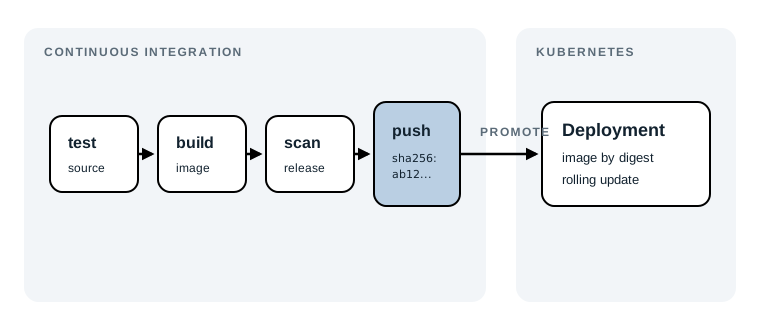
The release path contains four steps:
- A push to
mainstarts GitHub Actions. - The workflow builds and pushes
task-apito GitHub Container Registry. - Docker gives the pushed image a SHA-256 digest.
- A reviewed Deployment change uses that digest, and Kubernetes replaces old Pods with new ones.
CI is the automated work that checks and produces a change when it enters the shared branch. CD, continuous delivery or continuous deployment, is the follow-on process that makes a tested release available to an environment. Teams use the same initials differently, so it helps to say what happens: this resource builds, pushes, and scans in CI; applying the Deployment is a separate promotion step.
The diagram shows the required path: tests before a release image is built, then one immutable image promoted to Kubernetes. The checked-in workflow begins at the build step because test commands depend on the application’s language and test runner. Add that application-specific test step before the build step when you use this workflow.
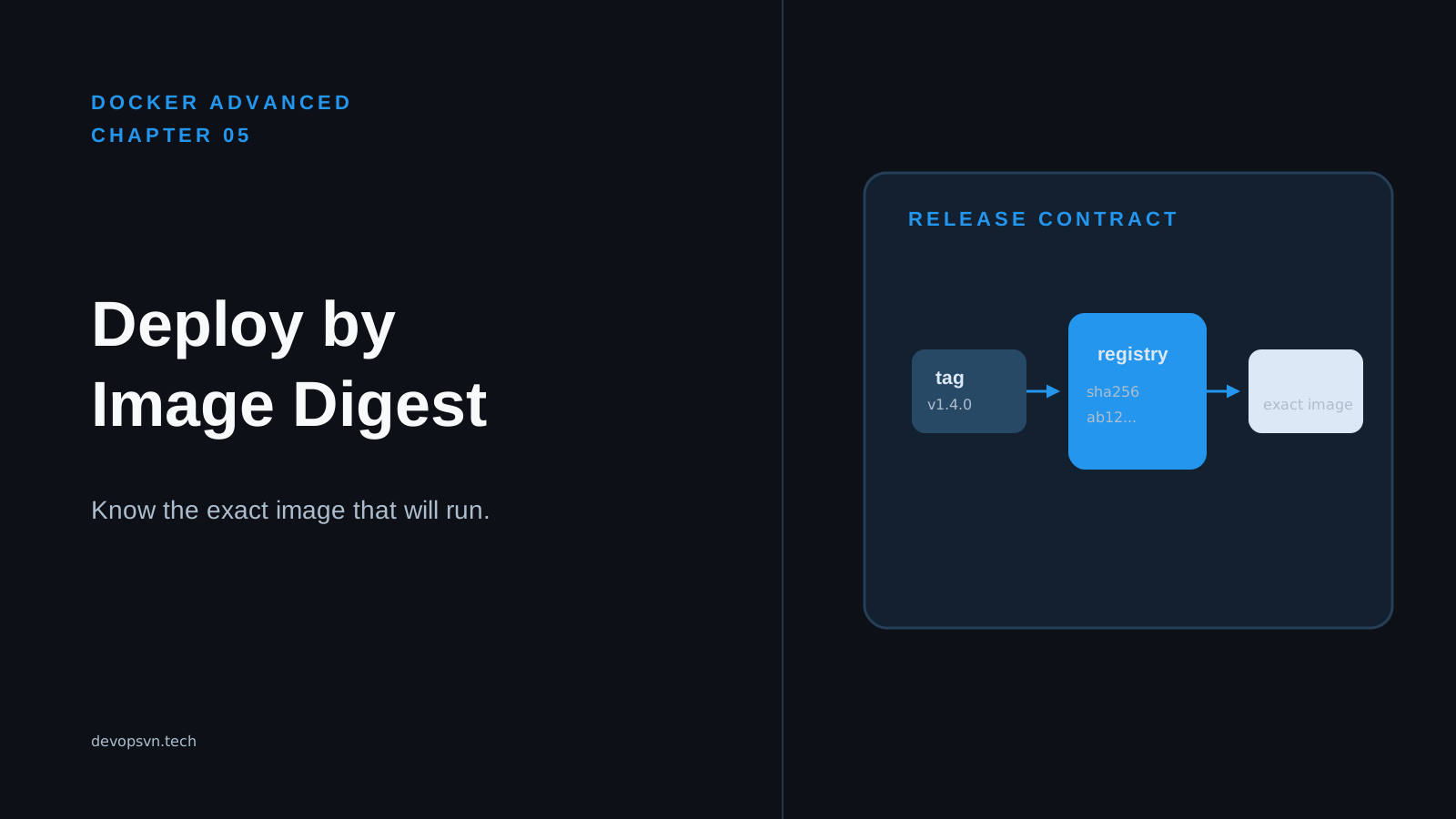
A registry is a service that stores container images. This example uses GitHub Container Registry at ghcr.io. An image tag, such as :abc123, is a readable label that can point somewhere else later. An image digest, such as @sha256:..., identifies one exact image manifest by its content. That difference is the foundation of a reliable promotion.
Build and publish in CI
The resource workflow is _resource/docker-advanced/08-cicd-and-kubernetes/ci.yaml. Put it in .github/workflows/ci.yaml in the application repository that contains the Docker build context. The example image name, ghcr.io/acme/task-api, is a placeholder. Replace acme and task-api with the GitHub organization or user and package name you actually own.
name: Build and publish task-api

on:
  push:
    branches: [main]
name is the label shown in GitHub Actions. The push trigger limits this workflow to commits that reach main. That matters because the image is a release candidate for the shared branch, not every unfinished branch. Expect a new run in the repository’s “Actions” page after a push to main.
The workflow grants only the permissions it needs:
permissions:
  contents: read
  packages: write
contents: read lets the checkout action read the repository. packages: write lets the job publish to GitHub Container Registry. Do not add broad write permissions just to make an authentication error disappear. If the workflow cannot publish, first check that package publishing is allowed for the repository and that the image name belongs to the authenticated actor.
The job exposes the digest produced by its build step:
jobs:
  build-and-publish:
    runs-on: ubuntu-latest
    outputs:
      image_digest: ${{ steps.build.outputs.digest }}
runs-on selects a hosted Linux runner. The outputs block makes the digest output from the step named build available to a later job as needs.build-and-publish.outputs.image_digest. The supplied workflow does not have a later job, but exporting the value makes the release identity explicit and leaves a clean place to add one. Expect the build action’s log to report a sha256: digest after a successful push.
Next, the runner checks out the source, enables Buildx, and signs in:
steps:
  - uses: actions/checkout@v4

  - uses: docker/setup-buildx-action@v3

  - uses: docker/login-action@v3
    with:
      registry: ghcr.io
      username: ${{ github.actor }}
      password: ${{ secrets.GITHUB_TOKEN }}
actions/checkout puts the repository in the runner so context: . can use its Dockerfile and application files. Buildx is Docker’s builder for multi-platform images. The login action uses the short-lived GITHUB_TOKEN; it avoids storing a separate registry password in the workflow. The token is still a credential, so never print it or pass it as a Docker build argument.
The build step is the release-producing part:
- name: Build and push
  id: build
  uses: docker/build-push-action@v6
  with:
    context: .
    push: true
    platforms: linux/amd64,linux/arm64
    tags: ghcr.io/acme/task-api:${{ github.sha }}
    cache-from: type=gha
    cache-to: type=gha,mode=max
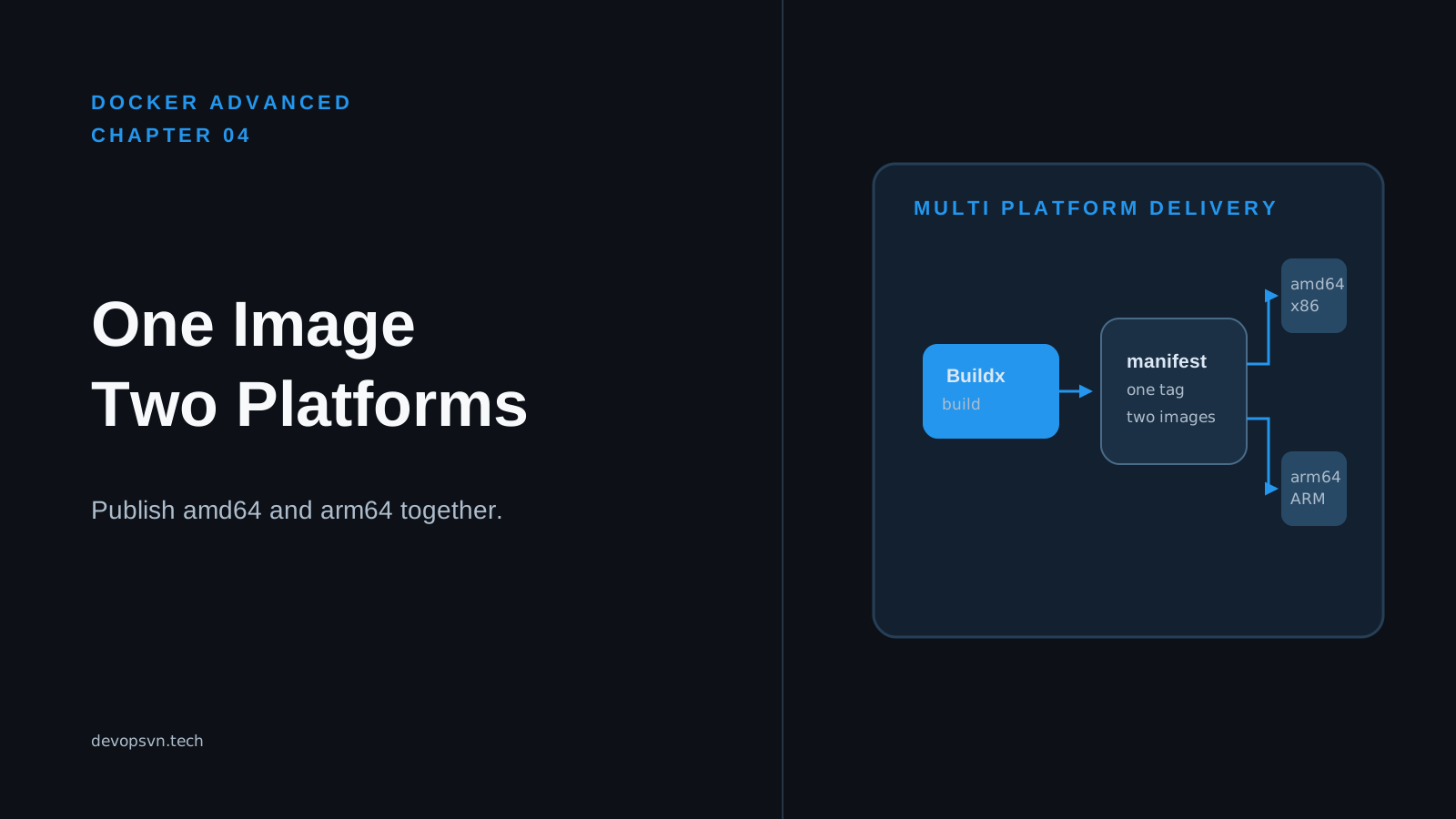
context: . sends the checked-out repository to the Docker build. push: true publishes the resulting image instead of leaving it only on the temporary runner. platforms creates a manifest that can select an amd64 or arm64 image when a node pulls it. Remove a platform only when you know the cluster never needs it; multi-platform builds take more time.
The tag uses github.sha, the commit SHA that triggered the run. It is useful for a human browsing the registry, but the digest is the value to deploy. The two GitHub Actions cache settings reuse build layers between runs and save new layers for later runs. They improve build time; they do not change the image identity.
Note: This workflow does not run unit or integration tests yet. Add a test step that matches the application’s language before the build step, and make the build depend on it. A successful image build only proves that Docker could build the image.
The final step scans the image that was pushed:
- name: Scan the pushed image
  uses: aquasecurity/[email protected]
  with:
    image-ref: ghcr.io/acme/task-api@${{ steps.build.outputs.digest }}
    format: table
    exit-code: "1"
    ignore-unfixed: true
    severity: CRITICAL,HIGH
image-ref combines the registry name with the digest from the build step. It deliberately scans the artifact that was published, rather than rebuilding or scanning a tag that could later move. severity limits findings to high and critical vulnerabilities; exit-code: "1" fails the workflow when Trivy finds one. ignore-unfixed: true skips findings without an available fix. That keeps the signal manageable, but it is a policy choice: an unfixed critical issue can still be a release risk and may need an exception process.
Expect the workflow to fail before promotion when Trivy reports a matching fixed vulnerability. The image may already be in the registry because the scan happens after the push. That is normal for this simple workflow. Restrict promotion to successful workflow runs, and consider a registry retention policy for rejected images.
Promote the digest, not a tag
Building once means creating the release artifact a single time. Promoting it means changing the target environment to use that already-built artifact. It does not mean rebuilding from the same Git commit for staging and production.
Suppose CI prints this digest:
sha256:4d8b2d7e0ab0f6c8f7d4a6c2e9b1d3f5a7c9e0b2d4f6a8c1e3d5f7a9b0c2d4e
The exact characters will differ for your image. Record the full digest from the successful workflow or registry. Then replace the placeholder in _resource/docker-advanced/08-cicd-and-kubernetes/deployment.yaml:
containers:
  - name: api
    image: ghcr.io/acme/task-api@sha256:replace-with-release-digest
After replacement, the image value must contain the full digest, with no tag. A tag can be reassigned; a digest keeps the image content fixed. Review this one-line manifest change as the promotion approval. The same digest can move from a test cluster to production, so the bytes you scanned are the bytes Kubernetes pulls.
Warning: Do not apply the supplied manifest while it still says
replace-with-release-digest. Kubernetes will try to pull a repository digest that does not exist, and the Pod will remain in an image-pull failure state.
Deploy the image to Kubernetes
Kubernetes is a system that schedules and maintains containers across a cluster of machines. You describe the state you want in YAML; its controllers work to make the running state match. A Deployment is the Kubernetes object for a stateless, replaceable application. It manages a set of Pods and creates a new revision when its Pod template changes.
The supplied deployment.yaml is complete for a minimal Deployment:
apiVersion: apps/v1
kind: Deployment
metadata:
  name: task-api
spec:
  replicas: 3
  selector:
    matchLabels:
      app: task-api
  template:
    metadata:
      labels:
        app: task-api
    spec:
      containers:
        - name: api
          image: ghcr.io/acme/task-api@sha256:replace-with-release-digest
          resources:
            requests:
              cpu: 100m
              memory: 128Mi
            limits:
              memory: 512Mi
apiVersion: apps/v1 and kind: Deployment select the stable Kubernetes Deployment API. metadata.name gives this Deployment its cluster-local name. replicas: 3 asks Kubernetes to keep three Pods running. That provides some tolerance for one Pod or node failing, but it does not make an application highly available by itself; the cluster, load balancing, dependencies, and readiness behavior also matter.
The selector and template labels must agree. matchLabels.app: task-api tells the Deployment which Pods it owns, while template.metadata.labels.app: task-api puts that label on every new Pod. Do not change a live Deployment selector casually. Kubernetes treats this selector as immutable in current versions because changing ownership would be ambiguous.
The containers list names the container and pins its image. The resources.requests values reserve scheduling capacity: each Pod asks for 100 millicores of CPU and 128 MiB of memory. 100m is one tenth of one CPU core. The memory limit prevents a Pod from using unlimited node memory; if it exceeds 512 MiB, Kubernetes can terminate it for exceeding its limit. There is no CPU limit in this example, so a busy Pod can use CPU above its request when node capacity allows.
This file intentionally does not define a Service, an ingress, a namespace, probes, or registry credentials. It teaches the deployment path only. A real externally reachable API needs a Service and usually an ingress or gateway; a private registry may need cluster pull credentials. Add readiness and liveness probes when the application has endpoints that can answer those questions. Without a readiness probe, Kubernetes considers a newly created container ready as soon as it starts, which can send traffic to an application that is still warming up.
With kubectl configured for the intended cluster, apply the edited manifest:
kubectl apply -f _resource/docker-advanced/08-cicd-and-kubernetes/deployment.yaml
kubectl apply sends the declared state to the Kubernetes API. Expect deployment.apps/task-api created the first time, or configured after a digest change. Before running it, verify the current cluster and namespace. kubectl config current-context tells you the active context; a context named for production deserves an extra pause.
Wait for the Deployment controller to finish replacing Pods:
kubectl rollout status deployment/task-api --timeout=5m
Expect deployment "task-api" successfully rolled out when all desired replicas become available within five minutes. A timeout does not explain the failure. It tells you to inspect the Pods rather than guessing that the image or Kubernetes is at fault.
Use these two commands to observe the current state:
kubectl get deployment task-api
kubectl get pods -l app=task-api
The Deployment output should show 3/3 in the ready column after a successful rollout. The second command uses the same app: task-api label from the manifest and should list three Pods with Running status. Running only means the container process started. For an API, make a real request through its Service or gateway as the final release check.
Diagnose a rollout before rolling back
One common failure is a digest typo or a registry the nodes cannot read. In that case, kubectl rollout status waits while Pods show ImagePullBackOff or ErrImagePull. Ask Kubernetes for the events attached to one failing Pod:
kubectl describe pod -l app=task-api
Expect an “Events” section near the end. An event containing not found points to a wrong image name or digest. An authentication error points to missing or incorrect registry credentials. Correct the manifest or cluster pull configuration, then apply the corrected manifest and run kubectl rollout status again. Reapplying an unchanged manifest will not repair an image pull failure.
Another failure is more subtle: the image starts, but the new application returns errors. kubectl get pods can show Running throughout the rollout because this minimal manifest has no readiness probe. That is why a deployment needs an application-level smoke check and, in production, readiness probes that represent whether a Pod should receive traffic.
Roll forward and roll back
Every change to the Deployment Pod template, including the image digest, creates a revision. See the recorded revisions after a few promotions:
kubectl rollout history deployment/task-api
Expect a revision list. The default history is finite, and clusters may prune older revisions according to the Deployment’s revisionHistoryLimit. Use this command soon enough that the known-good revision still exists.
If the new release fails its smoke check, restore the previous revision:
kubectl rollout undo deployment/task-api
kubectl rollout status deployment/task-api --timeout=5m
The first command changes the Deployment template back to the previous recorded revision. The second waits for Kubernetes to make that previous image available again. Expect the same successful rollout message, then confirm the image digest rather than relying only on green Pod status:
kubectl get deployment task-api \
  -o jsonpath='{.spec.template.spec.containers[0].image}{"\n"}'
Expect the prior ghcr.io/acme/task-api@sha256:... value. In an incident, record the failed digest, the time, the user-visible symptom, and the rollback revision. That turns the rollback into an investigation with a fixed artifact, not a mystery about what latest meant at the time.
For a deliberate rollback to a known revision, first inspect the history, then specify it:
kubectl rollout undo deployment/task-api --to-revision=2
Use a revision number only after confirming it is the release you want. A more auditable promotion model keeps the desired digest in version-controlled environment configuration and makes a new commit that restores the known-good digest. Kubernetes rollback is excellent for fast recovery; Git history is better for explaining the intended state later.
Choose Compose or Kubernetes deliberately
Docker Compose is often the right tool for one developer machine, a small integration environment, or one server with a straightforward set of services. A compose.yaml keeps local dependencies, ports, volumes, and environment settings close together. docker compose up is easy to understand and fast to change. It does not provide a control plane that reschedules replicas across failed machines or performs a cluster rollout.
Kubernetes earns its operational cost when you need multiple replicas, scheduled workloads across several nodes, declarative rollouts and rollbacks, service discovery, or shared cluster policies. In return, you manage more concepts: Pods, Deployments, Services, namespaces, access control, resource quotas, observability, and cluster upgrades. A three-replica Deployment is not automatically simpler or safer than a well-operated Compose service on one host.
For local development, keep Compose when it gives the team a quick repeatable environment. Build the same Docker image locally or in CI, but do not pretend a laptop Compose run proves the Kubernetes manifest, node architecture, pull permissions, or rollout behavior. For production, pin the image digest and use a deployment system with an explicit approval and rollback path. The tool choice should follow the failure modes you need to handle.
Summary
- CI builds and publishes the Docker image; a registry stores it, and the image digest identifies its exact immutable content.
- The supplied GitHub Actions workflow builds for
linux/amd64andlinux/arm64, pushes a commit-tagged image, and scans the pushed digest for high and critical fixed vulnerabilities. - Promote the full digest into the Kubernetes Deployment instead of deploying a mutable tag, so every environment runs the artifact CI actually produced.
-
Use
kubectl rollout status, Pod events, and an application smoke check to distinguish a completed rollout from a healthy release; usekubectl rollout undoto restore a previous revision quickly. - Keep Compose for focused local or single-host work. Use Kubernetes when its scheduling, replica management, and rollout controls justify the operational overhead.
Complete the delivery path by adding application tests before the build, a deployment-promotion job that consumes image_digest, and readiness probes that keep unready Pods out of traffic. Digest-based image identity is the foundation for each of those controls.