Most Istio problems reach you the same way: a request fails, and the response says very little.
It might be a 503 with an empty body, a 404 on a path that worked yesterday, or a new route
that never takes effect. The Gateway and VirtualService YAML looks right, kubectl apply
succeeded, and the request still fails.
The YAML is not what handles the request. istiod translates it into Envoy configuration, and
Envoy follows that configuration exactly, whatever you meant. Debugging Istio comes down to two
skills: reading what Envoy actually has, and reading what Envoy says about each request. Chapters
3 and 4 used both in passing. This chapter turns them into a method you can repeat on any
failure.
By the end of this chapter you will:
- Map a
Gatewayand aVirtualServiceonto Envoy’s four layers (listener, route, cluster, endpoint) and inspect each withistioctl proxy-config. - Read the response flags in an access log line (
NR,NC,UH,UF,URX) and know which layer each one points to. - Follow one request from the gateway’s log into the next proxy’s log by its request ID.
- Fix four failures that
kubectl applyaccepts without complaint, two of whichistioctl analyzecan’t see. - Log only failed requests at the gateway with the Telemetry API.
Code for this chapter. The files are in _resource/kubernetes-service-mesh/05-debug-gateway. I tested them with Kind v0.33.0 (Kubernetes v1.37.0) and Istio 1.32.0 on macOS with Docker Desktop, and the command output in this chapter comes from those runs.
Starting Point
Run every command from _resource/kubernetes-service-mesh, with the series’ istioctl on your
PATH:
export PATH="$PWD/bin:$PATH"
The chapter starts with chapter 3’s HTTP gateway: http://bookstore.local:8080 routes to
productpage. If you finished chapter 4, its reset section put that gateway back. To build the
state from scratch:
./scripts/bootstrap.sh 05
Check that the page loads before you start breaking things:
curl -s -o /dev/null -w "%{http_code}\n" --resolve bookstore.local:8080:127.0.0.1 http://bookstore.local:8080/productpage
200
Envoy’s Four Layers
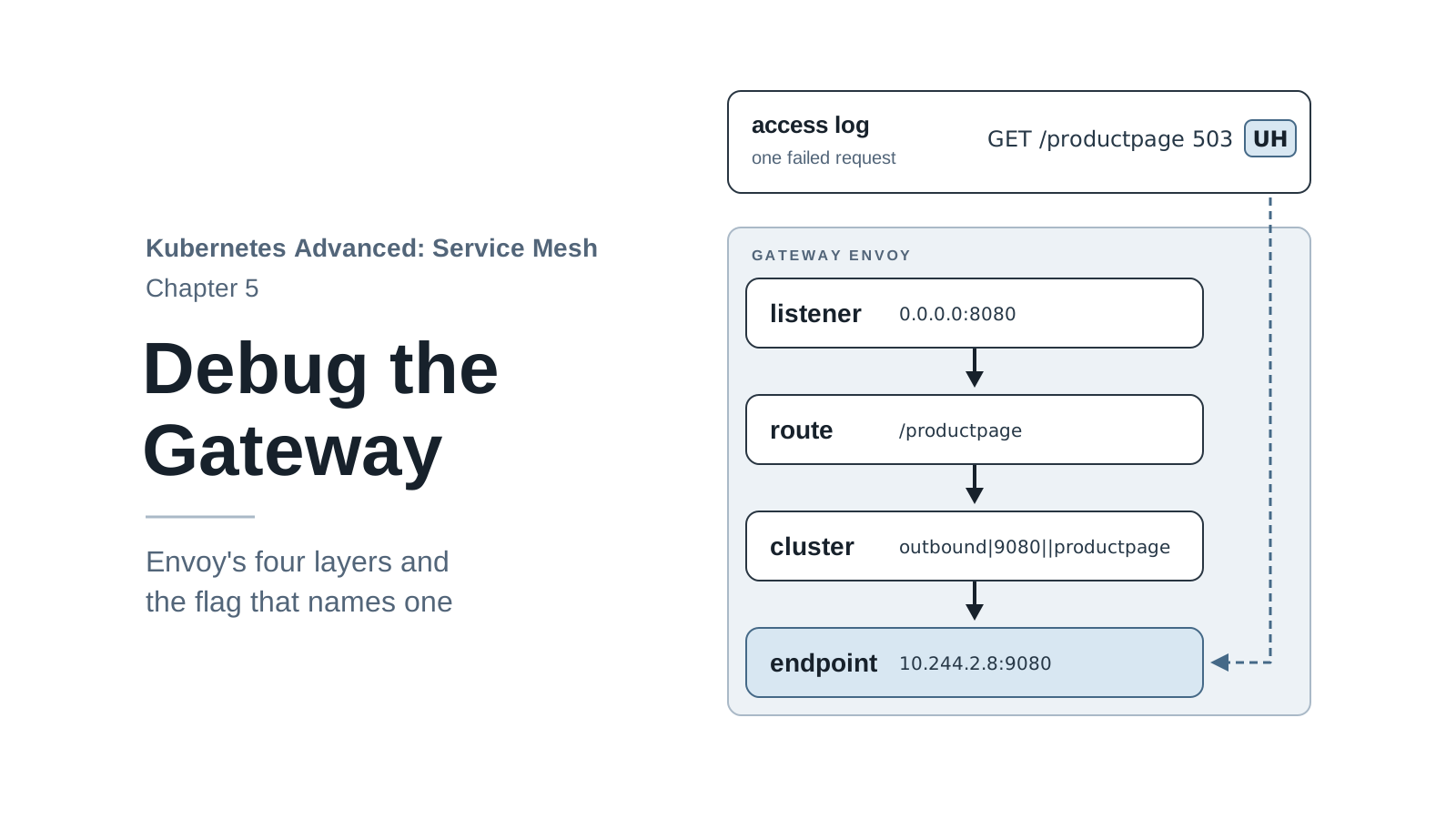
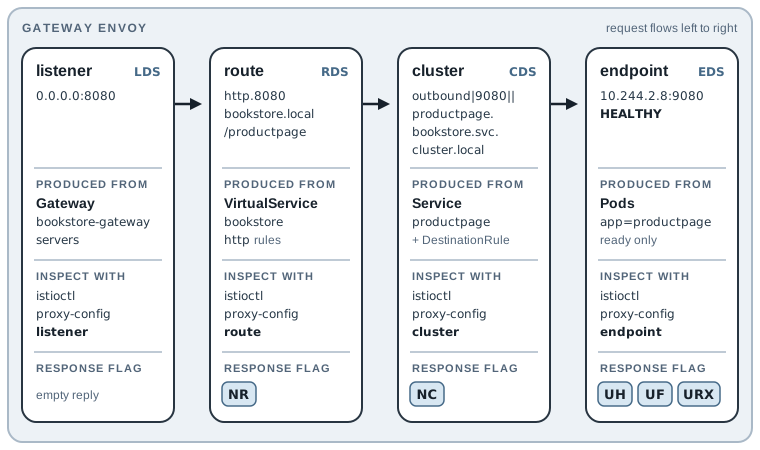
Envoy handles a request in four steps, and each step has its own kind of configuration:
- A listener accepts the connection on a port.
- A route table picks a destination for the HTTP request, by host and path.
- A cluster is the destination: a named group of servers, with settings such as load balancing and connection limits.
- An endpoint is one server in that cluster: a Pod IP and port.
These are the LDS, RDS, CDS, and EDS types from chapter 2’s proxy-status table. Each layer is
built from a different object, and each has its own istioctl proxy-config command:
| Layer | Produced from | Inspect with |
|---|---|---|
| Listener | Gateway servers (port, protocol, TLS) |
istioctl proxy-config listener |
| Route | VirtualService http rules |
istioctl proxy-config route |
| Cluster | Kubernetes Service (plus DestinationRule, chapter 6) |
istioctl proxy-config cluster |
| Endpoint | Ready Pods behind the Service |
istioctl proxy-config endpoint |
When a request fails, the question is always “which layer stopped it?” The rest of the chapter answers that question first from the configuration, then from the access log.
Follow One Request Through the Layers
Take GET http://bookstore.local:8080/productpage and look up each layer in the gateway’s
Envoy. All four commands take the same target, the gateway Deployment:
istioctl proxy-config listener -n istio-system deploy/istio-ingressgateway --port 8080
ADDRESSES PORT MATCH DESTINATION
0.0.0.0   8080 ALL   Route: http.8080
The request arrives on port 8080 (chapter 3: the Service’s port 80 maps to 8080 in the Pod). The
listener hands every HTTP request to the route table named http.8080. Look that up:
istioctl proxy-config route -n istio-system deploy/istio-ingressgateway --name http.8080
NAME          VHOST NAME             DOMAINS             MATCH                 VIRTUAL SERVICE
http.8080     bookstore.local:80     bookstore.local     /                     bookstore.bookstore
http.8080     bookstore.local:80     bookstore.local     /productpage          bookstore.bookstore
http.8080     bookstore.local:80     bookstore.local     /static/*             bookstore.bookstore
http.8080     bookstore.local:80     bookstore.local     /login                bookstore.bookstore
http.8080     bookstore.local:80     bookstore.local     /logout               bookstore.bookstore
http.8080     bookstore.local:80     bookstore.local     /api/v1/products*     bookstore.bookstore
The Host header selects the bookstore.local virtual host (Istio ignores the :8080, as
chapter 3 showed), and /productpage matches the second row. The table doesn’t show where that
row sends the request; the JSON output does. The full dump is long, so this command uses
python3 to print only the first route named productpage (the VirtualService rule’s
name). Without the filter you get the same data, buried in the full route table:
istioctl proxy-config route -n istio-system deploy/istio-ingressgateway --name http.8080 -o json \
  | python3 -c '
import json, sys
for rc in json.load(sys.stdin):
    for vh in rc["virtualHosts"]:
        for r in vh["routes"]:
            if r.get("name") == "productpage":
                print(json.dumps({"match": r["match"], "cluster": r["route"]["cluster"],
                                  "retryPolicy": r["route"]["retryPolicy"]}, indent=2))
                sys.exit()'
{
  "match": {
    "path": "/productpage",
    "caseSensitive": true
  },
  "cluster": "outbound|9080||productpage.bookstore.svc.cluster.local",
  "retryPolicy": {
    "retryOn": "connect-failure,refused-stream,unavailable,cancelled,retriable-status-codes",
    "numRetries": 2,
    "retryHostPredicate": [
      {
        "name": "envoy.retry_host_predicates.previous_hosts",
        "typedConfig": {
          "@type": "type.googleapis.com/envoy.extensions.retry.host.previous_hosts.v3.PreviousHostsPredicate"
        }
      }
    ],
    "hostSelectionRetryMaxAttempts": "5"
  }
}
Two things to note. First, the route points at a cluster by name:
outbound|9080||productpage.bookstore.svc.cluster.local. Read it as
direction|port|subset|service, where the port is the Service port. The empty field between
|| is the subset, which chapter 6 fills in.
Second, Istio added a retry policy you never wrote. retryOn lists the conditions that trigger a
retry. The plainest is connect-failure: if Envoy can’t open a connection to the endpoint, it
tries again, up to numRetries: 2 more times. refused-stream, unavailable, and cancelled
cover HTTP/2 and gRPC errors. The previous_hosts predicate makes each retry prefer an endpoint
it hasn’t tried yet. So one failed request in the log may stand for several attempts. Sidecars
retry too, as failure 3 shows.
Now the cluster and its endpoints:
istioctl proxy-config cluster -n istio-system deploy/istio-ingressgateway --fqdn productpage.bookstore.svc.cluster.local
istioctl proxy-config endpoint -n istio-system deploy/istio-ingressgateway \
  --cluster "outbound|9080||productpage.bookstore.svc.cluster.local"
SERVICE FQDN                                PORT     SUBSET     DIRECTION     TYPE     DESTINATION RULE
productpage.bookstore.svc.cluster.local     9080     -          outbound      EDS
ENDPOINT            STATUS      OUTLIER CHECK     CLUSTER
10.244.2.8:9080     HEALTHY     OK                outbound|9080||productpage.bookstore.svc.cluster.local
TYPE EDS means the cluster gets its servers from the endpoint API. There’s one endpoint, the
productpage Pod’s IP on port 9080, and Envoy considers it healthy. That’s the whole path:
listener 8080 → route http.8080, /productpage → cluster outbound|9080||productpage... →
endpoint 10.244.2.8:9080. Your Pod IP will differ; compare it with
kubectl -n bookstore get pod -l app=productpage -o wide.
Read the Access Log
The configuration says what Envoy would do. The access log says what it did for one
request. Chapter 3 read three fields of it. The table below maps every field of Istio’s default
format onto one gateway line. The line is a 503 from failure 3 later in the chapter, and it
carries no response flag, which is part of that puzzle:
[2026-11-17T01:27:41.229Z] "GET /productpage HTTP/1.1" 503 - via_upstream - "-" 0 121 62 59 "172.21.0.4" "curl/8.7.1" "e96642a0-a8da-44c6-93a3-2696a3dcc28b" "bookstore.local:8080" "10.244.2.16:9090" outbound|9080||productpage.bookstore.svc.cluster.local 10.244.1.13:34656 10.244.1.13:8080 172.21.0.4:64552 - productpage
| Part of the line | Value here | Meaning |
|---|---|---|
[timestamp] |
01:27:41.229Z |
When the request started (UTC). |
"method path protocol" |
"GET /productpage HTTP/1.1" |
The request. |
| status | 503 |
The status code returned to the client. |
| response flags | - |
Envoy’s short code for what went wrong, if anything. |
| response details | via_upstream |
Why Envoy returned this status. via_upstream means the upstream sent it. |
| connection termination | - |
Why Envoy closed the connection, if it did. |
"upstream failure reason" |
"-" |
Why the connection to the upstream failed, if it did. |
| bytes in, bytes out | 0 121 |
Request and response body sizes. |
| duration, upstream time | 62 59 |
Total time and the upstream’s time, in milliseconds. |
"x-forwarded-for" |
"172.21.0.4" |
The client address (here, an address on Kind’s Docker network). |
"user agent" |
"curl/8.7.1" |
The client program. |
"request id" |
"e96642a0-..." |
x-request-id, generated by the first Envoy and passed to the next. |
"authority" |
"bookstore.local:8080" |
The Host header. |
"upstream host" |
"10.244.2.16:9090" |
The endpoint Envoy sent the request to. |
| upstream cluster | the productpage cluster |
The cluster the route picked. |
| upstream local address | 10.244.1.13:34656 |
The gateway’s side of its connection to the upstream. |
| downstream local address | 10.244.1.13:8080 |
Where the request arrived: the gateway Pod’s IP and listener port. |
| downstream remote address | 172.21.0.4:64552 |
The client’s side of the incoming connection. |
| server name | - |
The TLS SNI; - on plain HTTP. |
| route name | productpage |
The VirtualService rule that matched. |
In practice you read a handful of these: the status, the flags, the details, the upstream host, and the request ID. Start with the response flags, because each flag points to a layer. These five cover most gateway problems:
| Flag | Name | Layer | Typical cause |
|---|---|---|---|
NR |
No route | Route | No virtual host or path matches: wrong host, path not listed, broken gateways link. |
NC |
No cluster | Cluster | The route points to a cluster Envoy doesn’t have: wrong destination.host. |
UH |
No healthy upstream | Endpoint | The cluster has no ready endpoints: no Pods, or none ready. |
UF |
Upstream connection failure | Endpoint | Envoy couldn’t connect to the endpoint: wrong port, app not listening. |
URX |
Upstream retry limit exceeded | Endpoint | Envoy retried and every attempt failed. Usually appears with another flag. |
The flowchart puts the table in the order you check it, starting from the failed request’s log
line. The last branch, a via_upstream line with no flag, is the one that sends you to another
proxy’s log:
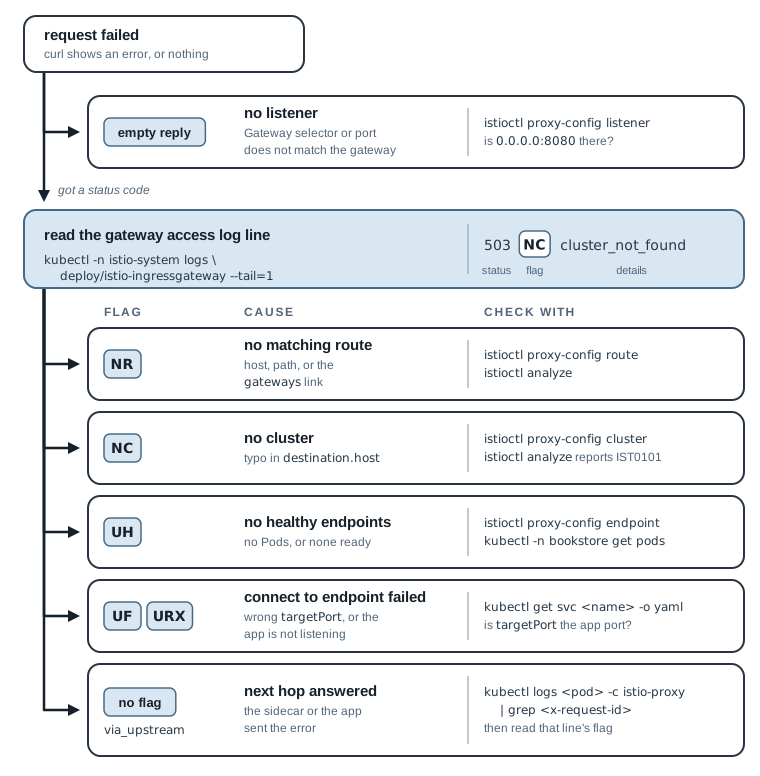
Envoy has more flags than these five; its access log documentation lists them all. With this
table and the four proxy-config commands, each of the four failures below takes a few minutes
to find.
Failure 1: 503 with “no healthy upstream”
A Deployment is scaled to zero, or every Pod fails its readiness probe. Simulate it by scaling
productpage to zero. kubectl wait --for=delete holds until the old Pod is gone, so curl
runs only after the last endpoint has left:
kubectl -n bookstore scale deploy/productpage-v1 --replicas=0
kubectl -n bookstore wait --for=delete pod -l app=productpage --timeout=60s
curl -si --resolve bookstore.local:8080:127.0.0.1 http://bookstore.local:8080/productpage
deployment.apps/productpage-v1 scaled
pod/productpage-v1-54996bff96-v8bnq condition met
HTTP/1.1 503 Service Unavailable
content-length: 19
content-type: text/plain
date: Tue, 17 Nov 2026 01:26:54 GMT
server: istio-envoy

no healthy upstream
The body no healthy upstream is Envoy’s own text. The access log line:
kubectl -n istio-system logs deploy/istio-ingressgateway --tail=1
[2026-11-17T01:26:54.522Z] "GET /productpage HTTP/1.1" 503 UH no_healthy_upstream - "-" 0 19 0 - "172.21.0.4" "curl/8.7.1" "4203c527-d9e2-4171-a46f-3e46d495d687" "bookstore.local:8080" "-" outbound|9080||productpage.bookstore.svc.cluster.local - 10.244.1.13:8080 172.21.0.4:21877 - productpage
UH: the route matched (rule productpage) and the cluster exists, but the upstream host is
"-". The endpoint layer is empty:
istioctl proxy-config endpoint -n istio-system deploy/istio-ingressgateway \
  --cluster "outbound|9080||productpage.bookstore.svc.cluster.local"
istioctl analyze -n bookstore
ENDPOINT     STATUS     OUTLIER CHECK     CLUSTER

✔ No validation issues found when analyzing namespace: bookstore.
No endpoints, and istioctl analyze finds nothing, because the configuration is correct. This
is a runtime problem, so the next step is Kubernetes: kubectl get pods, readiness probes,
events. Restore the Deployment:
kubectl -n bookstore scale deploy/productpage-v1 --replicas=1
kubectl -n bookstore rollout status deploy/productpage-v1
Failure 2: 503 with no body and NC
Someone edits the VirtualService and mistypes the destination. Make the same mistake with a
JSON patch on the first route of the productpage rule:
kubectl -n bookstore patch virtualservice bookstore --type=json \
  -p='[{"op":"replace","path":"/spec/http/1/route/0/destination/host","value":"productpages"}]'
curl -si --resolve bookstore.local:8080:127.0.0.1 http://bookstore.local:8080/productpage | head -4
kubectl -n istio-system logs deploy/istio-ingressgateway --tail=1
virtualservice.networking.istio.io/bookstore patched
HTTP/1.1 503 Service Unavailable
date: Tue, 17 Nov 2026 01:27:14 GMT
server: istio-envoy
content-length: 0
[2026-11-17T01:27:14.785Z] "GET /productpage HTTP/1.1" 503 NC cluster_not_found - "-" 0 0 1 - "172.21.0.4" "curl/8.7.1" "8545f365-eeef-4079-889f-74bf81e071b8" "bookstore.local:8080" "-" - - 10.244.1.13:8080 172.21.0.4:39476 - productpage
The flags say NC cluster_not_found: the route matched (rule productpage), then pointed at a
cluster that doesn’t exist, so the upstream cluster field is -. There’s no Service named
productpages, so istiod never created a cluster for it, and
proxy-config cluster --fqdn productpages returns an empty table. Unlike failure 1, this is a
configuration problem, and istioctl analyze names it:
istioctl analyze -n bookstore
Error [IST0101] (VirtualService bookstore/bookstore) Referenced host not found: "productpages"
Error: Analyzers found issues when analyzing namespace: bookstore.
See https://istio.io/v1.32/docs/reference/config/analysis for more information about causes and resolutions.
Restore the file:
kubectl apply -f 03-gateway-virtualservice/virtualservice.yaml
Failure 3: 503 “upstream connect error”, Found One Hop Later
A Service’s targetPort must be the port the app listens on. Someone changes it to 9090:
kubectl -n bookstore patch svc productpage --type=json \
  -p='[{"op":"replace","path":"/spec/ports/0/targetPort","value":9090}]'
curl -si --resolve bookstore.local:8080:127.0.0.1 http://bookstore.local:8080/productpage | head -8
service/productpage patched
HTTP/1.1 503 Service Unavailable
content-length: 121
content-type: text/plain
date: Tue, 17 Nov 2026 01:27:41 GMT
server: istio-envoy
x-envoy-upstream-service-time: 59

upstream connect error or disconnect/reset before headers. retried and the latest reset reason: remote connection failure
The gateway’s log:
kubectl -n istio-system logs deploy/istio-ingressgateway --tail=1
[2026-11-17T01:27:41.229Z] "GET /productpage HTTP/1.1" 503 - via_upstream - "-" 0 121 62 59 "172.21.0.4" "curl/8.7.1" "e96642a0-a8da-44c6-93a3-2696a3dcc28b" "bookstore.local:8080" "10.244.2.16:9090" outbound|9080||productpage.bookstore.svc.cluster.local 10.244.1.13:34656 10.244.1.13:8080 172.21.0.4:64552 - productpage
No flag, and via_upstream: as far as the gateway knows, something upstream answered with
503. That something is the productpage Pod’s sidecar, not the app. The upstream host,
10.244.2.16:9090, already hints at the cause: the gateway sends to the Pod IP and the Service’s
targetPort, and the port is now 9090. To see what the sidecar saw, find the same request in
its log by the request ID:
kubectl -n bookstore logs deploy/productpage-v1 -c istio-proxy | grep e96642a0
[2026-11-17T01:27:41.239Z] "GET /productpage HTTP/1.1" 503 URX,UF upstream_reset_before_response_started{remote_connection_failure|delayed_connect_error:_Connection_refused} - "delayed_connect_error:_Connection_refused" 0 121 45 - "172.21.0.4" "curl/8.7.1" "e96642a0-a8da-44c6-93a3-2696a3dcc28b" "bookstore.local:8080" "10.244.2.16:9090" inbound|9090|| - 10.244.2.16:9090 172.21.0.4:0 outbound_.9080_._.productpage.bookstore.svc.cluster.local default
Now the cause is plain. The sidecar received the request on the inbound side and tried to pass
it to the app on port 9090 (inbound|9090||). The upstream failure reason, the quoted field
after the flags, says delayed_connect_error:_Connection_refused: nothing listens on 9090. UF
is that connection failure, and URX means the sidecar retried and every attempt failed.
The sidecar also wrote the response body. Both lines show 121 bytes sent, because the gateway
passed the sidecar’s text on unchanged. So the “retried” in that text describes the sidecar’s
retries, not the gateway’s: URX appears only in the sidecar’s line.
istioctl analyze reports no issues here either. A Service whose targetPort points to a
closed port is valid configuration. This failure is the reason to learn the request ID: when the
gateway’s line says via_upstream, the answer is in the next proxy’s log. Restore the port:
kubectl -n bookstore patch svc productpage --type=json \
  -p='[{"op":"replace","path":"/spec/ports/0/targetPort","value":9080}]'
Failure 4: A New Route That Never Takes Effect
The team wants a maintenance page. A teammate writes a second VirtualService for the same host,
05-debug-gateway/virtualservice-maintenance.yaml, that answers every path with a 503 and a
message. directResponse makes the gateway answer itself, like chapter 3’s redirect:
apiVersion: networking.istio.io/v1
kind: VirtualService
metadata:
  name: bookstore-maintenance
  namespace: bookstore
spec:
  hosts:
    - bookstore.local
  gateways:
    - bookstore-gateway
  http:
    - name: maintenance
      match:
        - uri:
            prefix: /
      directResponse:
        status: 503
        body:
          string: "Book Store is down for maintenance\n"
kubectl apply -f 05-debug-gateway/virtualservice-maintenance.yaml
for p in /productpage /health /; do
  curl -s -o /dev/null -w "$p %{http_code}\n" --resolve bookstore.local:8080:127.0.0.1 http://bookstore.local:8080$p
done
virtualservice.networking.istio.io/bookstore-maintenance created
/productpage 200
/health 503
/ 301
The shop is still up, and / still redirects. Only /health, a path the original
VirtualService doesn’t route, gets the maintenance page. istioctl analyze sees nothing wrong,
and /productpage succeeds, so there’s no error to look up in the access log. The route table
explains it:
istioctl proxy-config route -n istio-system deploy/istio-ingressgateway --name http.8080
NAME          VHOST NAME             DOMAINS             MATCH                 VIRTUAL SERVICE
http.8080     bookstore.local:80     bookstore.local     /                     bookstore.bookstore
http.8080     bookstore.local:80     bookstore.local     /productpage          bookstore.bookstore
http.8080     bookstore.local:80     bookstore.local     /static/*             bookstore.bookstore
http.8080     bookstore.local:80     bookstore.local     /login                bookstore.bookstore
http.8080     bookstore.local:80     bookstore.local     /logout               bookstore.bookstore
http.8080     bookstore.local:80     bookstore.local     /api/v1/products*     bookstore.bookstore
http.8080     bookstore.local:80     bookstore.local     /*                    bookstore-maintenance.bookstore
When two VirtualService objects on the same gateway claim the same host, Istio merges their
rules into one virtual host. Envoy still takes the first match, so the order decides who wins,
and here the existing object’s rules came first. Istio doesn’t let you choose that order across
objects. The catch-all /* sits at the bottom and only catches what nothing else matched.
This is the one failure where the flags don’t help: every request succeeded by Envoy’s rules. Only the route table shows that the new rule landed below the old ones.
The simplest fix is one VirtualService per host on a gateway. For a maintenance window, change
that object (or apply a maintenance version of it) instead of adding a second one. Splitting a
host across several objects does work when their paths don’t overlap, as /health shows, but a
catch-all in a second object never wins. Delete the extra object:
kubectl delete -f 05-debug-gateway/virtualservice-maintenance.yaml
The Four Failures Side by Side
| Symptom | Flag | Layer | analyze finds it? |
Cause in this chapter |
|---|---|---|---|---|
503 no healthy upstream |
UH |
Endpoint | No | No ready Pods |
503, empty body |
NC |
Cluster | Yes (IST0101) |
Typo in destination.host |
503 upstream connect error |
- at the gateway, URX,UF in the sidecar |
Endpoint, one hop later | No | Wrong targetPort |
| New route ignored | none; requests succeed | Route | No | Two VirtualService objects for one host |
Add chapter 3’s two failures (NR for a broken gateways link, an empty reply for a broken
selector) and you have the six gateway failures I’ve met most often.
Log Only Failures at the Gateway
Chapter 2 turned on access logs for every proxy with accessLogFile in
cluster/istio-install.yaml. At a busy gateway, one line per request is a lot of log volume,
and most of it is 200s. The Telemetry API is an Istio resource that changes logging, metrics,
and tracing for selected workloads without reinstalling Istio. This one is
05-debug-gateway/telemetry-gateway-errors.yaml:
apiVersion: telemetry.istio.io/v1
kind: Telemetry
metadata:
  name: gateway-errors-only
  namespace: istio-system
spec:
  selector:
    matchLabels:
      istio: ingressgateway
  accessLogging:
    - providers:
        - name: envoy
      filter:
        expression: "response.code >= 400 || response.code == 0"
selectorlimits it to the ingress gateway Pods inistio-system; sidecars keep logging everything.envoyis the built-in provider that writes to stdout, the same place the logs went before.filteris a CEL (Common Expression Language) expression that Envoy evaluates for each request.response.code == 0keeps requests that got no response at all, such as a connection the client dropped.
Apply it, send 10 good requests and one bad one, and count the new log lines:
kubectl apply -f 05-debug-gateway/telemetry-gateway-errors.yaml
before=$(kubectl -n istio-system logs deploy/istio-ingressgateway | grep -c '^\[')
./scripts/count-versions.sh http://bookstore.local:8080 10 > /dev/null
curl -s -o /dev/null --resolve bookstore.local:8080:127.0.0.1 http://bookstore.local:8080/health
sleep 3
after=$(kubectl -n istio-system logs deploy/istio-ingressgateway | grep -c '^\[')
echo "new lines: $((after - before))"
kubectl -n istio-system logs deploy/istio-ingressgateway --tail=1
telemetry.telemetry.istio.io/gateway-errors-only created
new lines: 1
[2026-11-17T01:28:16.438Z] "GET /health HTTP/1.1" 404 NR route_not_found - "-" 0 0 0 - "172.21.0.4" "curl/8.7.1" "c29c1106-d415-48f7-b0d2-7d8f6a20b2eb" "bookstore.local:8080" "-" - - 10.244.1.13:8080 172.21.0.4:3563 - -
Eleven requests, one log line: the 404. (sleep 3 is there because Envoy buffers log lines and
writes them out shortly after the request; without the pause, the last lines can be missing.)
The filter has a cost. A slow 200, or a 200 with the wrong page, leaves no line at the
gateway, so you can’t start from the gateway’s log for those requests. In this setup the
sidecars still log every request, and metrics (chapter 13) count the successful traffic. That
combination is a reasonable default at a busy gateway. If your sidecars log less, keep the
gateway logging everything.
Reset Before the Next Chapter
Remove the Telemetry filter, so later chapters see every request in the gateway log:
kubectl delete -f 05-debug-gateway/telemetry-gateway-errors.yaml
Check that nothing from the failures is left behind:
istioctl analyze -n bookstore
curl -s -o /dev/null -w "%{http_code}\n" --resolve bookstore.local:8080:127.0.0.1 http://bookstore.local:8080/productpage
✔ No validation issues found when analyzing namespace: bookstore.
200
To rebuild the starting state of chapter 6 from scratch: ./scripts/bootstrap.sh 06.
Summary
- Envoy handles a request in four layers: listener (from the
Gateway), route (from theVirtualService), cluster (from theService), endpoint (from ready Pods).istioctl proxy-config listener|route|cluster|endpointshows each one. - The response flag in the access log points to the failing layer:
NRroute,NCcluster,UHno endpoints,UF/URXconnection to the endpoint failed. via_upstreamwith an error means something upstream answered: the app, or the sidecar in front of it. Follow thex-request-idinto that sidecar’s log.istioctl analyzecatches broken references, not runtime problems (no Pods, a closed port) or legal-but-wrong configuration (twoVirtualServiceobjects for one host).- The Telemetry API changes logging per workload; a CEL filter can keep only failures at the
gateway. Next, chapter 6 moves inside the mesh and controls which version of
reviewsgets traffic.