Book Store now answers at http://bookstore.local:8080, and everything between the browser and
the gateway travels in plain text. That includes the login form: the user name and password a
customer types into /login cross the network unencrypted, and anyone on the path can read
them. Any public site needs HTTPS, and the ingress gateway is the natural place to add it,
because every outside request already passes through it.
The Book Store team also has two new requests. Partner shops want to read the book catalog from their own systems, and the team wants only known partners to get in. And the payments team runs a service that must decrypt its own traffic (for example, because a compliance rule says only that service may hold its private key), so the gateway must pass that traffic through without opening it.
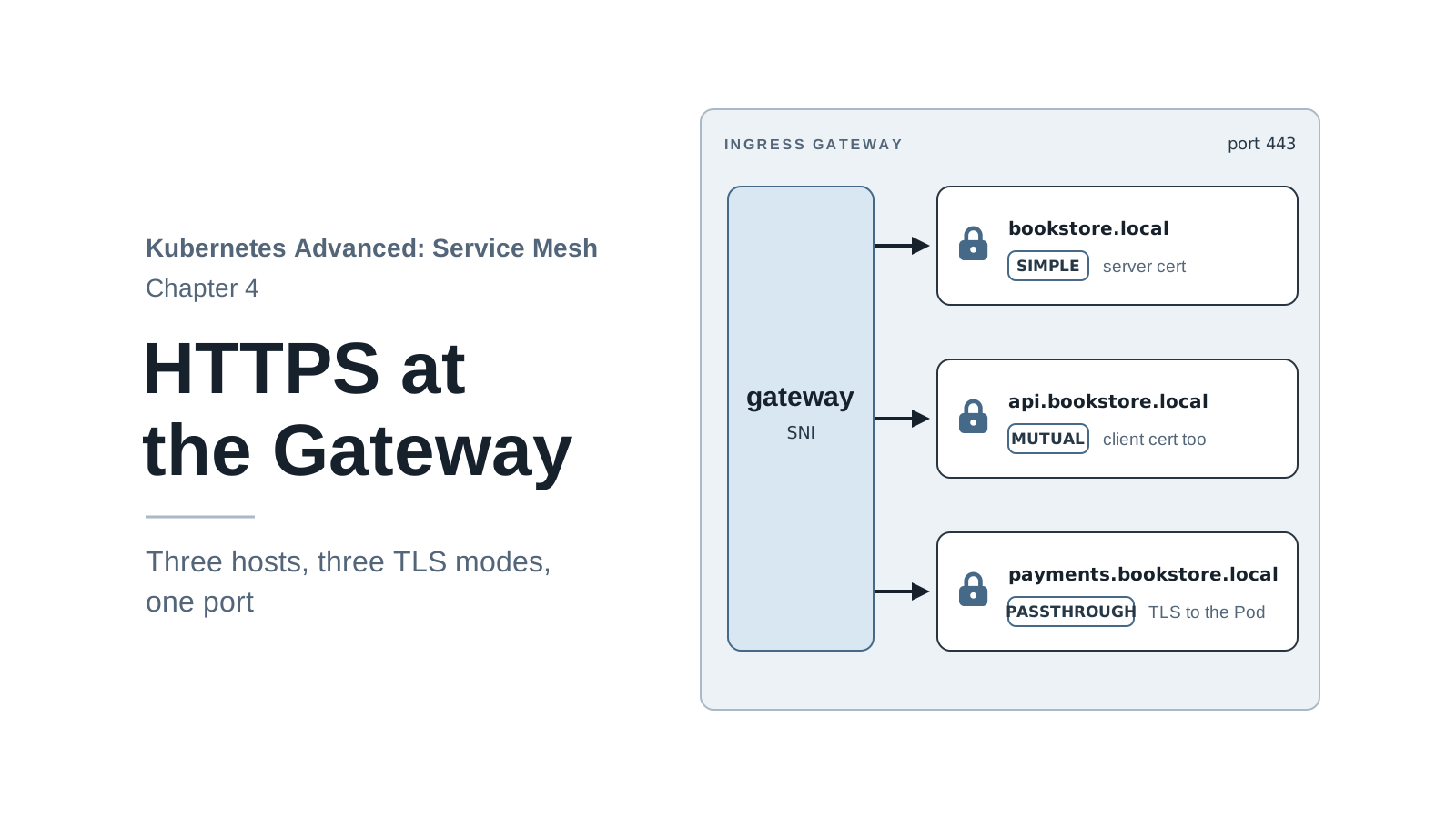
Those three needs map onto the three TLS modes of an Istio Gateway:
SIMPLE: the gateway decrypts HTTPS and routes plain HTTP inside the mesh (the shop).MUTUAL: the same, and the client must also show a certificate (the partner API).PASSTHROUGH: the gateway routes by host name and never decrypts (payments).
By the end of this chapter you will:
- Create a local certificate authority and certificates, and give them to the gateway with
credentialName. - Serve
https://bookstore.local:8443and redirect HTTP to HTTPS. - Run three host names with three TLS modes on the gateway’s single HTTPS port.
- Diagnose a TLS Secret in the wrong namespace, a mistake that works until the gateway restarts.
Code for this chapter. The files are in _resource/kubernetes-service-mesh/04-https, and the certificate script is
scripts/make-certs.sh. I tested them with Kind v0.33.0 (Kubernetes v1.37.0) and Istio 1.32.0 on macOS with Docker Desktop, and the command output in this chapter comes from those runs.
Starting Point
Run every command from _resource/kubernetes-service-mesh, with the series’ istioctl on your
PATH (export PATH="$PWD/bin:$PATH"). The chapter starts where chapter 3 ended: Book Store in
the mesh, reachable through the bookstore-gateway Gateway and the bookstore
VirtualService at http://bookstore.local:8080. To build that state from scratch:
./scripts/bootstrap.sh 04
The HTTPS side of the path already exists. Chapter 1’s Kind config maps localhost:8443 to node
port 30443, and chapter 2’s install maps node port 30443 to the gateway Service’s port 443, which
points at port 8443 in the gateway Pod (the same non-root rule that maps port 80 to 8080 in
chapter 3). Nothing listens on 8443 yet, because no Gateway server asks for port 443.
Create Certificates
An HTTPS server proves its identity with a certificate: a file that binds a host name to a
public key and is signed by a certificate authority (CA). A client trusts the server when it
trusts the CA that signed the certificate. Public sites use a CA that browsers already trust,
such as Let’s Encrypt. A local name like bookstore.local can’t get one, so the series creates
its own small CA and tells curl to trust it.
scripts/make-certs.sh uses openssl to create the CA and four certificates in certs/, each
with its private key (.key) next to it. Everything is valid for one year. I ran the script
with OpenSSL 4 (from Homebrew) and with the LibreSSL that macOS ships as openssl, and both
work. The openssl s_client outputs later in the chapter come from OpenSSL 4 (on
macOS, brew install openssl); LibreSSL prints the same failures with different wording.
./scripts/make-certs.sh
created ca.crt
created bookstore.local.crt
created api.bookstore.local.crt
created payments.bookstore.local.crt
created partner-client.crt
The script skips any certificate that already exists, so running it again is safe and prints nothing new.
| File | Used by | Purpose |
|---|---|---|
ca.crt |
curl --cacert; the partner API’s client check |
The “Book Store Local CA” that signs the others. |
bookstore.local.crt |
the gateway | Server certificate for the shop. |
api.bookstore.local.crt |
the gateway | Server certificate for the partner API. |
payments.bookstore.local.crt |
the payments app | Server certificate the app presents itself. |
partner-client.crt |
a partner’s curl |
Client certificate that proves “I am a partner”. |
Each server certificate carries its host name in the Subject Alternative Name (SAN) field, which is the field clients check against the host name in the URL:
openssl x509 -in certs/bookstore.local.crt -noout -subject -issuer
openssl x509 -in certs/bookstore.local.crt -noout -text | grep -A1 "Subject Alternative Name"
subject=O=Book Store, CN=bookstore.local
issuer=O=Book Store, CN=Book Store Local CA
            X509v3 Subject Alternative Name:
                DNS:bookstore.local
The CA signed it, and the SAN is bookstore.local, the name curl will connect to.
certs/ is in .gitignore. The CA key sits next to the certificates without a password, which
is fine for a laptop and never acceptable anywhere else.
Three Ways a Gateway Handles TLS
The three modes differ in where the encrypted connection ends:
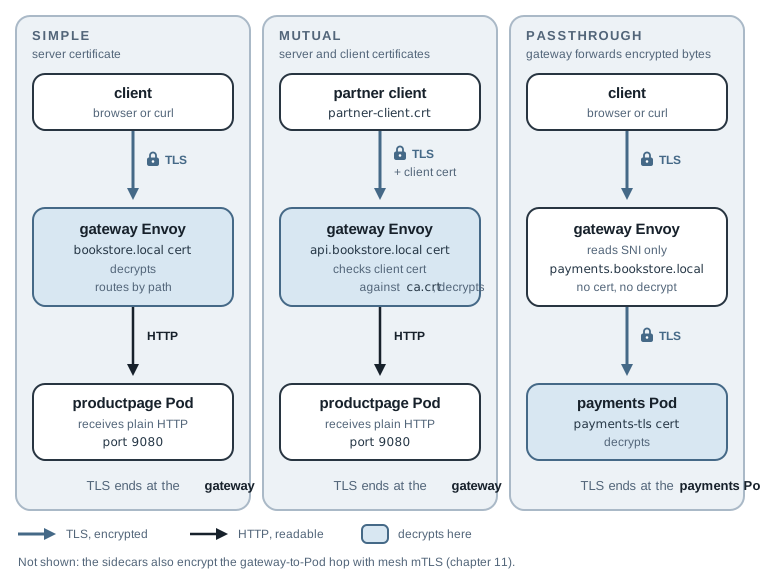
With SIMPLE and MUTUAL, the gateway holds the server certificate, terminates TLS (completes
the handshake and decrypts the request), and can apply everything from chapter 3: paths,
redirects, routes. With PASSTHROUGH, the gateway never sees the HTTP request. It reads one
thing from the start of the TLS handshake, the Server Name Indication (SNI), which is the host
name the client wants, and forwards the encrypted bytes to a Pod that holds the certificate. No
path routing is possible, because the path is encrypted.
(The hop from the gateway to productpage is plain HTTP in this picture, from the app’s point
of view. The gateway’s Envoy and the productpage sidecar encrypt it with the mesh’s own
certificates; chapter 11 covers that.)
Serve HTTPS with SIMPLE TLS
Put the certificate where the gateway can read it
The gateway takes its certificates from Kubernetes Secrets, and only from Secrets in the
namespace where the gateway Pods run, istio-system. That is not the namespace of the Gateway
object, which lives in bookstore. This rule is the cause of this chapter’s failure story, so
keep it in mind. Create a TLS Secret (the Kubernetes Secret type that holds a certificate under
tls.crt and its key under tls.key) from the shop’s files:
kubectl -n istio-system create secret tls bookstore-local-tls \
  --cert=certs/bookstore.local.crt --key=certs/bookstore.local.key
secret/bookstore-local-tls created
Add an HTTPS server to the Gateway
04-https/gateway-https.yaml keeps chapter 3’s HTTP server and adds a second one:
apiVersion: networking.istio.io/v1
kind: Gateway
metadata:
  name: bookstore-gateway
  namespace: bookstore
spec:
  selector:
    istio: ingressgateway
  servers:
    - port:
        number: 80
        name: http
        protocol: HTTP
      hosts:
        - bookstore.local
    - port:
        number: 443
        name: https-bookstore
        protocol: HTTPS
      hosts:
        - bookstore.local
      tls:
        mode: SIMPLE
        credentialName: bookstore-local-tls
The new server listens on the Service’s port 443 with protocol HTTPS. tls.mode: SIMPLE
means the gateway terminates TLS itself, and credentialName names the Secret that holds the
certificate and key. The port names (http, https-bookstore) must be unique within the
Gateway; they also appear in Envoy’s route names, which helps when debugging.
The VirtualService from chapter 3 doesn’t change: it is attached to bookstore-gateway for
host bookstore.local, so its routes apply to every server of that Gateway that accepts the
host, HTTP and HTTPS alike. Apply the Gateway and request the page over HTTPS:
kubectl apply -f 04-https/gateway-https.yaml
curl -s --resolve bookstore.local:8443:127.0.0.1 --cacert certs/ca.crt \
  https://bookstore.local:8443/productpage | grep -o "<title>.*</title>"
gateway.networking.istio.io/bookstore-gateway configured
<title>Simple Bookstore App</title>
The shop answers on https://bookstore.local:8443. --cacert certs/ca.crt tells curl to trust
the local CA, and --resolve works as in chapter 3. Check the handshake details with -v; the
grep keeps only the lines about TLS:
curl -sv --resolve bookstore.local:8443:127.0.0.1 --cacert certs/ca.crt \
  https://bookstore.local:8443/productpage -o /dev/null 2>&1 | grep -E "SSL connection|subject:|issuer:|verify ok|ALPN: server"
* SSL connection using TLSv1.3 / AEAD-CHACHA20-POLY1305-SHA256 / [blank] / UNDEF
* ALPN: server accepted h2
*  subject: O=Book Store; CN=bookstore.local
*  issuer: O=Book Store; CN=Book Store Local CA
*  SSL certificate verify ok.
The connection uses TLS 1.3, and the gateway presented the certificate from the Secret, which
curl verified against the local CA. ALPN (Application-Layer Protocol Negotiation) is the step
of the handshake where client and server agree on an HTTP version. server accepted h2 means
they settled on HTTP/2, so this request reached the gateway as HTTP/2, not HTTP/1.1. (The cipher
name depends on your curl’s TLS library; this is macOS’s.)
Without --cacert, curl rejects the gateway’s certificate, as a browser does until you trust the
CA:
curl -s --resolve bookstore.local:8443:127.0.0.1 https://bookstore.local:8443/productpage
echo "exit=$?"
exit=60
-s hides the error message, so the exit code carries it. Exit code 60 means curl couldn’t
verify the server’s certificate against any CA it trusts. The gateway is fine; the client
doesn’t know the CA.
How the certificate reaches Envoy
Envoy doesn’t read the Secret from Kubernetes itself. istiod reads the Secret named in
credentialName from the gateway’s namespace and sends the certificate and key to the gateway’s
Envoy over the Secret Discovery Service (SDS). SDS is one more xDS API (chapter 2), next to
LDS, RDS, CDS, and EDS, and it carries certificates:
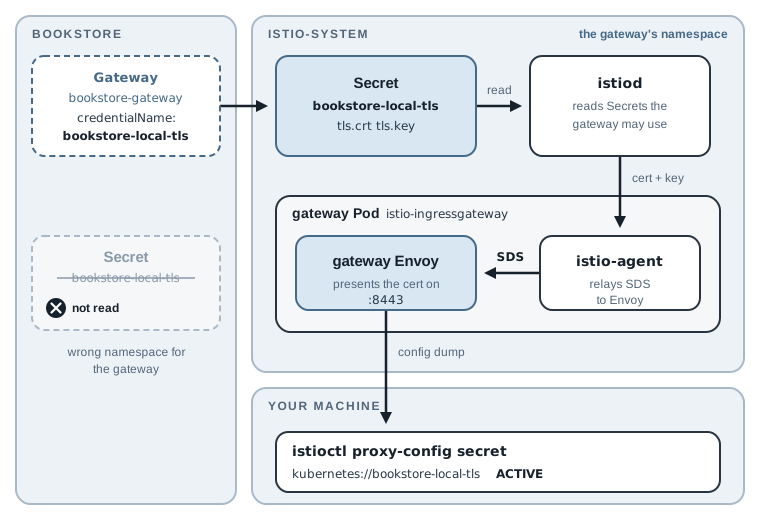
The figure follows the certificate from the Gateway field to Envoy. The last step is the one
you can inspect: istioctl proxy-config secret lists the certificates Envoy holds right now:
istioctl proxy-config secret -n istio-system deploy/istio-ingressgateway
RESOURCE NAME                        TYPE           STATUS     VALID CERT     SERIAL NUMBER                                NOT AFTER                NOT BEFORE
kubernetes://bookstore-local-tls     Cert Chain     ACTIVE     true           7dc785976eaee019b0dd21dc603fcf2251fda1d4     2027-11-17T01:18:57Z     2026-11-17T01:18:57Z
default                              Cert Chain     ACTIVE     true           945d71525d1493c4222b412372f77b69             2026-11-18T01:04:58Z     2026-11-17T01:02:58Z
ROOTCA                               CA             ACTIVE     true           ffdb4b4b665f3f79e3d64934aab6906f             2036-11-14T01:04:35Z     2026-11-17T01:04:35Z
kubernetes://bookstore-local-tls is your certificate, ACTIVE and valid for a year. The other
two rows are the mesh’s own certificates, which istiod issues to every proxy (chapter 11).
Because certificates arrive over SDS, replacing the Secret updates the gateway within seconds,
with no restart. Certificate renewal in production depends on this: a tool such as
cert-manager renews the Secret, and the gateway picks it up. The failure story at the end of the
chapter shows the same push in action.
Redirect HTTP to HTTPS
The shop still answers on plain HTTP, so a customer who types http:// still sends the login
form unencrypted. 04-https/gateway-redirect.yaml changes the HTTP server only; the HTTPS server
stays as it was:
  servers:
    # ... same as gateway-https.yaml, except the HTTP server:
    - port:
        number: 80
        name: http
        protocol: HTTP
      hosts:
        - bookstore.local
      tls:
        httpsRedirect: true
httpsRedirect: true makes the gateway answer every HTTP request for this host with a 301
redirect to the same URL with https://. No route runs for these requests. Apply it and request
the page over HTTP, keeping only the status line and the location header:
kubectl apply -f 04-https/gateway-redirect.yaml
curl -si --resolve bookstore.local:8080:127.0.0.1 http://bookstore.local:8080/productpage | head -2
gateway.networking.istio.io/bookstore-gateway configured
HTTP/1.1 301 Moved Permanently
location: https://bookstore.local:8080/productpage
The redirect works, but on Kind it points to the wrong port. The gateway changes only the scheme
and keeps the host and port from the request’s Host header, so bookstore.local:8080 becomes
https://bookstore.local:8080, and port 8080 doesn’t speak TLS. A browser that follows it fails.
The problem exists only locally. In production, HTTP and HTTPS are on the standard ports 80 and
443, and a browser leaves standard ports out of the Host header. Send the request the way a
production browser would, with a Host header and no port (the -H "Host: ..." form from
chapter 3):
curl -si -H "Host: bookstore.local" http://localhost:8080/productpage | head -2
HTTP/1.1 301 Moved Permanently
location: https://bookstore.local/productpage
That’s the right redirect for a site on port 443. On Kind, keep using https://...:8443
directly.
One Gateway, Three Hosts
The gateway has one HTTPS port, and it can serve any number of host names on it. When a TLS
connection arrives, Envoy reads the SNI host name and picks the server for it, each with its own
certificate and its own TLS mode. 04-https/gateway-hosts.yaml keeps the two servers from
gateway-redirect.yaml and adds two more on the same port:
  servers:
    # ... the http and https-bookstore servers from gateway-redirect.yaml
    - port:
        number: 443
        name: https-api
        protocol: HTTPS
      hosts:
        - api.bookstore.local
      tls:
        mode: MUTUAL
        credentialName: api-bookstore-local-tls
    - port:
        number: 443
        name: tls-payments
        protocol: TLS
      hosts:
        - payments.bookstore.local
      tls:
        mode: PASSTHROUGH
The partner API server uses protocol: HTTPS with MUTUAL, because the gateway still decrypts
it and routes HTTP. The payments server uses protocol: TLS with PASSTHROUGH and no
credentialName: the gateway sees only encrypted bytes and holds no certificate for this host.
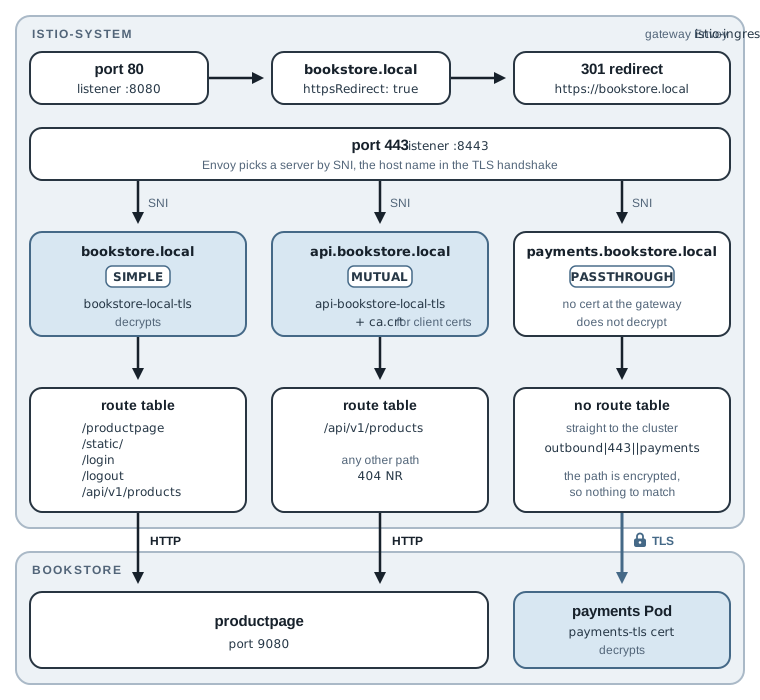
In the figure, every connection arrives on the same port, and the SNI alone decides which of the
three paths it takes. curl sends the URL’s host name as the SNI, so --resolve is all the
commands in this chapter need. The chapter 3 form -H "Host: ..." doesn’t work for HTTPS. I
tried curl -H "Host: bookstore.local" --cacert certs/ca.crt https://localhost:8443/productpage
and the handshake failed (curl exit code 35): curl sent localhost as the SNI, the gateway has
no server for that name, and it matches servers by SNI before it decrypts anything, so it never
gets as far as the header.
The partner API with MUTUAL TLS
With MUTUAL, the gateway asks the client for a certificate during the handshake and accepts
only certificates signed by a CA you choose. The Secret needs a third key, ca.crt, with that CA.
kubectl create secret tls accepts only a certificate and a key, so create a generic Secret
with all three files instead:
kubectl -n istio-system create secret generic api-bookstore-local-tls \
  --from-file=tls.crt=certs/api.bookstore.local.crt \
  --from-file=tls.key=certs/api.bookstore.local.key \
  --from-file=ca.crt=certs/ca.crt
secret/api-bookstore-local-tls created
Here one CA signs both the server certificates and the partner’s client certificate, to keep the lab small. The gateway accepts any client certificate that CA signed. In production, partner certificates usually come from a CA used for nothing else, so that “signed by this CA” really means “is a partner”.
The partner API serves the JSON catalog and nothing else. 04-https/virtualservice-api.yaml is
a second VirtualService on the same Gateway, for the new host:
apiVersion: networking.istio.io/v1
kind: VirtualService
metadata:
  name: bookstore-api
  namespace: bookstore
spec:
  hosts:
    - api.bookstore.local
  gateways:
    - bookstore-gateway
  http:
    - name: products-api
      match:
        - uri:
            prefix: /api/v1/products
      route:
        - destination:
            host: productpage
            port:
              number: 9080
It has one rule, the same prefix: /api/v1/products match the shop uses in chapter 3, and the
same destination. Any other path on this host has no route.
Payments with PASSTHROUGH
The payments service is a stand-in: go-httpbin, the same image Istio’s own httpbin sample
uses. 04-https/payments.yaml mounts the Secret payments-tls into the Pod and starts
go-httpbin on port 8443 with that certificate, so the app serves HTTPS itself. The Secret goes
in bookstore, the app’s namespace, because the app reads it, not the gateway. Remember that
difference for the failure story.
payments.yaml names the Service port https. Istio reads that name, as with http in
chapter 1, and treats the traffic as TLS: the payments Pod’s sidecar passes the encrypted
connection to the app without trying to read it.
Because a PASSTHROUGH connection stays encrypted, its VirtualService has a tls section
instead of http, and it matches on SNI instead of a path. 04-https/virtualservice-payments.yaml:
apiVersion: networking.istio.io/v1
kind: VirtualService
metadata:
  name: payments
  namespace: bookstore
spec:
  hosts:
    - payments.bookstore.local
  gateways:
    - bookstore-gateway
  tls:
    - match:
        - port: 443
          sniHosts:
            - payments.bookstore.local
      route:
        - destination:
            host: payments
            port:
              number: 443
match.port: 443 is the Gateway server’s port, and sniHosts is the host name from the
handshake. The destination is the payments Service on its port 443, which forwards to the app’s
port 8443.
Apply and test all three
Create the payments Secret, apply the four files, and wait for the payments Pod, which starts
with a sidecar like every Pod in bookstore:
kubectl -n bookstore create secret tls payments-tls \
  --cert=certs/payments.bookstore.local.crt --key=certs/payments.bookstore.local.key
kubectl apply -f 04-https/payments.yaml \
  -f 04-https/gateway-hosts.yaml \
  -f 04-https/virtualservice-api.yaml \
  -f 04-https/virtualservice-payments.yaml
kubectl -n bookstore rollout status deploy/payments-v1
secret/payments-tls created
service/payments created
serviceaccount/bookstore-payments created
deployment.apps/payments-v1 created
gateway.networking.istio.io/bookstore-gateway configured
virtualservice.networking.istio.io/bookstore-api created
virtualservice.networking.istio.io/payments created
Waiting for deployment "payments-v1" rollout to finish: 0 of 1 updated replicas are available...
deployment "payments-v1" successfully rolled out
Call the partner API without a client certificate first:
curl -sS --resolve api.bookstore.local:8443:127.0.0.1 --cacert certs/ca.crt \
  https://api.bookstore.local:8443/api/v1/products -o /dev/null
curl: (56) LibreSSL SSL_read: LibreSSL/3.3.6: error:1404C45C:SSL routines:ST_OK:reason(1116), errno 0
The gateway refused the connection, as intended, but the message depends on curl’s TLS library,
and macOS’s is unreadable. (A curl built with OpenSSL, like the curlimages/curl container,
printed curl: (55) Send failure: Broken pipe.) openssl s_client shows the real reason. It
opens the TLS connection, sends a request, and prints what the server said:
printf 'GET /api/v1/products HTTP/1.1\r\nHost: api.bookstore.local\r\n\r\n' \
  | openssl s_client -connect 127.0.0.1:8443 -servername api.bookstore.local \
      -CAfile certs/ca.crt -quiet 2>&1 | tail -1
80FFF7F401000000:error:0A00045C:SSL routines:ssl3_read_bytes:tlsv13 alert certificate required:ssl/record/rec_layer_s3.c:923:SSL alert number 116
tlsv13 alert certificate required: the gateway ended the connection because no client
certificate came with it. -servername sets the SNI, which is how the gateway knew this
connection was for the partner API. Now call it as a partner, with the client certificate and
its key:
curl -s --resolve api.bookstore.local:8443:127.0.0.1 --cacert certs/ca.crt \
  --cert certs/partner-client.crt --key certs/partner-client.key \
  https://api.bookstore.local:8443/api/v1/products | head -c 120; echo
curl -s --resolve api.bookstore.local:8443:127.0.0.1 --cacert certs/ca.crt \
  --cert certs/partner-client.crt --key certs/partner-client.key \
  -o /dev/null -w "%{http_code}\n" https://api.bookstore.local:8443/productpage
[{"id": 0, "title": "The Comedy of Errors", "descriptionHtml": "<a href=\"https://en.wikipedia.org/wiki/The_Comedy_of_Erro
404
The first command prints the start of the catalog JSON. The second prints 404: the partner
API’s VirtualService routes only /api/v1/products, so /productpage gets a gateway 404
(NR in the access log, as in chapter 3, and as the log below shows). A partner gets only what
its host exposes.
Then call payments. It needs only --cacert, because the payments certificate is signed by the
same local CA:
curl -s --resolve payments.bookstore.local:8443:127.0.0.1 --cacert certs/ca.crt \
  https://payments.bookstore.local:8443/get
{
  "args": {},
  "headers": {
    "Accept": [
      "*/*"
    ],
    "Host": [
      "payments.bookstore.local:8443"
    ],
    "User-Agent": [
      "curl/8.7.1"
    ]
  },
  "method": "GET",
  "origin": "127.0.0.6:41938",
  "url": "https://payments.bookstore.local:8443/get"
}
/get echoes the request the app received, and two details show that no proxy opened it. The
app listens only for TLS on port 8443, so it decrypted the request itself, and its url shows
https://. And the request has only the three headers curl sent. When Envoy processes an HTTP
request it adds headers such as x-request-id and x-forwarded-proto; none appear here. (The
origin, 127.0.0.6, is the source address the payments sidecar uses when it hands inbound
traffic to the app. The sidecar forwarded the encrypted bytes without reading them, so the app
sees the sidecar as its client, not curl.)
The gateway’s listener shows how it tells the three hosts apart:
istioctl proxy-config listener -n istio-system deploy/istio-ingressgateway
ADDRESSES PORT  MATCH                         DESTINATION
0.0.0.0   8080  ALL                           Route: http.8080
0.0.0.0   8443  SNI: bookstore.local          Route: https.443.https-bookstore.bookstore-gateway.bookstore
0.0.0.0   8443  SNI: api.bookstore.local      Route: https.443.https-api.bookstore-gateway.bookstore
0.0.0.0   8443  SNI: payments.bookstore.local Cluster: outbound|443||payments.bookstore.svc.cluster.local
0.0.0.0   15021 ALL                           Inline Route: /healthz/ready*
0.0.0.0   15090 ALL                           Inline Route: /stats/prometheus*
The gateway has one listener on Pod port 8443, split by SNI into three rows. The two decrypting
servers end in a route table whose name includes the server’s port name (https-bookstore,
https-api), which is why those names matter. The passthrough server goes straight to a
cluster (chapter 2), the group of payments Pods, with no route table, because there is no HTTP
to route. The access log shows the same difference. Send one request to the partner API and one
to payments, then read the last two lines:
curl -s --resolve api.bookstore.local:8443:127.0.0.1 --cacert certs/ca.crt \
  --cert certs/partner-client.crt --key certs/partner-client.key \
  -o /dev/null https://api.bookstore.local:8443/productpage
curl -s --resolve payments.bookstore.local:8443:127.0.0.1 --cacert certs/ca.crt \
  -o /dev/null https://payments.bookstore.local:8443/get
kubectl -n istio-system logs deploy/istio-ingressgateway --tail=2
[2026-11-17T01:25:18.939Z] "GET /productpage HTTP/2" 404 NR route_not_found - "-" 0 0 0 - "172.21.0.4" "curl/8.7.1" "f028c0f5-cccb-42a8-82cc-bbf7669676e4" "api.bookstore.local:8443" "-" - - 10.244.1.13:8443 172.21.0.4:47728 api.bookstore.local -
[2026-11-17T01:25:18.954Z] "- - -" 0 - - - "-" 615 1962 11 - "-" "-" "-" "-" "10.244.2.15:8443" outbound|443||payments.bookstore.svc.cluster.local 10.244.1.13:59910 10.244.1.13:8443 172.21.0.4:20442 payments.bookstore.local -
The first line is an HTTP request with a method, path, and status, and the HTTP/2 that ALPN
agreed on. The second is a TCP connection: "- - -" where the request should be, then bytes
received and sent (615 and 1962). The SNI (api.bookstore.local, payments.bookstore.local)
appears near the end of both lines.
Note: Istio has two more TLS modes.
OPTIONAL_MUTUALasks for a client certificate but accepts connections without one, which helps while partners migrate.ISTIO_MUTUALuses the mesh’s own certificates instead of a Secret, for traffic that comes from a sidecar or another gateway in the same mesh. Chapter 10 uses it for the egress gateway.
Break It: The Secret in the Wrong Namespace
Many teams keep each app’s Secrets in the app’s namespace. payments-tls already lives in
bookstore, so moving the shop’s certificate next to it and next to the Gateway looks tidy.
Delete the Secret from istio-system, create it in bookstore, and request the shop:
kubectl -n istio-system delete secret bookstore-local-tls
kubectl -n bookstore create secret tls bookstore-local-tls \
  --cert=certs/bookstore.local.crt --key=certs/bookstore.local.key
curl -sS --resolve bookstore.local:8443:127.0.0.1 --cacert certs/ca.crt \
  https://bookstore.local:8443/productpage -o /dev/null -w "%{http_code}\n"
secret "bookstore-local-tls" deleted
secret/bookstore-local-tls created
200
It still works, and that is the dangerous part. The running gateway keeps the last certificate
it received, so nothing breaks today, and the change looks safe. But istiod, which reads the
Secret for the gateway, already knows something is wrong:
kubectl -n istio-system logs deploy/istiod --since=1m | grep bookstore-local-tls
... warn ads failed to fetch key and certificate for kubernetes://bookstore-local-tls: secret istio-system/bookstore-local-tls not found
The message names the namespace it looked in: istio-system, not bookstore. Now do what
happens in real life sooner or later: restart the gateway, as a node upgrade, a scale-up, or an
Istio upgrade would. rollout status waits until the new Pod is ready:
kubectl -n istio-system rollout restart deploy/istio-ingressgateway
kubectl -n istio-system rollout status deploy/istio-ingressgateway
curl -sS --resolve bookstore.local:8443:127.0.0.1 --cacert certs/ca.crt \
  https://bookstore.local:8443/productpage -o /dev/null
curl: (35) LibreSSL SSL_connect: SSL_ERROR_SYSCALL in connection to bookstore.local:8443
The shop is down for HTTPS. The handshake fails before any HTTP happens, so there is no status
code and no access log line to read. Work through the gateway’s TLS state instead. First, check
what certificate the gateway presents for bookstore.local:
echo | openssl s_client -connect 127.0.0.1:8443 -servername bookstore.local 2>&1 | grep -E "CONNECTED|no peer"
CONNECTED(00000003)
no peer certificate available
The TCP connection opens, but no certificate comes back. Ask Envoy which certificates it has:
istioctl proxy-config secret -n istio-system deploy/istio-ingressgateway
RESOURCE NAME                                   TYPE           STATUS      VALID CERT     SERIAL NUMBER                                NOT AFTER                NOT BEFORE
kubernetes://bookstore-local-tls                               WARMING     false
kubernetes://api-bookstore-local-tls            Cert Chain     ACTIVE      true           7dc785976eaee019b0dd21dc603fcf2251fda1d5     2027-11-17T01:18:57Z     2026-11-17T01:18:57Z
default                                         Cert Chain     ACTIVE      true           0b2b6e9c782e321b51b75c16eaa833d3             2026-11-18T01:22:58Z     2026-11-17T01:20:58Z
kubernetes://api-bookstore-local-tls-cacert     CA             ACTIVE      true           60577180868fe20cb7e7499a1414d95fa3500097     2027-11-17T01:18:57Z     2026-11-17T01:18:57Z
ROOTCA                                          CA             ACTIVE      true           ffdb4b4b665f3f79e3d64934aab6906f             2036-11-14T01:04:35Z     2026-11-17T01:04:35Z
kubernetes://bookstore-local-tls is WARMING with no certificate: Envoy asked for it and is
waiting for a Secret that never arrives. The partner API’s Secret is in the right namespace, so
its rows are ACTIVE. (The -cacert row is the ca.crt part of that Secret.) I checked it in
the same broken state: the partner curl with the client certificate still returned 200. One
broken host doesn’t take down the others on the same port.
istioctl analyze names the cause directly:
istioctl analyze -n bookstore
Error [IST0101] (Gateway bookstore/bookstore-gateway) Referenced credentialName not found: "bookstore-local-tls"
Error: Analyzers found issues when analyzing namespace: bookstore.
See https://istio.io/v1.32/docs/reference/config/analysis for more information about causes and resolutions.
Fix it by putting the Secret back in the gateway’s namespace:
kubectl -n bookstore delete secret bookstore-local-tls
kubectl -n istio-system create secret tls bookstore-local-tls \
  --cert=certs/bookstore.local.crt --key=certs/bookstore.local.key
curl -sS --resolve bookstore.local:8443:127.0.0.1 --cacert certs/ca.crt \
  https://bookstore.local:8443/productpage -o /dev/null -w "%{http_code}\n"
secret "bookstore-local-tls" deleted
secret/bookstore-local-tls created
200
The shop answers again without a gateway restart; SDS delivered the Secret within seconds.
The lesson goes beyond Secrets: a configuration change that “works” in a running proxy can still
be broken, and a restart is when you find out. Run istioctl analyze after every change, before
a restart finds the problem for you.
Note: The rule is “the gateway’s namespace”, not “
istio-system”. Chapter 15 installs the gateway in its own namespace, and its Secrets go there. In production, create these Secrets with cert-manager and a real CA so renewal is automatic, and limit who can read Secrets in the gateway namespace, since they hold private keys.
Reset Before the Next Chapter
Later chapters send test traffic over plain HTTP to http://bookstore.local:8080, so put
chapter 3’s HTTP-only Gateway back and remove this chapter’s extra hosts. Applying chapter 3’s
gateway.yaml replaces the whole server list, which removes the redirect and the three HTTPS
servers. The shop’s VirtualService stays:
kubectl apply -f 03-gateway-virtualservice/gateway.yaml
kubectl delete -f 04-https/virtualservice-api.yaml -f 04-https/virtualservice-payments.yaml \
  -f 04-https/payments.yaml
kubectl -n bookstore delete secret payments-tls
kubectl -n istio-system delete secret bookstore-local-tls api-bookstore-local-tls
The certificates stay in certs/, so you can redo the chapter at any time. To rebuild the
starting state of chapter 5 from scratch:
./scripts/bootstrap.sh 05
Summary
- A
Gatewayserver withprotocol: HTTPSandtls.mode: SIMPLEterminates TLS at the gateway, with the certificate from the Secret named incredentialName. The Secret must be in the namespace of the gateway Pods, andistioddelivers updates over SDS without a restart. httpsRedirect: trueon the HTTP server answers every request with a301tohttps://. It keeps the request’s port, which is correct on 80/443 and wrong on Kind’s 8080/8443.- One HTTPS port can serve many host names; Envoy picks the server, the certificate, and the TLS mode from the SNI.
MUTUALalso requires a client certificate signed by the CA in the Secret’sca.crt.PASSTHROUGHforwards encrypted traffic by SNI with atlsroute, so no path routing applies.- A Secret in the wrong namespace keeps working until the gateway restarts.
istioctl analyze,istioctl proxy-config secret(WARMING), andopenssl s_clientfind it. Next, chapter 5 follows a request through every layer of the gateway’s Envoy configuration.