Chapter 2 installed Istio with one istioctl install and one file. That was the right choice for
learning: one command, one control plane, everything in istio-system. It isn’t how most teams
run Istio in production, for three reasons.
First, production clusters are managed by pipelines, and most pipelines speak Helm (or a GitOps
tool that renders Helm charts). Second, one istiod Pod is a single point of failure: chapter 2
showed that with istiod down, the API server refuses to create any new Pod in a mesh namespace.
Third, and most important, Istio ships a new minor version about every quarter and supports each
one for about six months. You will upgrade the mesh at least twice a year, and an in-place upgrade
of the only control plane switches every proxy to the new version at once, with nothing to fall
back to.
This chapter installs Istio the production way on a fresh cluster: Helm charts, a highly available control plane, the ingress gateway in its own namespace, and revisions, which let two control planes run side by side. Then it does what this setup is for: a canary upgrade from Istio 1.31.4 to 1.32.0 on a running Book Store, followed by a rollback drill.
By the end of this chapter you will:
- Install Istio with the
base,istiod, andgatewayHelm charts and values files. - Run the control plane with two replicas, a PodDisruptionBudget, and autoscaling.
- Use a revision tag (
prod) so namespaces never name a version. - Upgrade the control plane, the gateway, and the sidecars from 1.31 to 1.32, and roll back.
- Take away a checklist for installing Istio on EKS, GKE, AKS, or your own clusters.
Code for this chapter. The files are in _resource/kubernetes-service-mesh/15-production. I tested them with Kind v0.33.0 (Kubernetes v1.37.0), Helm 3.15, and Istio 1.31.4 and 1.32.0 on macOS with Docker Desktop, and the command output in this chapter comes from those runs.
Starting Point: a New Cluster
This chapter starts over on a new cluster with Book Store deployed and no Istio at all. Besides
the tools from chapter 1, you need Helm 3 (helm version; I used 3.15). Install it from
helm.sh if it’s missing. Then, from
_resource/kubernetes-service-mesh:
export PATH="$PWD/bin:$PATH"
./scripts/bootstrap.sh 15
bootstrap.sh deletes any mesh cluster, creates a new one, and deploys Book Store as in chapter
1, without the istio-injection label. For this chapter it also runs
./cluster/install-istio.sh download, which puts Istio 1.32.0 in .istio/ and its istioctl in
./bin (a no-op if you already have them). This chapter uses that istioctl for both versions.
Tip: slow image pulls. On a new cluster every node pulls every image again. During my run,
registry.istio.iowas slow enough that one node took 20 minutes to pull thereviewsandratingsimages, andwait-for-app.shtimed out../scripts/preload-images.shpulls the series’ images once on your machine and copies them into every Kind node withkind load docker-image.bootstrap.shcreates the cluster and then waits for Book Store, so run the preload in a second terminal as soon asbootstrap.shprints==> Deploying Book Store without Istio. The script covers the Book Store images and the Istio 1.31.4 and 1.32.0 images.
The Charts
Istio publishes its installation as three Helm charts, each installed as its own Helm release:
| Chart | Installs | Released as |
|---|---|---|
base |
Istio’s CRDs and cluster-wide resources. One per cluster. | istio-base |
istiod (folder istio-control/istio-discovery) |
One control plane revision: Deployment, Service, webhooks, HPA, PDB. | istiod-1-31, istiod-1-32 |
gateway |
One gateway: Deployment, Service, HPA, PDB, in any namespace. | istio-ingress |
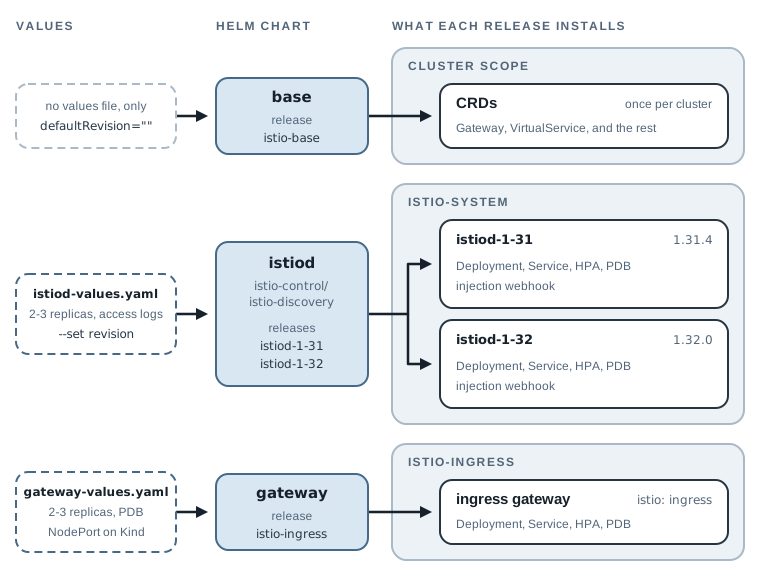
They install in that order: base registers the CRDs that istiod reads, and the gateway needs a
running istiod to inject its proxy (more on that below).
Istio’s documentation installs the charts from a Helm repository. When I checked
https://istio-release.storage.googleapis.com/charts for this chapter, its index went only up to
1.31.0-rc.0: no final 1.31 release and nothing for 1.32. Every Istio release archive contains
the same charts under manifests/charts/, so this chapter installs from the archives. Download
1.31.4 next to 1.32.0:
ISTIO_VERSION=1.31.4 ./cluster/install-istio.sh download
Downloading https://github.com/istio/istio/releases/download/1.31.4/istio-1.31.4-osx-arm64.tar.gz
SHA-256 ok
Istio 1.31.4 is in .istio/istio-1.31.4
For any version other than the series’ 1.32.0, the script leaves ./bin/istioctl alone, so
istioctl stays at 1.32.0. That one client is enough for the whole chapter: every istioctl
command below, including the ones aimed at the 1.31 control plane, ran with 1.32.0.
Revisions and Tags
A revision is a named installation of the control plane. You set it with the istiod chart’s
revision value, and the release’s Deployment, Service, and injection webhook carry that name:
revision 1-31 runs as Deployment istiod-1-31. The name uses a dash, not a dot, because it
becomes part of Kubernetes object names such as the Service, which can’t contain dots. Two
revisions can run in one cluster at the same time, each serving its own set of proxies.
Namespaces choose a control plane with the label istio.io/rev=<name> instead of chapter 2’s
istio-injection=enabled. Naming the version in every namespace would mean relabeling every
namespace on every upgrade, so Istio adds revision tags: a stable name, such as prod, that
points at a revision. Namespaces say istio.io/rev=prod. An upgrade moves the tag; no namespace
changes.
Install Istio 1.31.4 with Helm
The control plane
15-production/istiod-values.yaml holds the settings that differ from the chart’s defaults:
pilot:
  autoscaleMin: 2
  autoscaleMax: 3
  resources:
    requests:
      cpu: 100m
      memory: 256Mi
meshConfig:
  accessLogFile: /dev/stdout
global:
  proxy:
    resources:
      requests:
        cpu: 50m
        memory: 64Mi
pilot.autoscaleMin: 2: at least twoistiodPods (the chart’s default is one, scaling up to five). The chart creates a PodDisruptionBudget only when this minimum is above one, so this setting also turns on the PDB that stops a node drain from taking both Pods down at once.pilot.resources: the requests for eachistiodPod. The chart asks for 500m CPU and 2 GiB of memory, so two Pods would reserve 4 GiB, more than a laptop Kind cluster can spare. 100m and 256 MiB fit Kind; on a real cluster, start from the chart’s numbers and adjust from whatistiodactually uses.meshConfig.accessLogFile: chapter 2’s access logs.global.proxy.resources: the requests for every injected sidecar. Chapter 2 noted the default, 100m CPU and 128 MiB per Pod. On a big cluster that reserve adds up, so size it from what your proxies actually use.
Install the CRDs, then the first revision:
C1=.istio/istio-1.31.4/manifests/charts
helm install istio-base $C1/base -n istio-system --create-namespace --set defaultRevision="" --wait
helm install istiod-1-31 $C1/istio-control/istio-discovery -n istio-system \
  --set revision=1-31 -f 15-production/istiod-values.yaml --wait --timeout 10m
kubectl -n istio-system get pods,pdb,hpa
NAME: istio-base
...
STATUS: deployed
...
NAME: istiod-1-31
...
STATUS: deployed
...
NAME                               READY   STATUS    RESTARTS   AGE
pod/istiod-1-31-6854849847-4htrs   1/1     Running   0          41s
pod/istiod-1-31-6854849847-zxjwp   1/1     Running   0          41s

NAME                                     MIN AVAILABLE   MAX UNAVAILABLE   ALLOWED DISRUPTIONS   AGE
poddisruptionbudget.policy/istiod-1-31   1               N/A               1                     41s

NAME                                              REFERENCE                TARGETS              MINPODS   MAXPODS   REPLICAS   AGE
horizontalpodautoscaler.autoscaling/istiod-1-31   Deployment/istiod-1-31   cpu: <unknown>/80%   2         3         2          41s
Two istiod-1-31 Pods, a PDB that keeps at least one, and an HPA between 2 and 3. (The HPA shows
<unknown> because Kind has no metrics server; on a real cluster it reads CPU usage.)
--set defaultRevision="" is for the base chart. The value’s default, default, adds a
cluster-wide validation webhook that calls an istiod installed without a revision. This cluster
will never have one, so the empty value leaves that webhook out. That choice has a side effect,
which “Break It: Who Validates Your Istio Objects?” below tests and fixes. --wait makes Helm wait until the Pods are ready, so a pipeline step fails if the control plane
doesn’t come up.
The tag
Create the prod tag pointing at 1-31:
istioctl tag set prod --revision 1-31
istioctl tag list
Revision tag "prod" created, referencing control plane revision "1-31". To enable injection using this
revision tag, use 'kubectl label namespace <NAMESPACE> istio.io/rev=prod'
TAG  REVISION NAMESPACES
prod 1-31
A tag is a mutating webhook (istio-revision-tag-prod) that sends injection requests for
namespaces labeled istio.io/rev=prod to the tagged revision. The istiod chart can also create
tags (its revisionTags value), but then the tag belongs to one istiod release, and uninstalling
that release deletes it. Created with istioctl, the tag belongs to neither release, so removing
the old revision later can’t take it away.
The ingress gateway, in its own namespace
The gateway gets its own namespace, istio-ingress, owned by the platform team. Its TLS Secrets
must live in the gateway’s namespace (chapter 4), so they sit there, away from the control plane,
and access to them can be granted separately.
The chart’s Deployment doesn’t name a proxy image. Its container says image: auto, and the
injection webhook fills in the proxy, like a sidecar in any other Pod. So the namespace needs the
same tag label as an app namespace, and the gateway’s proxy version follows the tag.
15-production/gateway-values.yaml sets the Service and capacity:
service:
  type: NodePort
  ports:
    - name: status-port
      port: 15021
      protocol: TCP
      targetPort: 15021
    - name: http2
      port: 80
      protocol: TCP
      targetPort: 80
      nodePort: 30080
    - name: https
      port: 443
      protocol: TCP
      targetPort: 443
      nodePort: 30443
autoscaling:
  minReplicas: 2
  maxReplicas: 3
podDisruptionBudget:
  minAvailable: 1
The NodePorts are for Kind, the same 30080 and 30443 as chapter 2. On a cloud, drop the whole
service block: the chart’s default is a LoadBalancer Service with the same three ports. Two
replicas and a PDB keep the gateway serving while one Pod restarts. Unlike the istiod chart,
the gateway chart creates no PDB by default (and starts at one replica), so both settings have to
be in the values file.
kubectl create namespace istio-ingress
kubectl label namespace istio-ingress istio.io/rev=prod
helm install istio-ingress $C1/gateway -n istio-ingress -f 15-production/gateway-values.yaml --wait --timeout 10m
kubectl -n istio-ingress get pods,svc
namespace/istio-ingress created
namespace/istio-ingress labeled
NAME: istio-ingress
...
STATUS: deployed
...
NAME                                 READY   STATUS    RESTARTS   AGE
pod/istio-ingress-75866cb56b-9lns7   1/1     Running   0          66s
pod/istio-ingress-75866cb56b-vfpv8   1/1     Running   0          66s

NAME                    TYPE       CLUSTER-IP      EXTERNAL-IP   PORT(S)                                      AGE
service/istio-ingress   NodePort   10.96.209.228   <none>        15021:31406/TCP,80:30080/TCP,443:30443/TCP   66s
Two things differ from chapter 2’s gateway. First, the container listens on 80 and 443
directly, so targetPort is 80, not 8080. Chapter 3 explained that a non-root proxy can’t bind a
port below 1024 by default; the chart lifts that limit for its Pods with the sysctl
net.ipv4.ip_unprivileged_port_start=0. Second, the Pods are labeled istio: ingress, not
istio: ingressgateway: the label mismatch chapter 3 warned about.
Book Store
Put bookstore on the prod tag and restart it, as in chapter 2, then expose it with chapter 3’s
VirtualService and a copy of its Gateway with the new selector,
15-production/gateway.yaml:
kubectl label namespace bookstore istio.io/rev=prod
kubectl -n bookstore rollout restart deploy
./scripts/wait-for-app.sh
kubectl apply -f 15-production/gateway.yaml -f 03-gateway-virtualservice/virtualservice.yaml
./scripts/count-versions.sh http://bookstore.local:8080 20
namespace/bookstore labeled
...
gateway.networking.istio.io/bookstore-gateway created
virtualservice.networking.istio.io/bookstore created
   7 200 reviews-v2 stars fast
   7 200 reviews-v1 no-stars fast
   6 200 reviews-v3 stars fast
Book Store is back at http://bookstore.local:8080. Check which control plane each proxy uses:
istioctl proxy-status --revision 1-31
NAME                                             CLUSTER        ISTIOD                           VERSION     SUBSCRIBED TYPES
details-v1-585997868c-zhssx.bookstore            Kubernetes     istiod-1-31-6854849847-zxjwp     1.31.4      4 (CDS,LDS,EDS,RDS)
istio-ingress-75866cb56b-9lns7.istio-ingress     Kubernetes     istiod-1-31-6854849847-4htrs     1.31.4      4 (CDS,LDS,EDS,RDS)
istio-ingress-75866cb56b-vfpv8.istio-ingress     Kubernetes     istiod-1-31-6854849847-zxjwp     1.31.4      4 (CDS,LDS,EDS,RDS)
productpage-v1-854797745c-qk2w6.bookstore        Kubernetes     istiod-1-31-6854849847-zxjwp     1.31.4      4 (CDS,LDS,EDS,RDS)
ratings-v1-cb7b9d979-j8jhd.bookstore             Kubernetes     istiod-1-31-6854849847-zxjwp     1.31.4      4 (CDS,LDS,EDS,RDS)
reviews-v1-6cc67bfb4b-dqz5t.bookstore            Kubernetes     istiod-1-31-6854849847-zxjwp     1.31.4      4 (CDS,LDS,EDS,RDS)
reviews-v2-6b6669948-lm67f.bookstore             Kubernetes     istiod-1-31-6854849847-zxjwp     1.31.4      4 (CDS,LDS,EDS,RDS)
reviews-v3-646597976b-9wdlm.bookstore            Kubernetes     istiod-1-31-6854849847-zxjwp     1.31.4      4 (CDS,LDS,EDS,RDS)
Eight proxies on 1.31.4, six sidecars and two gateway Pods, spread over both istiod Pods.
--revision is needed now: without a default revision, plain istioctl proxy-status and
istioctl version look for a control plane without a revision, and fail with
no running Istio pods in "istio-system". That error looks alarming the first time and only means
“tell me which revision”.
The sidecars also picked up the smaller requests from the values file, half of chapter 2’s default:
kubectl -n bookstore get pod -l app=productpage \
  -o jsonpath='{.items[0].spec.initContainers[?(@.name=="istio-proxy")].resources.requests}{"\n"}'
{"cpu":"50m","memory":"64Mi"}
Canary Upgrade to 1.32.0
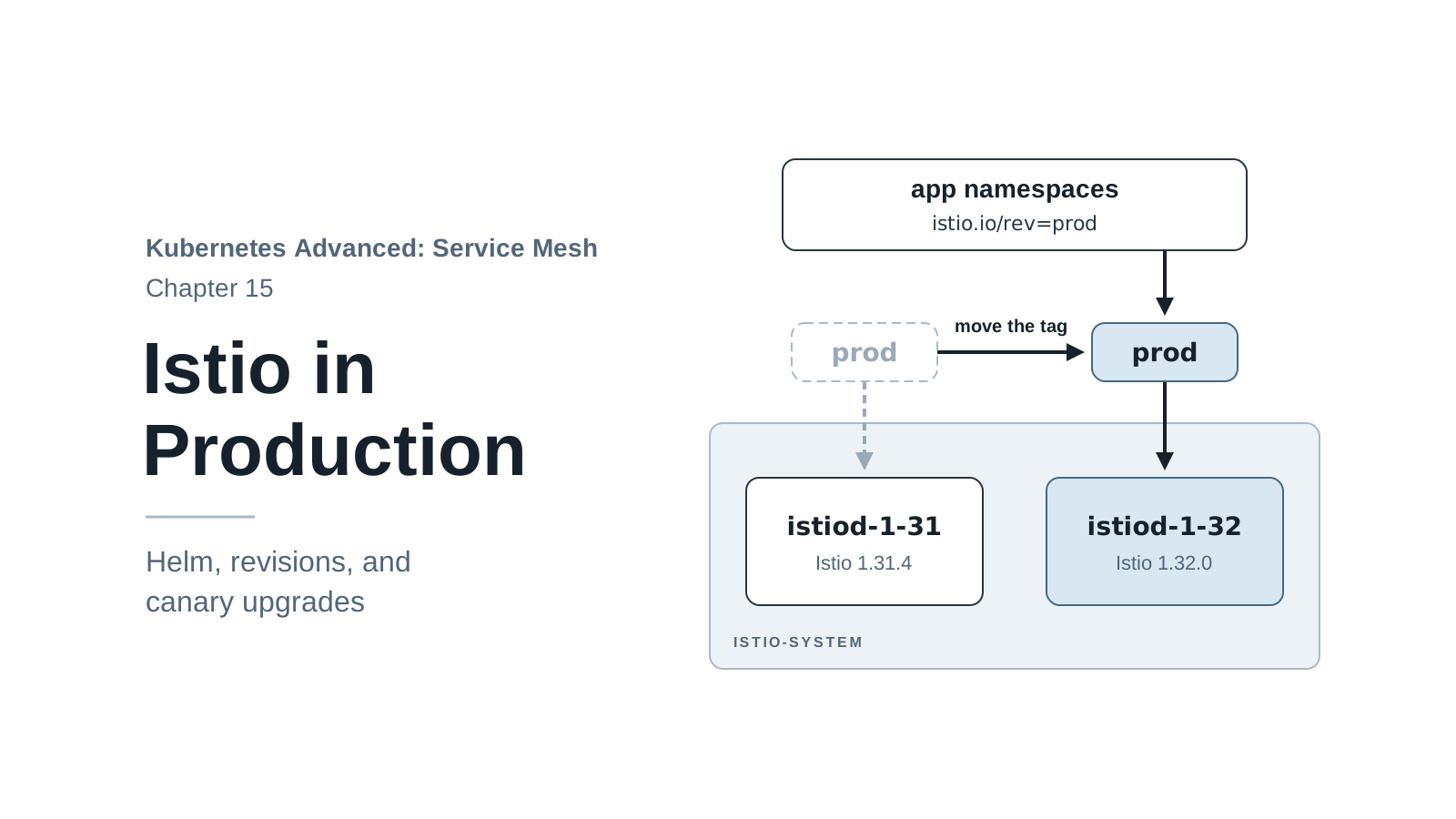
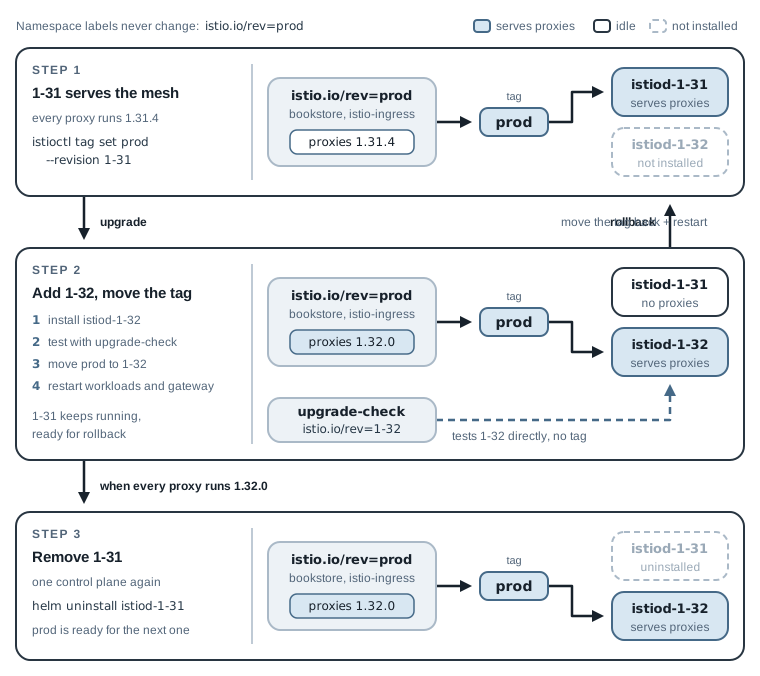
A canary upgrade never replaces the running control plane. It installs the new one next to it, moves workloads over a few at a time, and removes the old one only when nothing uses it. The figure shows the three states the cluster goes through; the five steps below walk through them.
1. Upgrade the CRDs, install the new revision
CRDs are shared by all revisions, and a newer istiod may need fields the old CRDs don’t have, so
the base chart goes first. The old revision keeps working with the newer CRDs, because Istio
keeps its CRDs backward compatible. Helm normally never upgrades CRDs, but Istio’s base chart
renders them as ordinary templates, so helm upgrade does update them. Then install istiod-1-32
next to istiod-1-31, with the same values file:
C2=.istio/istio-1.32.0/manifests/charts
helm upgrade istio-base $C2/base -n istio-system --set defaultRevision="" --wait
helm install istiod-1-32 $C2/istio-control/istio-discovery -n istio-system \
  --set revision=1-32 -f 15-production/istiod-values.yaml --wait --timeout 10m
kubectl -n istio-system get pods
istioctl tag list
Release "istio-base" has been upgraded. Happy Helming!
...
NAME: istiod-1-32
...
NAME                           READY   STATUS    RESTARTS   AGE
istiod-1-31-6854849847-4htrs   1/1     Running   0          31m
istiod-1-31-6854849847-zxjwp   1/1     Running   0          31m
istiod-1-32-579887ccbd-6clr2   1/1     Running   0          24s
istiod-1-32-579887ccbd-6qqd8   1/1     Running   0          24s
TAG  REVISION NAMESPACES
prod 1-31     bookstore,istio-ingress
     1-32
Two control planes. Nothing has changed for Book Store: every namespace still points at prod,
and prod still points at 1-31. The new revision serves nobody yet.
2. Try the new revision with one workload
Before moving any real workload, give the new control plane one throwaway client. Label a test
namespace with the revision itself, istio.io/rev=1-32, not the tag, so the test runs on 1.32
while prod still points at 1.31. Then call Book Store from it:
kubectl create namespace upgrade-check
kubectl label namespace upgrade-check istio.io/rev=1-32
kubectl -n upgrade-check run curl --image=docker.io/curlimages/curl:8.16.0 --restart=Never --command -- sleep 3600
kubectl -n upgrade-check wait --for=condition=Ready pod/curl --timeout=120s
kubectl -n upgrade-check exec curl -c curl -- curl -s -o /dev/null -w "%{http_code}\n" http://productpage.bookstore:9080/productpage
istioctl proxy-status --revision 1-32
namespace/upgrade-check created
namespace/upgrade-check labeled
pod/curl created
pod/curl condition met
200
NAME                   CLUSTER        ISTIOD                           VERSION     SUBSCRIBED TYPES
curl.upgrade-check     Kubernetes     istiod-1-32-579887ccbd-6clr2     1.32.0      4 (CDS,LDS,EDS,RDS)
A 1.32.0 proxy, configured by the new istiod, talks to Book Store’s 1.31.4 proxies and gets a
200. Mixed versions are normal during an upgrade; Istio supports proxies one minor version apart
working together. In a real upgrade, this is where you’d also run your own checks: istioctl
analyze, a few key requests, and the error-rate query from chapter 13 (this cluster has no
Prometheus, so on Kind the 200 is the check).
3. Move the tag, restart the workloads
Point prod at 1-32, restart Book Store so its Pods are injected again, and upgrade the gateway
release to the 1.32 chart. --overwrite is required because the tag already exists:
istioctl tag set prod --revision 1-32 --overwrite
istioctl tag list
kubectl -n bookstore rollout restart deploy
./scripts/wait-for-app.sh
helm upgrade istio-ingress $C2/gateway -n istio-ingress -f 15-production/gateway-values.yaml --wait
./scripts/count-versions.sh http://bookstore.local:8080 20
istioctl proxy-status --revision 1-32
Revision tag "prod" created, referencing control plane revision "1-32". To enable injection using this
revision tag, use 'kubectl label namespace <NAMESPACE> istio.io/rev=prod'
TAG  REVISION NAMESPACES
     1-31
prod 1-32     bookstore,istio-ingress
...
Release "istio-ingress" has been upgraded. Happy Helming!
  10 200 reviews-v3 stars fast
   6 200 reviews-v1 no-stars fast
   4 200 reviews-v2 stars fast
NAME                                             CLUSTER        ISTIOD                           VERSION     SUBSCRIBED TYPES
curl.upgrade-check                               Kubernetes     istiod-1-32-579887ccbd-6clr2     1.32.0      4 (CDS,LDS,EDS,RDS)
details-v1-7f8bf5fb8d-x258c.bookstore            Kubernetes     istiod-1-32-579887ccbd-6clr2     1.32.0      4 (CDS,LDS,EDS,RDS)
istio-ingress-655dfc8f88-mgfrk.istio-ingress     Kubernetes     istiod-1-32-579887ccbd-6clr2     1.32.0      4 (CDS,LDS,EDS,RDS)
istio-ingress-655dfc8f88-wk5wm.istio-ingress     Kubernetes     istiod-1-32-579887ccbd-6qqd8     1.32.0      4 (CDS,LDS,EDS,RDS)
productpage-v1-f6cd96b5b-c277g.bookstore         Kubernetes     istiod-1-32-579887ccbd-6clr2     1.32.0      4 (CDS,LDS,EDS,RDS)
ratings-v1-65bd99f66d-z799d.bookstore            Kubernetes     istiod-1-32-579887ccbd-6qqd8     1.32.0      4 (CDS,LDS,EDS,RDS)
reviews-v1-747f844897-z98fq.bookstore            Kubernetes     istiod-1-32-579887ccbd-6clr2     1.32.0      4 (CDS,LDS,EDS,RDS)
reviews-v2-8bcfb7c9-7z47p.bookstore              Kubernetes     istiod-1-32-579887ccbd-6qqd8     1.32.0      4 (CDS,LDS,EDS,RDS)
reviews-v3-8585dc4489-qdrm8.bookstore            Kubernetes     istiod-1-32-579887ccbd-6clr2     1.32.0      4 (CDS,LDS,EDS,RDS)
istioctl says the tag was “created” even though it replaced an existing one; tag list confirms
that prod now points at 1-32, with both namespaces behind it.
Moving the tag changes nothing by itself: running Pods keep the proxy they were created with and
keep talking to the istiod that injected them. The restart is what moves each workload, one
Deployment at a time, with chapter 2’s rolling update. On a real cluster, restart in waves: a
low-risk namespace first, watch it, then the rest. The helm upgrade of the gateway applies the
1.32 chart’s templates and rolls its Pods, which get the 1.32 proxy because their namespace
follows prod. All 20 requests afterwards returned 200, and every proxy now reports 1.32.0.
(The rolling update keeps an old Pod serving until its replacement is ready, but I didn’t send traffic during the restart, so this run doesn’t prove zero failed requests. If you need that number, keep a load generator running across the restart.)
4. Roll back, if you need to
A rollback is the same move in reverse. Point prod back at 1-31 and restart what you want to
move back. Try it with one Deployment:
istioctl tag set prod --revision 1-31 --overwrite
kubectl -n bookstore rollout restart deploy/ratings-v1
kubectl -n bookstore rollout status deploy/ratings-v1
istioctl proxy-status --revision 1-31
...
deployment "ratings-v1" successfully rolled out
NAME                                   CLUSTER        ISTIOD                           VERSION     SUBSCRIBED TYPES
ratings-v1-b6495fb-xct9x.bookstore     Kubernetes     istiod-1-31-6854849847-zxjwp     1.31.4      4 (CDS,LDS,EDS,RDS)
ratings is back on 1.31.4, served by the old control plane, which is still running. This is the
whole reason for keeping it until the upgrade is proven. A full rollback restarts every
Deployment the same way. The gateway’s proxy also follows the tag on its next restart, and
helm rollback istio-ingress would put back the 1.31 chart’s templates; I didn’t run either in
this drill.
Move forward again, so the cluster is back on 1.32 for the last step:
istioctl tag set prod --revision 1-32 --overwrite
kubectl -n bookstore rollout restart deploy/ratings-v1
kubectl -n bookstore rollout status deploy/ratings-v1
istioctl proxy-status --revision 1-31
...
deployment "ratings-v1" successfully rolled out
NAME     CLUSTER     ISTIOD     VERSION     SUBSCRIBED TYPES
The table is empty: no proxy uses 1-31 any more, so it’s safe to remove.
5. Remove the old revision
Delete the test namespace, uninstall the old istiod release, and check what’s left:
kubectl delete namespace upgrade-check
helm uninstall istiod-1-31 -n istio-system
istioctl tag list
helm list -A
istioctl version --revision 1-32
namespace "upgrade-check" deleted
release "istiod-1-31" uninstalled
TAG  REVISION NAMESPACES
prod 1-32     bookstore,istio-ingress
NAME         	NAMESPACE    	REVISION	UPDATED                             	STATUS  	CHART         	APP VERSION
istio-base   	istio-system 	2       	2026-11-17 10:14:35.957019 +0700 +07	deployed	base-1.32.0   	1.32.0
istio-ingress	istio-ingress	2       	2026-11-17 10:16:24.985697 +0700 +07	deployed	gateway-1.32.0	1.32.0
istiod-1-32  	istio-system 	1       	2026-11-17 10:14:37.993354 +0700 +07	deployed	istiod-1.32.0 	1.32.0
client version: 1.32.0
control plane version: 1.32.0
data plane version: 1.32.0 (8 proxies)
The upgrade is done: one control plane, every proxy on 1.32.0 (six sidecars and two gateway
Pods), and the prod tag ready for the next upgrade. helm list shows three releases on the
1.32.0 charts and no trace of istiod-1-31. The tag survived the uninstall because no release
owns it. The next upgrade is the same five steps with new version numbers.
Break It: Who Validates Your Istio Objects?
When you kubectl apply an Istio object, an istiod webhook checks it before the API server
stores it. With defaultRevision="", the only validation webhooks left are the per-revision ones,
and they select objects by label. I tested this on a separate one-node Kind cluster with the same
base settings and istiod-1-32:
kubectl get validatingwebhookconfiguration \
  -o jsonpath='{range .items[*].webhooks[*]}{.name}{" objectSelector="}{.objectSelector}{"\n"}{end}'
rev.validation.istio.io objectSelector={"matchExpressions":[{"key":"istio.io/rev","operator":"In","values":["1-32"]}]}
The webhook checks only objects labeled istio.io/rev=1-32. Nobody labels their Gateway and
VirtualService objects that way; this chapter’s don’t have it. So apply a VirtualService with
an invalid subset name, bad subset!, first with the label and then without (--dry-run=server
runs every check without saving anything):
Error from server: error when creating "STDIN": admission webhook "rev.validation.istio.io" denied the request: configuration is invalid: subset name is invalid: bad subset!
virtualservice.networking.istio.io/unlabeled-bad created (server dry run)
With the label, rejected. Without it, accepted, and istiod would meet the bad object only when
it builds proxy configuration. Chapter 5 showed how quietly such mistakes fail.
The fix is a second revision tag named default. The default tag makes its revision the
cluster’s default, which adds a validation webhook for objects without a revision label (and makes
istio-injection=enabled namespaces inject from it):
istioctl tag set default --revision 1-32
kubectl get validatingwebhookconfigurations
Revision tag "default" created, referencing control plane revision "1-32". To enable injection using this
revision tag, use 'kubectl label namespace <NAMESPACE> istio.io/rev=default'
NAME                                WEBHOOKS   AGE
istio-validator-1-32-istio-system   1          37s
istiod-default-validator            1          0s
The same unlabeled VirtualService is now rejected:
Error from server: error when creating "STDIN": admission webhook "validation.istio.io" denied the request: configuration is invalid: subset name is invalid: bad subset!
On your own clusters, create the default tag next to prod at install time
(istioctl tag set default --revision 1-31 in this chapter), and move both tags in step 3 of every
upgrade. (This chapter’s earlier istioctl tag list outputs show only prod, because I found the
gap after running them.)
Checklist for Your Own Cluster
Two settings in this chapter are specific to Kind: the gateway’s NodePort Service and the small
istiod requests. The charts, revisions, tag, and upgrade steps are the same on EKS, GKE, AKS, or
a cluster you run yourself.
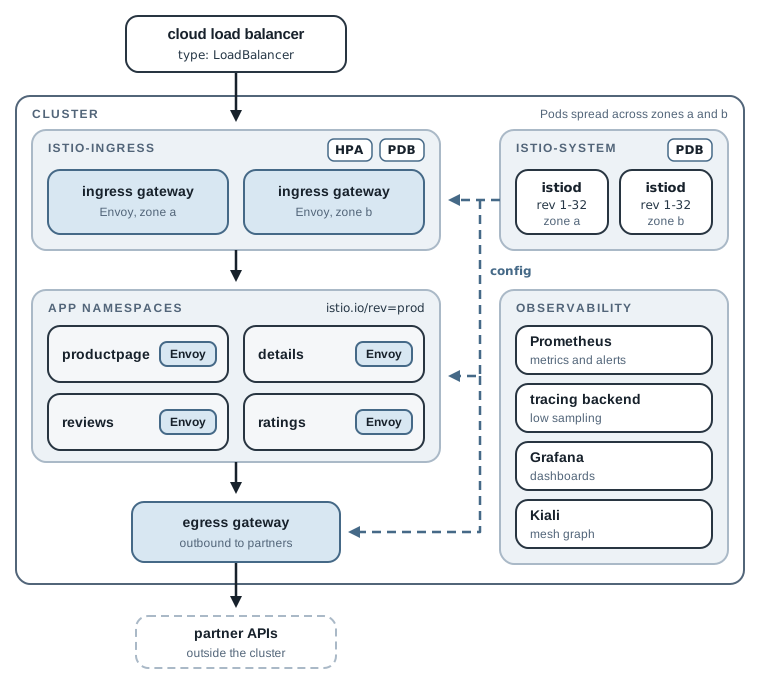
The figure shows where the pieces end up on such a cluster, including the parts earlier chapters
added. The checklist below collects what to decide for each of them. I wrote it from the series
and general practice, not from a run on each cloud, so treat it as a starting point.
Before installing
- Check the version: Istio’s support matrix lists which Kubernetes versions each release supports (1.32 supports 1.33 to 1.37). Plan an upgrade at least every six months.
- Decide where the charts come from (the Helm repository or the release archives, mirrored into your own registry), and pin chart versions in your pipeline.
- Mirror the images (
istio/pilot,istio/proxyv2) into your registry if your clusters can’t pull from the internet, and setglobal.hubin theistiodvalues. The gateway gets its proxy image by injection, so it follows the same setting.
Control plane
- Install with revisions and tags from day one:
prodfor namespaces anddefaultfor validation. Moving from a non-revisioned install later is extra work. - Run at least two
istiodreplicas (pilot.autoscaleMin: 2, which also turns on the chart’s PodDisruptionBudget), and on a multi-zone cluster, spread the Pods across zones. - Size
pilot.resourcesandglobal.proxy.resourcesfrom measurements. Every Pod in the mesh pays the proxy requests. - Set mesh-wide defaults in the values: access log format, tracing provider (chapter 13), outbound traffic policy (chapter 10).
Gateways
- Give each gateway its own namespace, owned by the platform team, with its TLS Secrets in that namespace, ideally issued and renewed by cert-manager (chapter 4).
- On a cloud, use a
LoadBalancerService with your provider’s annotations (internal or external load balancer, health checks), andexternalTrafficPolicy: Localif you need the client’s real IP. - Set at least two replicas, a PodDisruptionBudget, and autoscaling. The chart creates no PDB unless the values ask for one.
Security and policy
- Require
PeerAuthenticationSTRICTper namespace, then mesh-wide, after finding plain-text callers (chapter 11). - Add a default-deny
AuthorizationPolicyper namespace, with explicit allows (chapter 12). - Restrict outbound traffic and route partners through an egress gateway, backed by a NetworkPolicy or firewall (chapter 10).
Observability
- Run a production Prometheus (persistent, with alerts on 5xx rate and p99 latency per service) and a tracing backend with low sampling (chapter 13).
Upgrades
- Read the release’s upgrade notes first, then follow this chapter’s five steps: upgrade
base, install the new revision and test it with one namespace, move theprodanddefaulttags and restart in waves, keep the old revision until you’re sure, then uninstall it.
Clean Up
The series is over, and the cluster can go. Delete it:
kind delete cluster --name mesh
If you skipped chapter 10’s reset, its partner container is still running outside the cluster,
and Docker starts it again every time Docker itself restarts. Remove it with
docker rm -f partner-catalog.
Summary
- Production Istio is three Helm charts:
base(CRDs, once per cluster),istiod(one release per revision), andgateway(one release per gateway, in its own namespace), configured with values files kept in version control. - Two
istiodreplicas with a PodDisruptionBudget keep injection and configuration working through node drains. The gateway gets the same treatment, but only if its values ask for it. - Namespaces use
istio.io/rev=prod, a revision tag. An upgrade installs a new revision next to the old one, tests it, moves the tag, and restarts workloads; a rollback moves the tag back and restarts again. Without a default revision, pass--revisiontoistioctl proxy-statusandistioctl version. - That completes the series. Chapter 1 asked plain Kubernetes which version answers a request, what happens when a dependency fails or slows down, and who may call whom. You can now answer each of those with Istio configuration, observe the result, and install and upgrade the mesh that does it. The checklist above is the starting point for doing the same on your own clusters.