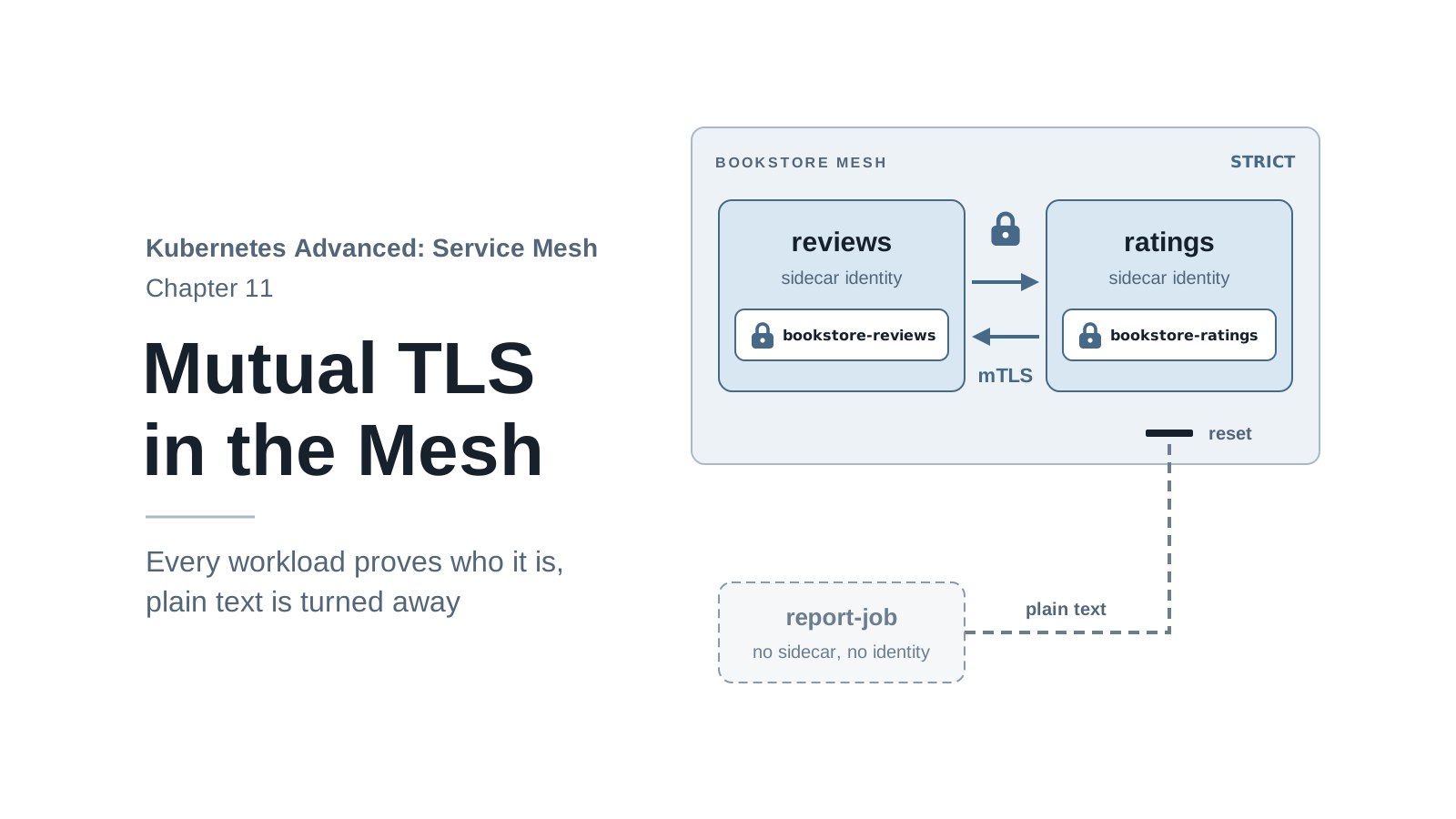
In chapter 1’s fourth question, a test Pod in an unrelated namespace called ratings in plain
HTTP. It worked: nothing checked who the caller was, and anyone who could capture traffic on the
node network could read it. Chapter 2 fixed half of that without saying so. Since Book Store
joined the mesh, calls between its sidecars have been encrypted, with certificates nobody created
by hand. The other half is still open. The same test Pod would get in today, because Istio’s
default is to accept plain text as well.
This chapter looks at what Istio set up: an identity for every workload, a certificate that
carries it, and mutual TLS (mTLS), where both sides of a connection prove who they are. Then it
closes the gap. A PeerAuthentication object set to STRICT makes a namespace refuse plain text.
Turning that on carelessly breaks real clients, so the chapter also shows how to find them first.
By the end of this chapter you will:
- Read a workload’s identity (its SPIFFE ID) from its certificate and from the header its peer receives.
- Explain the difference between
PERMISSIVEandSTRICT, and what each accepts. - Find the workloads that still receive plain text with one Prometheus query, and trace each one back to its caller.
- Switch
bookstoretoSTRICT, see a plain-text client fail, and fix it the right way.
Code for this chapter. The files are in _resource/kubernetes-service-mesh/11-mtls. I tested them with Kind v0.33.0 (Kubernetes v1.37.0) and Istio 1.32.0 on macOS with Docker Desktop, and the command output in this chapter comes from those runs.
Starting Point
Run every command from _resource/kubernetes-service-mesh:
export PATH="$PWD/bin:$PATH"
The chapter needs Book Store in the mesh, reachable at http://bookstore.local:8080, and
Prometheus from chapter 2. Any state from chapter 3 on works. To build it from scratch:
./scripts/bootstrap.sh 11
Deploy three helpers from 11-mtls/:
httpbin.yaml:httpbininbookstore, an echo service that returns the headers it received.tester.yaml: a curl client inbookstore, with a sidecar.outside-client.yaml: a namespacereportswithout injection and a Podreport-jobin it, with no sidecar. It stands in for a nightly report job that reads ratings.
kubectl apply -f 11-mtls/httpbin.yaml -f 11-mtls/tester.yaml -f 11-mtls/outside-client.yaml
kubectl -n bookstore rollout status deploy/httpbin
kubectl -n bookstore rollout status deploy/tester
kubectl -n reports wait --for=condition=Ready pod/report-job --timeout=90s
Every Workload Has an Identity
Call httpbin from the tester and look at one header in the response:
kubectl -n bookstore exec deploy/tester -c tester -- \
  curl -s http://httpbin:8000/headers | grep -A2 -i "forwarded-client-cert"
    "X-Forwarded-Client-Cert": [
      "By=spiffe://cluster.local/ns/bookstore/sa/httpbin;Hash=1e64998890bf5c109fcf8a9dd04b86778118789ce86044acfd4b46837411b23d;Subject=\"\";URI=spiffe://cluster.local/ns/bookstore/sa/tester"
    ],
The tester’s curl sent no such header. httpbin’s sidecar added it after the TLS handshake with
the tester’s sidecar, to tell the app who connected. (go-httpbin returns each header as a list,
hence the brackets.) Two identities appear in it:
URI=spiffe://cluster.local/ns/bookstore/sa/tester: the client, the tester.By=spiffe://cluster.local/ns/bookstore/sa/httpbin: the server,httpbin.
These are SPIFFE IDs, a standard format for workload identity:
spiffe://<trust domain>/ns/<namespace>/sa/<service account>. The trust domain is
cluster.local by default. The rest comes from the Pod’s namespace and Kubernetes service
account. That’s why chapter 1 gave every Book Store service its own service account: the account
is the identity. Two Pods with the same service account have the same identity, and an IP address
plays no part in it.
Now make the same call from report-job, which has no sidecar:
kubectl -n reports exec report-job -- \
  curl -s http://httpbin.bookstore:8000/headers | grep -A2 -i "forwarded-client-cert"
grep prints nothing. The call itself succeeds (drop the grep to see the full response),
because Istio still accepts plain text, as the next sections show. But the response has no
X-Forwarded-Client-Cert header at all. Without a sidecar there’s no certificate, so there’s no
identity to report.
Where the Certificate Comes From
The identity lives in a certificate that each sidecar holds. Show productpage’s:
istioctl proxy-config secret deploy/productpage-v1 -n bookstore
RESOURCE NAME     TYPE           STATUS     VALID CERT     SERIAL NUMBER                        NOT AFTER                NOT BEFORE
default           Cert Chain     ACTIVE     true           233d5f6a503da1c49821e8b4e6aac8fa     2026-11-18T01:27:03Z     2026-11-17T01:25:03Z
ROOTCA            CA             ACTIVE     true           ffdb4b4b665f3f79e3d64934aab6906f     2036-11-14T01:04:35Z     2026-11-17T01:04:35Z
default is the workload’s own certificate. ROOTCA is the certificate authority (CA) that
signed it, and that every sidecar trusts. They’re the same two rows chapter 4 found on the
ingress gateway, next to the shop’s certificate. The ROOTCA serial number here matches chapter
4’s exactly, because one CA serves the whole mesh.
Decode default to see what’s inside. The JSON output holds it base64-encoded; this command
extracts it with a few lines of Python and hands it to openssl:
istioctl proxy-config secret deploy/productpage-v1 -n bookstore -o json | python3 -c '
import base64, json, sys
for s in json.load(sys.stdin)["dynamicActiveSecrets"]:
    if s["name"] == "default":
        print(base64.b64decode(s["secret"]["tlsCertificate"]["certificateChain"]["inlineBytes"]).decode())' \
  | openssl x509 -noout -issuer -dates -ext subjectAltName
issuer=O=cluster.local
notBefore=Nov 17 01:25:03 2026 GMT
notAfter=Nov 18 01:27:03 2026 GMT
X509v3 Subject Alternative Name: critical
    URI:spiffe://cluster.local/ns/bookstore/sa/bookstore-productpage
(-ext needs OpenSSL 3 or later. With the LibreSSL that macOS ships as openssl, use -text
and look for “Subject Alternative Name”.) The output shows three things:
- Issuer
O=cluster.local:istiodsigned it.istiodis the mesh’s CA, one of the jobs chapter 1 listed for it. It created its own root certificate at install time, valid for ten years according to theROOTCArow above. - Valid for 24 hours: short-lived on purpose.
istio-agent, the process that runs next to Envoy in theistio-proxycontainer, asksistiodfor a new certificate well before the old one expires. It hands the certificate to Envoy over SDS, the same API chapter 4 used for gateway certificates. Nobody rotates anything by hand, and a stolen certificate and key stop working within a day. - The SPIFFE ID is in the Subject Alternative Name, as a URI. The subject itself is empty
(the
Subject=""in the header earlier), so the SAN is the certificate’s only name, which is why it’s markedcritical. That URI is what each side checks during the handshake.
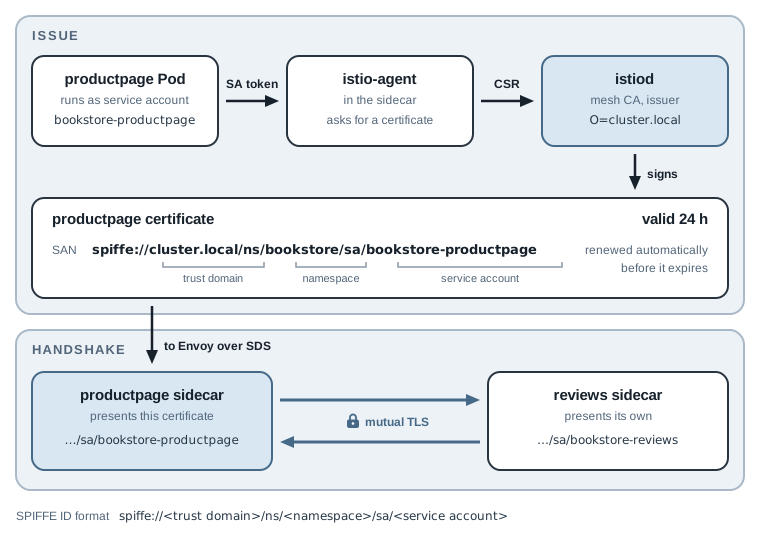
The figure follows the identity from the service account to the handshake. When productpage’s
sidecar calls reviews, it knows the destination has a sidecar (istiod told it), so it uses
mTLS automatically. Istio calls this auto mTLS. That’s why traffic between sidecars has been
encrypted since chapter 2 without any configuration.
Note: A root that
istiodgenerates for itself is fine for a lab. In production, many teams giveistiodan intermediate CA signed by their own root instead (Istio’s docs call this plugging in CA certificates), so mesh certificates chain to a root the organization controls and can rotate. This series keeps the self-generated root.
PERMISSIVE: Accept Both
If sidecars use mTLS by default, why did report-job’s plain-text call work? Because each sidecar
also accepts plain text. The mode is called PERMISSIVE, and it’s Istio’s default: a sidecar
accepts mTLS from mesh clients and plain text from everyone else. It exists so you can add Istio
to a running system one service at a time without breaking callers that don’t have a sidecar yet.
To accept both, the sidecar’s inbound listener looks at the first bytes of each new connection.
A TLS handshake from a mesh client goes to one filter chain, which completes mTLS; anything else
goes to a second chain that handles it as plain text. The figure shows the result for
ratings, and what changes under STRICT, the mode the rest of the chapter switches to:
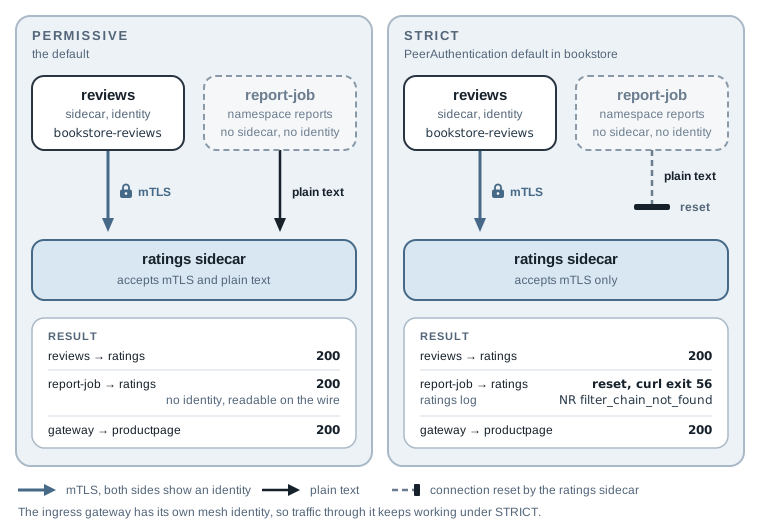
The setting that changes it is a PeerAuthentication object, which controls what a sidecar
accepts. (What a sidecar sends is decided by auto mTLS, or by a DestinationRule’s tls
settings as in chapter 10.)
Find the Plain-Text Callers First
Before switching anything to STRICT, find out who would break. Every sidecar records, for each
request it receives, whether the connection used mTLS. Prometheus collects that as the
connection_security_policy label on the istio_requests_total metric: mutual_tls or none.
Generate some plain-text traffic first. This sends ten requests from the report job to
ratings:
for i in $(seq 10); do
  kubectl -n reports exec report-job -- curl -s -o /dev/null http://ratings.bookstore:9080/ratings/0
done
Then open a second terminal, move into the same folder, and forward a local port to Prometheus. The command holds the tunnel open until you press Ctrl+C:
kubectl -n istio-system port-forward svc/prometheus 9090:9090
Prometheus collects new numbers every 15 seconds, so wait about half a minute after the loop.
Back in the first terminal, ask Prometheus which bookstore workloads received plain text. The
query adds up requests per destination workload where connection_security_policy is none.
reporter="destination" selects the receiving sidecar’s count, which is the only one that
exists here, because a caller without a sidecar reports nothing. The Python lines print one
result per line:
curl -s http://localhost:9090/api/v1/query --data-urlencode \
  'query=sum by (destination_workload, connection_security_policy) (istio_requests_total{reporter="destination", destination_workload_namespace="bookstore", connection_security_policy="none"})' \
  | python3 -c '
import json, sys
for r in json.load(sys.stdin)["data"]["result"]:
    m = r["metric"]
    print(m["destination_workload"], m["connection_security_policy"], r["value"][1])'
httpbin none 1
ratings-v1 none 15
reviews-v1 none 6
reviews-v2 none 13
reviews-v3 none 11
The counters add up everything since each Pod started, so the list includes old traffic.
ratings-v1 received 15 plain-text requests, all from the report job (I had sent it five more
before this loop). The httpbin line is the report job’s call from the identity section. The
reviews lines came from chapter 6’s test Pod in the outside namespace: 6, 13, and 11 are
exactly the 30 calls that chapter counted. If you bootstrapped this chapter, you’ll see only
ratings-v1 and httpbin.
The query names the workloads that receive plain text, not the callers. A caller without a
sidecar has no identity for the metric to record. To find it, read the receiving sidecar’s
access log, which records each client’s IP address (the next section shows such a line), and
match the IP against kubectl get pod -A -o wide.
In a real cluster, run the query over a longer window, so that a job that calls once a night
shows up too. Wrapping the metric in increase(...[7d]) counts the last seven days and handles
counter resets when Pods restart. Your Prometheus must keep that much data (the add-on from
chapter 2 keeps 15 days). I didn’t run that variant, because the lab has only minutes of
history. The result is the list of services whose callers need fixing before STRICT.
The same query with connection_security_policy="mutual_tls" lists the healthy side: workloads
such as productpage and reviews that receive mTLS from other sidecars and the gateway. Kiali
shows the same information as a lock icon on each graph edge when you turn on the “Security”
badge in the graph’s “Display” menu.
Switch bookstore to STRICT
11-mtls/peerauthentication-strict.yaml:
apiVersion: security.istio.io/v1
kind: PeerAuthentication
metadata:
  name: default
  namespace: bookstore
spec:
  mtls:
    mode: STRICT
A PeerAuthentication named default with no selector applies to every workload in its
namespace. The same object in istio-system, the root namespace, would apply to the whole mesh.
Apply it, then test the three kinds of caller: the report job, Book Store through the gateway, and
the tester inside the mesh:
kubectl apply -f 11-mtls/peerauthentication-strict.yaml
kubectl -n reports exec report-job -- \
  curl -sS -o /dev/null -w "%{http_code}\n" http://ratings.bookstore:9080/ratings/0
./scripts/count-versions.sh http://bookstore.local:8080 10
kubectl -n bookstore exec deploy/tester -c tester -- \
  curl -s -o /dev/null -w "%{http_code}\n" http://ratings:9080/ratings/0
peerauthentication.security.istio.io/default created
000
curl: (56) Recv failure: Connection reset by peer
command terminated with exit code 56
   6 200 reviews-v1 no-stars fast
   2 200 reviews-v3 stars fast
   2 200 reviews-v2 stars fast
200
The report job is cut off: 000 means curl got no HTTP response, and exit code 56 is the reset
connection. (-sS keeps curl quiet but still prints the error.) Everything with a sidecar is
unaffected. That includes the ingress gateway, which has its own mesh certificate (the default
row in chapter 4’s output) and calls productpage with mTLS.
On the ratings side, the rejected connection appears in the sidecar’s access log. A rejected
connection never becomes an HTTP request, so grep -v '"GET' hides the normal request lines and
tail -1 keeps the latest of the rest:
kubectl -n bookstore logs deploy/ratings-v1 -c istio-proxy --since=2m | grep -v '"GET' | tail -1
[2026-11-17T02:04:10.810Z] "- - -" 0 NR filter_chain_not_found - "-" 0 0 0 - "-" "-" "-" "-" "-" - - 10.244.1.18:9080 10.244.1.16:44166 - -
"- - -" means no HTTP request was read, as in chapter 10’s TCP lines. NR is the “no route”
flag from chapter 5’s table, but the detail differs from the route_not_found you saw there:
filter_chain_not_found. The connection failed one step earlier, before any HTTP routing. Compare
the inbound listener for port 9080 in ratings’ sidecar before and after the switch:
istioctl proxy-config listener deploy/ratings-v1 -n bookstore --port 15006 | grep -E "ADDRESS|9080"
Under PERMISSIVE:
ADDRESSES PORT  MATCH                                                                                           DESTINATION
0.0.0.0   15006 Trans: tls; App: istio,istio-peer-exchange,istio-http/1.0,istio-http/1.1,istio-h2; Addr: *:9080 Cluster: inbound|9080||
0.0.0.0   15006 Trans: raw_buffer; Addr: *:9080                                                                 Cluster: inbound|9080||
Under STRICT:
ADDRESSES PORT  MATCH                                                   DESTINATION
0.0.0.0   15006 Trans: tls; Addr: *:9080                                Cluster: inbound|9080||
Trans: raw_buffer is the filter chain for plain text, and STRICT removed it. A connection that
doesn’t start a TLS handshake now matches no chain, so the sidecar closes it.
The last address on the line, 10.244.1.16, is the client’s Pod IP: the report job, the caller
to go find. istioctl x describe confirms which policy a Pod is under:
istioctl x describe pod $(kubectl -n bookstore get pod -l app=ratings -o jsonpath='{.items[0].metadata.name}') \
  -n bookstore | grep -A1 PeerAuthentication
Effective PeerAuthentication:
   Workload mTLS mode: STRICT
Applied PeerAuthentication:
   default.bookstore
The $(...) part looks up the name of the first ratings Pod. “Effective” is the mode the Pod
enforces, and “Applied” names the object it came from: default in bookstore. When several
policies could apply, this is the quickest way to see which one won.
Two Ways to Fix the Report Job
The report job is the failure most teams hit when they turn on STRICT: a client nobody thought
of, in a namespace nobody injected. There are two ways out, one for the next ten minutes and one
for good.
A temporary exception
A PeerAuthentication with a selector applies to matching workloads only, and it overrides the
namespace default. 11-mtls/peerauthentication-ratings-permissive.yaml puts ratings alone back
on PERMISSIVE:
apiVersion: security.istio.io/v1
kind: PeerAuthentication
metadata:
  name: ratings-permissive
  namespace: bookstore
spec:
  selector:
    matchLabels:
      app: ratings
  mtls:
    mode: PERMISSIVE
kubectl apply -f 11-mtls/peerauthentication-ratings-permissive.yaml
kubectl -n reports exec report-job -- curl -s -o /dev/null -w "ratings %{http_code}\n" http://ratings.bookstore:9080/ratings/0
kubectl -n reports exec report-job -- curl -sS -o /dev/null -w "httpbin %{http_code}\n" http://httpbin.bookstore:8000/get
peerauthentication.security.istio.io/ratings-permissive created
ratings 200
httpbin 000
curl: (56) Recv failure: Connection reset by peer
command terminated with exit code 56
ratings accepts the report job again; httpbin, still under the namespace’s STRICT, doesn’t.
Mesh clients such as reviews keep using mTLS to ratings, because auto mTLS decides what they
send. The exception only reopens the plain-text door.
This buys time, and it’s a hole: while it exists, any Pod in the cluster can call ratings
without an identity, and that traffic crosses the network unencrypted. Remove it once the real
fix is in:
kubectl delete -f 11-mtls/peerauthentication-ratings-permissive.yaml
The real fix: give the client an identity
The report job fails because it has no sidecar, so it has no certificate. Give it one: label its namespace for injection and recreate the Pod (chapter 2’s rule: injection happens only when a Pod is created):
kubectl label namespace reports istio-injection=enabled
kubectl -n reports delete pod report-job
kubectl apply -f 11-mtls/outside-client.yaml
kubectl -n reports wait --for=condition=Ready pod/report-job --timeout=90s
kubectl -n reports get pod report-job
kubectl -n reports exec report-job -c report-job -- \
  curl -s -o /dev/null -w "ratings %{http_code}\n" http://ratings.bookstore:9080/ratings/0
namespace/reports labeled
pod "report-job" deleted
namespace/reports unchanged
pod/report-job created
pod/report-job condition met
NAME         READY   STATUS    RESTARTS   AGE
report-job   2/2     Running   0          3s
ratings 200
namespace/reports unchanged is expected: the manifest doesn’t list the injection label, so
kubectl apply leaves the label you just set in place. The exec names the container with
-c report-job now that the Pod has two.
2/2, and the call works under STRICT. The app still sends plain HTTP to
http://ratings.bookstore:9080; its new sidecar upgrades the connection to mTLS. The Pod sets no
service account, so it runs as default. Call httpbin from it and the header shows its new
identity:
kubectl -n reports exec report-job -c report-job -- \
  curl -s http://httpbin.bookstore:8000/headers | grep -A2 -i "forwarded-client-cert"
    "X-Forwarded-Client-Cert": [
      "By=spiffe://cluster.local/ns/bookstore/sa/httpbin;Hash=afc0746f7c76efe6ba1c24e7fb3e1c2343adbbfaeee69186ee9a9954abeb9afa;Subject=\"\";URI=spiffe://cluster.local/ns/reports/sa/default"
    ],
The client is spiffe://cluster.local/ns/reports/sa/default. Every other Pod in reports that doesn’t name a
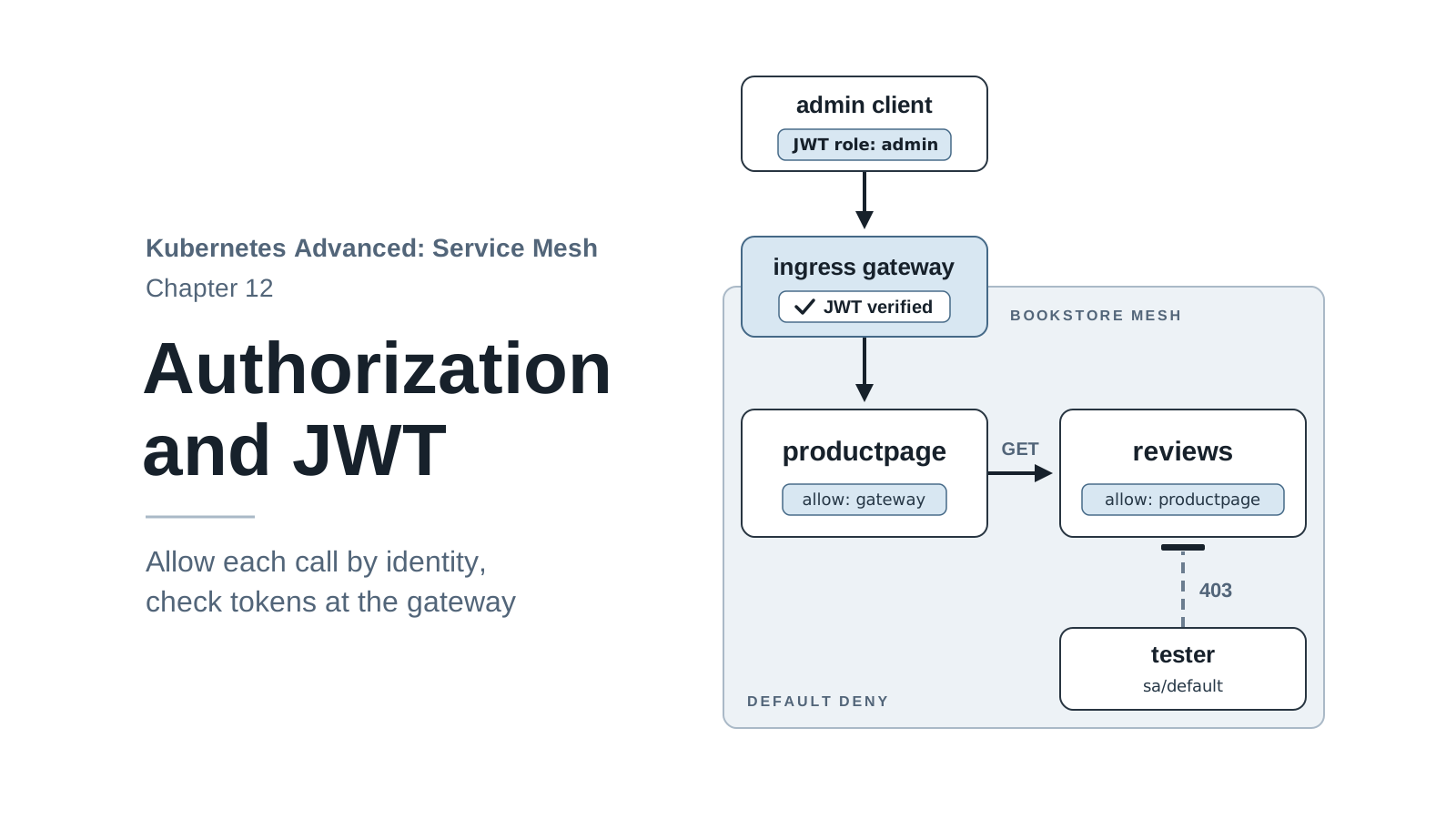
service account gets the same identity. That matters in chapter 12, where authorization policies
decide which identities may call which service: a real report job should get a service account
of its own, as each Book Store service has.
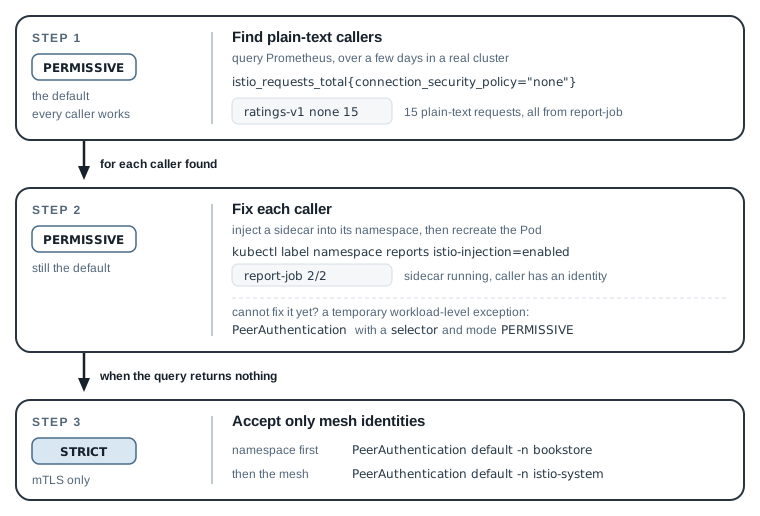
The figure sums up the chapter as a migration plan. The order for a real cluster:
- Leave the mesh on
PERMISSIVE(the default) while you add sidecars. - Run the plain-text query, over a window long enough to catch nightly and weekly jobs, until it returns nothing for the namespace. Fix each caller it finds, usually by injecting it. Callers that can never have a sidecar, such as a service on a VM outside the cluster, need a workload-level exception or a different path in, such as the ingress gateway.
- Switch the namespace to
STRICT. Once every namespace is done, switch the mesh with aPeerAuthenticationnameddefaultinistio-system.
Reset Before the Next Chapter
Keep STRICT on: chapter 12 builds authorization on top of mTLS identities. Remove the helpers:
kubectl delete -f 11-mtls/httpbin.yaml -f 11-mtls/tester.yaml
kubectl delete namespace reports
kubectl get peerauthentication -A
...
namespace "reports" deleted
NAMESPACE   NAME      MODE     AGE
bookstore   default   STRICT   2m3s
The last command should list one object, default in bookstore with mode STRICT. If
ratings-permissive is still there, delete it as shown above; chapter 12 starts with only the
namespace-wide STRICT policy, the same state bootstrap.sh 12 builds.
Stop the Prometheus port-forward with Ctrl+C. To rebuild the starting state of chapter 12 from
scratch: ./scripts/bootstrap.sh 12.
Summary
- Every workload gets a SPIFFE ID from its namespace and service account,
spiffe://cluster.local/ns/<namespace>/sa/<account>, in a 24-hour certificate thatistiodsigns and the sidecar renews. - Sidecars use mTLS with each other automatically (auto mTLS). By default they also accept plain
text (
PERMISSIVE), so clients without a sidecar keep working and carry no identity. istio_requests_total{connection_security_policy="none"}in Prometheus lists every workload that still receives plain text. The receiving sidecar’s access log gives each caller’s IP. Fix those callers beforeSTRICT.- A
PeerAuthenticationwithmode: STRICTrejects plain text (NR filter_chain_not_foundin the log). A workload-levelPERMISSIVEwith aselectoris a temporary exception; injecting the client is the fix. - Next, chapter 12 uses these identities to decide who may call whom, and adds JWT checks at the gateway.