Until now, the only way to reach Book Store from your machine has been
kubectl port-forward. It works for a quick look, but it isn’t how users reach an app. It
connects to one Pod and stops when that Pod restarts. It needs a terminal kept open. And, as
chapter 2 showed, it delivers traffic to the app inside the Pod without passing productpage’s
sidecar, so the proxy never records the requests you send.
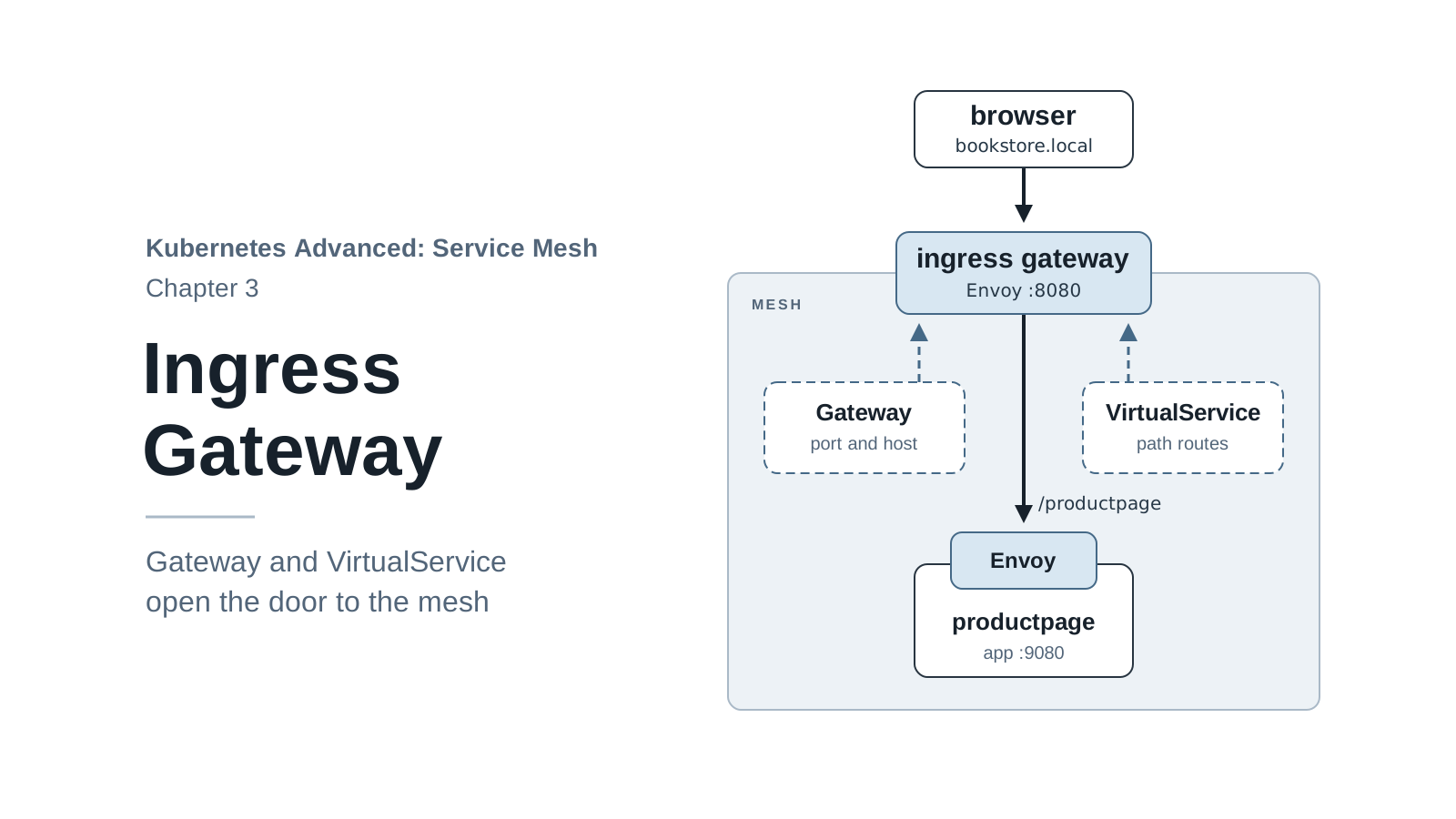
In a mesh, outside traffic enters through an ingress gateway: an Envoy proxy that runs on its
own at the edge of the cluster. Chapter 2 installed one, and it has been running with nothing to
do. This chapter configures it with two Istio objects, a Gateway and a VirtualService, and
opens Book Store at http://bookstore.local:8080.
By the end of this chapter you will:
- Reach Book Store through the ingress gateway, from
curland from a browser. - Know which of three things does which job: the gateway Deployment, the
Gatewayobject, and theVirtualServiceobject. - Route paths with exact and prefix matches, and redirect one path to another.
- Tell a 404 returned by the gateway from a 404 returned by the app, and find the cause of each.
Code for this chapter. The files are in _resource/kubernetes-service-mesh/03-gateway-virtualservice. I tested them with Kind v0.33.0 (Kubernetes v1.37.0) and Istio 1.32.0 on macOS with Docker Desktop, and the command output in this chapter comes from those runs.
Starting Point
Run every command from _resource/kubernetes-service-mesh, with the series’ istioctl on your
PATH:
export PATH="$PWD/bin:$PATH"
The chapter starts where chapter 2 ended: Istio 1.32.0 is installed, the six Book Store Pods run
with sidecars (2/2), and Prometheus and Kiali run in istio-system. Stop any port-forward
left from chapter 2; nothing in this chapter uses it. If the cluster is gone or in a state you
don’t trust, rebuild it. This takes about four minutes:
./scripts/bootstrap.sh 03
The Path of One Request
A browser request takes five steps on its way to productpage. Earlier chapters set up every
step except one:
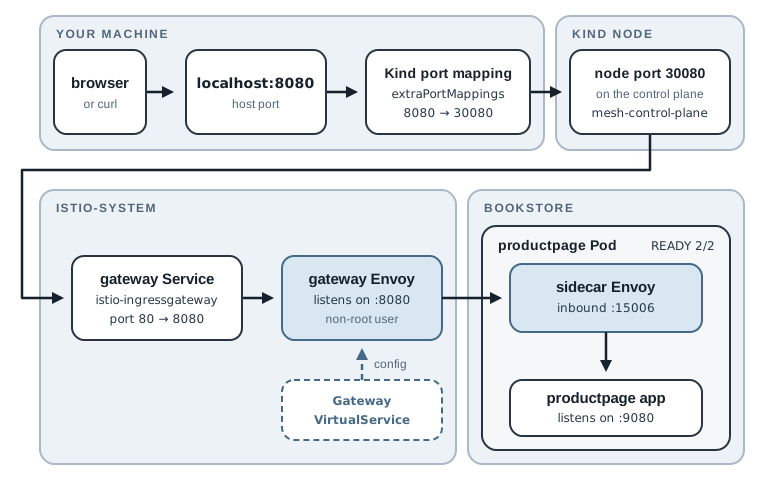
- The browser connects to
localhost:8080. - Kind’s
extraPortMappings(chapter 1) forwards it to port 30080 on the control-plane node. - Node port 30080 belongs to the
istio-ingressgatewayService (chapter 2), which sends it to a gateway Pod. The Service’s port 80 points at port 8080 in the Pod. The gateway runs as a non-root user (UID 1337), and by default a non-root process can’t listen on a port below- So Istio’s default gateway settings, which
cluster/istio-install.yamlkeeps, map Service port 80 to Pod port 8080.
- So Istio’s default gateway settings, which
- The gateway’s Envoy decides where the request goes and sends it to a
productpagePod. productpage’s sidecar receives it on 15006, the inbound port from chapter 2, and hands it to the app.
Step 4 is the one not configured yet. Send a request and see what happens without it:
curl -v http://localhost:8080/productpage
> GET /productpage HTTP/1.1
> Host: localhost:8080
...
* Empty reply from server
Empty reply from server means the connection opened and then closed without any HTTP
response. The first three steps worked, so the connection reached the gateway Pod, but nothing
inside it listens on port 8080. (On Linux, where Docker forwards ports differently, curl may
report Connection reset by peer instead. Both mean the same thing here.) Envoy calls each port it accepts connections on a listener
(the LDS type from chapter 2’s proxy-status table). Ask the gateway for its listeners:
istioctl proxy-config listener -n istio-system deploy/istio-ingressgateway
ADDRESSES PORT  MATCH DESTINATION
0.0.0.0   15021 ALL   Inline Route: /healthz/ready*
0.0.0.0   15090 ALL   Inline Route: /stats/prometheus*
There are only two internal ports: 15021 for health checks and 15090 for metrics. An Istio
gateway starts with no listeners for traffic. It opens a port only when a Gateway object asks
for it.
Three Objects, Three Jobs
Configuring an Istio ingress takes three separate things. Keeping them apart is the key to reading any Istio ingress configuration:
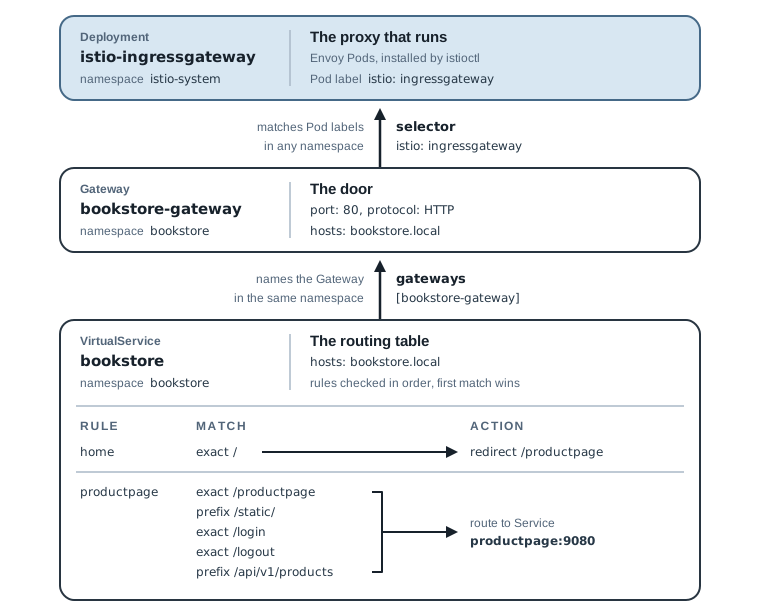
| Object | Job | Created by | Linked by |
|---|---|---|---|
Gateway Deployment (istio-ingressgateway) |
The proxy that runs and receives traffic. | istioctl install (chapter 2) |
Pod labels, such as istio: ingressgateway |
Gateway |
The door: which port, protocol, and host names the proxy accepts. | You | selector picks gateway Pods by label |
VirtualService |
The routing table: which request goes to which Service. | You | gateways names the Gateway |
The split exists because different people own different parts. A platform team runs the gateway
Pods and decides which ports and host names are open. Each app team writes the routes for its
own host. One gateway Deployment can serve many Gateway objects, and one Gateway can have
routes from several VirtualService objects.
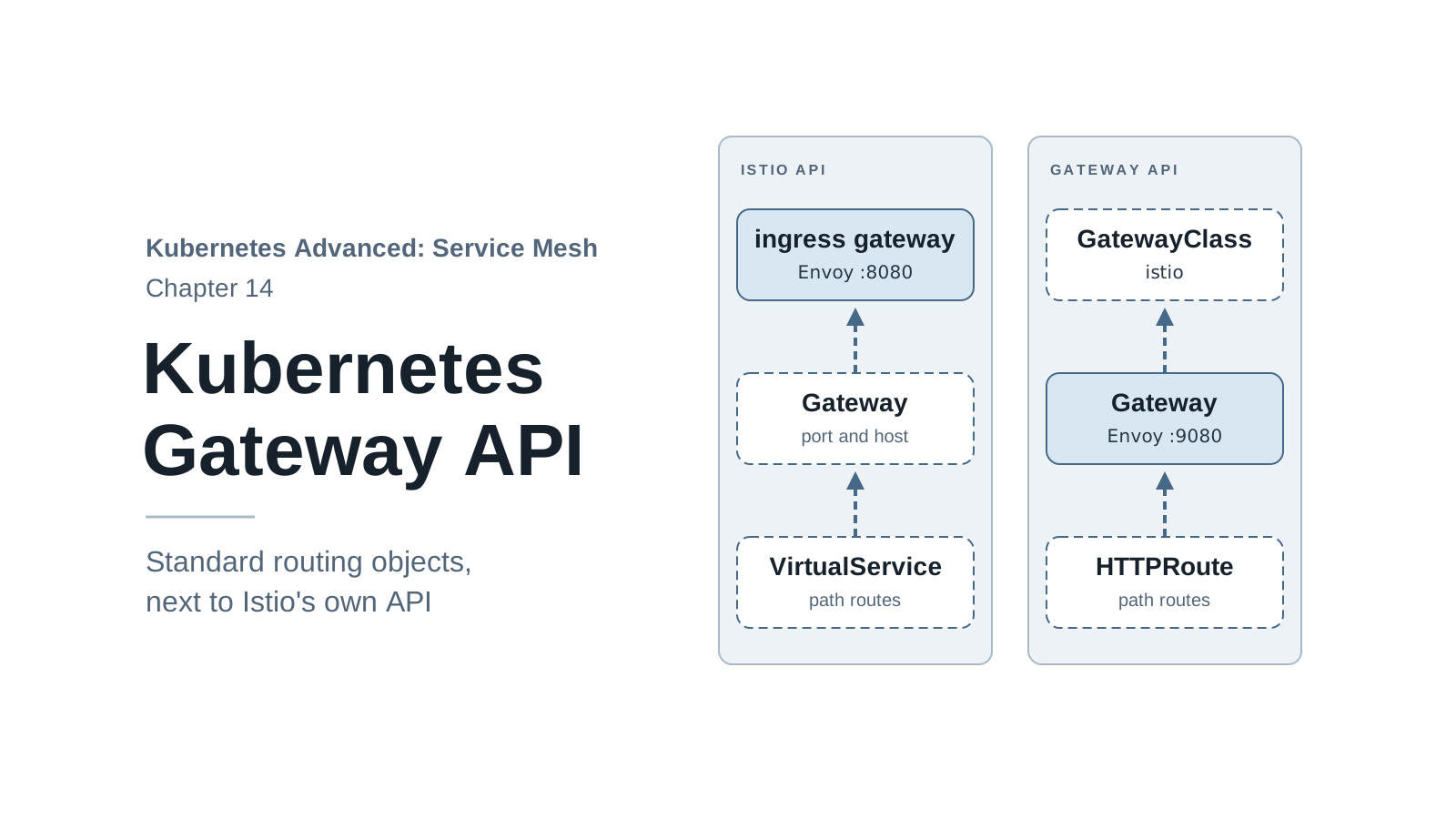
Note: Kubernetes has its own Gateway API, with objects also named
Gateway. It’s a different API with the same idea, and chapter 14 covers it. In this chapter,Gatewayalways means Istio’snetworking.istio.io/v1object.
Open the Door: the Gateway
03-gateway-virtualservice/gateway.yaml:
apiVersion: networking.istio.io/v1
kind: Gateway
metadata:
  name: bookstore-gateway
  namespace: bookstore
spec:
  selector:
    istio: ingressgateway
  servers:
    - port:
        number: 80
        name: http
        protocol: HTTP
      hosts:
        - bookstore.local
selectorfinds the gateway Pods by label.istio: ingressgatewayis the label thatistioctl installputs on its ingress gateway. By default the selector matches Pods in any namespace, so theGatewaycan live inbookstorewhile the Pods run inistio-system.serverslists what to accept. Here: port 80 of the gateway’s Service, plain HTTP, for requests whoseHostheader isbookstore.local.
The Host header is how one gateway serves many sites on one port. A browser sets it from the
URL, so a request to http://bookstore.local:8080/ carries Host: bookstore.local:8080. Istio
compares the name and ignores the port.
Apply it and send the request again, this time with the host name. The curl option
--resolve bookstore.local:8080:127.0.0.1 connects to 127.0.0.1 whenever the URL says
bookstore.local:8080. Your machine’s name lookup doesn’t change, and the request carries the
same Host header a browser would send:
kubectl apply -f 03-gateway-virtualservice/gateway.yaml
curl -si --resolve bookstore.local:8080:127.0.0.1 http://bookstore.local:8080/productpage
gateway.networking.istio.io/bookstore-gateway created
HTTP/1.1 404 Not Found
date: Tue, 17 Nov 2026 01:14:05 GMT
server: istio-envoy
content-length: 0
That’s progress. The empty reply became an HTTP 404 with an empty body. No route to the app
exists yet, so the gateway’s Envoy answered on its own. The gateway now listens, but it has no
routes. istioctl proxy-config shows both changes, the listeners first and then the routes:
istioctl proxy-config listener -n istio-system deploy/istio-ingressgateway
istioctl proxy-config route -n istio-system deploy/istio-ingressgateway
ADDRESSES PORT  MATCH DESTINATION
0.0.0.0   8080  ALL   Route: http.8080
0.0.0.0   15021 ALL   Inline Route: /healthz/ready*
0.0.0.0   15090 ALL   Inline Route: /stats/prometheus*
NAME          VHOST NAME       DOMAINS     MATCH                  VIRTUAL SERVICE
http.8080     blackhole:80     *           /*                     404
              backend          *           /stats/prometheus*
              backend          *           /healthz/ready*
A listener on 8080 appeared. (The Gateway said port 80, the Service port; Envoy listens on the
Pod port behind it.) Its route table, http.8080, has a single entry, blackhole, that answers
every path with 404. That entry is a placeholder until a VirtualService adds real routes.
Add the Routes: the VirtualService
03-gateway-virtualservice/virtualservice.yaml:
apiVersion: networking.istio.io/v1
kind: VirtualService
metadata:
  name: bookstore
  namespace: bookstore
spec:
  hosts:
    - bookstore.local
  gateways:
    - bookstore-gateway
  http:
    - name: home
      match:
        - uri:
            exact: /
      redirect:
        uri: /productpage
    - name: productpage
      match:
        - uri:
            exact: /productpage
        - uri:
            prefix: /static/
        - uri:
            exact: /login
        - uri:
            exact: /logout
        - uri:
            prefix: /api/v1/products
      route:
        - destination:
            host: productpage
            port:
              number: 9080
Read it from the top:
hostsis the host name these routes are for. It must match a host in theGateway.gatewaysattaches the routes tobookstore-gateway. A name without a namespace means aGatewayin the same namespace as theVirtualService.httpis a list of rules. Envoy checks them in order and uses the first one that matches.- The
homerule matches exactly/and answers with a redirect to/productpage. Aredirectdoesn’t call any Service; the gateway answers itself. - The
productpagerule lists the paths a user needs: the page, its static files, login and logout, and the JSON API. Thematchentries are alternatives: a request that matches any of them uses the rule.exactmatches the whole path.prefixmatches the start, soprefix: /api/v1/productsalso covers/api/v1/products/0/reviews. destination.host: productpageis the Kubernetes Service. A short name is completed with theVirtualService’s namespace, so it meansproductpage.bookstore.svc.cluster.local.
Listing paths one by one is a choice. A single prefix: / rule would send everything to
productpage and need no change when the app adds a page. The list costs an edit for every new
path, but it keeps paths that users shouldn’t reach off the gateway. productpage serves
/health for its readiness probe, for example, and this list doesn’t expose it. (The list
follows the one in Istio’s own Bookinfo sample.)
Apply it and request the page:
kubectl apply -f 03-gateway-virtualservice/virtualservice.yaml
curl -s --resolve bookstore.local:8080:127.0.0.1 http://bookstore.local:8080/productpage | grep -o "<title>.*</title>"
virtualservice.networking.istio.io/bookstore created
<title>Simple Bookstore App</title>
Book Store answers through the gateway. Check the redirect too:
curl -si --resolve bookstore.local:8080:127.0.0.1 http://bookstore.local:8080/ | head -3
HTTP/1.1 301 Moved Permanently
location: http://bookstore.local:8080/productpage
date: Tue, 17 Nov 2026 01:14:18 GMT
The redirect keeps the host and port of the original request. The route table now holds the real routes:
istioctl proxy-config route -n istio-system deploy/istio-ingressgateway
NAME          VHOST NAME             DOMAINS             MATCH                  VIRTUAL SERVICE
http.8080     bookstore.local:80     bookstore.local     /                      bookstore.bookstore
http.8080     bookstore.local:80     bookstore.local     /productpage           bookstore.bookstore
http.8080     bookstore.local:80     bookstore.local     /static/*              bookstore.bookstore
http.8080     bookstore.local:80     bookstore.local     /login                 bookstore.bookstore
http.8080     bookstore.local:80     bookstore.local     /logout                bookstore.bookstore
http.8080     bookstore.local:80     bookstore.local     /api/v1/products*      bookstore.bookstore
              backend                *                   /stats/prometheus*
              backend                *                   /healthz/ready*
blackhole is gone. Envoy grouped the routes under a virtual host named after
bookstore.local, one row per path, each labeled with the VirtualService that produced it
(bookstore.bookstore is <name>.<namespace>). Run istioctl proxy-status and the gateway’s row
now lists RDS as well, because it has routes to receive.
The version-counting script from chapter 1 works through the gateway too. It calls
/api/v1/products/0/reviews, which the prefix match covers. When the URL’s host ends in
.local, the script sends the request to 127.0.0.1, the same as --resolve:
./scripts/count-versions.sh http://bookstore.local:8080 20
  10 200 reviews-v2 stars fast
   6 200 reviews-v3 stars fast
   4 200 reviews-v1 no-stars fast
Open it in a browser
A browser can’t use --resolve; it needs bookstore.local to resolve to 127.0.0.1. Add one
line to your hosts file (/etc/hosts on macOS and Linux,
C:\Windows\System32\drivers\etc\hosts on Windows):
127.0.0.1 bookstore.local
Then open http://bookstore.local:8080/. The redirect takes you to the product page, and the
reviews change between no stars, black stars, and red stars as you refresh, as in chapter 1.
This step is optional. Every command in the series uses --resolve or the script, which need
no hosts entry. And http://localhost:8080/productpage doesn’t work in a browser: the browser
sends Host: localhost:8080, the Gateway accepts only bookstore.local, and the gateway
answers with an empty 404.
How the Gateway Matches a Request
The gateway makes the same three decisions for every request. The first two can end in a 404 from the gateway itself:
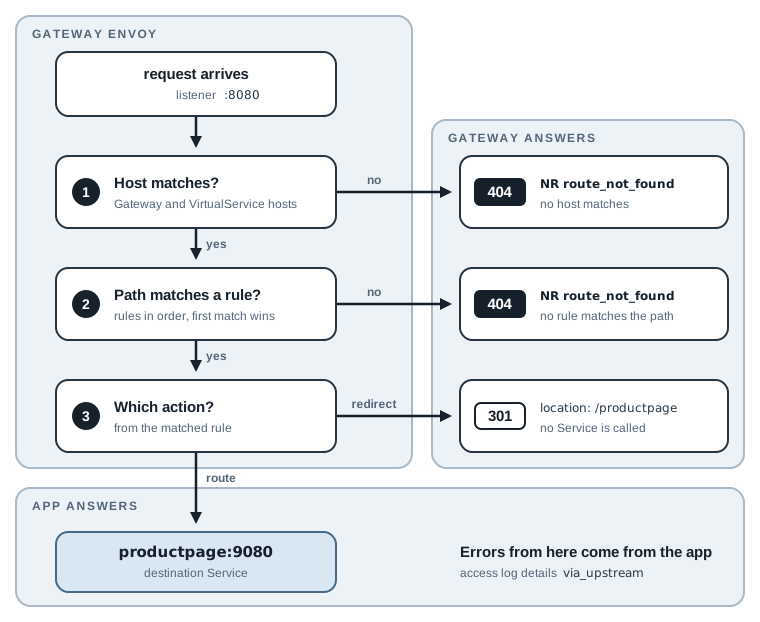
- Host. The listener for the port picks a virtual host by the
Hostheader. A virtual host exists only for a name that aGatewayserver lists and aVirtualServiceattached to thatGatewayalso lists. An unknown host gets a 404. - Path. Does any rule in that
VirtualServicematch? Rules are checked in order. No match means a 404. - Destination. The request goes to the Service named in the matching rule. From here, any error comes from the app, or from the trip to it.
There is one step before all three. If no Gateway opens the port, there is no listener, and
the result is the empty reply from the start of the chapter, not a 404.
Gateway 404 or App 404?
A 404 can come from the gateway (no route) or from productpage (no such page). The fix is
completely different, so the first step is always to find out which one answered. Send three
requests: a wrong host, a path the VirtualService doesn’t list, and a path the
VirtualService sends to the app but the app doesn’t know. The second one is /health, which
the app does serve; the gateway doesn’t route it, so the request never reaches the app:
curl -si -H "Host: shop.local" http://localhost:8080/productpage
curl -si --resolve bookstore.local:8080:127.0.0.1 http://bookstore.local:8080/health
curl -si --resolve bookstore.local:8080:127.0.0.1 http://bookstore.local:8080/api/v1/products/0/nothing
-H "Host: ..." is the other way to set the host: curl connects to localhost and replaces only
the header. The responses, in the same order and shortened to the headers that matter:
HTTP/1.1 404 Not Found
server: istio-envoy
content-length: 0

HTTP/1.1 404 Not Found
server: istio-envoy
content-length: 0

HTTP/1.1 404 Not Found
server: istio-envoy
content-type: text/html; charset=utf-8
content-length: 207
x-envoy-upstream-service-time: 7
All three say server: istio-envoy, even the one the app produced. The gateway sets that header
on every response it passes on, so it doesn’t tell you who answered. Two other signs do. The
app’s 404 has a body, and it has x-envoy-upstream-service-time, which Envoy adds only when a
backend answered (the value is the backend’s time in milliseconds).
The clearest answer is in the gateway’s access log, which accessLogFile in
cluster/istio-install.yaml turned on in chapter 2. --tail=3 prints the last three lines, one
per request:
kubectl -n istio-system logs deploy/istio-ingressgateway --tail=3
[2026-11-17T01:17:30.107Z] "GET /productpage HTTP/1.1" 404 NR route_not_found - "-" 0 0 0 - "172.21.0.4" "curl/8.7.1" "9185ab3c-4a7a-4a78-9b16-a8b7b629760e" "shop.local" "-" - - 10.244.2.6:8080 172.21.0.4:30314 - -
[2026-11-17T01:17:30.118Z] "GET /health HTTP/1.1" 404 NR route_not_found - "-" 0 0 0 - "172.21.0.4" "curl/8.7.1" "4a84be4d-d1a8-4f5b-bd1f-0a04e0644f1b" "bookstore.local:8080" "-" - - 10.244.2.6:8080 172.21.0.4:54725 - -
[2026-11-17T01:17:30.126Z] "GET /api/v1/products/0/nothing HTTP/1.1" 404 - via_upstream - "-" 0 207 8 7 "172.21.0.4" "curl/8.7.1" "d82e122e-a8cb-4635-8209-a7dc4c819067" "bookstore.local:8080" "10.244.2.8:9080" outbound|9080||productpage.bookstore.svc.cluster.local 10.244.2.6:54770 10.244.2.6:8080 172.21.0.4:42346 - productpage
Three fields tell the story: the two right after the status code, and the upstream host, which
is the quoted field right after the requested host ("shop.local" or "bookstore.local:8080"):
| Field | Gateway 404 | App 404 |
|---|---|---|
| Response flags | NR (no route) |
- (none) |
| Details | route_not_found |
via_upstream: the backend sent this response |
| Upstream host | "-": nothing was called |
"10.244.2.8:9080": the productpage Pod |
The last field of each line is the name of the VirtualService rule that matched: productpage
for the app 404, - when no rule matched. That’s why the rules have names.
So a NR route_not_found line means the problem is in Istio configuration: the host, the path,
or the link between Gateway and VirtualService. A via_upstream line means the gateway did
its job, and the app needs a look. Chapter 5 covers the other response flags.
Break It: Two Wrong Links
The three objects are linked by two references: the Gateway’s selector and the
VirtualService’s gateways field. Each one fails in its own way when it’s wrong. This section
breaks each link on purpose, on the live objects, so you know the symptom before you meet it in
a real cluster.
The VirtualService names a Gateway that doesn’t exist
A typo in gateways is easy to make and hard to see. kubectl patch with a JSON patch replaces
the first entry of the list with a wrong name, and the curl prints only the status code:
kubectl -n bookstore patch virtualservice bookstore --type=json \
  -p='[{"op":"replace","path":"/spec/gateways/0","value":"bookstore-gw"}]'
curl -s -o /dev/null -w "%{http_code}\n" --resolve bookstore.local:8080:127.0.0.1 http://bookstore.local:8080/productpage
virtualservice.networking.istio.io/bookstore patched
404
Kubernetes accepted the change, because the field is only a string. The VirtualService no
longer attaches to any Gateway, so the gateway is back to its placeholder route:
istioctl proxy-config route shows blackhole again, and the access log shows
NR route_not_found. Neither tells you why. istioctl analyze names the cause:
istioctl analyze -n bookstore
Error [IST0101] (VirtualService bookstore/bookstore) Referenced gateway not found: "bookstore-gw"
Warning [IST0132] (VirtualService bookstore/bookstore) one or more host [bookstore.local] defined in VirtualService bookstore/bookstore not found in Gateway bookstore/bookstore-gw.
Error: Analyzers found issues when analyzing namespace: bookstore.
See https://istio.io/v1.32/docs/reference/config/analysis for more information about causes and resolutions.
The error points at the missing Gateway. The warning is a side effect of the same typo: the
analyzer looks for bookstore.local in a Gateway that doesn’t exist. Fix it by applying the
file again, which puts back bookstore-gateway:
kubectl apply -f 03-gateway-virtualservice/virtualservice.yaml
The Gateway selects no gateway Pods
The second mistake comes from copying examples. Istio’s gateway Helm chart (chapter 15)
labels its Pods with the Helm release name minus the istio- prefix. The Istio docs install it
as istio-ingress, so most examples written for Helm use istio: ingress, while
istioctl install uses istio: ingressgateway. A Gateway copied from one setup into the
other selects nothing. A merge patch changes the selector to the Helm label:
kubectl -n bookstore patch gateway bookstore-gateway --type=merge \
  -p '{"spec":{"selector":{"istio":"ingress"}}}'
curl -s -o /dev/null -w "%{http_code}\n" --resolve bookstore.local:8080:127.0.0.1 http://bookstore.local:8080/productpage
gateway.networking.istio.io/bookstore-gateway patched
000
000 means curl got no HTTP response at all: the Empty reply from server from the start of
the chapter. No gateway Pod matches the selector, so no proxy opens port 8080, and
proxy-config listener is back to the two internal ports.
This symptom differs from the previous one, and the difference is useful. A 404 means the
gateway is listening but has no route. An empty reply means it isn’t listening on that port at
all. istioctl analyze again names the cause:
istioctl analyze -n bookstore
Error [IST0101] (Gateway bookstore/bookstore-gateway) Referenced selector not found: "istio=ingress"
Error: Analyzers found issues when analyzing namespace: bookstore.
See https://istio.io/v1.32/docs/reference/config/analysis for more information about causes and resolutions.
To see which labels your gateway Pods really have, list them with --show-labels:
kubectl -n istio-system get pods -l app=istio-ingressgateway --show-labels
The LABELS column includes istio=ingressgateway, the value the Gateway should select.
Restore the file:
kubectl apply -f 03-gateway-virtualservice/gateway.yaml
Both mistakes passed kubectl apply without a complaint, because the API server checks each
object on its own. istioctl analyze checks that the references between objects resolve, so
make it the first command after any Istio change.
See the Gateway in Kiali
The gateway’s Envoy reports metrics like every sidecar, so Kiali can now draw the first hop that chapter 2’s graph was missing. Send some traffic and open Kiali as in chapter 2:
./scripts/count-versions.sh http://bookstore.local:8080 20
istioctl dashboard kiali
In “Traffic Graph”, select both the bookstore and istio-system namespaces, because the
gateway runs in istio-system. The graph now starts at
istio-ingressgateway with an edge into productpage-v1, an edge chapter 2’s port-forward
couldn’t produce. If you sent the 404 requests from this chapter recently, a second edge from the
gateway goes to an unknown node: those are requests that matched no route.
Reset Before the Next Chapter
Stop istioctl dashboard with Ctrl+C. Keep the Gateway and the VirtualService. Chapter 4
adds HTTPS to this Gateway, and later chapters send their test traffic through it. To rebuild
this state from scratch:
./scripts/bootstrap.sh 04
It builds the chapter 3 starting state, then applies gateway.yaml and virtualservice.yaml.
If you open a new terminal afterwards, run the export PATH line again.
Summary
- Outside traffic enters the mesh through the ingress gateway, an Envoy that runs on its own.
On Kind, the path is
localhost:8080→ node port 30080 → gateway Service port 80 → Envoy on port 8080. - The gateway Deployment is the proxy, the
Gatewayopens a port for a set of host names (linked byselector), and theVirtualServiceholds the routes (linked bygateways). VirtualServicerules are checked in order;exactandprefixmatch paths, and a rule canredirectinstead ofroute. Listing paths keeps endpoints such as/healthoff the gateway, at the cost of an edit for every new path.- A gateway 404 has
NR route_not_foundand no upstream host in the access log. An app 404 hasvia_upstreamand an upstream Pod IP.server: istio-envoyappears on both. - A broken
gatewaysreference gives a 404; a brokenselectorgives an empty reply.istioctl analyzefinds both. Next, chapter 4 adds HTTPS, an HTTP-to-HTTPS redirect, and more host names to the same gateway.