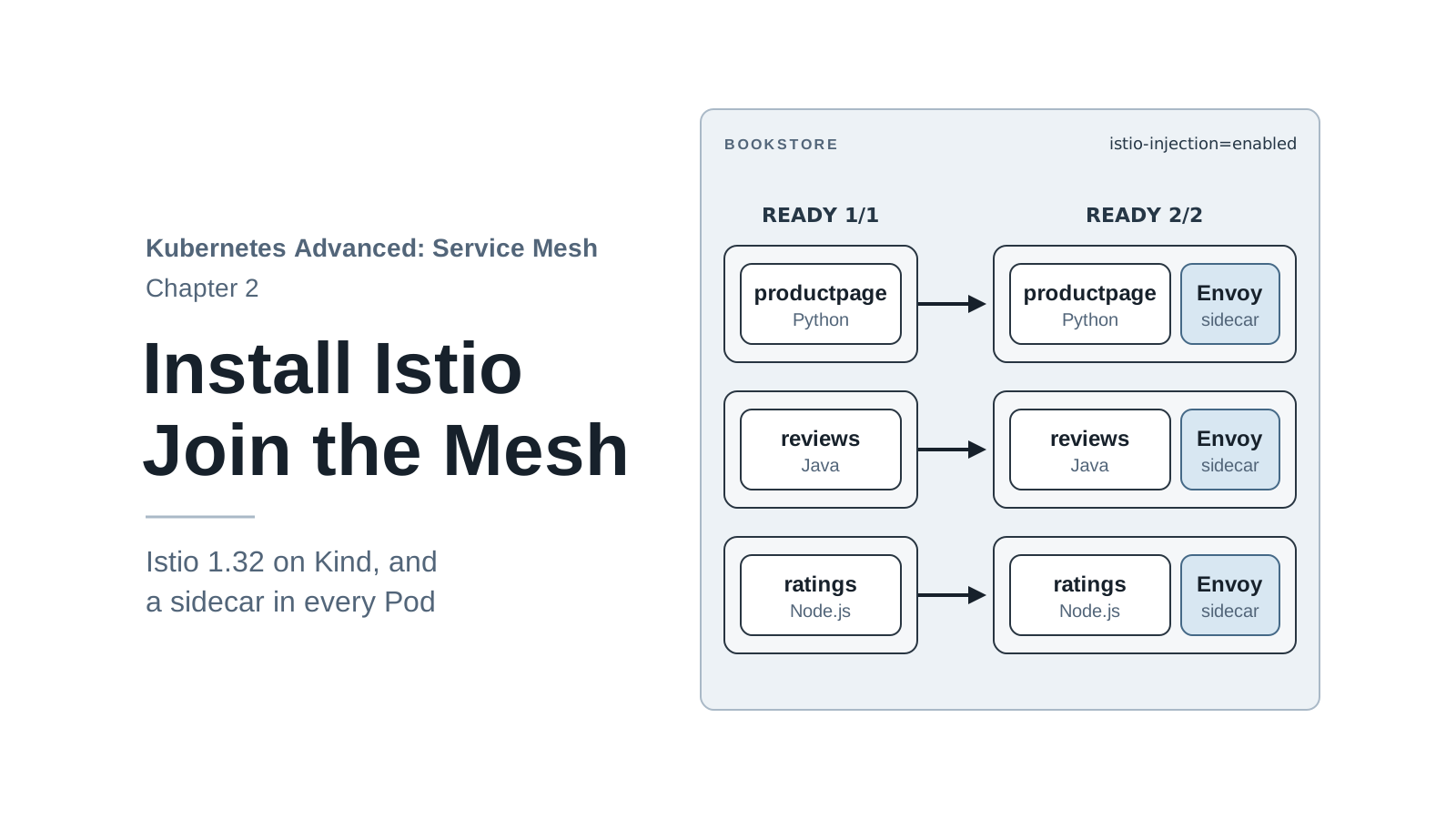
Chapter 1 ended with Book Store running on plain Kubernetes and four problems that Kubernetes can’t fix on its own: you can’t choose which version answers, a slow or failed dependency has no retry or timeout you control, traffic is split per connection rather than per request, and any Pod can call any service in plain text. Every fix in this series comes from the same place: an Envoy proxy that runs next to each service and is configured by Istio.
This chapter installs that machinery. It downloads a pinned Istio release, installs the control plane and the gateways, and moves Book Store into the mesh. Along the way it explains the two mechanisms that keep the mesh invisible to the app: sidecar injection, which adds the proxy to each Pod, and traffic capture, which sends the app’s traffic through that proxy without any code change.
By the end of this chapter you will have:
- Istio 1.32.0 installed in the
meshcluster, with an ingress gateway that later chapters use. - Every Book Store Pod running with an Envoy sidecar (
2/2instead of1/1). - Three ways to check the mesh:
istioctl analyzefor configuration problems,istioctl proxy-statusfor the proxies, and the Kiali graph for live traffic.
Code for this chapter. The install files are in _resource/kubernetes-service-mesh/cluster, because every later chapter uses them.
02-install-istio/README.mdlists this chapter’s commands in order. I tested them with Kind v0.33.0 (Kubernetes v1.37.0) and Istio 1.32.0 on macOS with Docker Desktop, and the command output in this chapter comes from those runs.
Starting Point
Run every command from the _resource/kubernetes-service-mesh folder, as in chapter 1. The
chapter starts where chapter 1 ended: the mesh cluster exists and Book Store runs in the
bookstore namespace without Istio.
kubectl config current-context
kubectl -n bookstore get pods
kind-mesh
NAME                              READY   STATUS    RESTARTS   AGE
details-v1-65c85cb5f7-rg4pk       1/1     Running   0          8h
productpage-v1-5995f9b747-wlrts   1/1     Running   0          8h
ratings-v1-c57b9b4b9-ph4ff        1/1     Running   0          8h
reviews-v1-65d97f4766-w5jcq       1/1     Running   0          8h
reviews-v2-797c7f44db-nv29h       1/1     Running   0          8h
reviews-v3-665587dbf8-kdmhf       1/1     Running   0          8h
If the cluster is gone, or you’re starting the series here, build this state with one command.
It deletes any existing mesh cluster, creates a new one, and deploys Book Store without Istio:
./scripts/bootstrap.sh 02
Download istioctl
istioctl is Istio’s command-line tool. It installs Istio, checks configuration, and inspects
proxies. Its version should match the Istio version in the cluster, because it installs and
checks configuration with the templates and rules of its own release. An istioctl left over
from an old project is a common source of confusing errors, so the series doesn’t rely on
whatever istioctl is already on your PATH. It downloads its own.
cluster/install-istio.sh downloads the Istio 1.32.0 release from GitHub, checks the archive
against its published SHA-256 hash, unpacks it into .istio/, and links istioctl into
./bin. Run it with download first, so you can look at the release before installing
anything:
./cluster/install-istio.sh download
Downloading https://github.com/istio/istio/releases/download/1.32.0/istio-1.32.0-osx-arm64.tar.gz
SHA-256 ok
istioctl 1.32.0 is at ./bin/istioctl
The script picks the archive for your machine: osx-arm64, osx (Intel Mac), linux-amd64,
or linux-arm64. On Windows, run the series inside WSL, where the script takes the Linux
archive. If the hash doesn’t match, the script deletes the archive and stops, so a broken or
tampered download never gets installed.
Put ./bin first on your PATH for this terminal, then check the version:
export PATH="$PWD/bin:$PATH"
istioctl version --remote=false
client version: 1.32.0
--remote=false asks only for the client version. Without it, istioctl also asks the cluster,
which has no Istio yet. The export lasts only for the current terminal, so run it again in
every new terminal you open for the series.
Tip: The official install guide uses
curl -L https://istio.io/downloadIstio | sh -. That works, but it runs a remote script without showing it to you first. The series script does the same download with a hash check you can read.
Choose What to Install
An Istio installation has three kinds of parts:
istiod, the control plane. It watches the Kubernetes API, turns Services and Istio configuration into Envoy configuration, sends it to every proxy, and issues the certificates that proxies use for encrypted traffic.- Gateways: Envoy proxies that run on their own at the edge of the mesh, not next to an app. An ingress gateway receives traffic from outside the cluster (chapters 3 to 5). An egress gateway is a single exit point for traffic leaving the mesh (chapter 10).
- The sidecars, which aren’t installed directly.
istiodadds one to each Pod when the Pod is created, as the next sections show.
Istio groups these into profiles, ready-made starting points. The release you downloaded keeps
them in .istio/istio-1.32.0/manifests/profiles/. Three matter here:
| Profile | Installs | Use it for |
|---|---|---|
minimal |
istiod only |
Clusters where you install gateways separately (chapter 15 does this with Helm). |
default |
istiod and an ingress gateway |
A production starting point. |
demo |
istiod, ingress and egress gateways, extra tracing and logging, small resource requests |
Trying features quickly. Not for production. |
The series uses default and changes three things in cluster/istio-install.yaml:
apiVersion: install.istio.io/v1alpha1
kind: IstioOperator
metadata:
  name: mesh
spec:
  profile: default
  meshConfig:
    accessLogFile: /dev/stdout
  components:
    ingressGateways:
      - name: istio-ingressgateway
        enabled: true
        k8s:
          service:
            type: NodePort
            ports:
              - name: status-port
                port: 15021
                targetPort: 15021
              - name: http2
                port: 80
                targetPort: 8080
                nodePort: 30080
              - name: https
                port: 443
                targetPort: 8443
                nodePort: 30443
    egressGateways:
      - name: istio-egressgateway
        enabled: true
An IstioOperator is a settings file that istioctl install reads. It isn’t deployed into the
cluster as an object; istioctl turns it into Kubernetes resources and applies them. The three
changes:
accessLogFile: /dev/stdoutmakes every Envoy write one line per request to its log. The default profile leaves it off. Access logs are the main debugging tool from chapter 3 onward.- The ingress gateway Service is a NodePort with fixed ports. On a cloud, the gateway gets a
LoadBalancerService and a public address. Kind has no cloud load balancer, so the gateway listens on node ports 30080 and 30443. TheextraPortMappingsincluster/kind-config.yamlfrom chapter 1 forwardlocalhost:8080andlocalhost:8443to exactly these ports. If the two files disagree, the browser can’t reach the gateway. - The egress gateway is turned on. The
defaultprofile doesn’t include it. Chapter 10 needs it, and installing it now means you don’t reinstall Istio later.
Install Istio
Run the script again without download. It finds the release already unpacked in .istio/ and
skips the download, checks that kubectl points at kind-mesh, and runs
istioctl install -f cluster/istio-install.yaml -y. The -y skips the confirmation prompt:
./cluster/install-istio.sh
istioctl 1.32.0 is at ./bin/istioctl
...
✔ Istio core installed ⛵️
✔ Istiod installed 🧠
✔ Ingress gateways installed 🛬
✔ Egress gateways installed 🛫
✔ Installation complete
It takes about a minute, most of it pulling images. The context check is there for safety:
istioctl install installs into whatever cluster kubectl points at, and a mistake there puts
Istio into a work cluster.
Look at what it created in the istio-system namespace:
kubectl -n istio-system get pods,svc
NAME                                        READY   STATUS    RESTARTS   AGE
pod/istio-egressgateway-58f58cf5-4nstq      1/1     Running   0          27s
pod/istio-ingressgateway-59b4dbf78b-slvvj   1/1     Running   0          27s
pod/istiod-888bf84c4-wttrs                  1/1     Running   0          51s

NAME                                  TYPE        CLUSTER-IP      EXTERNAL-IP   PORT(S)                                      AGE
service/istio-egressgateway           ClusterIP   10.96.143.151   <none>        80/TCP,443/TCP                               27s
service/istio-ingressgateway          NodePort    10.96.16.113    <none>        15021:32281/TCP,80:30080/TCP,443:30443/TCP   27s
service/istiod                        ClusterIP   10.96.230.179   <none>        15010/TCP,15012/TCP,443/TCP,15014/TCP        51s
service/istiod-revision-tag-default   ClusterIP   10.96.64.151    <none>        15010/TCP,15012/TCP,443/TCP,15014/TCP        3s
Check the line for istio-ingressgateway: 80:30080/TCP,443:30443/TCP means the gateway’s
port 80 is reachable on node port 30080 and port 443 on 30443, which matches the Kind port
mappings. Port 15021 is the gateway’s health-check port. It got a random node port, which is
fine; nothing outside the cluster uses it.
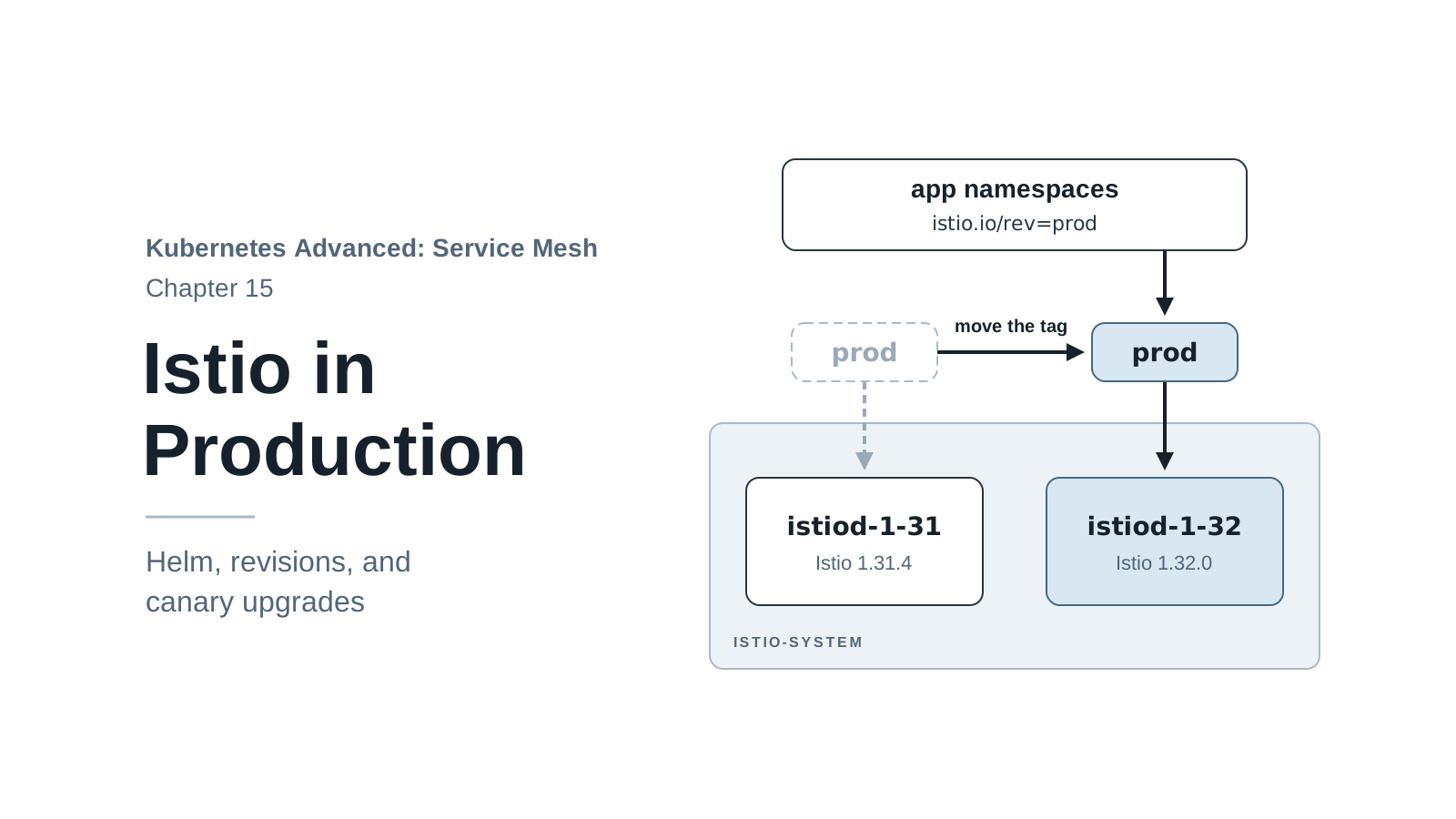
istiod-revision-tag-default is a second Service in front of the same istiod Pod. It belongs
to Istio’s revision tags, which let two control plane versions run side by side during an
upgrade. Chapter 15 uses them; until then you can ignore this Service.
The install also added Istio’s own resource types to the Kubernetes API as custom resource
definitions (CRDs): Gateway, VirtualService, DestinationRule, and others, 15 in total. It
also registered two mutating webhooks, istio-sidecar-injector and
istio-revision-tag-default. The next section explains what they do; the second one belongs to
revision tags, which chapter 15 uses for upgrades. Confirm that the
client and the cluster run the same version:
istioctl version
client version: 1.32.0
control plane version: 1.32.0
data plane version: 1.32.0 (2 proxies)
The two proxies are the two gateways. None of the Book Store Pods has a proxy yet.
Join Book Store to the Mesh
A Pod joins the mesh when it gets an Envoy sidecar. You don’t add the sidecar to the Deployment
yourself. You label a namespace with istio-injection=enabled, and Istio adds the sidecar to
every Pod created there. Label bookstore and list its Pods:
kubectl label namespace bookstore istio-injection=enabled
kubectl -n bookstore get pods
namespace/bookstore labeled
NAME                              READY   STATUS    RESTARTS   AGE
details-v1-65c85cb5f7-rg4pk       1/1     Running   0          8h
productpage-v1-5995f9b747-wlrts   1/1     Running   0          8h
ratings-v1-c57b9b4b9-ph4ff        1/1     Running   0          8h
reviews-v1-65d97f4766-w5jcq       1/1     Running   0          8h
reviews-v2-797c7f44db-nv29h       1/1     Running   0          8h
reviews-v3-665587dbf8-kdmhf       1/1     Running   0          8h
The label is set, and nothing changed. Every Pod is still 1/1. This is a common first mistake
with Istio, and it has a precise cause.
Why the running Pods didn’t change
When you create a Pod, the Kubernetes API server can pass the Pod’s definition to a mutating
admission webhook before saving it. The webhook is an HTTP service that receives the object and
returns a changed version. Istio registers one, served by istiod, that matches Pods in
namespaces labeled istio-injection=enabled. When it receives a Pod, it adds the proxy
containers and returns the Pod.
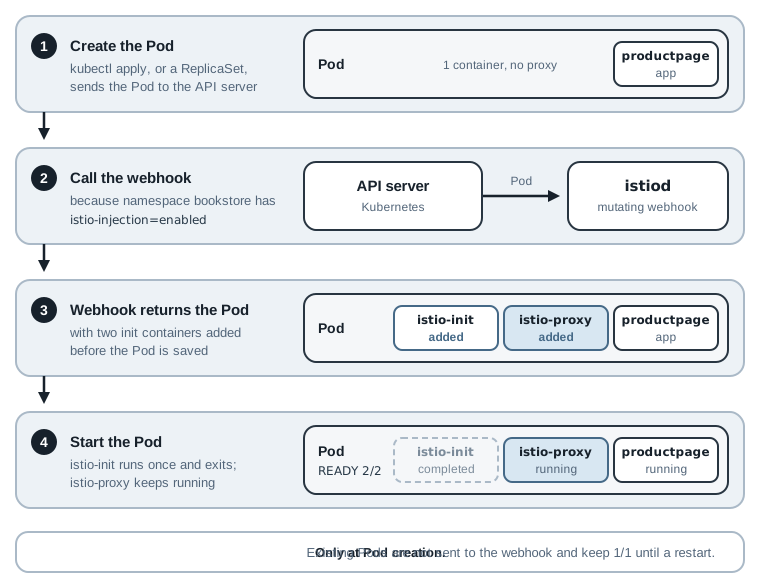
The webhook runs only when a Pod is created. Pods that already exist are never sent to it again,
so labeling a namespace doesn’t touch them. istioctl analyze finds this problem. It reads the
cluster’s configuration and reports anything that looks wrong. -n bookstore limits it to one
namespace:
istioctl analyze -n bookstore
Warning [IST0103] (Pod bookstore/details-v1-65c85cb5f7-rg4pk) The pod bookstore/details-v1-65c85cb5f7-rg4pk is missing the Istio proxy. This can often be resolved by restarting or redeploying the workload.
Warning [IST0103] (Pod bookstore/productpage-v1-5995f9b747-wlrts) The pod bookstore/productpage-v1-5995f9b747-wlrts is missing the Istio proxy. This can often be resolved by restarting or redeploying the workload.
...
There is one warning per Pod. (Run before the label, the same command printed a different hint:
IST0102 The namespace is not enabled for Istio injection.) Each IST code has a page in the
Istio docs that explains it.
Restart to inject
The fix is to create new Pods. kubectl rollout restart replaces the Pods of a Deployment with
a rolling update, so the old Pod keeps serving until its replacement is ready. With deploy and
no name, it restarts every Deployment in the namespace:
kubectl -n bookstore rollout restart deploy
./scripts/wait-for-app.sh
kubectl -n bookstore get pods
deployment.apps/details-v1 restarted
...
NAME                              READY   STATUS    RESTARTS   AGE
details-v1-6c4d7c66fb-rnhnl       2/2     Running   0          63s
productpage-v1-54996bff96-v8bnq   2/2     Running   0          63s
ratings-v1-864f4f9bd8-vwbt9       2/2     Running   0          63s
reviews-v1-678d69454f-xz8dc       2/2     Running   0          63s
reviews-v2-5c8db7b6c5-clc8n       2/2     Running   0          63s
reviews-v3-74946666d9-sd2xm       2/2     Running   0          63s
Every Pod now shows 2/2: the app and its proxy. The restart took about a minute. If you see an
old Pod with Terminating in the list, wait a few seconds; Kubernetes is still shutting it down.
Run the analyzer again:
istioctl analyze -n bookstore
✔ No validation issues found when analyzing namespace: bookstore.
Keep the order in mind for your own clusters: label the namespace first, then deploy. When the
order is wrong, the symptom is 1/1 Pods in a labeled namespace, and the fix is a restart.
Warning: The injection webhook is registered with
failurePolicy: Fail. Ifistiodis down, the API server refuses to create new Pods in a labeled namespace rather than create them without a sidecar. I tested this by scalingistiodto zero and restartingdetails-v1: the old Pod kept serving, the new ReplicaSet stayed at0Pods, and its events saidfailed calling webhook "namespace.sidecar-injector.istio.io" ... connect: connection refused. As soon asistiodwas back, the Pod was created with its sidecar. On a real cluster, this is whyistiodruns more than one replica (chapter 15).
What Is Inside a Pod Now
The 2/2 says the Pod has a second container, but not what it is or how it starts. Print the
container names in the productpage Pod, init containers on one line and app containers on the
next:
kubectl -n bookstore get pod -l app=productpage \
  -o jsonpath='init: {.items[0].spec.initContainers[*].name}{"\n"}app: {.items[0].spec.containers[*].name}{"\n"}'
init: istio-init istio-proxy
app: productpage
The webhook added two containers, both listed as init containers, which Kubernetes starts before the app container:
istio-initruns once and exits. It writes network rules into the Pod that send traffic through the proxy (next section).istio-proxyruns Envoy. It is an init container withrestartPolicy: Always, which Kubernetes calls a native sidecar: it starts before the app, keeps running next to it, and stops after it. That order matters. The app’s first outgoing call already goes through a running proxy, and the proxy is still there while the app finishes its last requests during shutdown.
The 2/2 in the READY column counts the app and istio-proxy. istio-init has finished, so it
isn’t counted.
Each sidecar has a cost. With Istio’s default settings, the injected proxy requests 100m CPU and 128 MiB of memory, so the six Book Store Pods now reserve 600m CPU and 768 MiB more than in chapter 1. On a real cluster, that overhead is part of the decision to adopt a mesh, and chapter 15 shows how to tune it.
How Traffic Reaches the Proxy
The app code didn’t change. productpage still calls http://reviews:9080. Its traffic passes
through Envoy anyway because of the rules istio-init wrote. They are iptables rules, the
Linux kernel’s packet filtering and redirect rules, and they live in the Pod’s own network
namespace, so they affect only that Pod. istio-init prints them to its log. The grep keeps
the three rules that matter here:
kubectl -n bookstore logs deploy/productpage-v1 -c istio-init \
  | grep -E 'REDIRECT --to-ports|-m owner --uid-owner 1337 -j RETURN' | sort -u
-A ISTIO_IN_REDIRECT -p tcp -j REDIRECT --to-ports 15006
-A ISTIO_OUTPUT -m owner --uid-owner 1337 -j RETURN
-A ISTIO_REDIRECT -p tcp -j REDIRECT --to-ports 15001
The full log has a few dozen rules, printed twice (once as the commands it runs, once in
iptables-save format). The three above carry the idea:
- Outgoing TCP traffic from the app is redirected to port
15001, where Envoy listens for outbound traffic. - Incoming TCP traffic to the Pod is redirected to port
15006, where Envoy listens for inbound traffic. - Traffic sent by user ID
1337is let through unchanged. Envoy runs as that user, so when Envoy forwards a request after processing it, the rules don’t send it back to Envoy in a loop.
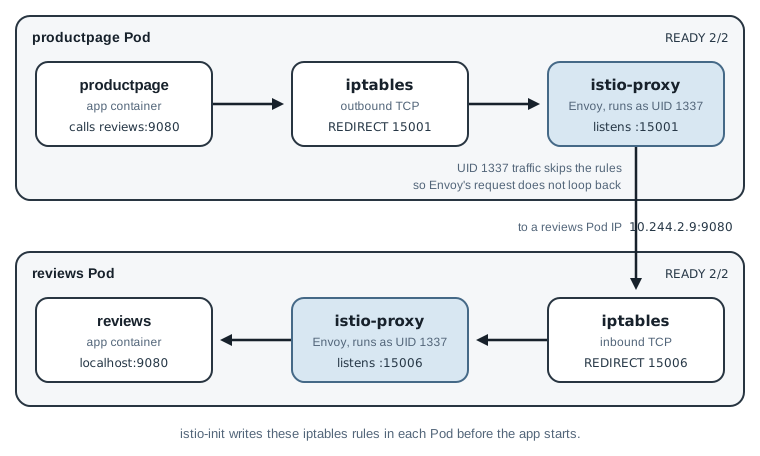
The figure follows one call from productpage to reviews. It passes through two proxies: the
outbound side in the caller’s Pod and the inbound side in the callee’s Pod. Both write an access
log line, because accessLogFile is set in cluster/istio-install.yaml. To see the caller’s
line, start the port-forward from chapter 1 in a second terminal:
kubectl -n bookstore port-forward svc/productpage 9000:9080
Back in the first terminal, send 30 requests and read the last log line of productpage’s
proxy. -c istio-proxy picks the sidecar container; without it, kubectl logs shows the app’s
log:
./scripts/count-versions.sh http://localhost:9000 30
kubectl -n bookstore logs deploy/productpage-v1 -c istio-proxy --tail=1
  11 200 reviews-v2 stars fast
  11 200 reviews-v1 no-stars fast
   8 200 reviews-v3 stars fast
[2026-11-17T01:06:49.105Z] "GET /reviews/0 HTTP/1.1" 200 - via_upstream - "-" 0 358 1 1 "-" "curl/8.7.1" "3c557b71-c3f8-4c1c-b5d5-874b156200cf" "reviews:9080" "10.244.2.9:9080" outbound|9080||reviews.bookstore.svc.cluster.local 10.244.2.8:39776 10.96.121.127:9080 10.244.2.8:44952 - default
The app behaves as it did in chapter 1, and Envoy recorded the call. The fields that matter now:
"GET /reviews/0 HTTP/1.1" 200: the request and its status."reviews:9080": the host the app asked for."10.244.2.9:9080": the Pod IP that Envoy picked. The Service IP (10.96.121.127) appears later in the line, but Envoy sent the request straight to a Pod. Envoy gets the list ofreviewsPods fromistiodand balances requests across them itself.outbound|9080||reviews.bookstore.svc.cluster.local: the cluster, Envoy’s name for a group of destination Pods (not the Kubernetes cluster). Chapter 5 reads these names in detail.
There is one gap. The port-forward connects to the app’s port on localhost inside the Pod,
not through the Pod’s network interface, so it never meets the inbound rules. productpage’s
proxy logs the calls productpage makes, but not the requests you send it. That is one more
reason why chapter 3 replaces the port-forward with the ingress gateway.
The chapter 1 slow build, again
Chapter 1 deployed a ratings build that answers half of its requests after 7 seconds. The
Service sent it little or no traffic, because each reviews Pod kept one connection open and the
Service picks a Pod per connection. Envoy picks a Pod per request, so the same test should now
give the slow build a share. Deploy it again, wait for it, send 40 requests, and count the calls
it received. With a sidecar in the Pod, kubectl logs needs -c ratings to read the app’s log:
kubectl apply -f 01-why-service-mesh/ratings-v-delayed.yaml
kubectl -n bookstore rollout status deploy/ratings-v-delayed
kubectl -n bookstore get pods -l app=ratings
./scripts/count-versions.sh http://localhost:9000 40
kubectl -n bookstore logs deploy/ratings-v-delayed -c ratings | grep -c 'GET /ratings'
deployment.apps/ratings-v-delayed created
Waiting for deployment "ratings-v-delayed" rollout to finish: 0 of 1 updated replicas are available...
deployment "ratings-v-delayed" successfully rolled out
NAME                                 READY   STATUS    RESTARTS   AGE
ratings-v-delayed-69d8949d8d-ffmpt   2/2     Running   0          8s
ratings-v1-864f4f9bd8-vwbt9          2/2     Running   0          111s
  17 200 reviews-v1 no-stars fast
  10 200 reviews-v3 stars fast
   8 200 reviews-v2 stars fast
   4 200 reviews-v3 ratings-error 1-3s
   1 200 reviews-v3 stars 3-8s
8
The new Pod got a sidecar on the first try, because the namespace label applies to every new
Pod. It received 8 rating calls. The 23 v2 and v3 responses needed at least one call each, so
the slow build took about a third of them. Over many requests you’d expect about half from two
Pods; 23 is a small sample, and the exact number changes from run to run. Four reviews-v3
requests hit a slow answer and gave up after their 2.5 second limit. One request took between 3 and 8 seconds and
still showed stars; chapter 8 explains how the timeouts in productpage and reviews combine to
produce results like that.
This is better than chapter 1 and still not acceptable. The slow build now gets a fair share of traffic, so its problem is visible instead of hidden, but users still see errors. Chapter 6 controls how much traffic a new build gets, and chapter 8 adds timeouts and retries. Remove the slow build:
kubectl delete -f 01-why-service-mesh/ratings-v-delayed.yaml
Check the Proxies with proxy-status
istiod sends configuration to every Envoy over a long-lived gRPC connection, using a set of
APIs called xDS. Each API carries one kind of configuration, and the name of each ends in DS
for “discovery service”:
| API | Carries | Example |
|---|---|---|
| LDS | Listeners: ports Envoy listens on | 15001, 15006 |
| RDS | Routes: which request goes where | reviews:9080 → reviews cluster |
| CDS | Clusters: named groups of destinations | outbound|9080||reviews... |
| EDS | Endpoints: Pod IPs inside each cluster | 10.244.2.9:9080 |
When a Pod starts, stops, or you change Istio configuration, istiod pushes the changed parts
to the proxies that need them. istioctl proxy-status lists every proxy connected to istiod:
istioctl proxy-status
NAME                                                   CLUSTER        ISTIOD                     VERSION     SUBSCRIBED TYPES
details-v1-6c4d7c66fb-rnhnl.bookstore                  Kubernetes     istiod-888bf84c4-wttrs     1.32.0      4 (CDS,LDS,EDS,RDS)
istio-egressgateway-58f58cf5-4nstq.istio-system        Kubernetes     istiod-888bf84c4-wttrs     1.32.0      3 (CDS,LDS,EDS)
istio-ingressgateway-59b4dbf78b-slvvj.istio-system     Kubernetes     istiod-888bf84c4-wttrs     1.32.0      3 (CDS,LDS,EDS)
productpage-v1-54996bff96-v8bnq.bookstore              Kubernetes     istiod-888bf84c4-wttrs     1.32.0      4 (CDS,LDS,EDS,RDS)
ratings-v1-864f4f9bd8-vwbt9.bookstore                  Kubernetes     istiod-888bf84c4-wttrs     1.32.0      4 (CDS,LDS,EDS,RDS)
reviews-v1-678d69454f-xz8dc.bookstore                  Kubernetes     istiod-888bf84c4-wttrs     1.32.0      4 (CDS,LDS,EDS,RDS)
reviews-v2-5c8db7b6c5-clc8n.bookstore                  Kubernetes     istiod-888bf84c4-wttrs     1.32.0      4 (CDS,LDS,EDS,RDS)
reviews-v3-74946666d9-sd2xm.bookstore                  Kubernetes     istiod-888bf84c4-wttrs     1.32.0      4 (CDS,LDS,EDS,RDS)
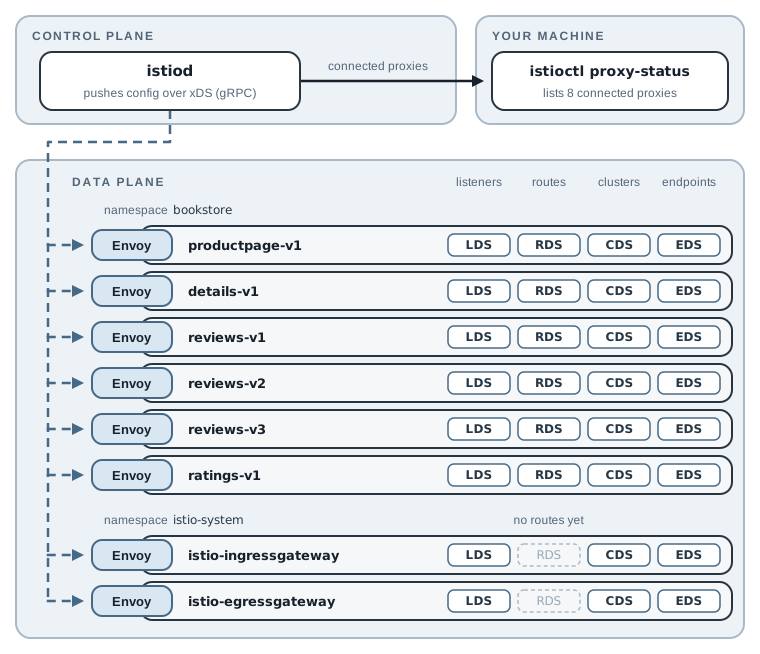
Eight proxies: six Book Store sidecars and two gateways. Every one is connected to the same
istiod and runs 1.32.0. The gateways subscribe to three types, not four, because they have no
HTTP routes yet. Chapter 3 gives the ingress gateway its first route, and RDS appears in its row.
A Pod with a sidecar that is missing from this list isn’t receiving configuration. Its proxy
can’t route anything new, and its log usually shows why (a network problem reaching istiod,
or a certificate error). You can also look inside a single proxy. istioctl proxy-config prints
the configuration one Envoy received, one xDS type at a time. These are the listeners on the two
capture ports in productpage’s Envoy:
istioctl proxy-config listener deploy/productpage-v1 -n bookstore | grep -E '15001|15006' | head -3
0.0.0.0       15001 ALL                                                                                             PassthroughCluster
0.0.0.0       15001 Addr: *:15001                                                                                   Non-HTTP/Non-TCP
0.0.0.0       15006 Addr: *:15006                                                                                   Non-HTTP/Non-TCP
These are the two ports that the iptables rules redirect to. Chapter 5 uses proxy-config to
follow a request through every layer of Envoy’s configuration.
See the Mesh in Kiali
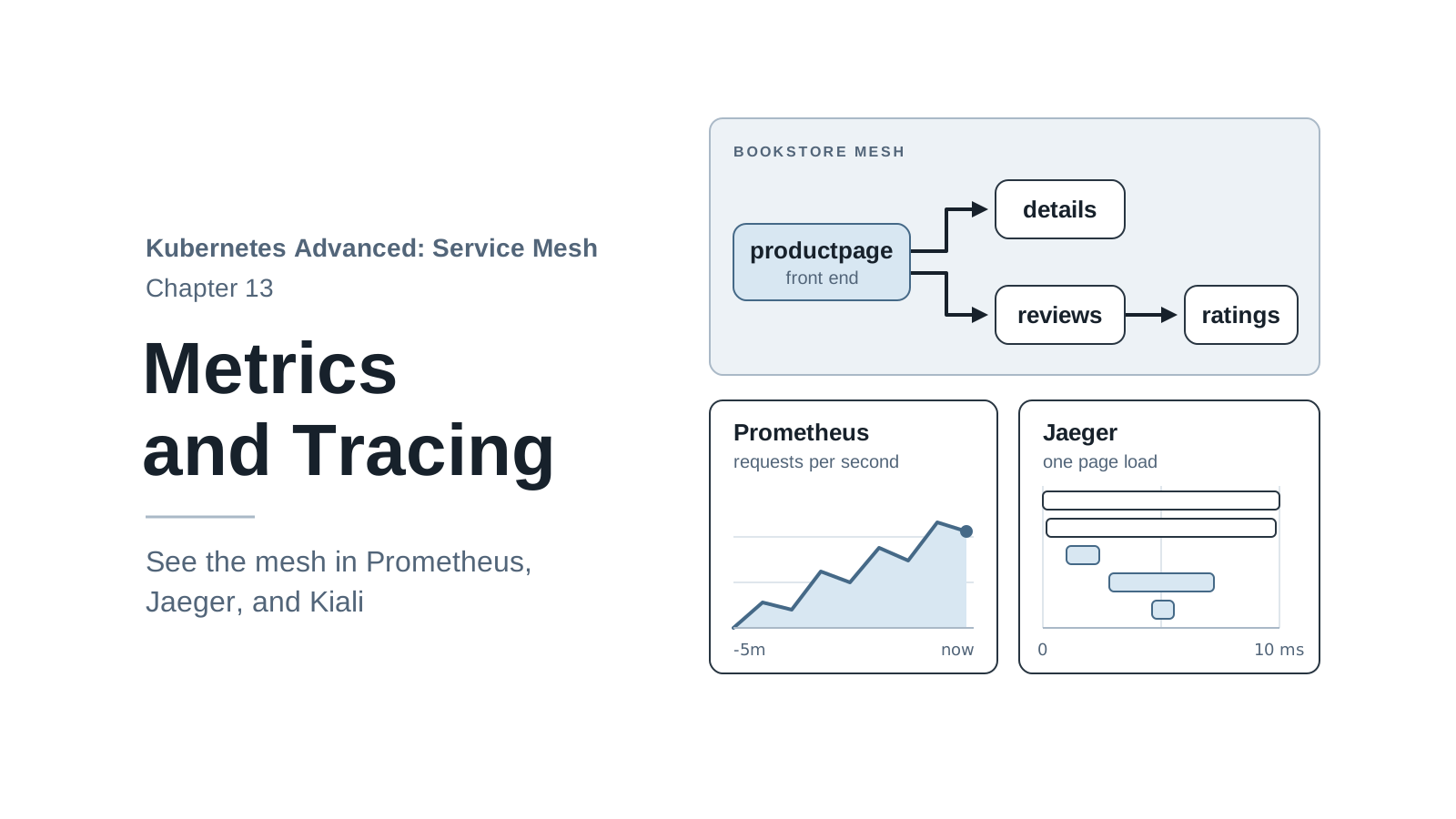
Every sidecar also counts the requests it handles. Prometheus, a metrics database, collects those numbers from each proxy, and Kiali, a dashboard built for Istio, draws them as a live graph of who calls whom. Install both from the same Istio release:
./cluster/addons.sh
serviceaccount/prometheus created
...
deployment.apps/kiali created
Waiting for deployment "prometheus" rollout to finish: 0 of 1 updated replicas are available...
deployment "prometheus" successfully rolled out
deployment "kiali" successfully rolled out
The script applies the add-on manifests that ship with Istio 1.32.0, in
.istio/istio-1.32.0/samples/addons/. They are meant for learning: one replica, no persistent
storage, no login. Chapter 13 adds Grafana and Jaeger and explains what a production setup
needs instead.
Send some traffic, then open Kiali. Keep the port-forward in the second terminal running:
./scripts/count-versions.sh http://localhost:9000 30
istioctl dashboard kiali
http://localhost:20001/kiali
istioctl dashboard starts a port-forward to Kiali and opens the address in your browser. It
keeps running until you press Ctrl+C. In Kiali, open “Traffic Graph”, select the bookstore
namespace, and set the graph type to “Versioned app graph”. Prometheus collects new numbers every
15 seconds, so give the graph up to a minute to fill in.
The graph shows the calls the sidecars recorded:
productpage-v1 -> reviews-v1   33.3% of requests
productpage-v1 -> reviews-v2   27.0%
productpage-v1 -> reviews-v3   39.7%
reviews-v2     -> ratings-v1  100.0%
reviews-v3     -> ratings-v1  100.0%
(I read these edges from Kiali’s API so they fit in text; the browser shows the same thing as
boxes and arrows.) That’s the Book Store map from chapter 1, drawn from real traffic, with no
code in the app reporting anything. (If you ran the slow-build test a minute ago, a
ratings-v-delayed node may still appear; it drops out once its traffic leaves the time window.)
Two parts are missing, both for reasons you’ve already met:
details has no edge because the reviews API that the script calls doesn’t use it (open
http://localhost:9000/productpage a few times and it appears), and nothing points into
productpage, because the port-forward bypasses its inbound proxy.
Kiali stays useful from here on. When a later chapter changes routing, the graph shows the change.
Reset Before the Next Chapter
Stop the port-forward and istioctl dashboard with Ctrl+C. Keep everything else: chapter 3
starts with Istio installed, Book Store in the mesh, and Prometheus and Kiali running.
To rebuild that state from scratch at any time:
./scripts/bootstrap.sh 03
It deletes the current mesh cluster, creates a new one, installs Istio with the same file,
labels the namespace before deploying Book Store (so the Pods get sidecars on the first try), and
installs the add-ons. It takes about four minutes. The script ends by printing the
export PATH line from “Download istioctl”; run it in every terminal where you use istioctl.
Summary
cluster/install-istio.shdownloads a pinned, hash-checked Istio release and keeps itsistioctlin./bin, so the client always matches the cluster. Put it on your PATH withexport PATH="$PWD/bin:$PATH"in each new terminal.- The
defaultprofile installsistiodand an ingress gateway. The series’IstioOperatoradds access logs, an egress gateway, and fixed node ports that match Kind’s port mappings. - A Pod joins the mesh when the injection webhook adds
istio-proxyat creation time. Labeling a namespace doesn’t change running Pods; restart them, and check withistioctl analyze. istio-initwritesiptablesrules that send the app’s outbound traffic to Envoy on 15001 and inbound traffic to 15006. Envoy picks a Pod per request, which already fixes chapter 1’s per-connection imbalance.istioctl proxy-statusshows which proxies receive configuration fromistiod, and Kiali draws the traffic the proxies recorded. Next, chapter 3 opens Book Store to your browser through the ingress gateway athttp://localhost:8080.