

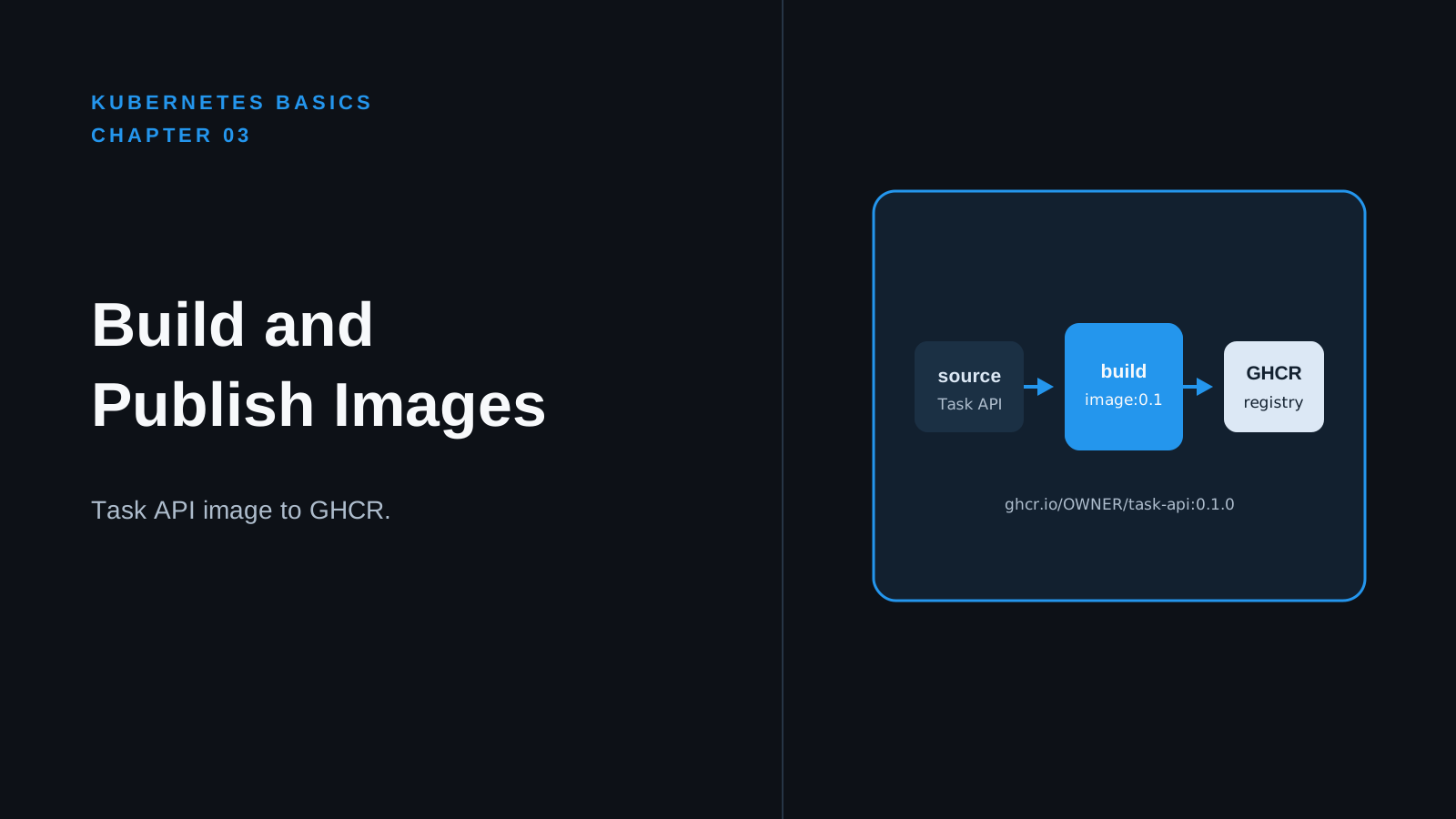
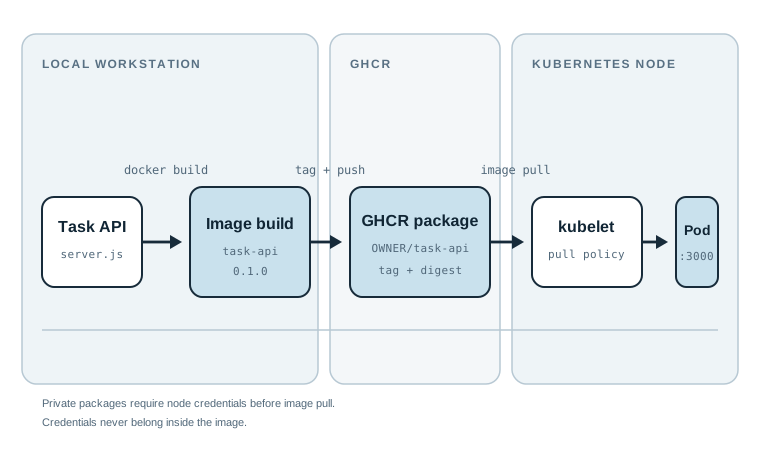
Kubernetes can start a container only after a node can obtain its image. An image that exists only on a developer laptop is not enough: another machine, another Kind node, or a recreated cluster cannot pull it. A container registry solves that distribution problem by storing named image versions that nodes can retrieve.
This chapter packages the Task API used in the rest of the series and prepares a publish workflow for GitHub Container Registry (GHCR). By the end, you will be able to build and test a versioned image locally, understand the GHCR name and permission model, and run an explicit publish command after you choose credentials. No image is published by this chapter.
Code for this chapter. The commands and README are in _resource/kubernetes-basics/03-build-and-publish-a-task-api-to-ghcr. The reusable Task API source is in _resource/kubernetes-basics/task-api.
Start With a Complete Image
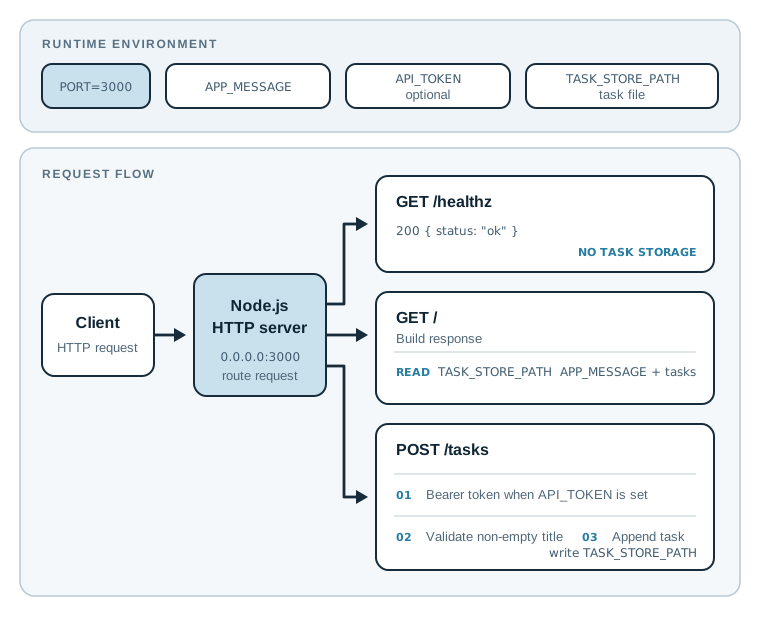
The Task API is a small Node.js HTTP service. GET /healthz returns a health response, GET /
lists tasks, and POST /tasks creates a task. It reads its listen port, message, optional bearer
token, and task file path from environment variables. POST /tasks requires a bearer token only
when API_TOKEN is set; Chapter 8 sets it. Those settings become useful in later chapters, but
the application has one job now: give the image a real process to run.
The Dockerfile is intentionally short:
FROM node:20-alpine

WORKDIR /app
COPY package.json package-lock.json ./
RUN npm ci --omit=dev
COPY src ./src

USER node
EXPOSE 3000
CMD ["node", "src/server.js"]
FROM selects a Node 20 Alpine base image. WORKDIR gives later instructions a stable
directory. Copying dependency manifests before source code lets Docker reuse the dependency
layer when only application code changes. npm ci installs exactly the versions in the lock
file. USER node avoids running the application process as root inside the container.
EXPOSE 3000 documents the intended port. It does not make the API reachable from the host or
from another Pod. Docker needs -p for host access, and Kubernetes needs a Service for stable
cluster access. Chapter 6 adds that Service.
Build and Test Before Naming a Registry
Change to the shared application directory and build an image with a local tag:
cd _resource/kubernetes-basics/task-api
docker build -t task-api:0.1.0 .

docker image inspect task-api:0.1.0 --format '{{.Config.User}}'
The final . is the build context. Docker can copy only files inside that directory, so the
Dockerfile can copy package.json, package-lock.json, and src. The inspect command should
print node, confirming the runtime process does not use the root user.
Start the image and test its health endpoint in a second terminal:
docker run --rm --name task-api -p 3000:3000 task-api:0.1.0
curl --fail http://localhost:3000/healthz
The container should log Task API listening on port 3000. curl should return JSON similar to
{"status":"ok"} and exit successfully. This checks that the process can bind its port; it does
not yet test persisted tasks or registry access. Stop the foreground container with Ctrl-C.
Tip: Build with a meaningful version before using a moving tag such as
latest. A Kubernetes manifest can name0.1.0and later be traced to one release. A mutable tag is convenient for a development loop but does not identify one immutable artifact.
Form the GHCR Image Name
GHCR image names have this shape:
ghcr.io/OWNER/PACKAGE:TAG
OWNER is a GitHub user or organization. PACKAGE is the container package name. TAG is a
human-readable version label. Replace the placeholders only in your shell; do not commit a
personal account name or token to a public example.
export GHCR_OWNER="YOUR_GITHUB_USER_OR_ORGANIZATION"
export IMAGE_NAME="ghcr.io/${GHCR_OWNER}/task-api"
export IMAGE_TAG="0.1.0"

docker tag task-api:0.1.0 "${IMAGE_NAME}:${IMAGE_TAG}"
docker image ls "${IMAGE_NAME}"
docker tag does not copy image layers. It adds another name to the image already present on
the local machine. The listing should show ghcr.io/YOUR_GITHUB_USER_OR_ORGANIZATION/task-api
and the 0.1.0 tag. A later docker push uses that fully qualified name to select GHCR.
Tags are labels, not content identities. A registry can move 0.1.0 if its policy allows it.
After publishing, Docker reports a digest such as sha256:...; a Kubernetes Deployment can use
that digest when it must select exactly one image manifest. Tags are easier to read during this
series, while digests are the stronger production choice for release pinning.
Give the Publisher Only the Permission It Needs
GHCR accepts either a GitHub personal access token (PAT) or a GitHub Actions GITHUB_TOKEN.
For a reader-run command from a workstation, create a classic PAT with the minimum package
scope required by your repository policy:
- In GitHub, open Settings, then Developer settings, then Personal access tokens.
- Create a token with
write:packagesto upload packages. GitHub may select dependent package scopes automatically; keep the token limited to the account and expiration you need. - Add
read:packagesonly when the same token must pull private packages. Adddelete:packagesonly for an intentional cleanup workflow. - Store the token in a password manager or secret manager. Do not put it in a shell history, Dockerfile, Kubernetes manifest, repository file, or image label.
An organization can require single sign-on authorization, restrict package creation, or block tokens with certain settings. In that case, an authentication error is a permission decision, not a Docker build error. Follow the organization’s package policy or ask an organization owner to grant the appropriate package access.
Log in by passing the token through standard input:
printf '%s' "$GHCR_TOKEN" | docker login ghcr.io -u "$GHCR_OWNER" --password-stdin
Set GHCR_TOKEN only in the terminal environment where you run this command. --password-stdin
keeps the token out of the command line and shell history. Docker normally stores a credential
reference in its configured credential store after a successful login; run docker logout
ghcr.io on a shared machine when finished.
The chapter resource provides the same sequence in build-and-push.sh. It refuses to run until
you set placeholders. Read it before executing it; a publish command changes remote state.
Publish Only After Local Verification
After the local health check and successful login, this is the command that would upload the image:
docker push "${IMAGE_NAME}:${IMAGE_TAG}"
Docker uploads layers that GHCR does not already have, then prints a digest for the pushed image.
The expected result includes a line ending in digest: sha256:.... This article does not run
that command and does not assert that any package exists in GHCR. It is deliberately reader-run
because it needs your GitHub account, chosen package visibility, and credential policy.
For a public learning image, set its package visibility to public in the GitHub package settings
after confirming its contents contain no secrets. A private image is the safer default for
internal software. Private images require every Kubernetes node to authenticate before pulling;
Chapter 8 shows the Kubernetes-side imagePullSecret pattern rather than putting registry
credentials into an image or Deployment.
Diagnose the Common Failures
The Build Cannot Find a File
COPY package.json package-lock.json ./ fails when the build context is not the Task API
directory. Run pwd and confirm it ends in _resource/kubernetes-basics/task-api, then repeat
the build with .. Docker resolves COPY sources against the build context, not against the
current location of the Dockerfile in an arbitrary command.
The Container Starts but curl Cannot Connect
EXPOSE does not publish a port. Check that docker run includes -p 3000:3000, then inspect
the process log with docker logs task-api when the container runs in the background. A host
port already in use produces a Docker error before the application starts; choose a different
host side such as -p 3001:3000 and request http://localhost:3001/healthz.
GHCR Returns 403 or Denied
First check the target name and login account:
docker info | grep -A 3 'Username'
docker image ls "${IMAGE_NAME}"
Then check the token scope, expiration, organization SSO authorization, and whether the organization permits package creation. Do not solve a permission failure by widening a token to repository-wide access without understanding why the narrow token failed. The registry error is usually enough to identify whether the problem is authentication, package ownership, or an organization policy.
Summary
- A container registry makes a tested image available to Kubernetes nodes beyond one laptop.
- The Task API image runs as the non-root
nodeuser and exposes a health endpoint on port 3000. ghcr.io/OWNER/PACKAGE:TAGidentifies a GHCR image; a digest identifies immutable image content.- A reader-run PAT needs
write:packagesfor publishing, and--password-stdinkeeps it out of the command line. - A successful local build does not prove registry access; test the API first, then publish only with the intended account and package policy.
The next chapter introduces Pods and Namespaces, the Kubernetes objects that provide the API’s runtime boundary and logical isolation.





