Deployment Pods are disposable. A rollout or recovery gives them new IP addresses, so another application cannot safely use a Pod IP as an endpoint. A Kubernetes Service selects matching Pods and gives clients a stable virtual IP and DNS name.
This chapter creates a ClusterIP Service for the Chapter 5 workload and accesses it from a
laptop with kubectl port-forward. By the end, you will know why the Service selector matters,
how port and targetPort differ, and when local forwarding is the right tool instead of an
external load balancer.
Code for this chapter. The Service manifest and README are in _resource/kubernetes-basics/06-services-and-local-access.
Give the Workload a Stable Name
Apply the Chapter 5 Deployment first, then create this Service:
kubectl apply -f ../05-deployments-and-rollouts/deployment.yaml
kubectl apply -f service.yaml
kubectl get service task-api -n tasks
kubectl get endpointslices -n tasks -l kubernetes.io/service-name=task-api
apiVersion: v1
kind: Service
metadata:
  name: task-api
  namespace: tasks
spec:
  selector:
    app: task-api
  ports:
    - name: http
      port: 80
      targetPort: 3000
  type: ClusterIP
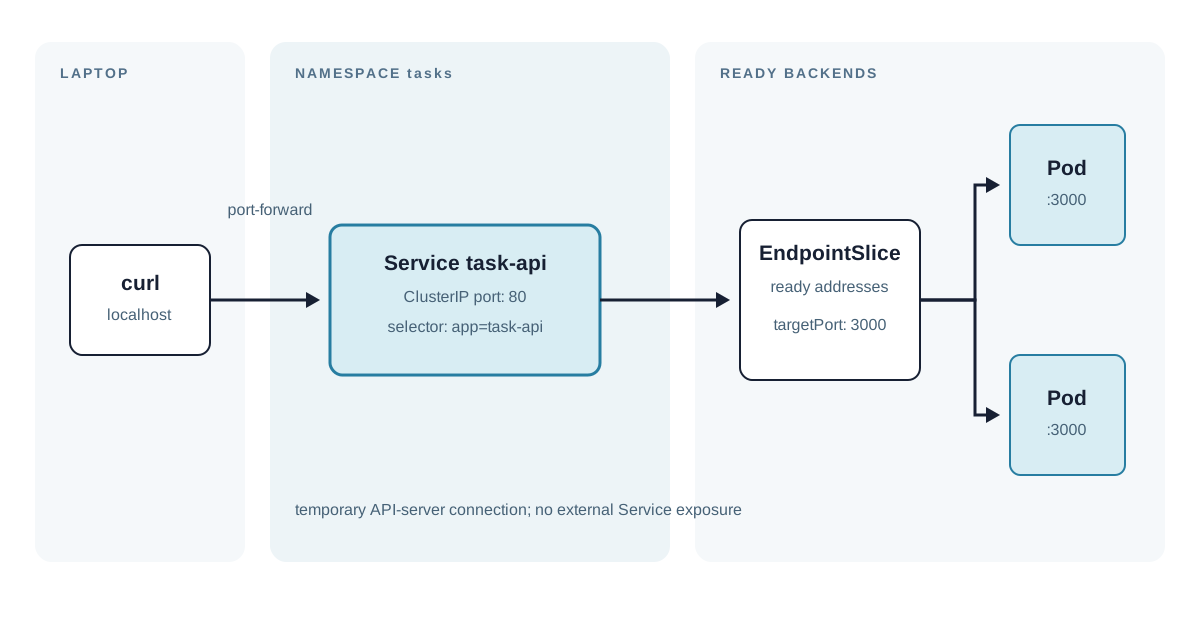
selector.app: task-api matches the label on the Deployment’s Pod template. Kubernetes records
ready matching Pod addresses in EndpointSlices. If no Pod label matches, the Service still
exists, but it has no usable endpoints and connections fail. The same is true while matching
Pods are not ready, which is why a Service depends on both correct labels and workload health.
port: 80 is the Service port clients use. targetPort: 3000 is the port on each selected Pod.
They do not have to be equal. A named targetPort can be useful when several containers expose
named ports, but this simple API uses one numeric container port. type: ClusterIP creates an
internal-only virtual address. It is the normal default for one service calling another inside a
cluster.
From another Pod in the same Namespace, the DNS name is task-api. Across Namespaces, use
task-api.tasks or the full name task-api.tasks.svc.cluster.local. DNS is convenient; the
important guarantee is the Service abstraction, which sends traffic to ready endpoints even as
the actual Pods change.
Access It Locally Without Changing the Service Type
ClusterIP intentionally does not accept connections directly from the laptop. Port forwarding
creates a temporary connection through the Kubernetes API instead:
kubectl port-forward --namespace tasks service/task-api 8080:80
Keep that command running. In another terminal, make a request:
curl --fail http://localhost:8080/
The placeholder server from Chapter 5 should return task-api placeholder. 8080 is a local
host port. 80 is the Service port, so this command tests Service selection and forwarding,
not direct access to a chosen Pod. Stop the command with Ctrl-C; no Kubernetes resource remains
afterward.
Port-forward is appropriate for local development, debugging, and a short inspection of a
private service. It depends on the user running kubectl and on API-server access. It is not a
production ingress path: it has no durable endpoint, TLS policy, shared authentication, or
load-balancing design.
Choose External Exposure Deliberately
NodePort reserves a port on every node and forwards it to the Service. It can be convenient in
a local cluster but exposes an implementation detail and has a constrained port range.
LoadBalancer asks an integrated cloud provider to provision an external load balancer. Kind
does not provide a cloud load balancer by default, so a LoadBalancer Service often remains
pending there.
HTTP applications commonly use an Ingress or Gateway API implementation that terminates TLS and routes hostnames or paths to ClusterIP Services. That is an edge-routing decision, not a reason to make every internal API public. Keep the Task API ClusterIP until a real external consumer and access policy exist.
Diagnose Missing Endpoints
When port-forward connects but requests hang or return connection errors, inspect the selector and endpoints:
kubectl get pods -n tasks -l app=task-api
kubectl get endpointslices -n tasks -l kubernetes.io/service-name=task-api -o yaml
kubectl describe service task-api -n tasks
Ready Pod addresses should appear in an EndpointSlice. If they do not, compare the Service
selector with Pod labels using kubectl get pods --show-labels -n tasks, then inspect whether
the matching Pods are ready. If addresses exist but the connection fails, check the container’s
listening port and application logs. A Service cannot make a process listen on targetPort; it
only directs packets to that port.
Summary
- A Service gives a changing set of Pods a stable name and virtual address.
- Its selector must match Pod labels, or it has no endpoints.
portis the client-facing Service port;targetPortis the selected Pod port.- ClusterIP keeps the Task API internal by default.
kubectl port-forward service/...is a temporary local diagnostic path, not production exposure.
The next chapter separates configuration, credentials, and durable data from the container image so the Task API can be configured without rebuilding it.