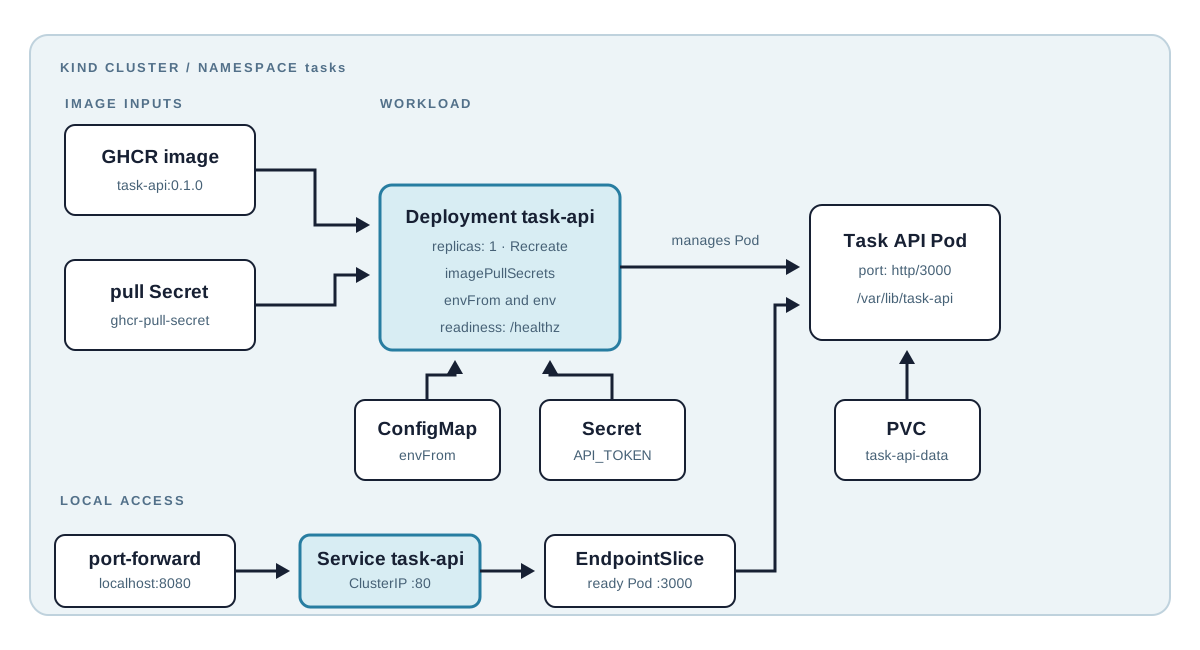
The individual resources from the previous chapters solve different problems. A Deployment keeps a process running, a Service gives it a stable name, a ConfigMap supplies ordinary settings, a Secret supplies sensitive input, and a PVC gives file-backed data a life beyond one Pod. A useful application needs those resources to agree on names, labels, ports, and mount paths.
This chapter deploys the Task API to the Kind cluster from Chapter 2. The commands are
reader-run: choose an image published under your GHCR owner, create your own token and registry
credentials, and apply the manifests to your local cluster. By the end, curl can create and
read tasks through a port-forwarded Service, while data survives a Pod replacement.
Code for this chapter. The complete manifest set and README are in _resource/kubernetes-basics/08-complete-task-api-deployment-on-kind.
Prepare a Reachable Image
Chapter 3 builds the Task API image and explains GHCR publishing. Before applying this chapter,
replace the image placeholder in deployment.yaml with your published name and tag:
image: ghcr.io/YOUR_GITHUB_USER_OR_ORGANIZATION/task-api:0.1.0
For a private package, create a pull Secret in the tasks Namespace. The GitHub token needs at
least read:packages for the package being pulled.
export GHCR_OWNER="YOUR_GITHUB_USER_OR_ORGANIZATION"
export GHCR_PULL_TOKEN="YOUR_GITHUB_TOKEN_WITH_READ_PACKAGES"

kubectl create namespace tasks --dry-run=client -o yaml | kubectl apply -f -
kubectl create secret docker-registry ghcr-pull-secret \
  --namespace tasks \
  --docker-server=ghcr.io \
  --docker-username="$GHCR_OWNER" \
  --docker-password="$GHCR_PULL_TOKEN" \
  --dry-run=client -o yaml | kubectl apply -f -
The Deployment references this Secret through imagePullSecrets. Do not add a registry token to
YAML, an image, or Git. For a public image, remove the entire imagePullSecrets block from
deployment.yaml before applying it; no credential is needed to pull it. Leaving a reference to
a Secret that does not exist makes the manifest harder to diagnose and provides no benefit.
Apply Configuration and Storage
Change to the resource directory, then apply the Namespace, ConfigMap, and PVC in that order:
cd _resource/kubernetes-basics/08-complete-task-api-deployment-on-kind
kubectl apply -f namespace.yaml
kubectl apply -f configmap.yaml
kubectl apply -f persistent-volume-claim.yaml
kubectl get pvc task-api-data -n tasks
Confirm that the PVC shows Bound before deploying so storage provisioning is separate from any
workload failure. On a new Kind cluster, wait for the default local storage provisioner. If it
stays Pending, inspect it with kubectl describe pvc task-api-data -n tasks and list available
classes with kubectl get storageclass. Removing the claim would make the API disposable rather
than fixing storage.
Create the API token without committing it. The following reader-run command creates the Secret name and key expected by the Deployment:
export TASK_API_TOKEN="CHOOSE_A_LONG_RANDOM_LOCAL_TOKEN"
kubectl create secret generic task-api-secret \
  --namespace tasks \
  --from-literal=API_TOKEN="$TASK_API_TOKEN" \
  --dry-run=client -o yaml | kubectl apply -f -
secret.template.yaml documents the required key but is not a place for a real token. Keep the
value in the current shell for the request test later.
Read the Deployment Contract
The Deployment has one replica because the tutorial stores tasks in one mounted JSON file:
spec:
  replicas: 1
  strategy:
    type: Recreate
  template:
    spec:
      securityContext:
        fsGroup: 1000
      imagePullSecrets:
        - name: ghcr-pull-secret
      containers:
        - name: api
          envFrom:
            - configMapRef:
                name: task-api-config
          env:
            - name: API_TOKEN
              valueFrom:
                secretKeyRef:
                  name: task-api-secret
                  key: API_TOKEN
            - name: TASK_STORE_PATH
              value: /var/lib/task-api/tasks.json
envFrom injects ConfigMap keys. secretKeyRef injects only the API token. TASK_STORE_PATH
connects the process to the PVC mount. fsGroup: 1000 gives the volume a group the non-root Node
image process can write in typical local storage implementations. imagePullSecrets is only for
fetching the image; it does not supply the API’s bearer token.
Recreate and one replica avoid two Pods writing the same JSON file during an update. That costs
brief update downtime. It is a local tutorial tradeoff, not a highly available design. A
production API should use a database designed for concurrent access, then use rolling updates
with multiple replicas.
The manifest defines CPU and memory requests and limits. Requests reserve scheduler capacity; limits constrain the running container. The small values are only a laptop learning baseline. Measure a real workload before choosing production values.
Readiness and liveness probes call /healthz on the container port named http (port 3000).
Readiness prevents the Service from sending traffic until the API responds. Liveness restarts a
process that remains running but no longer responds. This endpoint does not read or write the
task file, so neither probe proves that the PVC is writable or that every business operation is
healthy.
Deploy and Verify
After replacing the image placeholder and creating the appropriate Secrets, apply the workload and Service:
kubectl apply -f deployment.yaml
kubectl apply -f service.yaml
kubectl rollout status deployment/task-api -n tasks
kubectl get deployment,pods,service,pvc -n tasks
kubectl get endpointslices -n tasks -l kubernetes.io/service-name=task-api
The rollout should complete with one ready Pod and one ready EndpointSlice address. For
ImagePullBackOff, describe the Pod and check the image name, GHCR package visibility, and
ghcr-pull-secret when using a private image. For CrashLoopBackOff, inspect kubectl logs -n
tasks deployment/task-api and confirm the ConfigMap, Secret, and writable PVC exist under the
expected names. If the Pod stays Pending, describe it and check PVC binding before changing the
Deployment.
Forward the internal Service to the laptop and use the API in another terminal:
kubectl port-forward -n tasks service/task-api 8080:80
curl --fail -X POST http://localhost:8080/tasks \
  -H "Authorization: Bearer $TASK_API_TOKEN" \
  -H 'Content-Type: application/json' \
  -d '{"title":"Learn Kubernetes resources"}'
curl --fail http://localhost:8080/
The POST returns HTTP 201 with the new task. The GET returns the configured message and a task
list containing it. Stop port-forward with Ctrl-C when finished.
Prove Data Survives a Pod
Delete the current Pod by label, wait for the replacement, then forward the Service and repeat the GET request:
kubectl delete pod -n tasks -l app=task-api
kubectl rollout status deployment/task-api -n tasks
kubectl port-forward -n tasks service/task-api 8080:80
The saved task should still appear. The Deployment created a replacement Pod and the PVC mounted the existing data. This validates local persistence, not disaster recovery. Deleting the PVC or the Kind cluster can remove data; use tested backups and external storage for retained data.
Summary
- The Task API joins image, ConfigMap, Secret, PVC, probes, and Service through explicit names and labels.
- A private GHCR image needs a registry Secret with
read:packages; keep its token out of YAML. - One replica plus
Recreateprotects this file-backed tutorial store from concurrent writers. - Readiness determines Service endpoints, while liveness restarts an unresponsive process.
- Port-forward verifies the internal Service and a replacement Pod confirms the PVC path.
The series has now covered the resource boundaries needed to run a small application locally. Production next steps are external data storage, ingress and TLS, policy, observability, backup, and a repeatable delivery pipeline.