

A container is not the unit Kubernetes schedules. Kubernetes schedules a Pod: one or more containers that share an IP address, port space, and mounted volumes. That distinction matters when a container fails, when a Service selects application instances, and when an application needs a tightly coupled helper process.
This chapter creates a Namespace for the series and a single Pod inside it. By the end, you will be able to read the Pod lifecycle, inspect its logs and events, and recognize why an application Pod normally belongs under a controller rather than being created directly. The Task API returns in Chapter 8 after the controllers and networking it needs have been introduced.
Code for this chapter. The manifests and README are in _resource/kubernetes-basics/04-pods-and-namespaces.
Create the Scope First
A Namespace is a logical partition within one Kubernetes cluster. Resource names must be unique within a Namespace, and Kubernetes commands can target one Namespace at a time. Teams often use Namespaces to separate environments or applications and to attach policies, resource quotas, and permissions.
namespace.yaml has only one purpose: create the tasks Namespace.
apiVersion: v1
kind: Namespace
metadata:
  name: tasks
Apply it from the chapter resource directory:
kubectl apply -f namespace.yaml
kubectl get namespace tasks
The result should show tasks with an Active status. A Namespace does not create network
isolation by itself. Pods in different Namespaces can communicate unless a NetworkPolicy or
other network control restricts them. It also does not automatically restrict a team’s access;
that is an RBAC decision.
Using default works for a quick experiment, but it makes ownership and cleanup unclear. A
named Namespace gives the rest of this series one explicit scope. It also makes an accidental
command less likely to mix these resources with unrelated local work.
Create One Pod on Purpose
The following file runs one public nginx container. It is not a Task API deployment; it is a
small Pod chosen to show the runtime object without mixing in image registry credentials or
rollout behavior.
apiVersion: v1
kind: Pod
metadata:
  name: pod-inspector
  namespace: tasks
  labels:
    app: pod-inspector
spec:
  containers:
    - name: web
      image: nginx:1.27-alpine
      ports:
        - containerPort: 80
kind: Pod uses the core v1 API. metadata.namespace places this resource in tasks; if it
were omitted, kubectl would use the active context’s Namespace, normally default.
metadata.labels attach the app: pod-inspector label. A later Service uses labels to find
Pods, so labels should describe the workload rather than a transient Pod name.
The one-item containers list contains the container specification. The container name is
unique inside this Pod. image tells the node runtime what to pull, and containerPort records
the port the process listens on. It is useful metadata for readers and tools, but it does not
open a host port or create a Service.
Apply and observe it:
kubectl apply -f pod.yaml
kubectl get pods -n tasks -o wide
kubectl describe pod pod-inspector -n tasks
kubectl logs pod-inspector -n tasks
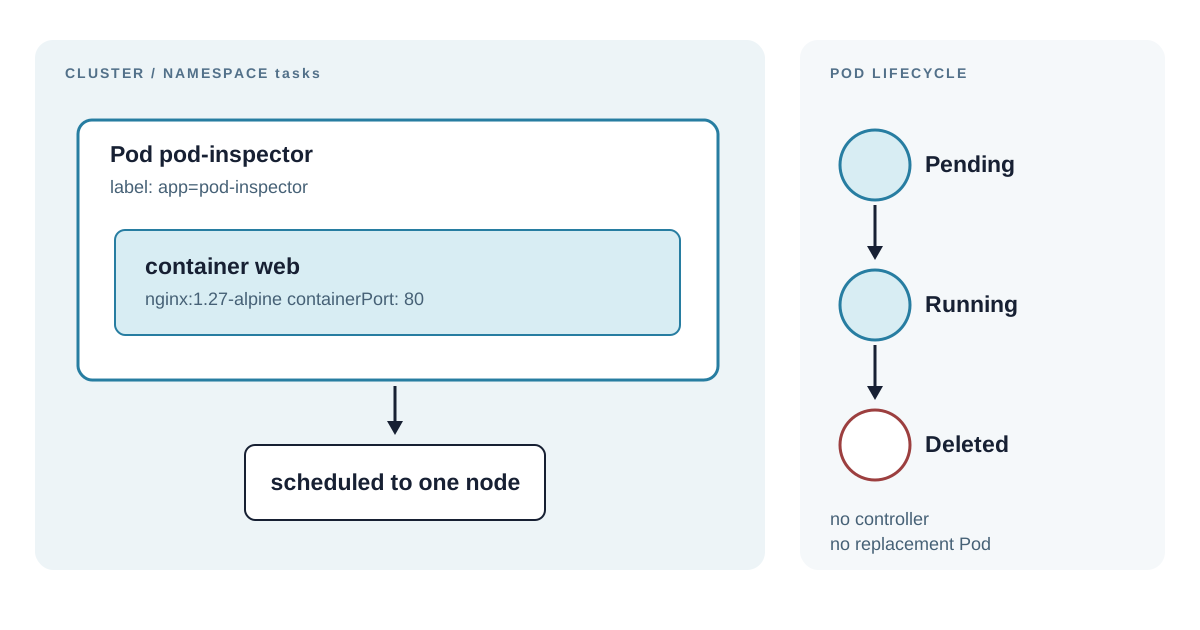
The Pod should progress from Pending while Kubernetes selects a node and pulls the image to
Running after its container starts. -o wide adds the assigned node and Pod IP. describe
shows the container state and the Event list, which is the first place to look when a Pod does
not start. The log command reads the web container’s standard output. A Running Pod only
means its container is running; this simple example has no readiness probe to test whether nginx
can serve a request.
The Pod Lifecycle Is Not an Availability Guarantee
Kubernetes assigns a Pod to one node. The node’s kubelet starts its containers and normally
restarts a failed container because the default Pod restart policy is Always. A container
restart increments the RESTARTS value but keeps the same Pod object.
If the Pod is deleted, no controller recreates it. Demonstrate that behavior only in this example:
kubectl delete pod pod-inspector -n tasks
kubectl get pods -n tasks
The second command should return no Pods. This is the important limitation of a naked Pod: it describes one instance, not a desired number of instances. A Deployment creates replacement Pods and performs controlled updates. Chapter 5 uses that controller for the Task API.
Do not use kubectl run as a substitute for a versioned manifest in team environments. It is
helpful for a short diagnostic Pod, but a manifest can be reviewed, committed, reapplied, and
checked in CI. The YAML files in this chapter separate the Namespace and Pod because each has a
different lifecycle and permission boundary.
Diagnose Pod States From Events
Pending does not mean the application crashed. It usually means the scheduler cannot assign
the Pod or the Pod waits for a dependency. ImagePullBackOff means the node has repeatedly
failed to pull the named image. CrashLoopBackOff means the process starts and exits repeatedly.
Read the status and Events before changing YAML:
kubectl get pod pod-inspector -n tasks
kubectl describe pod pod-inspector -n tasks
kubectl logs pod-inspector -n tasks --previous
--previous reads the preceding container instance when it has restarted. It has no output for
a container that never started or has never restarted. For ImagePullBackOff, inspect the image
name, network access, and registry credentials. For a crash loop, inspect the application log
and its command, environment, or configuration. Deleting the Pod only repeats the same failure
when the manifest remains wrong.
Clean Up the Experiment
Delete the Pod and Namespace when finished:
kubectl delete -f pod.yaml
kubectl delete -f namespace.yaml
Deleting a Namespace starts deletion of all namespaced resources inside it. That can be useful for a disposable exercise, but it is a broad operation in a shared cluster. Namespace deletion can also wait on resource finalizers, so a terminating Namespace needs investigation rather than repeated deletion. In production, delete individual workloads deliberately and check what else lives in the Namespace first.
Summary
- A Pod is Kubernetes’ smallest schedulable unit; its containers share network and storage context.
- A Namespace scopes resource names and commands but does not itself enforce network or access isolation.
kubectl describeand the Pod Event list identify scheduling, image-pull, and startup failures more directly than repeatedly recreating the resource.- A direct Pod is useful for inspection but is not self-healing after deletion.
- A Deployment adds replica management and controlled rollout behavior, which is the next chapter’s job.





