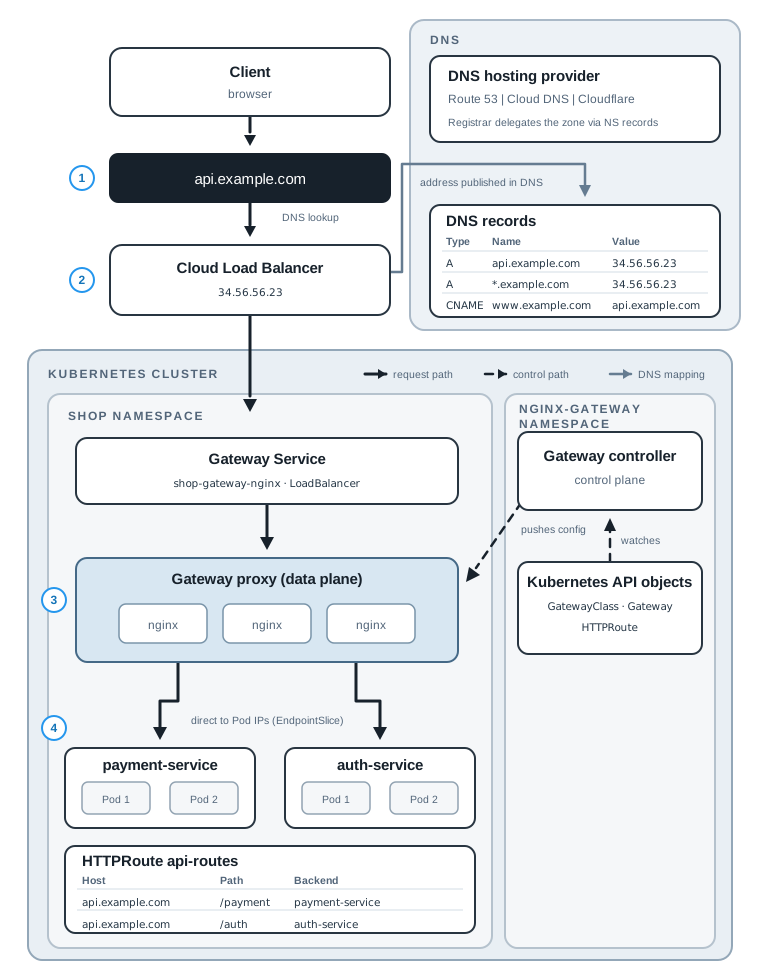
A user opens api.example.com/payment and gets a response from a Pod. Between those two points,
at least five systems make a decision: a DNS resolver, a DNS provider, a cloud load balancer, a
proxy inside the cluster, and the routing rules you wrote in YAML. When the request fails, the
error comes from one of them, and the fix depends on which one.
For years, the routing rules in that chain were an Ingress, and very often the proxy was Ingress NGINX. That changed. Kubernetes froze the Ingress API, Ingress NGINX stopped receiving updates in March 2026, and the Gateway API is now the recommended replacement.
This post covers both parts. The first part explains what was wrong with Ingress and why the Gateway API replaced it. The second part follows one request from the DNS lookup to the Pod and shows how the controller turns your YAML into proxy configuration. If you already know why you’re moving to the Gateway API, skip to Follow One Request.
Code for this post. The manifests are in _resource/kubernetes-gateway-api-dns-to-pod. I tested them on Kind with Gateway API v1.6.1 and NGINX Gateway Fabric 2.7.2. Command output in this post comes from that run.
What Ingress Got Wrong
An Ingress is the original Kubernetes resource for HTTP routing. It maps hostnames and paths to Services, and an Ingress controller (a proxy plus the code that configures it) does the actual routing. Here is the payment and auth routing as an Ingress for Ingress NGINX:
apiVersion: networking.k8s.io/v1
kind: Ingress
metadata:
  name: api
  namespace: shop
  annotations:
    nginx.ingress.kubernetes.io/ssl-redirect: "true"
    nginx.ingress.kubernetes.io/proxy-body-size: "10m"
spec:
  ingressClassName: nginx
  tls:
    - hosts: [api.example.com]
      secretName: api-example-tls
  rules:
    - host: api.example.com
      http:
        paths:
          - path: /payment
            pathType: Prefix
            backend:
              service:
                name: payment-service
                port:
                  number: 80
          - path: /auth
            pathType: Prefix
            backend:
              service:
                name: auth-service
                port:
                  number: 80
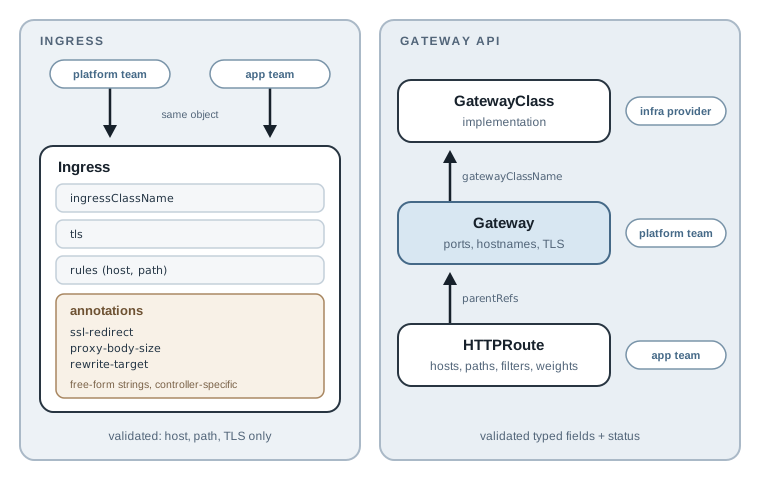
That works, and for a small cluster with one team it’s fine. The problems show up as soon as you need more than host and path, or more than one team.
The Ingress spec only covers hostnames, paths, and TLS. Everything else, such as redirects,
rewrites, timeouts, body size, header matching, and canary weights, goes into annotations.
Annotations are free-form strings. The API server doesn’t validate them, and each controller
invents its own. nginx.ingress.kubernetes.io/proxy-body-size means nothing to Traefik or to the
AWS Load Balancer Controller. Moving to another controller means rewriting every annotation, and
a typo in one fails silently.
The second problem is ownership. One Ingress object holds the TLS certificate, the controller choice, and the application routes. The platform team cares about the first two and the application team cares about the last one, but they edit the same YAML. Most organizations end up either giving app teams too much control or making every route change a platform ticket.
Why the Gateway API Replaced It
The Gateway API is the Kubernetes networking API that replaces Ingress. It fixes the two problems above directly.
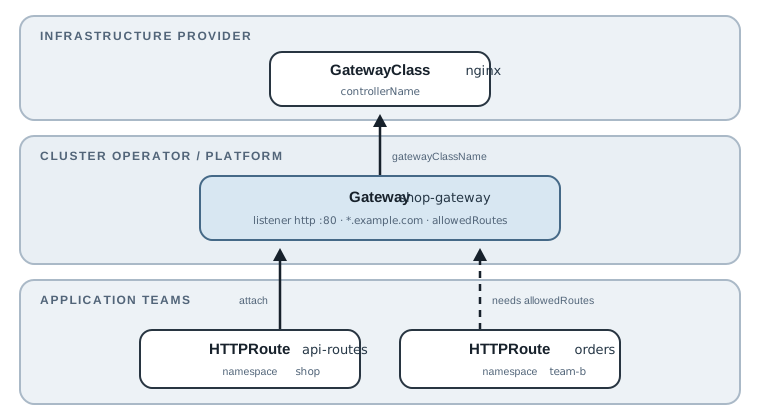
First, it splits the job by role. The infrastructure provider supplies a GatewayClass, which names an implementation such as NGINX Gateway Fabric or Envoy Gateway. The platform team owns the Gateway, which decides ports, hostnames, TLS, and which namespaces may attach routes. Application teams own HTTPRoutes in their own namespaces. Each team edits only its own objects, and the Gateway owner keeps control over who can publish what.
Second, features that used to be annotations are now typed fields in the spec. The API server validates them, and implementations prove support through shared conformance tests:
| What you need | Ingress NGINX annotation | Gateway API field |
|---|---|---|
| Redirect HTTP to HTTPS | ssl-redirect |
RequestRedirect filter |
| Strip or rewrite a path | rewrite-target |
URLRewrite filter |
| Canary traffic split | canary, canary-weight |
weight on backendRefs |
| Match on a header | canary-by-header (canary only) |
matches[].headers |
| Add a request header | configuration-snippet |
RequestHeaderModifier filter |
A canary, for example, is two weighted backends instead of a second Ingress with special annotations:
backendRefs:
  - name: payment-v1
    port: 80
    weight: 90
  - name: payment-v2
    port: 80
    weight: 10
The Gateway API also covers more than HTTP. GRPCRoute is stable, and since v1.6 TCPRoute and
UDPRoute are in the standard channel too. Every object also reports status conditions that
say whether it was accepted and why not, which Ingress never standardized. The failure section
below relies on that.
The Kubernetes documentation now says it directly: the Ingress API has been frozen. It still works and isn’t being removed, but new networking features go into the Gateway API only.
There is a cost. A setup that was one Ingress becomes at least a Gateway and an HTTPRoute, and you have to understand how they attach. Support for extended features (those outside the core conformance set) still varies between implementations, so check your implementation’s conformance report before relying on one.
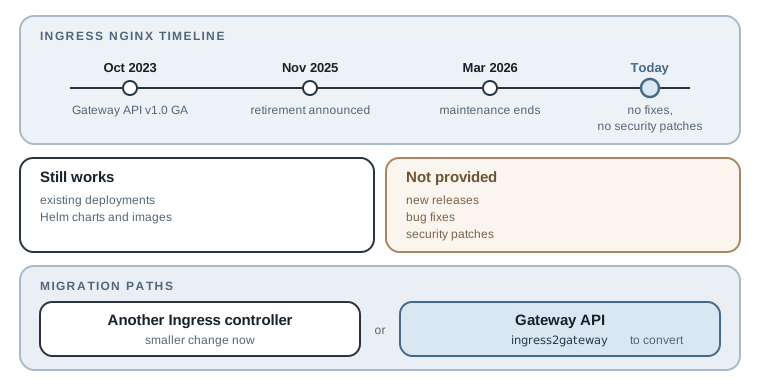
Why Ingress NGINX Was Retired
Ingress NGINX (the kubernetes/ingress-nginx project) started as an example implementation of
the Ingress API and became one of the most widely deployed controllers. In November 2025,
Kubernetes SIG Network and the Security Response Committee announced its retirement. Best-effort
maintenance ended in March 2026. Since then there are no new releases, no bug fixes, and no
patches for newly discovered security vulnerabilities.
The announcement gives two reasons. Its flexibility became technical debt: features such as the
snippets annotations, which let anyone who can create an Ingress inject raw NGINX
configuration, came to be treated as serious security flaws. And for years the project had only
one or two people developing it in their spare time. A planned replacement controller, InGate,
never matured and was retired as well.
Retirement doesn’t break anything on its own. Existing deployments keep running, and the Helm charts and images stay available. The risk is the next CVE: it won’t be fixed. Check whether you run it with:
kubectl get pods --all-namespaces \
  --selector app.kubernetes.io/name=ingress-nginx
If that returns Pods, you have two paths. You can move to another maintained Ingress controller,
which is the smaller change today. Or you can move to the Gateway API, which is where Kubernetes
networking is going; the ingress2gateway tool converts existing Ingress objects into Gateway
API resources as a starting point. I’d pick the Gateway API unless a deadline forbids the bigger
change, because the first path only pushes the same migration a few years out.
Note: Ingress NGINX is not the same project as F5’s NGINX Ingress Controller (
nginx/kubernetes-ingress) or the NGINX Gateway Fabric used in this post. The retirement applies only to the communitykubernetes/ingress-nginxcontroller.
Follow One Request
The rest of this post uses a small example. Two applications run in the shop namespace,
payment-service and auth-service, and both should be reachable under one public hostname:
| Host | Path | Backend |
|---|---|---|
api.example.com |
/payment |
payment-service |
api.example.com |
/auth |
auth-service |
One thing to keep in mind throughout: a Gateway and an HTTPRoute are only API objects. Neither receives a packet. A Gateway controller reads them and configures a proxy, and the proxy does the routing. Most of the confusing failures come from forgetting that split.
Step 1: DNS Turns the Name into an Address
The browser cannot connect to api.example.com. It needs an IP address, so it asks a
recursive resolver, usually run by the ISP, the company network, or a public service such as
1.1.1.1. The resolver walks the DNS tree on the client’s behalf:
- The root servers point it to the
.comservers. - The
.comservers return theNSrecords forexample.com. These name the authoritative nameservers, the servers that hold the zone’s records. - The authoritative nameservers return the record for
api.example.com.
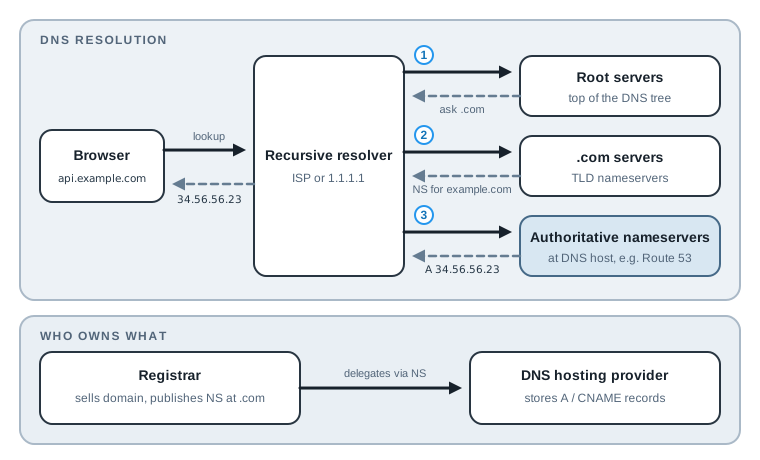
Two different companies are often involved here, and many architecture diagrams draw them as
one box. The registrar (GoDaddy, Namecheap, and so on) is where you bought the
domain. Its main DNS job is to publish the NS records at the .com level. The DNS hosting
provider (Route 53, Cloud DNS, Cloudflare, or the registrar itself) runs the authoritative
nameservers and stores your A and CNAME records. When you “move DNS to Route 53,” you are
changing the NS records at the registrar, not the records themselves.
You can see the delegation and the answer with dig:
dig +short NS example.com
dig +short api.example.com
The first command lists the authoritative nameservers. The second returns the address the browser will connect to. That address should be the load balancer in front of the Gateway.
Use the right record type
The record you create depends on what the cloud gives you for the load balancer:
| Load balancer address | Record |
|---|---|
| An IP address (GKE, Azure, many on-prem setups) | A record: api.example.com → 34.56.56.23 |
| A hostname (AWS NLB or ELB) | CNAME: api.example.com → abc123.elb.amazonaws.com |
A hostname, at the zone apex (example.com) |
Provider alias: Route 53 Alias, Cloudflare CNAME flattening |
A CNAME must point to another name, never to an IP. A CNAME also cannot sit at the zone
apex, because the apex already has NS and SOA records. If several subdomains share one
Gateway, a wildcard such as *.example.com saves a record per service.
Every record has a TTL, the number of seconds resolvers may cache the answer. If you recreate the Gateway and its load balancer gets a new address, clients keep using the old one until the TTL expires. Lower the TTL a day before a planned change, not during the outage.
Step 2: The Cloud Load Balancer Accepts the Connection
The browser opens a TCP connection to the address from DNS. That address belongs to a cloud load balancer, which exists because Kubernetes asked for it.
When you create a Gateway, the controller creates a proxy Deployment and a Service of type
LoadBalancer in front of it. The cloud provider’s controller sees that Service and provisions a
real load balancer, then writes its address back into the Service status. The Gateway controller
copies that address into the Gateway status, which is the one place you should read it from:
kubectl -n shop get gateway shop-gateway \
  -o jsonpath='{.status.addresses[0].value}'
That value is what goes into the DNS record from Step 1.
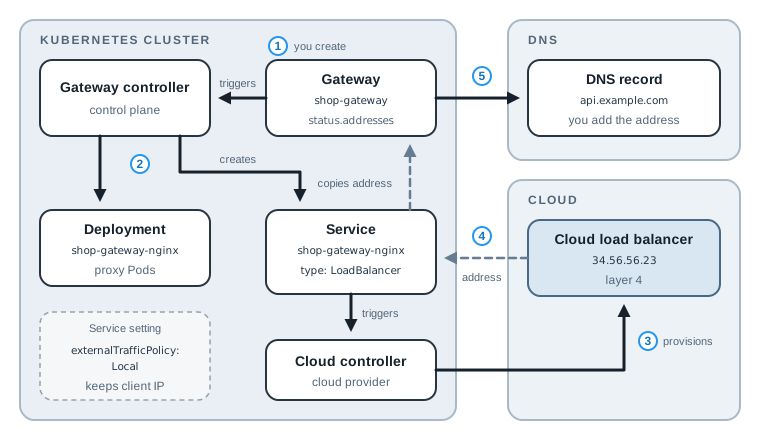
The load balancer itself knows nothing about hostnames or paths at this point. A layer-4 load
balancer forwards the TCP connection to a node (through the Service’s node port) or directly to
the proxy Pod, depending on the provider and its settings. NGINX Gateway Fabric’s Helm chart sets
externalTrafficPolicy: Local on this Service by default. That keeps the client’s source IP
intact and makes the load balancer send traffic only to nodes that run a proxy Pod.
Step 3: The Gateway Proxy Chooses a Route
The connection now reaches the data plane: the proxy Pods that actually move traffic. With NGINX Gateway Fabric they run NGINX; with Envoy Gateway or Istio they run Envoy. Here is the Gateway that created them:
apiVersion: gateway.networking.k8s.io/v1
kind: Gateway
metadata:
  name: shop-gateway
  namespace: shop
spec:
  gatewayClassName: nginx
  listeners:
    - name: http
      protocol: HTTP
      port: 80
      hostname: "*.example.com"
      allowedRoutes:
        namespaces:
          from: Same
gatewayClassName: nginx picks the implementation. Each entry in listeners is a port and
protocol the proxy should accept. hostname: "*.example.com" limits this listener to those
names. allowedRoutes.namespaces.from: Same lets only HTTPRoutes in the shop namespace attach
to it. That last field is the Gateway owner’s control over who can publish routes; it matters
again in the failure section.
Note: This example uses plain HTTP to keep the flow readable. In production, add an
HTTPSlistener on port 443 withtls.certificateRefspointing to a Secret, and the proxy will terminate TLS before routing. With HTTPS, the proxy picks the listener from the TLS SNI value instead of theHostheader, but the rest of the flow is the same.
And here is the route:
apiVersion: gateway.networking.k8s.io/v1
kind: HTTPRoute
metadata:
  name: api-routes
  namespace: shop
spec:
  parentRefs:
    - name: shop-gateway
      sectionName: http
  hostnames:
    - api.example.com
  rules:
    - matches:
        - path:
            type: PathPrefix
            value: /payment
      backendRefs:
        - name: payment-service
          port: 80
    - matches:
        - path:
            type: PathPrefix
            value: /auth
      backendRefs:
        - name: auth-service
          port: 80
parentRefs attaches the route to the http listener of shop-gateway. hostnames must fall
inside the listener’s hostname, and api.example.com does match *.example.com. Each rule pairs
a match with one or more backendRefs, which point to a Service and port.
For each request, the proxy makes the decision in this order:
- Listener. Match the port the connection arrived on, then the hostname.
- Route hostname. Keep only the routes whose
hostnamesmatch theHostheader. - Rule. Find the matching rule. When several match, the more specific one wins: an exact path beats a prefix, and a longer prefix beats a shorter one.
- Backend. Pick a backend from that rule and forward the request.
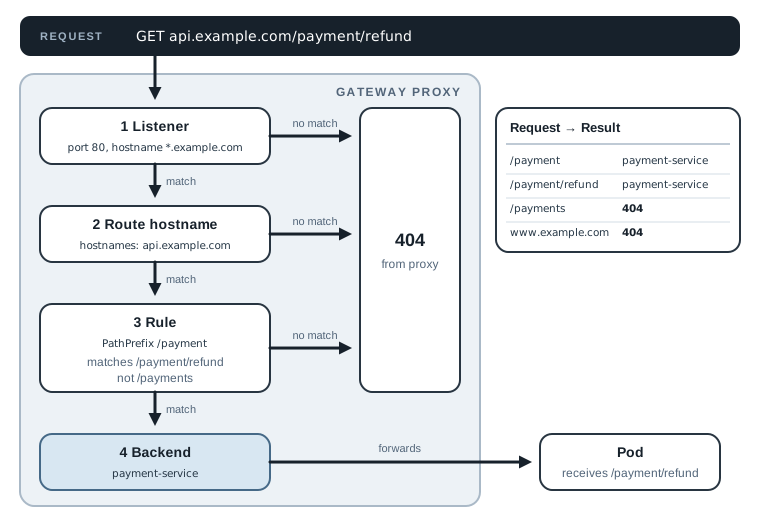
PathPrefix matches whole path segments, not characters. This is what the test run returned:
/payment           payment-service [200]
/payment/refund    payment-service [200]
/auth              auth-service [200]
/payments          [404]
www.example.com    [404]
/payment/refund matches the /payment prefix. /payments does not, because payments is a
different segment. A request for www.example.com gets past the listener, which accepts
*.example.com, but no route claims that hostname, so the proxy returns 404 itself. The
backend never sees it.
The path reaches the backend unchanged. payment-service receives /payment/refund, not
/refund. If the application expects paths without the prefix, add a URLRewrite filter to the
rule rather than changing the application.
Step 4: The Proxy Sends the Request to a Pod
You might expect the proxy to send the request to the payment-service ClusterIP and let
kube-proxy pick a Pod. NGINX Gateway Fabric doesn’t. I checked the generated NGINX configuration
in the test cluster:
kubectl -n shop exec deploy/shop-gateway-nginx -c nginx -- nginx -T
upstream shop_payment-service_80 {
    server 10.244.0.8:5678;
    server 10.244.0.7:5678;
Those are the two payment Pod IPs and their container port. They match the EndpointSlice for
the Service exactly:
NAME                    ADDRS                    PORT
payment-service-7275w   10.244.0.8,10.244.0.7    5678
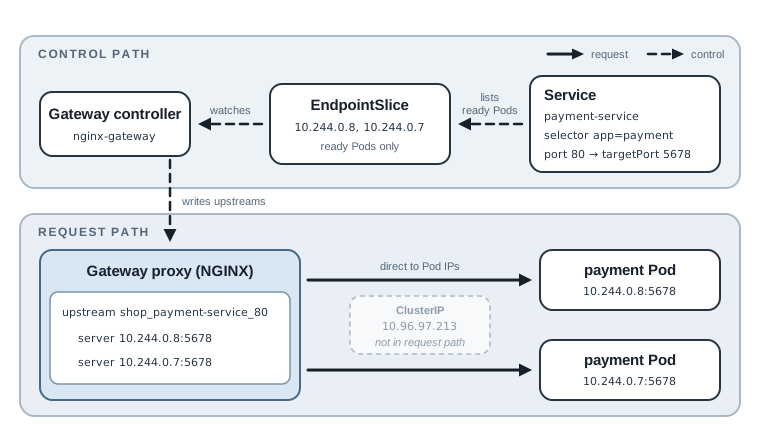
So the Service in backendRefs is a selector, not a hop. The controller watches the Service’s
EndpointSlices, which list the ready Pods behind it, and writes those Pod addresses into the
proxy configuration. The proxy then load-balances across them directly. Envoy-based
implementations work the same way.
This has two practical effects. Readiness probes matter: a Pod that is not ready drops out of the
EndpointSlice and therefore out of the proxy’s upstream list. And targetPort matters more than
port: the request goes to 5678 on the Pod, even though the route says port 80.
The Control Path: How YAML Becomes Proxy Config
The data path above only works because a controller has already done its part. That happens before any request arrives:
- You install the Gateway API CRDs. Kubernetes does not ship them; without them,
kubectl applyon a Gateway fails with “no matches for kind.” - You install an implementation. NGINX Gateway Fabric runs its controller in the
nginx-gatewaynamespace and creates a GatewayClass namednginxwhosecontrollerNameisgateway.nginx.org/nginx-gateway-controller. The controller marks the classAccepted. - You create a Gateway. The controller provisions a data plane for it in the Gateway’s own
namespace. In the test, that was a Deployment and a Service both named
shop-gateway-nginx, labeledgateway.networking.k8s.io/gateway-name=shop-gateway. - You create HTTPRoutes. The controller checks each one against the listener’s
allowedRoutes, resolves itsbackendRefsto EndpointSlices, renders the proxy configuration, and pushes it to the data plane. - The controller writes the result back into
statuson every object.
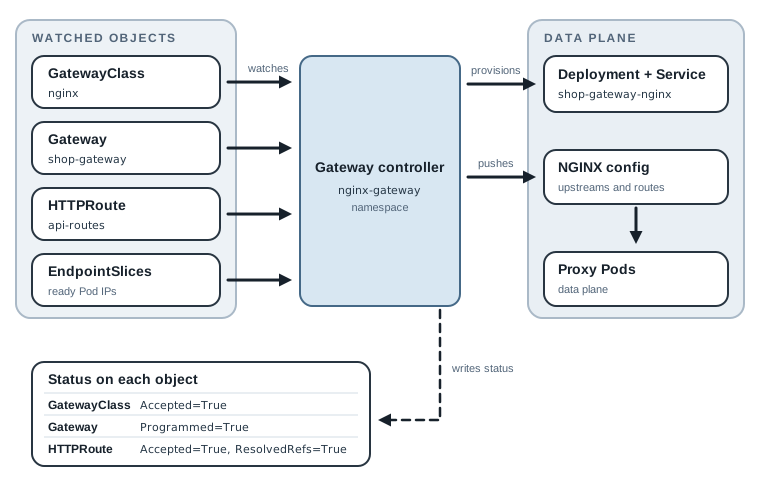
Step 5 is the useful one for debugging. A healthy setup looks like this:
kubectl get gatewayclass
kubectl -n shop get gateway shop-gateway
kubectl -n shop get httproute api-routes \
  -o jsonpath='{range .status.parents[0].conditions[*]}{.type}={.status} {.reason}{"\n"}{end}'
NAME    CONTROLLER                                   ACCEPTED
nginx   gateway.nginx.org/nginx-gateway-controller   True

NAME           CLASS   ADDRESS         PROGRAMMED
shop-gateway   nginx   10.96.214.138   True

Accepted=True Accepted
ResolvedRefs=True ResolvedRefs
Programmed=True on the Gateway means the data plane has its configuration. On a route,
Accepted means a listener took it, and ResolvedRefs means every backend exists. (The address
here is a ClusterIP because the test ran on Kind without a cloud load balancer. On a cloud
cluster it is the load balancer’s IP or hostname.)
When It Breaks: Read the Status Before the Logs
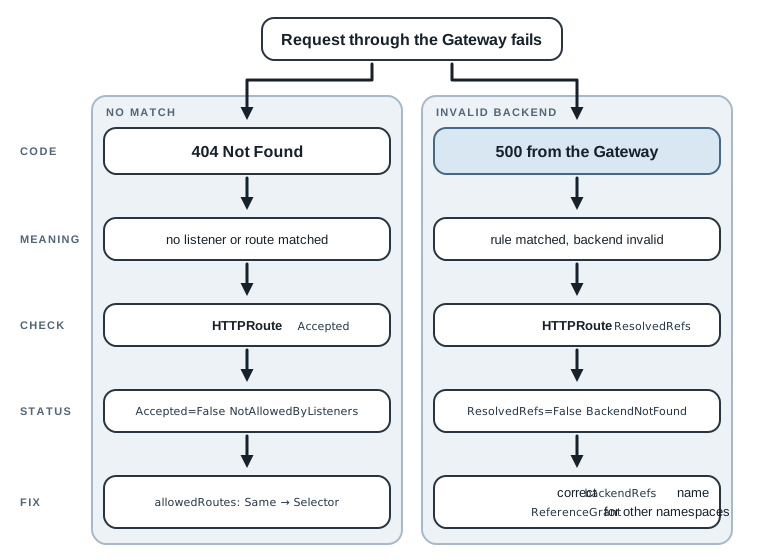
I broke the setup in two common ways to see what each layer reports.
A route in another namespace
A second team created an HTTPRoute in the team-b namespace and pointed it at shop-gateway.
Their requests to /orders returned 404. The route’s status explained why:
Accepted=False NotAllowedByListeners: The Route is not allowed by any listener
The Gateway’s listener says from: Same, so it ignores routes from other namespaces. Nothing in
the proxy logs mentions it, because the route never reached the proxy. The fix is a Gateway
change: set allowedRoutes.namespaces.from to All, or to Selector with a label that only
approved namespaces carry. Selector is the better production choice; All lets any namespace
publish routes under your hostname.
A related rule applies to backends. An HTTPRoute can point to a Service in another namespace
only if that namespace contains a ReferenceGrant allowing it. Without one, the route reports
ResolvedRefs=False with reason RefNotPermitted.
A misspelled Service name
A route pointed to paymnet-service. The route was accepted, since the listener allows it, but:
Accepted=True Accepted: The Route is accepted
ResolvedRefs=False BackendNotFound: spec.rules[0].backendRefs[0].name: Not found: "paymnet-service"
Requests that matched this rule returned 500, not 404. The Gateway API specifies this: when a rule matches but its backend is invalid, the proxy must return a 500 instead of quietly sending the request somewhere else. The status code alone tells you which half failed. A 404 means no rule matched; a 500 from the Gateway means a rule matched but had nowhere to send the request.
A checklist, in request order
When a request fails, check each layer in the order the request travels:
- DNS.
dig +short api.example.comreturns the Gateway address. - Load balancer. The Gateway’s
status.addressesis set, and the proxy Service has an external address. - Gateway.
Programmed=True, and the listener’sattachedRoutescount includes your route. - Route.
Accepted=TrueandResolvedRefs=Truefor your parent Gateway. - Backend. The Service’s EndpointSlice lists ready Pod IPs.
To test the cluster side before DNS exists, skip step 1 by setting the host yourself:
curl --resolve api.example.com:80:34.56.56.23 http://api.example.com/payment
--resolve makes curl use that IP for the name without touching DNS, and the Host header is
still correct, so listener and route matching behave exactly as they will in production.
Summary
- Ingress only standardized host, path, and TLS; everything else lived in controller-specific annotations. The Ingress API is now frozen, and Ingress NGINX stopped receiving fixes in March 2026.
- The Gateway API splits routing by role (GatewayClass, Gateway, HTTPRoute), replaces annotations with validated fields, and reports why a route was or wasn’t accepted.
- DNS maps the hostname to the load balancer the Gateway controller asked for. Use an
Arecord for an IP and aCNAMEor alias for a hostname. - The proxy matches listener, then route hostname, then rule, then backend, and sends traffic straight to Pod IPs taken from EndpointSlices.
- When something fails, read
statuson the Gateway and HTTPRoute first. A 404 means no rule matched; a 500 from the Gateway means the rule’s backend is invalid.
If you want to try it, the
example folder
has the install commands for Kind. If you’re migrating from Ingress NGINX, run ingress2gateway
against a copy of your Ingress objects first and compare its output with the routes you expect.