A direct Pod disappears when it is deleted. An application service needs a controller that keeps the requested number of instances running and changes them in a controlled order. A Deployment provides that controller for stateless workloads such as the Task API.
This chapter creates a two-replica Deployment using a public example image, watches its rollout, and practices a rollback. The manifest structure is the same one Chapter 8 uses with the Task API image. By the end, you will be able to distinguish a Deployment, ReplicaSet, and Pod and diagnose a rollout before it becomes a user-visible outage.
Code for this chapter. The manifests and README are in _resource/kubernetes-basics/05-deployments-and-rollouts.
Declare the Replica Count
Create the tasks Namespace first if it does not exist from Chapter 4. Then apply
deployment.yaml:
kubectl apply -f ../04-pods-and-namespaces/namespace.yaml
kubectl apply -f deployment.yaml
kubectl rollout status deployment/task-api -n tasks
The Deployment requests two copies of a small HTTP server:
apiVersion: apps/v1
kind: Deployment
metadata:
  name: task-api
  namespace: tasks
spec:
  replicas: 2
  selector:
    matchLabels:
      app: task-api
  template:
    metadata:
      labels:
        app: task-api
    spec:
      containers:
        - name: api
          image: hashicorp/http-echo:1.0.0
          args: ["-text=task-api placeholder", "-listen=:3000"]
          ports:
            - containerPort: 3000
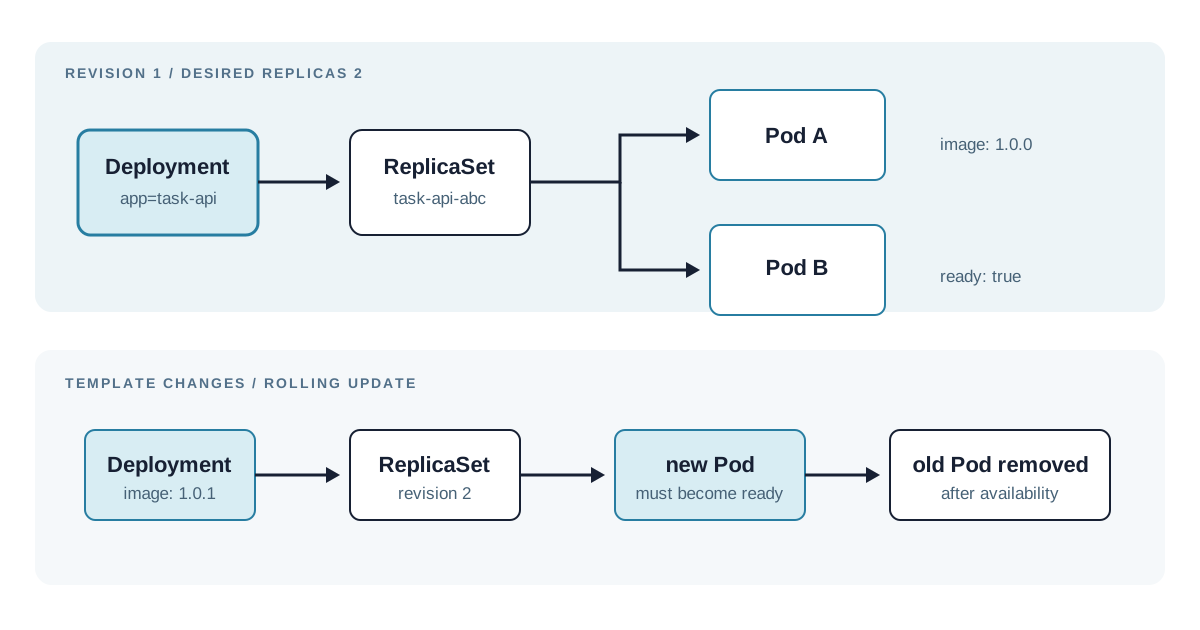
spec.replicas is the desired count. The Deployment creates a ReplicaSet, and that
ReplicaSet creates Pods until two matching Pods exist. The selector is the controller’s ownership
rule. It must match template.metadata.labels; Kubernetes rejects a Deployment whose selector
does not match its template.
The Pod template is the part that becomes a new Pod. The public http-echo image is used only
until the Task API is fully configured in Chapter 8. Its args override the image defaults so
the process listens on port 3000. containerPort is documentation and metadata, not network
exposure.
Read the Ownership Chain
Inspect all three resource types:
kubectl get deployment,replicaset,pods -n tasks -l app=task-api
kubectl get pods -n tasks -l app=task-api -o wide
The Deployment should show 2/2 ready replicas. Its ReplicaSet name starts with task-api- and
the two Pod names start with that ReplicaSet name. Pod names change after a rollout; select
application Pods by label instead of hard-coding a generated name.
Delete one Pod to test reconciliation:
kubectl delete pod -n tasks -l app=task-api
kubectl get pods -n tasks -l app=task-api --watch
The selector deletes both matching Pods. The ReplicaSet immediately creates replacements, and
the watch should return to two Running Pods. This is self-healing at the replica level. It
does not repair a broken image or application configuration; Kubernetes will faithfully restart
the same broken Pod specification. The watch can begin after the replacements already exist on a
fast local cluster, so the useful outcome is the restored replica count, not seeing every event.
Change an Image Through a Rollout
The separate deployment-image-update.yaml changes only the image tag to a deliberately bad
reference. Apply it as a controlled failure exercise:
kubectl apply -f deployment-image-update.yaml
kubectl rollout status deployment/task-api -n tasks --timeout=60s
kubectl get pods -n tasks -l app=task-api
The rollout should time out because nodes cannot pull hashicorp/http-echo:does-not-exist.
The old Pods remain available by default because a Deployment uses a rolling update strategy.
Kubernetes creates a new ReplicaSet from the changed Pod template, then gradually adds new Pods
and removes old Pods only when availability rules allow it.
Inspect the state before rolling back:
kubectl rollout history deployment/task-api -n tasks
kubectl describe pod -n tasks -l app=task-api
The Events section should include an image-pull error. Roll back to the previous ReplicaSet:
kubectl rollout undo deployment/task-api -n tasks
kubectl rollout status deployment/task-api -n tasks
rollout undo changes the Deployment template back to its prior revision. It is useful for a
bad image or configuration change, but it does not fix a database migration, a malformed request
already processed, or a secret exposed by a previous image. Production rollback plans need to
account for those external effects.
Set Rollout Tradeoffs Deliberately
Kubernetes defaults to RollingUpdate, with up to 25% unavailable and 25% extra Pods for many
Deployments. The default works for a small stateless API when the cluster has spare capacity.
It trades a temporary overlap of old and new versions for availability.
Recreate removes existing Pods before it creates new ones. It avoids concurrent versions but
causes downtime. It can suit a workload that cannot run two versions simultaneously, although
the better answer is often to redesign the compatibility boundary. Blue/green and canary
releases need additional routing or progressive-delivery tooling; a Deployment alone does not
direct traffic by version.
Readiness probes decide when Kubernetes may count a Pod as ready during a rollout. Chapter 8
adds the Task API’s /healthz endpoint as a readiness and liveness probe. Without a readiness
probe, Kubernetes treats a started container as ready and a Service can route traffic before the
application is ready to serve useful work. A probe is only as meaningful as its endpoint:
/healthz confirms that this API responds, not that every external dependency is healthy.
Summary
- A Deployment declares the desired Pod template and replica count.
- A ReplicaSet maintains that count; Pods are the disposable runtime instances it creates.
- Labels connect the Deployment selector, ReplicaSet, Pods, and later the Service.
- A rolling update keeps available old Pods while replacement Pods become ready.
kubectl describe, rollout history, and a rollback identify and recover from an image-pull failure without guessing.
The next chapter adds a Service, which gives these changing Pod IP addresses one stable in-cluster name and a safe local access path.