You’ve learned the pieces. Now let’s build something real. In this final chapter we’ll containerize the complete Task App — a Node.js API, Python worker, PostgreSQL, and Redis — and review best practices for taking Docker to production.
Code for this chapter. See 08-full-app.
Complete app code. The runnable sample application lives in _resource/docker-basic/task-app.
The Task App architecture
Our application has four components:
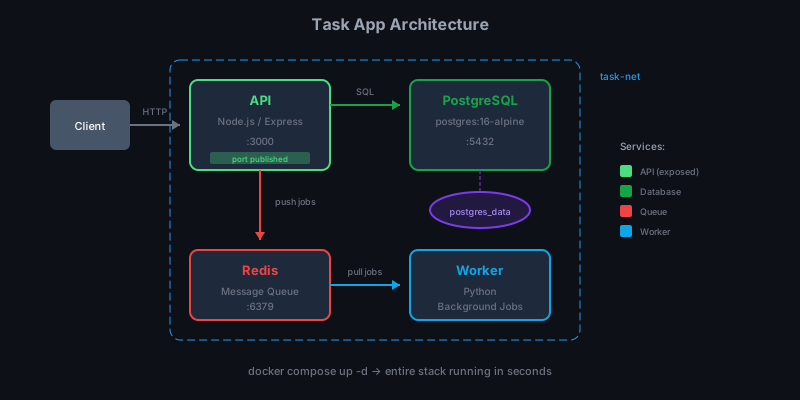
- API: REST endpoints for task management, stores in PostgreSQL, queues jobs to Redis
- Worker: Processes background jobs from the Redis queue
- PostgreSQL: Persistent task storage
- Redis: Message queue between API and worker
Project structure
task-app/
├── api/
│   ├── src/
│   │   └── index.js
│   ├── package.json
│   ├── Dockerfile
│   └── .dockerignore
├── worker/
│   ├── worker.py
│   ├── requirements.txt
│   ├── Dockerfile
│   └── .dockerignore
└── docker-compose.yml
The API service
Here’s the Node.js API Dockerfile — we use multi-stage builds:
# Stage 1: Install dependencies
FROM node:20-alpine AS deps
WORKDIR /app
COPY package*.json ./
RUN npm ci --only=production

# Stage 2: Production image
FROM node:20-alpine AS runner
WORKDIR /app

# Create non-root user
RUN addgroup -g 1001 -S nodejs && \
    adduser -S nodejs -u 1001

COPY --from=deps /app/node_modules ./node_modules
COPY src ./src
COPY package.json ./

USER nodejs

EXPOSE 3000

ENV NODE_ENV=production

CMD ["node", "src/index.js"]
Why multi-stage?
- Smaller image: Only production dependencies, no npm cache
- Security: No package manager or dev tools in final image
- Caching: Dependency layer only rebuilds when
package.jsonchanges
The worker service
The Python worker is simpler:
FROM python:3.12-slim

WORKDIR /app

COPY requirements.txt .
RUN pip install --no-cache-dir -r requirements.txt

COPY worker.py .

RUN useradd -m -u 1001 worker
USER worker

CMD ["python", "worker.py"]
No multi-stage needed — Python doesn’t compile anything. We still:
- Copy
requirements.txtfirst for layer caching - Run as non-root
- Use
--no-cache-dirto keep the image small
The docker-compose.yml
Everything comes together:
services:
  db:
    image: postgres:16-alpine
    environment:
      POSTGRES_DB: taskdb
      POSTGRES_USER: taskuser
      POSTGRES_PASSWORD: taskpass
    volumes:
      - postgres_data:/var/lib/postgresql/data
    ports:
      - "5432:5432"
    healthcheck:
      test: ["CMD-SHELL", "pg_isready -U taskuser -d taskdb"]
      interval: 5s
      timeout: 5s
      retries: 5

  redis:
    image: redis:7-alpine
    ports:
      - "6379:6379"
    volumes:
      - redis_data:/data
    healthcheck:
      test: ["CMD", "redis-cli", "ping"]
      interval: 5s
      timeout: 5s
      retries: 5

  api:
    build:
      context: ./api
      dockerfile: Dockerfile
    ports:
      - "3000:3000"
    environment:
      DB_HOST: db
      DB_PORT: 5432
      DB_NAME: taskdb
      DB_USER: taskuser
      DB_PASSWORD: taskpass
      REDIS_HOST: redis
      REDIS_PORT: 6379
      PORT: 3000
    depends_on:
      db:
        condition: service_healthy
      redis:
        condition: service_healthy
    restart: unless-stopped

  worker:
    build:
      context: ./worker
      dockerfile: Dockerfile
    environment:
      REDIS_HOST: redis
      REDIS_PORT: 6379
    depends_on:
      redis:
        condition: service_healthy
    restart: unless-stopped

volumes:
  postgres_data:
  redis_data:
Key patterns:
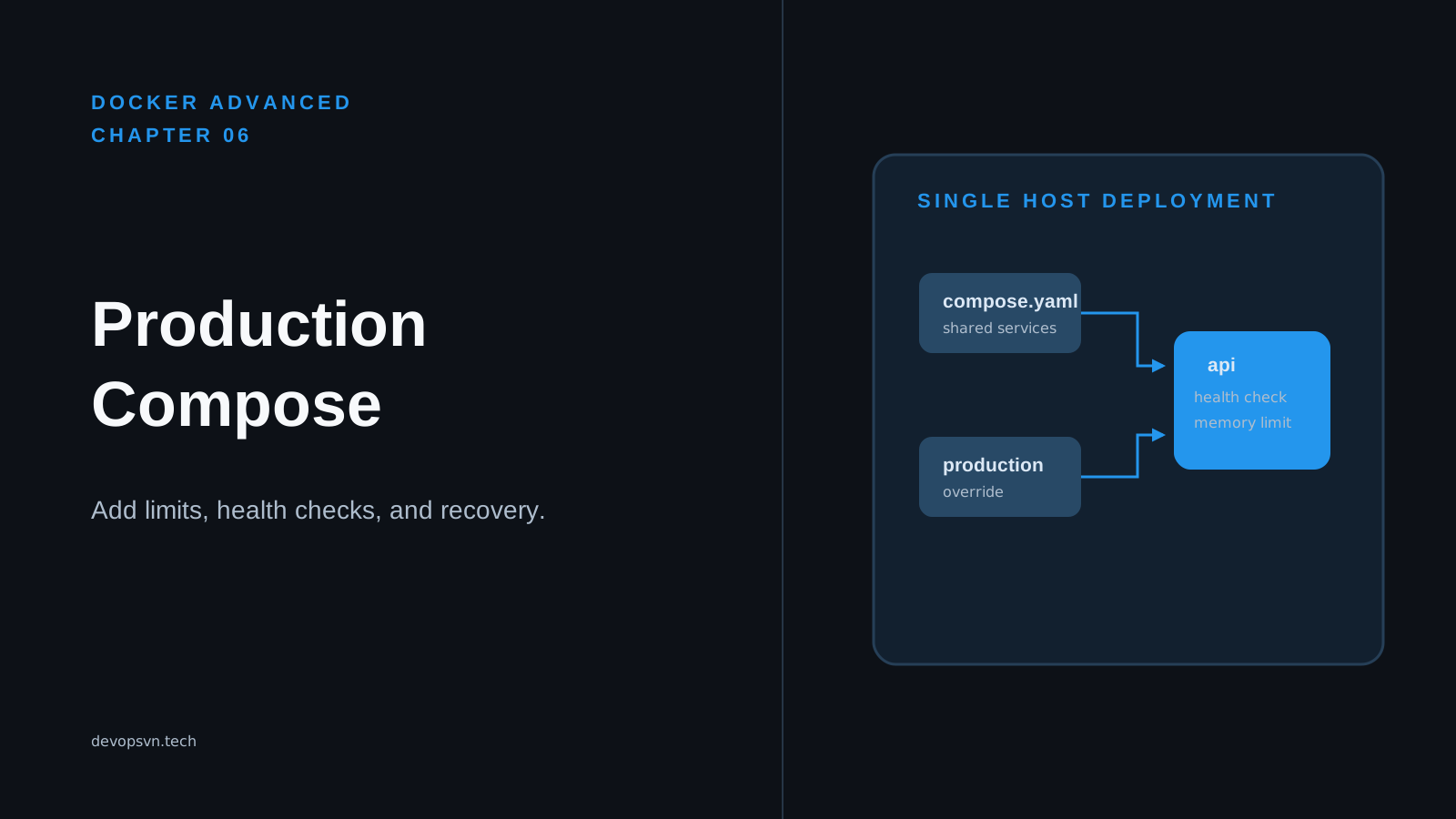
- Health checks ensure services start in the right order
- Named volumes persist database data
- Environment variables configure service connections
- Restart policies keep services running
Running the application
Build and start everything:
cd task-app
docker compose up -d --build
Check status:
docker compose ps
NAME                  STATUS                   PORTS
task-app-api-1        Up 10 seconds (healthy)  0.0.0.0:3000->3000/tcp
task-app-db-1         Up 15 seconds (healthy)  0.0.0.0:5432->5432/tcp
task-app-redis-1      Up 15 seconds (healthy)  0.0.0.0:6379->6379/tcp
task-app-worker-1     Up 10 seconds
Test the API:
# Create a task
curl -X POST http://localhost:3000/tasks \
  -H "Content-Type: application/json" \
  -d '{"title": "Learn Docker", "description": "Complete the basics series"}'

# List tasks
curl http://localhost:3000/tasks

# Check health
curl http://localhost:3000/health
Watch the worker process jobs:
docker compose logs -f worker
Best practices summary
Let me collect the best practices we’ve covered throughout the series.
Dockerfile best practices
- Use specific base image tags
# Bad FROM node:latest # Good FROM node:20-alpine - Order for layer caching — dependencies before code:
COPY package.json . RUN npm install COPY . . -
Multi-stage builds — keep build tools out of production images
- Run as non-root:
RUN adduser -S appuser USER appuser - Use .dockerignore — exclude
node_modules,.git, tests
Compose best practices
- Use health checks with depends_on conditions:
depends_on: db: condition: service_healthy - Named volumes for persistence:
volumes: postgres_data: - Restart policies for reliability:
restart: unless-stopped - Don’t hardcode secrets — use environment variables or Docker secrets
Security best practices
- Scan images for vulnerabilities:
docker scout cves my-image:v1 -
Never store secrets in images — pass at runtime
-
Keep images updated — rebuild with patched base images
- Limit resources — prevent runaway containers:
deploy:
  resources:
    limits:
      memory: 512M
Production considerations
Docker Compose is great for development and simple deployments, but for serious production you’ll want more:
What Compose doesn’t give you
- Multi-host deployment — Compose runs on one machine
- Auto-scaling — no built-in scaling based on load
- Rolling updates — no zero-downtime deployments
- Self-healing — restart policies help, but no rescheduling to healthy nodes
- Service discovery — limited to one network namespace
What to use instead
-
Kubernetes — the industry standard for container orchestration. Complex but powerful. Our Kubernetes series covers the basics.
-
Docker Swarm — Docker’s built-in orchestration. Simpler than Kubernetes, less capable.
-
Managed services — AWS ECS/Fargate, Google Cloud Run, Azure Container Apps. Let the cloud provider handle orchestration.
When Compose is enough
Compose works well for:
- Local development — always
- CI/CD pipelines — spin up test environments
- Small deployments — single server, few services, low traffic
- Staging environments — if production is on Kubernetes, staging can be simpler
Cleanup
Stop everything:
docker compose down
Remove volumes too:
docker compose down -v
Where to go from here
You now have the Docker fundamentals. Some paths forward:
-
Kubernetes — learn container orchestration at scale. Start with our Kubernetes Basics series.
-
CI/CD integration — build Docker images in GitHub Actions, GitLab CI, etc.
-
Security hardening — explore distroless images, rootless Docker, image signing
-
Monitoring — add Prometheus, Grafana, log aggregation
Summary
Over this series you’ve learned:
- What containers are and why they matter
- How to install Docker and run containers
- Building custom images with Dockerfiles
- Managing container lifecycle and resources
- Connecting containers with Docker networking
- Persisting data with volumes
- Orchestrating multi-container apps with Compose
You built a real application from scratch — API, worker, database, message queue — all defined in code and runnable with a single command.
That’s the power of Docker: consistent environments, reproducible deployments, and infrastructure as code. Take these skills and containerize everything.