Welcome to the Docker Basics series. Over the next chapters we’ll go from zero to running a multi-service application — a Task App with a Node.js API, Python worker, PostgreSQL, and Redis — all orchestrated with Docker Compose. But first, let’s answer the fundamental question: what problem does Docker actually solve?
Code for this chapter. Starter files and notes are in _resource/docker-basic.
The problem: “It works on my machine”
Every developer has heard it. Every ops engineer has dreaded it.
You write your app on a MacBook with Python 3.12, PostgreSQL 16, and a specific version of libssl. It works perfectly. You push to production, and it crashes. The server has Python 3.9, PostgreSQL 14, and a different libssl. Three hours of debugging later, you’ve learned more about shared library paths than you ever wanted to know.
The problem is environment inconsistency. Your app doesn’t run in isolation — it depends on the operating system, system libraries, language runtimes, database versions, and dozens of other things that can differ between machines.
Before containers, the solutions were painful:
- Document everything. Write a 50-page runbook that’s outdated before you finish it.
- Configuration management. Use Ansible or Chef to converge servers to a known state. Better, but slow and never quite reproducible.
- Virtual machines. Ship the entire OS. Reproducible, but heavy — gigabytes of disk, minutes to boot, wasted resources.
We needed a way to package an application with its entire environment — lightweight enough to start in milliseconds, reproducible enough to run identically everywhere.
That’s what containers do.
What is a container?
A container is a lightweight, isolated environment that packages an application along with everything it needs to run: code, runtime, libraries, and system tools.
Think of it like this: a virtual machine virtualizes hardware (CPU, memory, disk), so it needs a full operating system inside. A container virtualizes the operating system — it shares the host’s kernel but gets its own isolated view of the filesystem, network, and processes.
The difference matters:
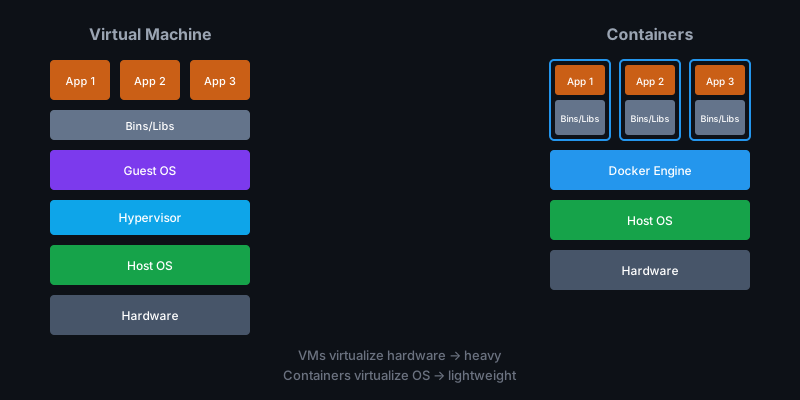
| Aspect | Virtual Machine | Container |
|---|---|---|
| Size | Gigabytes | Megabytes |
| Startup | Minutes | Milliseconds |
| Resource overhead | High (full OS) | Low (shared kernel) |
| Isolation | Complete (hypervisor) | Process-level (namespaces) |
Containers are fast because they don’t boot an OS. They’re small because they don’t include one. And they’re reproducible because everything the app needs is packaged inside.
Where does Docker fit in?
Docker didn’t invent containers — Linux had the underlying features (namespaces, cgroups) for years. But Docker made containers usable. Before Docker, you needed deep kernel knowledge to set up a container. After Docker, you run one command.
Docker provides:
- A standard format for packaging applications (Docker images)
- A runtime for executing containers from those images
- A registry for sharing images (Docker Hub, and others)
- A CLI and API that makes all of this simple
When people say “containers,” they usually mean “Docker containers” — even though alternatives exist (Podman, containerd, etc.). The concepts transfer directly.
The mental model: images and containers
Two words you’ll use constantly:
Image
An image is a read-only template containing your application and its environment. Think of it as a snapshot — everything needed to run, frozen in time. Images are built in layers: a base OS, then your runtime, then your dependencies, then your code.
Container
A container is a running instance of an image. When you start a container, Docker takes the image, adds a writable layer on top, and executes your application. You can run many containers from the same image, each isolated from the others.
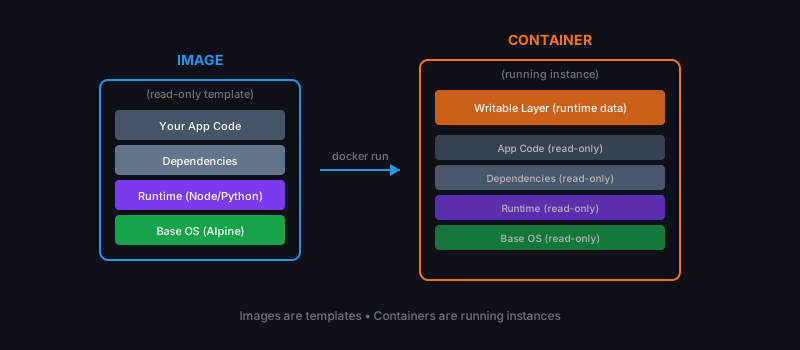
The key insight: images are built once, shared everywhere, and run identically on any machine with Docker installed. That’s how you solve “it works on my machine.”
What we’ll build
By the end of this series, you’ll have containerized a complete application:
- API service (Node.js) — REST endpoints for task management
- Worker service (Python) — Background job processor
- PostgreSQL — Persistent database
- Redis — Message queue
All of it defined in code, version-controlled, and runnable with a single command.
Code for this series. All examples live in _resource/docker-basic, one folder per chapter.
When to use Docker (and when not to)
Docker shines when you need:
- Consistent environments across development, CI, staging, and production
- Dependency isolation — run multiple versions of the same tool without conflicts
- Fast, reproducible deploys — ship images, not instructions
- Microservices — each service in its own container, independently scalable
- Local development that mirrors production
Docker is overkill when:
- You’re writing a quick script that runs once
- Your “deployment” is copying a binary to a server
- You’re on a constrained device without Docker support
For most backend development, web services, and anything headed to Kubernetes — Docker is the standard. Learn it once, use it everywhere.
Summary
- Containers solve the “works on my machine” problem by packaging apps with their full environment.
- Docker is the tool that made containers practical — standard format, simple CLI, image registries.
- Images are read-only templates; containers are running instances.
- This series will take you from zero to deploying a multi-service Task App.
In the next chapter we’ll install Docker and run our first container.