In the previous post we learned the core components of CDK and built infrastructure for a simple Q&A app. In this post we’ll learn how to expand that infrastructure.
Design
At the end of the previous post our infrastructure looked like this:
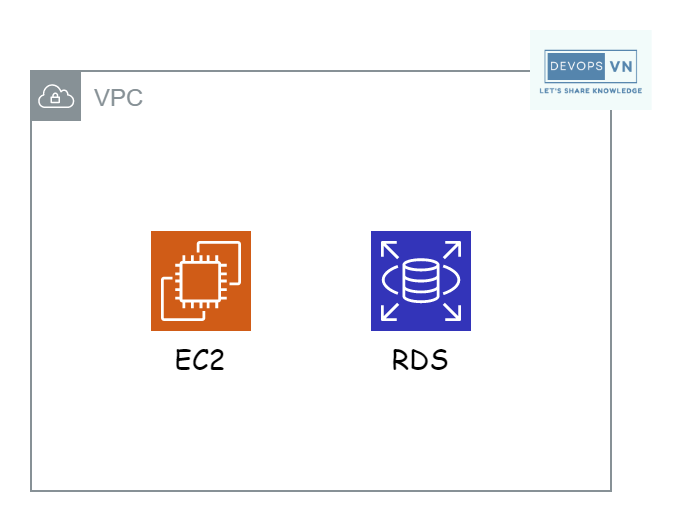
Currently, to fetch the list of questions and answers, the user calls the server (EC2), and the EC2 queries the database (RDS) directly. Usually, once a user creates a question or answer, it rarely changes. So querying RDS repeatedly for the same result wastes resources. On top of that, querying results directly from RDS is fairly slow.
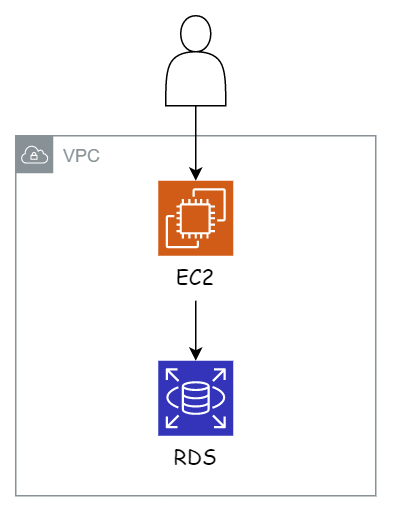
So we add a cache layer between EC2 and RDS to speed up reads and reduce load on RDS. AWS provides AWS ElastiCache for caching.
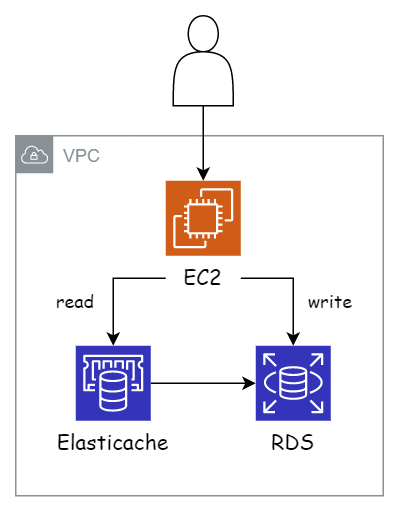
Besides caching, ElastiCache also improves the application’s high availability. For example, if RDS dies, users can’t write data but can still read it.
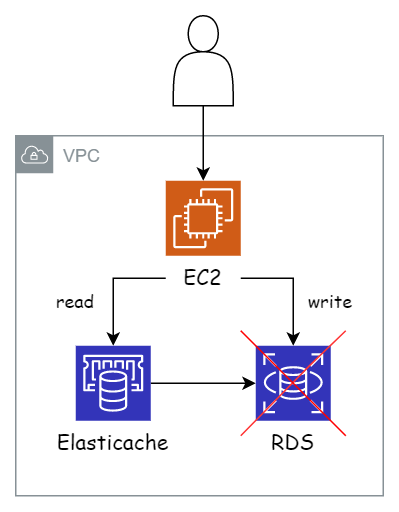
However, if our EC2 dies, users can’t access the app at all. So to improve availability, we separate the EC2 for reading and writing data.
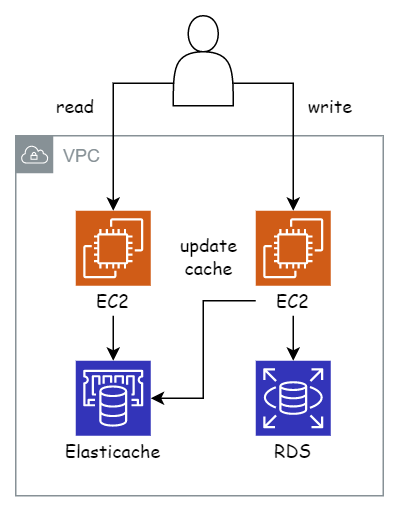
The current system looks fine, but it has a weakness: if users write continuously to RDS at a given time, and because our read data lives in ElastiCache, we’d have to update ElastiCache continuously. For a Q&A app, real-time updates like that aren’t necessary → this wastes ElastiCache resources.
We can update ElastiCache’s read data on an interval, once every 5 minutes — all the data written to RDS within 5 minutes gets updated at once. This avoids wasting ElastiCache resources.
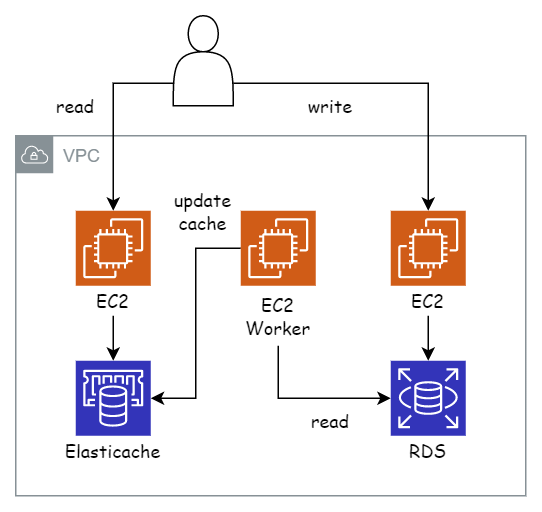
Instead of querying RDS and reading data over 5 minutes, we can simplify this work as follows:
- Save the data into RDS
- Take the ID of that data and store it in a separate temporary database
To show you how to create more AWS services with CDK, I’ll use DynamoDB as the temporary database.
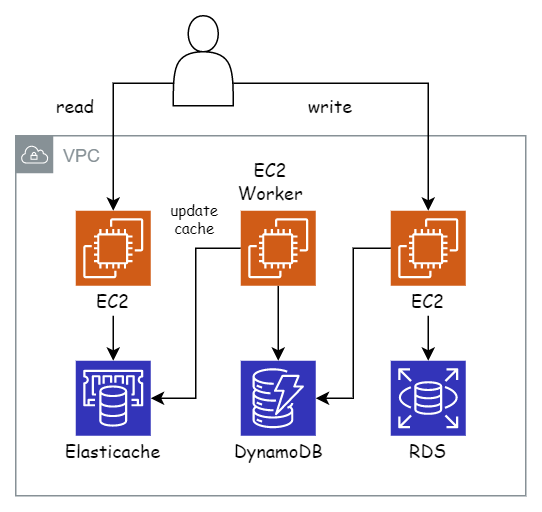
To make future expansion and management easier, we split each related area into a separate Stack in CDK.
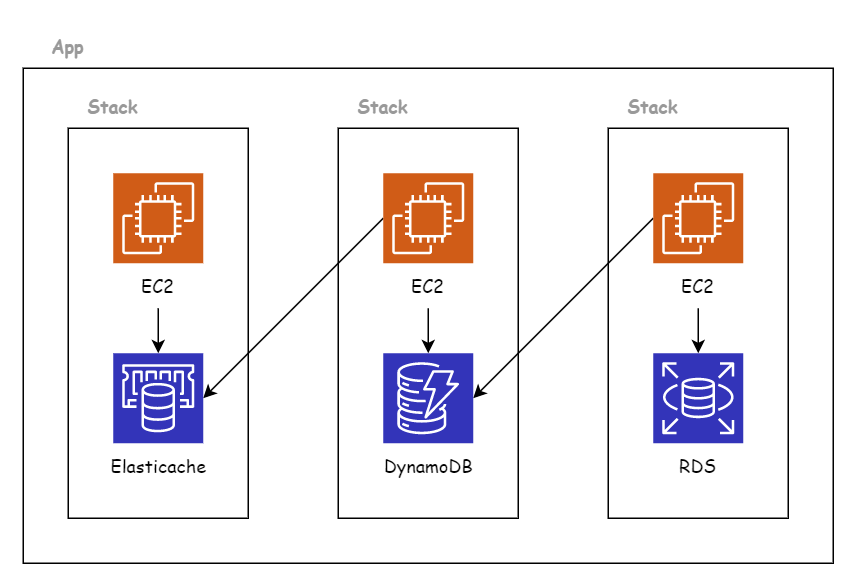
Preparation
Create the directory and initialize the app:
mkdir question-service && cd question-service
cdk init app --language go
go get
Delete all the code in question-service.go and paste in the following:
package main

import (
  "os"

  "github.com/aws/aws-cdk-go/awscdk/v2"
  "github.com/aws/jsii-runtime-go"
)

func main() {
  defer jsii.Close()

  // App
  app := awscdk.NewApp(nil)

  app.Synth(nil)
}

func env() *awscdk.Environment {
  return &awscdk.Environment{
    Account: jsii.String(os.Getenv("CDK_DEFAULT_ACCOUNT")),
    Region:  jsii.String(os.Getenv("CDK_DEFAULT_REGION")),
  }
}
Create a directory named stack:
mkdir stack
Create the following 3 files inside the stack directory:
├── cache-stack.go
├── insert-stack.go
└── worker-stack.go
The current directory structure:
...
├── go.mod
├── go.sum
├── question-service.go
├── question-service_test.go
└── stack
    ├── cache-stack.go
    ├── insert-stack.go
    └── worker-stack.go
Each file in the stack directory corresponds to one Stack in CDK. Paste the
following code into each file.
insert-stack.go:
package stack

import (
  "github.com/aws/aws-cdk-go/awscdk/v2"
  "github.com/aws/constructs-go/constructs/v10"
)

type QuestionInsertStackProps struct {
  awscdk.StackProps
}

func NewQuestionInsertStack(scope constructs.Construct, id string, props *QuestionInsertStackProps) awscdk.Stack {
  var sprops awscdk.StackProps
  if props != nil {
    sprops = props.StackProps
  }
  stack := awscdk.NewStack(scope, &id, &sprops)

  return stack
}
cache-stack.go:
package stack

import (
  "github.com/aws/aws-cdk-go/awscdk/v2"
  "github.com/aws/constructs-go/constructs/v10"
)

type QuestionCacheStackProps struct {
  awscdk.StackProps
}

func NewQuestionCacheStack(scope constructs.Construct, id string, props *QuestionCacheStackProps) awscdk.Stack {
  var sprops awscdk.StackProps
  if props != nil {
    sprops = props.StackProps
  }
  stack := awscdk.NewStack(scope, &id, &sprops)

  return stack
}
worker-stack.go:
package stack

import (
  "github.com/aws/aws-cdk-go/awscdk/v2"
  "github.com/aws/constructs-go/constructs/v10"
)

type QuestionWorkerStackProps struct {
  awscdk.StackProps
}

func NewQuestionWorkerStack(scope constructs.Construct, id string, props *QuestionWorkerStackProps) awscdk.Stack {
  var sprops awscdk.StackProps
  if props != nil {
    sprops = props.StackProps
  }
  stack := awscdk.NewStack(scope, &id, &sprops)

  return stack
}
All the code is the same, only the function names differ. Back in
question-service.go, add the following code:
...

import (
  "os"

  "question-service/stack"

  "github.com/aws/aws-cdk-go/awscdk/v2"
  "github.com/aws/jsii-runtime-go"
)

func main() {
  defer jsii.Close()

  // App
  app := awscdk.NewApp(nil)

  // Question Cache Stack
  stack.NewQuestionCacheStack(app, "QuestionCacheStack", &stack.QuestionCacheStackProps{
    StackProps: awscdk.StackProps{
      Env: env(),
    },
  })

  // Question Worker Stack
  stack.NewQuestionWorkerStack(app, "QuestionWorkerStack", &stack.QuestionWorkerStackProps{
    StackProps: awscdk.StackProps{
      Env: env(),
    },
  })

  // Question Insert Stack
  stack.NewQuestionInsertStack(app, "QuestionInsertStack", &stack.QuestionInsertStackProps{
    StackProps: awscdk.StackProps{
      Env: env(),
    },
  })

  app.Synth(nil)
}

...
When a CDK app has multiple Stacks, list all of them with:
cdk list
QuestionCacheStack
QuestionInsertStack
QuestionWorkerStack
Next we’ll start writing the code.
Write Code
QuestionInsertStack
We start with QuestionInsertStack, since this is the Stack we created in the
previous post.
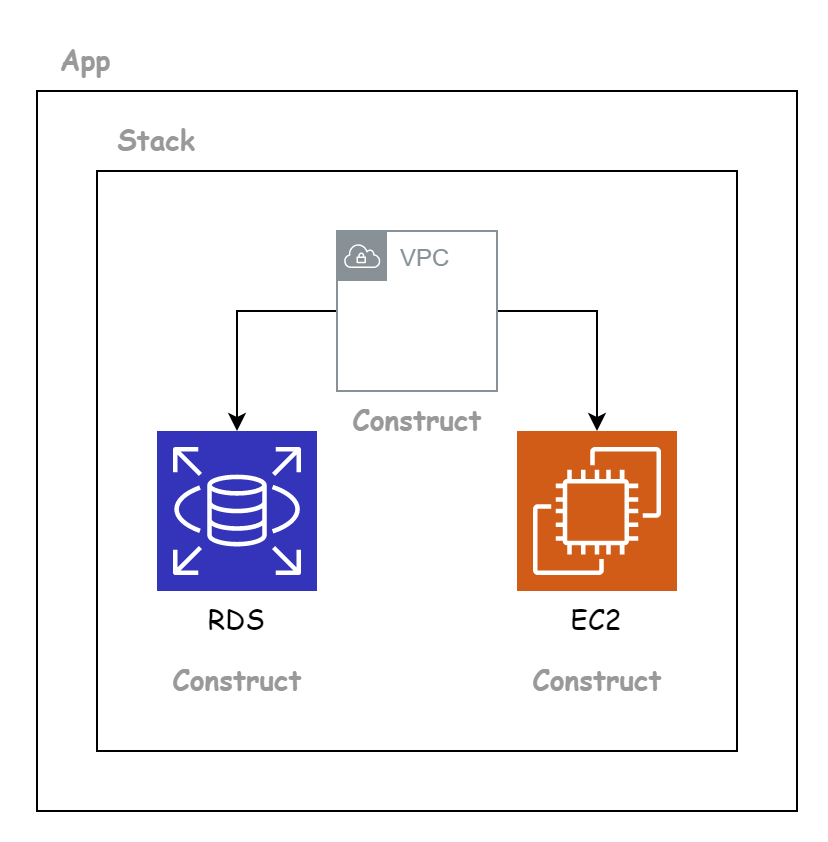
Open insert-stack.go and paste in the following:
package stack

import (
  "github.com/aws/aws-cdk-go/awscdk/v2"
  "github.com/aws/aws-cdk-go/awscdk/v2/awsec2"
  "github.com/aws/aws-cdk-go/awscdk/v2/awsrds"
  "github.com/aws/constructs-go/constructs/v10"
  "github.com/aws/jsii-runtime-go"
)

type QuestionInsertStackProps struct {
  awscdk.StackProps
}

func NewQuestionInsertStack(scope constructs.Construct, id string, props *QuestionInsertStackProps) awscdk.Stack {
  var sprops awscdk.StackProps
  if props != nil {
    sprops = props.StackProps
  }
  stack := awscdk.NewStack(scope, &id, &sprops)

  // VPC Construct
  vpc := awsec2.Vpc_FromLookup(stack, jsii.String("DefaultVPC"), &awsec2.VpcLookupOptions{IsDefault: jsii.Bool(true)})

  // RDS Construct
  awsrds.NewDatabaseInstance(stack, jsii.String("Postgres"), &awsrds.DatabaseInstanceProps{
    Engine: awsrds.DatabaseInstanceEngine_Postgres(&awsrds.PostgresInstanceEngineProps{
      Version: awsrds.PostgresEngineVersion_VER_16(),
    }),
    InstanceType: awsec2.NewInstanceType(jsii.String("t3.micro")),
    Credentials: awsrds.Credentials_FromPassword(
      jsii.String("question"),
      awscdk.SecretValue_UnsafePlainText(jsii.String("question")),
    ),
    PubliclyAccessible: jsii.Bool(true),
    VpcSubnets:         &awsec2.SubnetSelection{SubnetType: awsec2.SubnetType_PUBLIC},
    Vpc:                vpc,
  })

  // EC2 Construct
  awsec2.NewInstance(stack, jsii.String("Server"), &awsec2.InstanceProps{
    InstanceType: awsec2.NewInstanceType(jsii.String("t3.micro")),
    MachineImage: awsec2.MachineImage_LatestAmazonLinux2023(),
    Vpc:          vpc,
  })

  return stack
}
Generate CloudFormation to preview the resources. With a multi-Stack app, add the
Stack name after the synth command:
cdk synth QuestionInsertStack
QuestionCacheStack
Next we work on QuestionCacheStack.
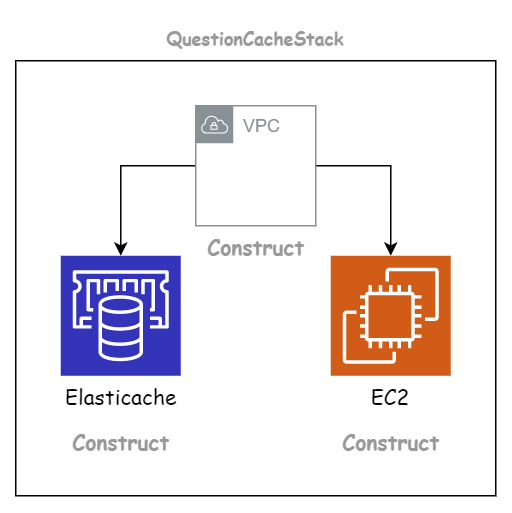
QuestionCacheStack includes three Constructs: VPC, EC2, and ElastiCache. VPC and
EC2 are Constructs we’re familiar with. Open cache-stack.go and first paste the
code to create the VPC and EC2 Constructs:
package stack

import (
  "github.com/aws/aws-cdk-go/awscdk/v2"
  "github.com/aws/aws-cdk-go/awscdk/v2/awsec2"
  "github.com/aws/constructs-go/constructs/v10"
  "github.com/aws/jsii-runtime-go"
)

type QuestionCacheStackProps struct {
  awscdk.StackProps
}

func NewQuestionCacheStack(scope constructs.Construct, id string, props *QuestionCacheStackProps) awscdk.Stack {
  var sprops awscdk.StackProps
  if props != nil {
    sprops = props.StackProps
  }
  stack := awscdk.NewStack(scope, &id, &sprops)

  // VPC Construct
  vpc := awsec2.Vpc_FromLookup(stack, jsii.String("DefaultVPC"), &awsec2.VpcLookupOptions{IsDefault: jsii.Bool(true)})

  // EC2 Construct
  awsec2.NewInstance(stack, jsii.String("Server"), &awsec2.InstanceProps{
    InstanceType: awsec2.NewInstanceType(jsii.String("t3.micro")),
    MachineImage: awsec2.MachineImage_LatestAmazonLinux2023(),
    Vpc:          vpc,
  })

  return stack
}
Then, to create the ElastiCache Construct, we use NewCfnCacheCluster:
// Elasticache Construct
awselasticache.NewCfnCacheCluster(stack, jsii.String("Cache"), &awselasticache.CfnCacheClusterProps{
  Engine:        jsii.String("redis"),
  CacheNodeType: jsii.String("cache.t3.micro"),
  NumCacheNodes: jsii.Number(1),
})
We create ElastiCache with engine Redis and a single node.
Unlike the EC2 Construct (an L2 Construct), the ElastiCache Construct is an L1 Construct. When we create it, there’s no built-in Security Group to allow other resources to access its port (I’ll explain the L Construct concept in a later post). So we need to create a Security Group for ElastiCache:
// SG Construct
sg := awsec2.NewSecurityGroup(stack, jsii.String("CacheSG"), &awsec2.SecurityGroupProps{
  AllowAllOutbound: jsii.Bool(true),
  Vpc:              vpc,
})
sg.AddIngressRule(
  awsec2.Peer_AnyIpv4(),
  awsec2.NewPort(&awsec2.PortProps{
    FromPort:             jsii.Number(6379),
    ToPort:               jsii.Number(6379),
    StringRepresentation: jsii.String("Redis"),
    Protocol:             awsec2.Protocol_ALL,
  }),
  jsii.String("Redis Port"),
  jsii.Bool(false),
)

// Elasticache Construct
awselasticache.NewCfnCacheCluster(stack, jsii.String("Cache"), &awselasticache.CfnCacheClusterProps{
  Engine:              jsii.String("redis"),
  CacheNodeType:       jsii.String("cache.t3.micro"),
  NumCacheNodes:       jsii.Number(1),
  VpcSecurityGroupIds: &[]*string{sg.SecurityGroupId()},
})
We create a Security Group allowing access to port 6379 and attach it to
ElastiCache. Generate CloudFormation for QuestionCacheStack:
cdk synth QuestionCacheStack
QuestionWorkerStack
Finally, we work on QuestionWorkerStack.
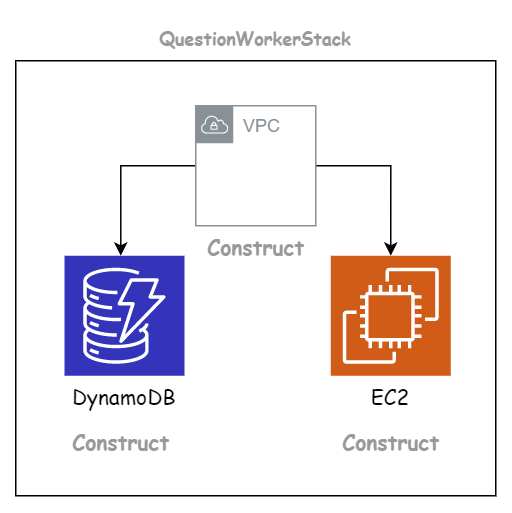
QuestionWorkerStack includes three Constructs: VPC, EC2, and DynamoDB. Open
worker-stack.go and paste in the following:
package stack

import (
  "github.com/aws/aws-cdk-go/awscdk/v2"
  "github.com/aws/aws-cdk-go/awscdk/v2/awsec2"
  "github.com/aws/constructs-go/constructs/v10"
  "github.com/aws/jsii-runtime-go"
)

type QuestionWorkerStackProps struct {
  awscdk.StackProps
}

func NewQuestionWorkerStack(scope constructs.Construct, id string, props *QuestionWorkerStackProps) awscdk.Stack {
  var sprops awscdk.StackProps
  if props != nil {
    sprops = props.StackProps
  }
  stack := awscdk.NewStack(scope, &id, &sprops)

  // VPC Construct
  vpc := awsec2.Vpc_FromLookup(stack, jsii.String("DefaultVPC"), &awsec2.VpcLookupOptions{IsDefault: jsii.Bool(true)})

  // EC2 Construct
  awsec2.NewInstance(stack, jsii.String("Worker"), &awsec2.InstanceProps{
    InstanceType: awsec2.NewInstanceType(jsii.String("t3.micro")),
    MachineImage: awsec2.MachineImage_LatestAmazonLinux2023(),
    Vpc:          vpc,
  })

  return stack
}
We use awsdynamodb.NewTable to create the DynamoDB table:
// DynamoDB Construct
awsdynamodb.NewTable(stack, jsii.String("QuestionID"), &awsdynamodb.TableProps{
  TableName: jsii.String("QuestionID"),
  PartitionKey: &awsdynamodb.Attribute{
    Name: jsii.String("id"),
    Type: awsdynamodb.AttributeType_STRING,
  },
})
We create a DynamoDB table named QuestionID with one column, id. Generate
CloudFormation for QuestionWorkerStack:
cdk synth QuestionWorkerStack
Deploy
To deploy an app with multiple Stacks, add the Stack name to the deploy command.
Deploy each Stack in order:
QuestionCacheStack:
cdk deploy QuestionCacheStack
QuestionWorkerStack:
cdk deploy QuestionWorkerStack
QuestionInsertStack:
cdk deploy QuestionInsertStack
Check the AWS Console and you’ll see your resources. When you’re done, remember to
delete the resources to avoid getting charged. Run destroy with each Stack name
in order:
cdk destroy QuestionCacheStack
cdk destroy QuestionWorkerStack
cdk destroy QuestionInsertStack
Conclusion
We’ve now learned how to design and build infrastructure with CDK in this example. As you can see, it’s not that hard.