In the previous post, we learned how to use CDK to provision infrastructure on AWS. In this post, we’ll learn about the core components of CDK and how to organize the code.
In this post, we’ll build infrastructure for a Q&A application: an app that lets users create questions and answers. The core CDK concepts will be explained through this Q&A example.
Preparation
Create the directory and initialize the app:
mkdir question-service && cd question-service
cdk init --language go
Download the libraries:
go get
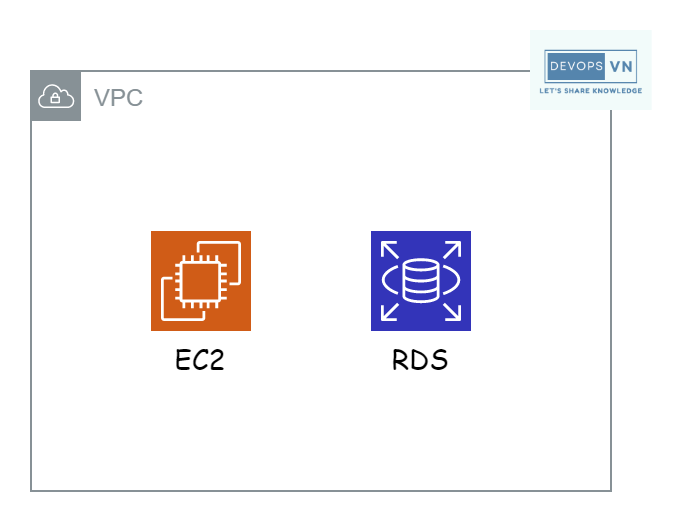
We’ll start with the most basic infrastructure: a Q&A app with one server to run the API and a database to store data. Illustration:
To create this infrastructure, open question-service.go and paste in the
following code.
package main

import (
  "os"

  "github.com/aws/aws-cdk-go/awscdk/v2"
  "github.com/aws/aws-cdk-go/awscdk/v2/awsec2"
  "github.com/aws/aws-cdk-go/awscdk/v2/awsrds"
  "github.com/aws/constructs-go/constructs/v10"
  "github.com/aws/jsii-runtime-go"
)

type QuestionServiceStackProps struct {
  awscdk.StackProps
}

func NewQuestionServiceStack(scope constructs.Construct, id string, props *QuestionServiceStackProps) awscdk.Stack {
  var sprops awscdk.StackProps
  if props != nil {
    sprops = props.StackProps
  }
  stack := awscdk.NewStack(scope, &id, &sprops)

  // VPC Construct
  vpc := awsec2.Vpc_FromLookup(scope, jsii.String("DefaultVPC"), &awsec2.VpcLookupOptions{IsDefault: jsii.Bool(true)})

  // RDS Construct
  awsrds.NewDatabaseInstance(stack, jsii.String("Postgres"), &awsrds.DatabaseInstanceProps{
    Engine: awsrds.DatabaseInstanceEngine_Postgres(&awsrds.PostgresInstanceEngineProps{
      Version: awsrds.PostgresEngineVersion_VER_16(),
    }),
    InstanceType: awsec2.NewInstanceType(jsii.String("t3.micro")),
    Credentials: awsrds.Credentials_FromPassword(
      jsii.String("question"),
      awscdk.SecretValue_UnsafePlainText(jsii.String("question")),
    ),
    PubliclyAccessible: jsii.Bool(true),
    VpcSubnets:         &awsec2.SubnetSelection{SubnetType: awsec2.SubnetType_PUBLIC},
    Vpc:                vpc,
  })

  // EC2 Construct
  awsec2.NewInstance(stack, jsii.String("Server"), &awsec2.InstanceProps{
    InstanceType: awsec2.NewInstanceType(jsii.String("t3.micro")),
    MachineImage: awsec2.MachineImage_LatestAmazonLinux2023(),
    Vpc:          vpc,
  })

  return stack
}

func main() {
  defer jsii.Close()

  // App
  app := awscdk.NewApp(nil)

  // Stack
  NewQuestionServiceStack(app, "QuestionServiceStack", &QuestionServiceStackProps{
    awscdk.StackProps{
      Env: env(),
    },
  })

  app.Synth(nil)
}

func env() *awscdk.Environment {
  return &awscdk.Environment{
    Account: jsii.String(os.Getenv("CDK_DEFAULT_ACCOUNT")),
    Region:  jsii.String(os.Getenv("CDK_DEFAULT_REGION")),
  }
}
Next, we’ll look at the core CDK components in the code.
Core Components
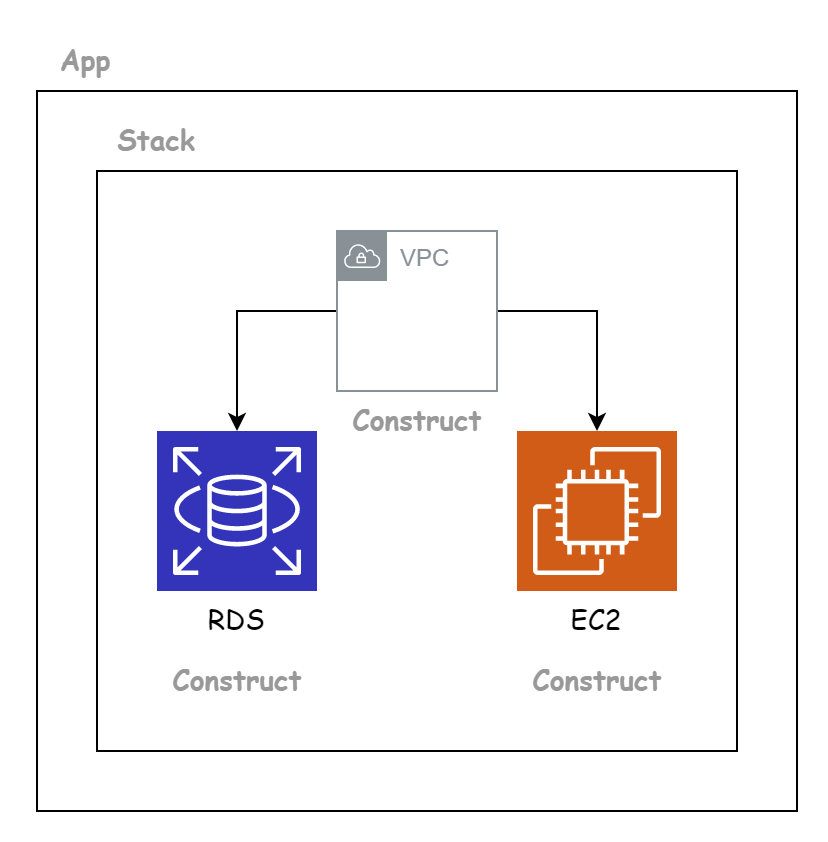
An AWS CDK application consists of three basic parts:
- App
- Stack
- Construct
App identifies an application. An App contains one or more Stacks.
Stack is a collection of related resources. A Stack contains one or more Constructs.
Construct is the most fundamental component of CDK. It identifies a specific resource on AWS — for example Amazon Simple Storage Service (Amazon S3).
Our initial infrastructure is described in CDK as follows:
App
In Go, our program starts with the main() function, so we initialize the App in
main().
func main() {
  defer jsii.Close()

  // App
  app := awscdk.NewApp(nil)

  ...

  app.Synth(nil)
}
Stack
Next we create the Stack. The syntax to create a Stack:
func main() {
  defer jsii.Close()

  // App
  app := awscdk.NewApp(nil)

  // Stack
  stack := awscdk.NewStack(app, jsii.String("QuestionServiceStack"), &QuestionServiceStackProps{
    awscdk.StackProps{
      Env: env(),
    },
  })

  app.Synth(nil)
}
We pass the app variable into NewStack to tell the Stack which App it belongs
to. To make it easier to distinguish and group related Constructs, instead of
writing the code outside main(), we should create a dedicated function for each
Stack.
func NewQuestionServiceStack(scope constructs.Construct, id string, props *QuestionServiceStackProps) awscdk.Stack {
  var sprops awscdk.StackProps
  if props != nil {
    sprops = props.StackProps
  }
  stack := awscdk.NewStack(scope, &id, &sprops)

  ...

  return stack
}

func main() {
  defer jsii.Close()

  // App
  app := awscdk.NewApp(nil)

  // Stack
  NewQuestionServiceStack(app, "QuestionServiceStack", &QuestionServiceStackProps{
    awscdk.StackProps{
      Env: env(),
    },
  })

  app.Synth(nil)
}
Construct
Finally, we declare the Constructs for the related resources. Functions that create a Construct usually take the following information:
<NameOfConstruct>(scope, id, props)
scope: tells the Construct which Stack it belongs toid: identifies the Construct within CDKprops: the resource’s related properties
VPC Construct:
// VPC Construct
vpc := awsec2.Vpc_FromLookup(stack, jsii.String("DefaultVPC"), &awsec2.VpcLookupOptions{IsDefault: jsii.Bool(true)})
We use Vpc_FromLookup to get the default VPC instead of creating a new one.
RDS Construct:
// RDS Construct
awsrds.NewDatabaseInstance(stack, jsii.String("Postgres"), &awsrds.DatabaseInstanceProps{
  Engine: awsrds.DatabaseInstanceEngine_Postgres(&awsrds.PostgresInstanceEngineProps{
    Version: awsrds.PostgresEngineVersion_VER_16(),
  }),
  InstanceType: awsec2.NewInstanceType(jsii.String("t3.micro")),
  Credentials: awsrds.Credentials_FromPassword(
    jsii.String("question"),
    awscdk.SecretValue_UnsafePlainText(jsii.String("question")),
  ),
  PubliclyAccessible: jsii.Bool(true),
  VpcSubnets:         &awsec2.SubnetSelection{SubnetType: awsec2.SubnetType_PUBLIC},
  Vpc:                vpc,
})
To create RDS we use NewDatabaseInstance. Above, we create a Postgres RDS with
instance type db.t3.micro. We set the Postgres access credentials with
username and password both question. To keep the example simple, we create
RDS in a public subnet and configure it to be accessible from outside.
EC2 Construct:
// EC2 Construct
awsec2.NewInstance(stack, jsii.String("Server"), &awsec2.InstanceProps{
  InstanceType: awsec2.NewInstanceType(jsii.String("t3.micro")),
  MachineImage: awsec2.MachineImage_LatestAmazonLinux2023(),
  Vpc:          vpc,
})
To create EC2 we use NewInstance. Above, we create an EC2 with the Amazon Linux
2023 OS and instance type t3.micro. (MachineImage_LatestAmazonLinux2023() always
picks the newest AL2023 AMI, so you never hard-code an image ID.)
Create the Infrastructure
Run the following to preview the resources that will be created:
cdk synth
Run deploy to create the infrastructure:
cdk deploy
✨  Synthesis time: 5.5s

QuestionServiceStack: building assets...

3:42:36 PM | CREATE_IN_PROGRESS   | AWS::CloudFormation::Stack | QuestionServiceStack
3:42:51 PM | CREATE_IN_PROGRESS   | AWS::RDS::DBInstance      | Postgres
3:43:04 PM | CREATE_IN_PROGRESS   | AWS::IAM::InstanceProfile | Server/InstanceProfile
After CDK finishes, open the AWS Console and you’ll see the EC2 and RDS have been created.
Upgrading the Infrastructure
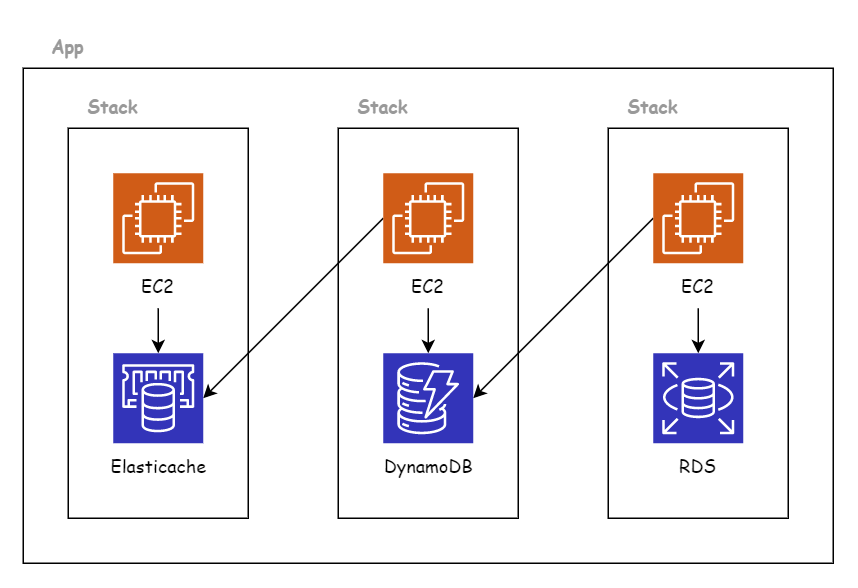
Our current Q&A infrastructure has many weaknesses. In the next post, we’ll learn how to expand the infrastructure for the Q&A app, like below.
Remember to run destroy to delete the resources:
cdk destroy
Conclusion
We’ve now learned the core components of CDK. The three main components of a CDK application are: App, Stack, and Construct. You can picture CDK like playing with Lego — we assemble a complete product from the smallest pieces.