In this post we’ll learn about the concepts of the Construct Tree and Construct Layers.
Construct
As we learned in previous posts, a Construct is the most fundamental part of CDK. A Construct identifies a resource on the cloud and contains everything needed to create that resource.
But how does CDK know which Construct to create first and which later so that our resources work correctly? For example, we need to create a VPC before creating an EC2 inside that VPC.
And why can some resources be created with just one function, while others require many different functions? For example, in the previous post EC2 used just one function, while ElastiCache used many.
The concepts of the Construct Tree and Construct Layers help us answer these questions.
Construct Tree
In the examples we’ve done, a CDK application has three components: App, Stack, and Construct. For example:
package main

import (
  "github.com/aws/aws-cdk-go/awscdk/v2"
  "github.com/aws/aws-cdk-go/awscdk/v2/awss3"

  "github.com/aws/constructs-go/constructs/v10"
  "github.com/aws/jsii-runtime-go"
)

type S3SimpleStackProps struct {
  awscdk.StackProps
}

func NewS3SimpleStack(scope constructs.Construct, id string, props *S3SimpleStackProps) awscdk.Stack {
  var sprops awscdk.StackProps
  if props != nil {
    sprops = props.StackProps
  }
  stack := awscdk.NewStack(scope, &id, &sprops)

  awss3.NewBucket(stack, jsii.String("L2"), &awss3.BucketProps{
    Versioned: jsii.Bool(false),
  })

  return stack
}

func main() {
  defer jsii.Close()

  app := awscdk.NewApp(nil)

  NewS3SimpleStack(app, "S3SimpleStack", &S3SimpleStackProps{
    awscdk.StackProps{
      Env: env(),
    },
  })

  app.Synth(nil)
}

func env() *awscdk.Environment {
  return nil
}
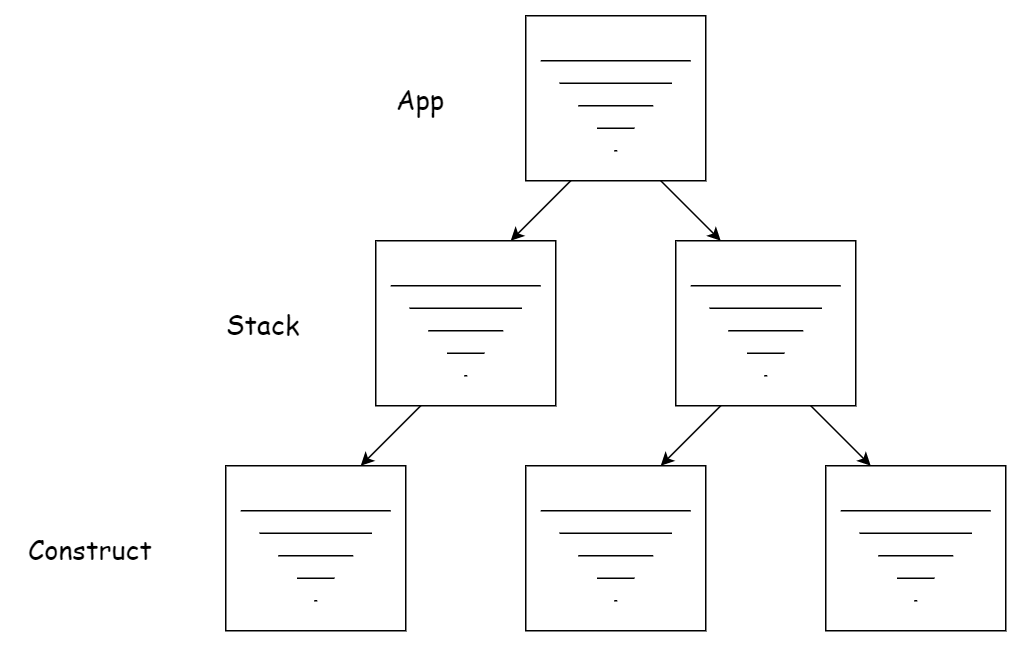
All of the components above are passed a scope value except the App. By passing
scope into the components, CDK defines a hierarchy between them. This hierarchy
is called the Construct Tree.
At the top of the Construct Tree is the App. Inside the App we have one or more Stacks. Inside a Stack we have one or more Constructs. Inside a Construct there can be an L1 Construct or an L2 Construct, and so on down the tree. The purpose of the Construct Tree is for CDK to create resources in the necessary order.
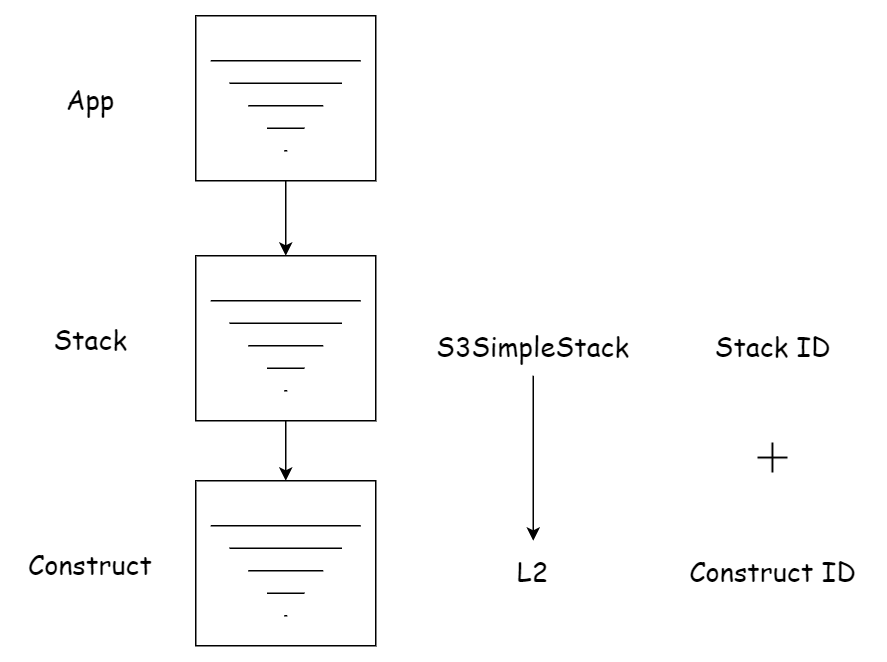
Besides the first parameter passed into a Construct (scope), there’s a second
parameter: the ID. This value identifies the Construct within its scope. AWS CDK
uses the IDs from the top of the Construct Tree down to the child Constructs to
generate a unique identifier for a Construct. For example, in the code above the
identifying ID for the S3 Construct could be S3SimpleStack-L2.
Construct Layers
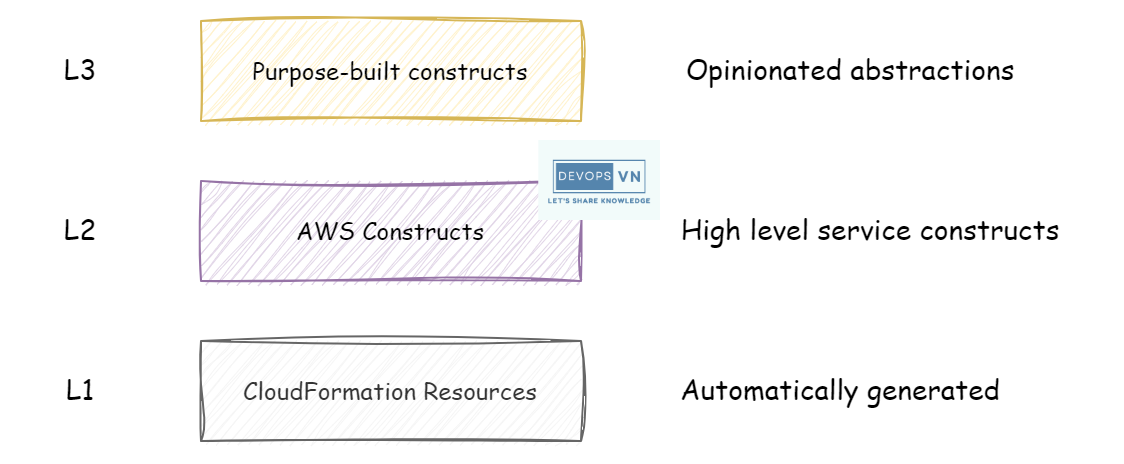
All Constructs are defined in the CDK library and split into three levels: L1 Construct, L2 Construct, and L3 Construct.
L1 Construct
Starting with the lowest level, the L1 Construct represents a specific resource in
AWS CloudFormation. The names of L1 Construct functions all start with Cfn. When
using an L1 Construct, you must specify all of the resource’s properties, just as
you would when using CloudFormation.
For example, in the previous post we created ElastiCache using an L1 Construct; the
function to create ElastiCache is NewCfnCacheCluster:
func NewQuestionCacheStack(scope constructs.Construct, id string, props *QuestionCacheStackProps) awscdk.Stack {
  var sprops awscdk.StackProps
  if props != nil {
    sprops = props.StackProps
  }
  stack := awscdk.NewStack(scope, &id, &sprops)

  ...

  // SG Construct
  sg := awsec2.NewSecurityGroup(stack, jsii.String("CacheSG"), &awsec2.SecurityGroupProps{
    AllowAllOutbound: jsii.Bool(true),
    Vpc:              vpc,
  })
  sg.AddIngressRule(
    awsec2.Peer_AnyIpv4(),
    awsec2.NewPort(&awsec2.PortProps{
      FromPort:             jsii.Number(6379),
      ToPort:               jsii.Number(6379),
      StringRepresentation: jsii.String("Redis"),
      Protocol:             awsec2.Protocol_ALL,
    }),
    jsii.String("Redis Port"),
    jsii.Bool(false),
  )

  // Elasticache Construct
  awselasticache.NewCfnCacheCluster(stack, jsii.String("Cache"), &awselasticache.CfnCacheClusterProps{
    Engine:              jsii.String("redis"),
    CacheNodeType:       jsii.String("cache.t3.micro"),
    NumCacheNodes:       jsii.Number(1),
    VpcSecurityGroupIds: &[]*string{sg.SecurityGroupId()},
  })

  return stack
}
As you can see, to access ElastiCache we have to create a Security Group as well. Using an L1 Construct to create a resource requires you to fully understand that resource’s properties in CloudFormation.
L2 Construct
The next level is the L2 Construct, which represents a specific resource on AWS rather than a CloudFormation resource. An L2 Construct is a pre-written collection of many L1 Constructs that helps us create resources more easily instead of writing a pile of L1 Construct code. When using an L2 Construct we only need to pass a few simple properties. We don’t need to know the resource’s low-level properties in detail as we do with an L1 Construct.
For example, creating S3 with an L2 Construct:
func NewS3SimpleStack(scope constructs.Construct, id string, props *S3SimpleStackProps) awscdk.Stack {
  var sprops awscdk.StackProps
  if props != nil {
    sprops = props.StackProps
  }
  stack := awscdk.NewStack(scope, &id, &sprops)

  awss3.NewBucket(stack, jsii.String("L2"), &awss3.BucketProps{
    Versioned: jsii.Bool(false),
  })

  return stack
}
L3 Construct
The highest level is the L3 Construct, also called Patterns. L3 Constructs are designed to help us create familiar infrastructure patterns that combine many different AWS resources. For example, Amazon ECS with ALB. Instead of writing an L2 Construct for ECS and an L2 Construct for ALB with lots of configuration to connect the two, we can just use an L3 Construct:
loadBalancedFargateService := ecsPatterns.NewApplicationLoadBalancedFargateService(this, jsii.String("Service"), &ApplicationLoadBalancedFargateServiceProps{
  Cluster: Cluster,
  MemoryLimitMiB: jsii.Number(1024),
  DesiredCount: jsii.Number(1),
  Cpu: jsii.Number(512),
  TaskImageOptions: &ApplicationLoadBalancedTaskImageOptions{
    Image: ecs.ContainerImage_FromRegistry(jsii.String("amazon/amazon-ecs-sample")),
  },
  TaskSubnets: &SubnetSelection{
    Subnets: []iSubnet{
      ec2.Subnet_FromSubnetId(this, jsii.String("subnet"), jsii.String("VpcISOLATEDSubnet1Subnet80F07FA0")),
    },
  },
  LoadBalancerName: jsii.String("application-lb-name"),
})
We learn how to use each Construct and which layer it belongs to through the API Reference.
Conclusion
We’ve now learned about the Construct Tree and Construct Layers. One note: we should use L2 Constructs to make developing with CDK easier. However, not every resource has an L2 Construct, because CDK is still under development — in that case you can use an L1 Construct instead.