

Running one container on one laptop is straightforward. The operational work changes when an application has an API, a worker, a database, several copies of each service, and more than one machine. A process can exit, a machine can fail, an image update can leave some copies on the old version, and someone still has to decide where new work should run.
Kubernetes is a system for operating containerized workloads across a group of machines. It
stores the state you want, schedules work onto available machines, and continually works to
make the running system match that state. This chapter establishes the vocabulary behind that
model. By the end, you will be able to read a small Kubernetes resource and understand which
parts of the platform, Docker, Kind, and kubectl are responsible for each job.
Code for this chapter. The resource and its README are in _resource/kubernetes-basics/01-what-is-kubernetes.
Why Containers Alone Stop Being Enough
A container runtime starts and stops containers on one machine. Docker is commonly used for this in local development: it builds images, pulls them from registries, and starts containers. An image is a packaged filesystem and startup instruction; a container is a running instance of that image.
That is enough for a small local setup. It does not answer the operational questions that appear when services multiply:
- Which machine should run the next API copy when one machine is full?
- What starts a replacement after an API process exits?
- How do ten copies move from one image version to another without stopping all of them?
- How do services find a database or another service when container addresses change?
- How can a team record the intended configuration instead of relying on commands typed into individual servers?
Docker Compose helps describe multiple local containers, but it still manages a single Docker host. You can build scripts around several hosts, but those scripts must then handle failure detection, placement, updates, and an accurate record of what should be running. Kubernetes provides those control loops and a common API.
Kubernetes does not replace application design. It cannot make a service stateless, recover lost database data, or choose correct CPU and memory limits without input from the team. It also adds an API, networking model, permissions, and operational vocabulary to learn. For one service on one reliable machine, that cost may exceed the benefit. The value grows when a system needs repeatable deployment and recovery across machines.
Kubernetes Is a Desired-State System
Desired state is a declaration of the result Kubernetes should maintain. For example: keep two copies of this web server running from this image. You submit that declaration to the Kubernetes API rather than writing a command that directly starts two containers.
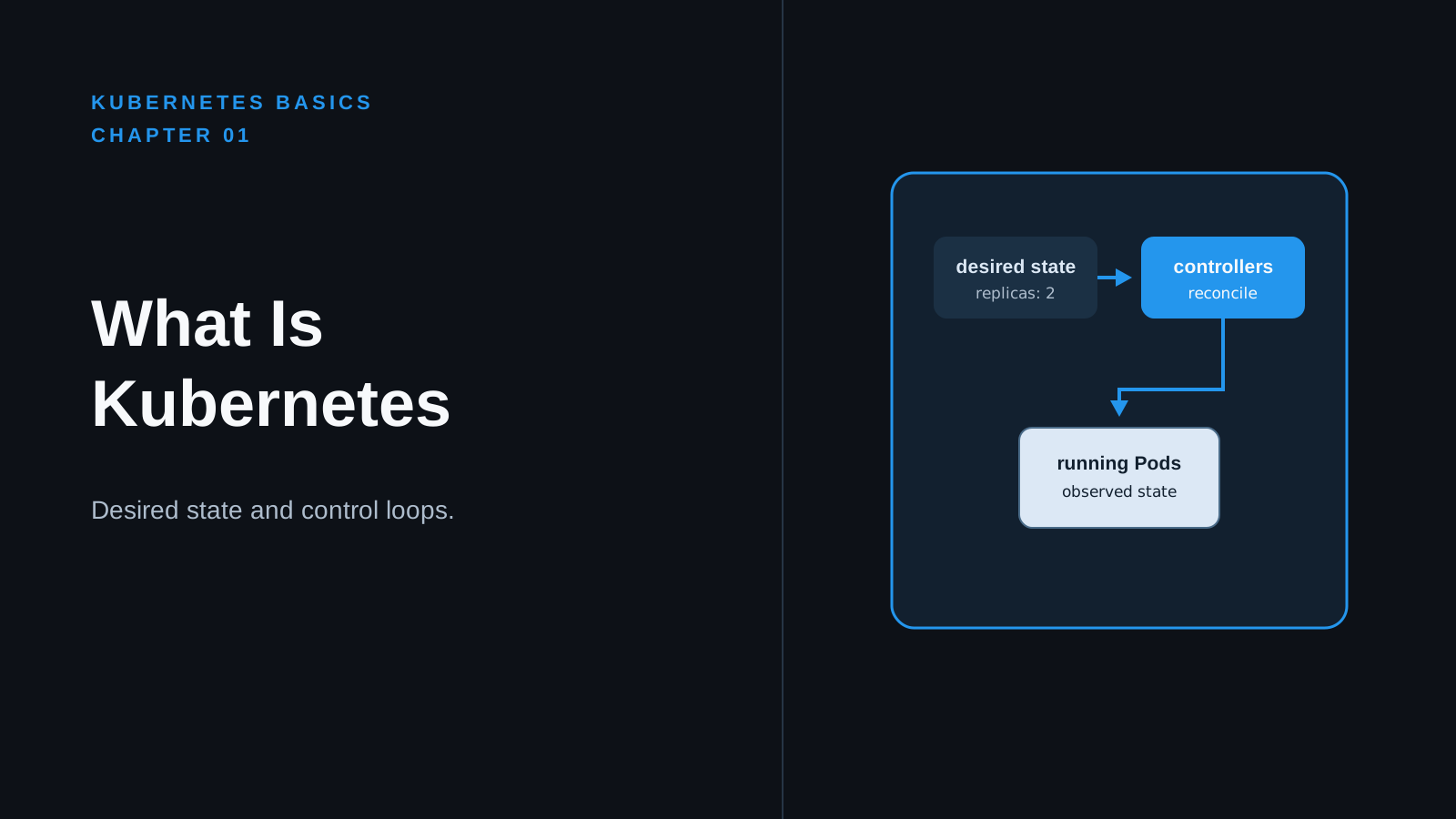
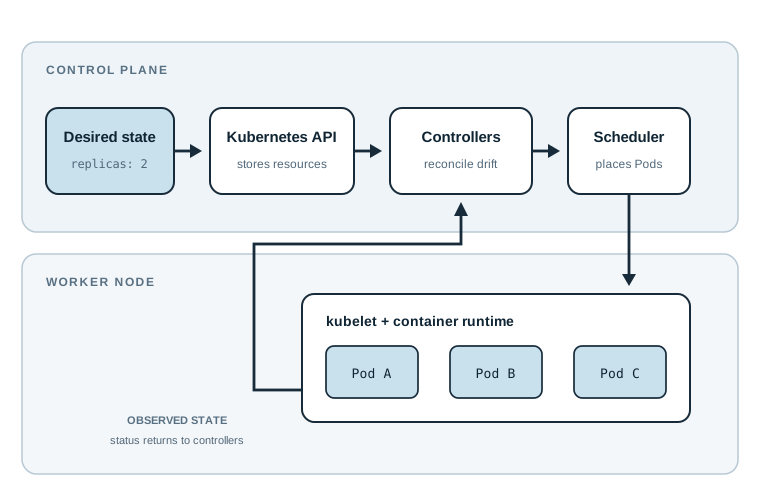
The observed state can drift away from the declaration. A container might crash, a node might become unavailable, or an update might still be in progress. Kubernetes controllers compare the observed state with the desired state and take actions to reduce the difference. This reconciliation loop is the central idea behind Kubernetes.
The declaration is not a promise that every failure disappears. A controller can create a replacement Pod, but it cannot preserve data written only to the failed Pod’s filesystem. It can schedule work, but it cannot create CPU or memory that the cluster does not have. Good Kubernetes operation still needs backups, capacity planning, application health checks, and monitoring.
The Parts of a Kubernetes Cluster
A cluster is the complete Kubernetes installation: its control components, its worker machines, and the API through which they are managed. A cluster may run on laptops, virtual machines, physical servers, or a cloud provider’s infrastructure.
The control plane makes cluster-wide decisions and records cluster state. Its API server
accepts requests from tools and automation. etcd stores the cluster’s persisted state. Other
control-plane components schedule Pods and run controllers that reconcile resources. In a
production cluster, the control plane is usually operated redundantly. If it becomes
unavailable, Kubernetes cannot accept changes, schedule new Pods, or perform controller-driven
recovery, although existing workloads can continue running on healthy nodes.
A node is a machine that can run Kubernetes workloads. It might be a virtual machine or a physical server. Each node runs software that receives Pod assignments and asks a container runtime to start the containers. Nodes provide finite CPU, memory, network interfaces, and local disk; Kubernetes schedules workloads according to the resources and rules available.
A workload is an application process Kubernetes manages. Kubernetes runs workload containers inside Pods. A Pod is the smallest deployable unit in Kubernetes and can contain one or more tightly related containers sharing network and storage context. Most application Pods contain one main container, but sidecar containers are useful for tasks such as a local proxy or log agent.
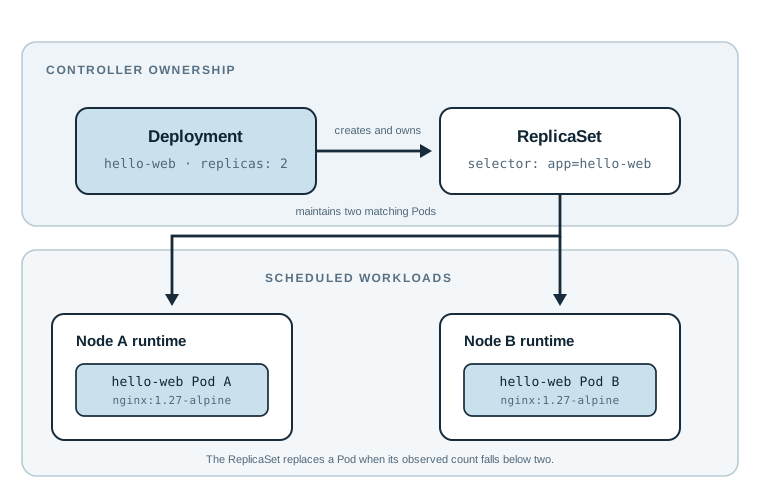
For this chapter, keep the ownership chain in mind: a Deployment declares the desired rollout and manages ReplicaSets; the active ReplicaSet maintains the requested number of Pods; the scheduler assigns unscheduled Pods to nodes; and each node’s kubelet asks its container runtime to start their containers. The control plane does not itself run application containers.
One Resource, One Intended Result
The following file has one purpose: declare that Kubernetes should maintain two identical
nginx web-server Pods. It does not make the Pods reachable from outside the cluster. That
separation is deliberate; network exposure belongs to a later resource type.
hello-web-deployment.yaml:
apiVersion: apps/v1
kind: Deployment
metadata:
  name: hello-web
  labels:
    app: hello-web
spec:
  replicas: 2
  selector:
    matchLabels:
      app: hello-web
  template:
    metadata:
      labels:
        app: hello-web
    spec:
      containers:
        - name: web
          image: nginx:1.27-alpine
          ports:
            - containerPort: 80
apiVersion: apps/v1 selects the stable Kubernetes API group and version that defines this
resource. kind: Deployment tells the API to create a Deployment, a controller that manages
replicated Pods and supports controlled updates.
metadata.name gives this Deployment the name hello-web. metadata.labels attach
searchable key/value metadata. The app: hello-web label is not merely a description here:
the selector and Pod template use the same label to connect the Deployment to the Pods it
owns.
spec.replicas: 2 is the desired state. Kubernetes will try to keep two matching Pods running.
spec.selector.matchLabels defines which Pods belong to this Deployment. It must match the
label in spec.template.metadata.labels; Kubernetes rejects a Deployment when these fields do
not match because the controller could not safely identify the Pods it creates.
spec.template is the recipe for each Pod. It contains Pod metadata and the Pod specification.
The containers list declares one container named web. Its image field uses the versioned
nginx:1.27-alpine tag rather than latest. A tag can still be moved by the image publisher;
production deployments that require an exact artifact should use an image digest.
containerPort: 80 documents that the process listens on port 80. It does not publish that
port or create a stable network address; a Kubernetes Service does that later.
After a cluster exists, apply the resource from the chapter folder:
kubectl apply -f hello-web-deployment.yaml
kubectl rollout status deployment/hello-web
kubectl get deployment hello-web
kubectl get pods -l app=hello-web
kubectl apply sends the desired state to the API server. The Deployment controller creates
or updates a ReplicaSet, which creates the Pods. The scheduler places them on nodes, and the
node runtime pulls the image if needed. kubectl rollout status waits until the Deployment
reports that its rollout completed. After it succeeds, kubectl get deployment hello-web
should show 2/2 in the READY column. kubectl get pods -l app=hello-web should list two Pods
with names that start with hello-web- and a Running status.
Note: The commands need a working Kubernetes cluster and a configured
kubectlcontext. The next chapter creates that local cluster with Kind. The YAML itself can be reviewed now; it cannot create containers until an API server receives it.
How the Tools Fit Together
Several tools appear around Kubernetes, but they do different jobs.
| Tool or service | Role |
|---|---|
| Container runtime | Starts containers on a node. Kubernetes commonly uses containerd or CRI-O through the Container Runtime Interface (CRI). |
| Docker | Builds, packages, pulls, and runs container images. Docker Desktop also provides a local container runtime, but Kubernetes does not require the Docker Engine on every node. |
| Kubernetes | Provides the API, scheduler, controllers, and workload model for operating containers across nodes. |
kubectl |
Command-line client for reading and changing Kubernetes resources through the API. It does not run the cluster. |
| Kind | Creates Kubernetes clusters where nodes run as Docker containers. It is useful for local learning and CI, not a default production platform. |
| Managed Kubernetes | A cloud service, such as Amazon EKS, Google Kubernetes Engine, or Azure Kubernetes Service, that operates some or all of the cluster infrastructure for you. |
The relationship is layered. You might use Docker to build an application image, push it to a
registry, use Kind to create a local Kubernetes cluster, and use kubectl to submit a
Deployment. Kind’s node containers run Kubernetes components; inside those nodes, a container
runtime starts the workload containers. In a managed service, the cloud provider usually runs
the control plane, while your team still owns workload configuration, image security,
permissions, observability, and often the worker nodes.
Managed Kubernetes reduces control-plane maintenance, but it does not eliminate Kubernetes operations. Version upgrades, network policies, resource requests, application rollouts, and cost decisions remain. A local Kind cluster makes experiments cheap and repeatable, but it does not reproduce every cloud load balancer, storage class, identity system, or failure mode.
A Failure Kubernetes Can Handle
Suppose the nginx process in one hello-web container exits. The node’s kubelet normally
restarts that container inside the existing Pod because a Deployment-created Pod uses the
default restartPolicy: Always. The Pod may remain on the same node throughout that restart.
If the Pod itself disappears, for example because the Pod is deleted, the ReplicaSet sees fewer Pods than its desired count and creates another one. The scheduler chooses a node for that new Pod, and the selected node’s runtime starts its container. A failed node is less immediate: the control plane first has to decide that the node is unavailable before it replaces its Pods. Kubernetes uses the same declaration for normal operation and recovery, but the component that acts depends on what failed.
Now change the scenario: the web server accepted an uploaded file and stored it only inside its container filesystem. Kubernetes replaces the failed Pod, but the new Pod starts with a fresh filesystem from the image. The file is gone. Kubernetes kept the process count, not the data. Persistent storage and a database are separate design decisions.
This distinction avoids a common early mistake: treating a healthy replica count as proof that the application is healthy. Replicas show that processes are running. Application-level health checks, metrics, logs, and data backups show whether the service is useful.
Summary
- Kubernetes operates containerized workloads across a cluster by reconciling observed state with declared desired state.
- A cluster contains a control plane and nodes; nodes run Pods, which contain the workload containers.
- A Deployment is a controller that maintains a requested number of matching Pods and supports controlled updates.
- Docker and container runtimes package or run containers, while Kubernetes coordinates them;
Kind creates a local cluster and
kubectltalks to its API. - Kubernetes replaces failed workload instances, but it does not automatically solve data durability, capacity, security, or application correctness.
The next chapter installs the local tools and uses Kind to create the cluster that will run this Deployment.





