Before you can debug a slow app, a refused connection, or a firewall rule, it helps to know where in the network the problem lives. That’s exactly what the OSI model gives us — a shared map of how data travels across a network, split into layers.
The 7 layers of the OSI model
The OSI (Open Systems Interconnection) model describes network communication as 7 independent layers. Splitting it up this way makes networks easier to build, understand, and troubleshoot: each layer has one job and only talks to the layers directly above and below it.
- Layer 7 — Application: the apps and protocols you use directly (HTTP, DNS, SSH).
- Layer 6 — Presentation: formatting and encryption (TLS, character encoding).
- Layer 5 — Session: opening, managing, and closing conversations.
- Layer 4 — Transport: reliable delivery and ports (TCP, UDP).
- Layer 3 — Network: addressing and routing between networks (IP).
- Layer 2 — Data Link: delivery between two devices on the same network (MAC, Ethernet).
- Layer 1 — Physical: the cables, radio waves, and electrical signals.
An easy way to remember them top-to-bottom: All People Seem To Need Data Processing.
Think of posting a parcel: you write the letter (Application), seal it in an envelope (Presentation/Session), write the address (Network), hand it to a courier who guarantees delivery (Transport), and it travels down the road (Physical). Each person in the chain only cares about their own step. For a deep dive on every layer, see the OSI model explained.
OSI vs. the TCP/IP model
The OSI model is a reference model — perfect for learning and for describing where a problem sits. But the model the internet actually runs on is the TCP/IP model, a simpler, 4-layer version of the same idea.
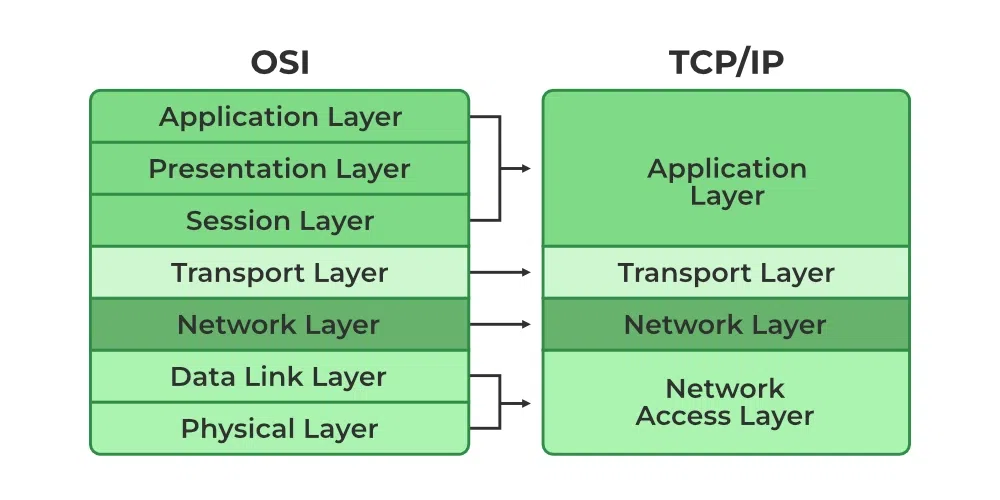
From the bottom up, its layers are:
- Network Access (Link): moves data between devices on the same physical network. (This rolls the OSI Physical + Data Link layers into one.)
- Internet: routes and forwards packets between different networks (IP).
- Transport: splits data into packets and reassembles them, making sure nothing is lost, duplicated, or out of order (TCP, UDP).
- Application: where programs such as web browsers and mail clients operate (HTTP, DNS, SMTP).
As a DevOps engineer, most of your day-to-day work lives at Layers 3–4 (IP, ports, routing, firewalls) and Layer 7 (HTTP, load balancers, TLS). When something breaks, asking “which layer is this?” is often the fastest way to narrow it down.
In the next post, we’ll zoom into Layers 3 and 4 and look at the three protocols you’ll use constantly: TCP, UDP, and IP.