DNS (the Domain Name System) is the internet’s phone book. Computers find each
other using IP addresses, but those are hard for humans to remember — so DNS translates
easy names like devopsvn.tech into the IP address a machine actually needs.
Why we need it
Say you own a server at 93.184.216.34 and host a website on it. You could ask people
to type 93.184.216.34 into their browser, but nobody would remember it. Instead you
register a domain name — say abc.vn — and point it at 93.184.216.34. Now users just
type abc.vn, and DNS quietly looks up the address behind the scenes.
Besides names, DNS also helps spread traffic across servers and route users to the nearest one, which makes it a key tool for scaling and reliability.
How a lookup works
When you visit a site, your computer asks a chain of DNS servers, step by step:
- Your machine asks a resolver (usually run by your ISP or a service like
1.1.1.1). - The resolver asks a root server, which points it to the right TLD server
(the one for
.vn,.com, etc.). - The TLD server points to the domain’s authoritative server — the one that holds the real answer.
- The authoritative server returns the IP address, and the resolver caches it so the next lookup is instant.
All of this usually happens in a few milliseconds.
DNS records you should know
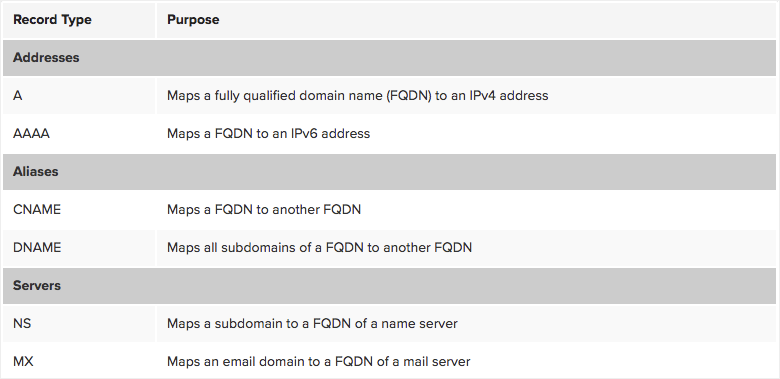
A domain’s settings are stored as records. As a DevOps engineer, these are the ones you’ll touch most:
| Record | What it does |
|---|---|
| A | Points a name to an IPv4 address |
| AAAA | Points a name to an IPv6 address |
| CNAME | Points a name to another name (an alias) |
| MX | Says which mail servers handle email for the domain |
| TXT | Free-form text, used for verification (SPF, DKIM, etc.) |
| NS | Says which name servers are authoritative for the domain |
Learn more here: What is DNS.
In the next post, we’ll look at VPNs — how to connect to a private network securely over the public internet.