

The whole point of packaging is reuse. In this chapter we deploy the same Book Info chart to different environments — dev and prod — changing only a small values file for each, never the templates.
The problem we’re solving
Without Helm, teams often keep a separate copy of their YAML for each environment: a
dev/ folder and a prod/ folder that are 90% identical. The moment you change a label
or a port, you have to remember to edit it in both places. Sooner or later they drift
apart, and a bug shows up in prod that “worked in dev” — simply because one file was
never kept in sync.
Helm fixes this with one chart plus a tiny values file per environment. The chart holds everything the environments share; each values file lists only what makes that environment special. One source of truth, no copy-paste.
The layering model
Helm merges values from several sources, and later sources win. From lowest to highest priority:
- The chart’s own
values.yaml(the defaults). - Any file passed with
-f/--values(in the order given — later files override earlier ones). - Any
--setflags on the command line (highest priority).
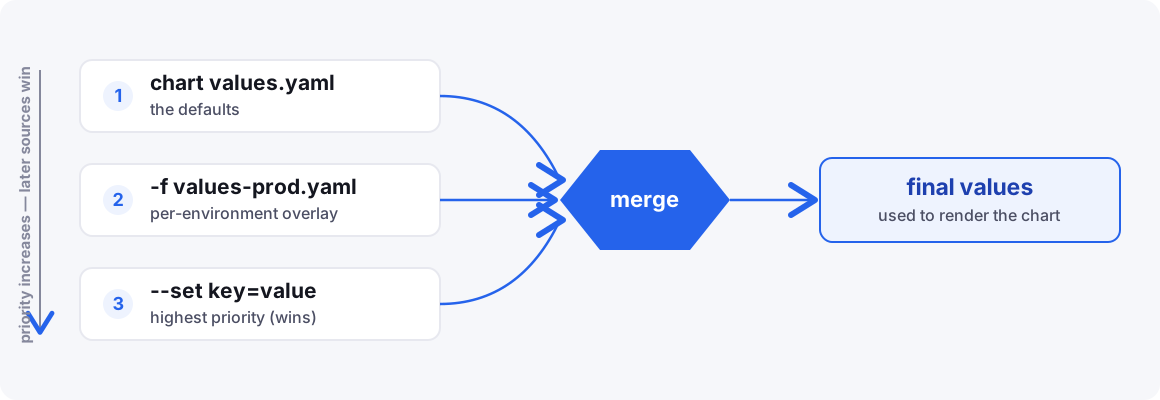
So the strategy is: put sensible defaults in values.yaml, then keep a small
per-environment file that only lists what differs.
Think of it like CSS: the chart’s values.yaml is the base stylesheet, and each
environment file is a small override that changes just a few rules. You never rewrite the
whole thing — you layer a thin sheet on top.
A worked example
Suppose values.yaml sets replicas: 1 for the reviews service. When you install prod
with -f values-prod.yaml (which sets reviews.replicas: 3), Helm walks the layers in
order, and the last layer to touch a key wins:
| Layer | Sets reviews.replicas |
Value after this layer |
|---|---|---|
values.yaml (defaults) |
1 |
1 |
-f values-prod.yaml |
3 |
3 |
--set services.reviews.replicas=5 |
5 |
5 |
Any key the higher layers don’t mention simply keeps its default. That’s the reason an overlay only needs the lines that differ — Helm fills in everything else for you.
A dev overlay
Development wants a light footprint and the plain (v1) reviews service. That’s the only
difference, so values-dev.yaml is tiny:
# values-dev.yaml
image:
  tag: "1.20.3"

services:
  reviews:
    repository: examples-bookinfo-reviews-v1
    replicas: 1
Read this file as “take the chart’s defaults, but for the reviews service use the v1
image.” We say nothing about productpage, details, or ratings, so they all keep
whatever values.yaml defined. This overlay is deliberately short — if it ever starts
growing, that’s a hint some of it probably belongs in the chart’s defaults instead.
Deploy it:
helm install book-info-dev ./book-info \
  -f ./book-info/values-dev.yaml \
  --namespace book-info-dev --create-namespace
A quick tour of that command:
book-info-dev— the release name. Giving each environment its own name lets dev and prod live side by side without clashing../book-info— the chart to install (our local chart folder).-f ./book-info/values-dev.yaml— layer the dev overlay on top of the defaults.--namespace book-info-dev --create-namespace— install into a dedicated namespace, creating it if it doesn’t exist yet.
A prod overlay
Production wants more replicas and the colourful v3 reviews:
# values-prod.yaml
services:
  productpage:
    replicas: 3
  details:
    replicas: 2
  ratings:
    replicas: 2
  reviews:
    repository: examples-bookinfo-reviews-v3
    replicas: 3
helm install book-info-prod ./book-info \
  -f ./book-info/values-prod.yaml \
  --namespace book-info-prod --create-namespace
Notice we ran the exact same chart — only the overlay and namespace changed. Dev and prod are now two completely independent releases: different pods, different namespaces, their own revision history. Upgrading or rolling back one never touches the other.
Two environments, one chart, and each overlay is only the handful of lines that actually change. There’s no copy-pasted YAML to drift out of sync.
How deep merging works
There’s one rule that surprises almost everyone at first: Helm merges maps deeply but replaces lists wholesale.
“Deep merge” means Helm walks into nested maps and combines them key by key. So when
the prod overlay sets only services.reviews.replicas, the other keys under reviews
survive:
# values.yaml (defaults)
services:
  reviews:
    serviceName: reviews
    account: bookinfo-reviews
    port: 9080
    replicas: 1

# values-prod.yaml (overlay)
services:
  reviews:
    replicas: 3

# what Helm actually uses
services:
  reviews:
    serviceName: reviews        # kept from defaults
    account: bookinfo-reviews   # kept from defaults
    port: 9080                  # kept from defaults
    replicas: 3                 # overridden
Lists behave differently — if you override a list, Helm takes your version entirely and throws the default list away. That’s exactly why we modelled the services as a map back in chapter 5: it lets each environment patch a single field without re-declaring every service.
Verify before you ship
Render each environment and diff them to be sure only the intended things changed:
helm template book-info ./book-info -f ./book-info/values-dev.yaml  > /tmp/dev.yaml
helm template book-info ./book-info -f ./book-info/values-prod.yaml > /tmp/prod.yaml
diff /tmp/dev.yaml /tmp/prod.yaml
You can also preview an upgrade against what’s really running with the diff plugin:
helm plugin install https://github.com/databus23/helm-diff
helm diff upgrade book-info-prod ./book-info -f ./book-info/values-prod.yaml
One-off overrides with –set
For quick, temporary changes — a CI pipeline bumping the image tag, say — --set beats
editing a file:
helm upgrade book-info-prod ./book-info \
  -f ./book-info/values-prod.yaml \
  --set image.tag=1.20.3
In --set, a dot means “go one level deeper,” so image.tag=1.20.3 is the command-line
way of writing:
image:
  tag: "1.20.3"
You can reach nested keys the same way, e.g. --set services.reviews.replicas=5. And
because --set is the top layer, it overrides both the defaults and any -f file.
Use --set sparingly, though: values that matter long-term belong in a file that’s
reviewed in Git, not buried in shell history.
Inspect what a release actually used
After the fact you can always ask Helm what values a release was installed with:
helm get values book-info-prod
The Book Info chart and its values-dev.yaml / values-prod.yaml overlays are in
05-charting-book-info.
By modelling configuration as data and layering thin overlays, one chart now serves every environment. In the next chapter we’ll pull in functionality we don’t want to write ourselves — using dependencies and subcharts.





