

Welcome to the Helm series. Over the next chapters we’ll go from zero to packaging a real application — the Book Info microservices — as our own Helm chart. In this first post we’ll answer the most important question: what problem does Helm actually solve?
The problem: too much YAML
To run anything on Kubernetes you write YAML — Deployments, Services, ConfigMaps, Secrets, ServiceAccounts, and so on. A single small app can be five or six files. Now imagine you need to deploy the same app to three environments (dev, staging, prod), each with a different number of replicas, a different image tag, and a different domain.
The naive solution is copy-paste: three folders of almost-identical YAML. This quickly becomes a nightmare:
- Change one label and you have to edit it in three (or thirty) places.
- It’s easy for the environments to drift apart without anyone noticing.
- There’s no easy way to say “give me version 2 of this app” or “undo that last change.”
We need a way to package all these resources together, parameterize the parts that change, and version the whole thing. That’s exactly what Helm does.
What is Helm?
Helm is the package manager for Kubernetes. If you’ve used apt on Ubuntu,
brew on macOS, or npm for Node.js, the idea will feel familiar: instead of
installing files by hand, you install a package that knows how to set everything up.
For Kubernetes, that package is called a chart. Helm takes a chart, fills in your values, and applies the resulting Kubernetes resources to your cluster for you.
This series uses Helm 4, the current major version. Helm 4 keeps everything you already know from Helm 3 — charts, values, templates, releases — and improves the plumbing underneath: first-class OCI registry support for storing charts, safer apply behaviour when talking to the cluster, and a modernized plugin system. Almost everything in this series applies equally to Helm 3, but we’ll call out anything specific to Helm 4.
Three ideas you’ll use everywhere
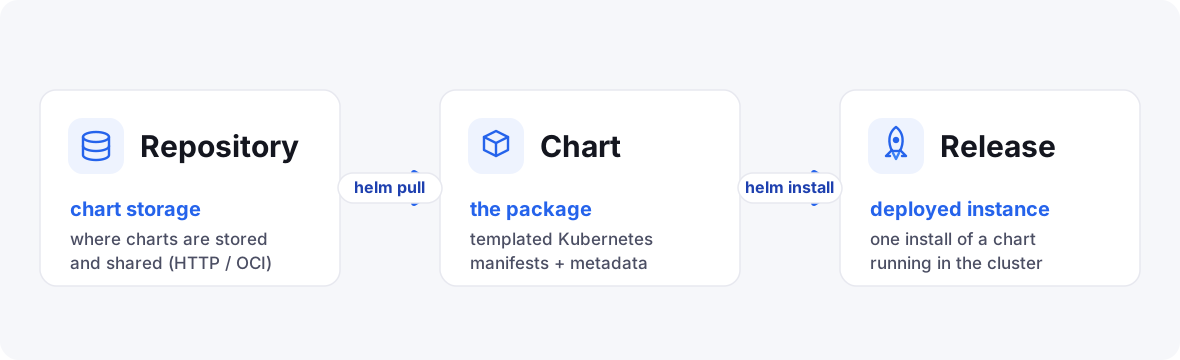
Helm has a small vocabulary. Learn these three words and the rest falls into place.
1. Chart
A chart is the package — a folder (or a .tgz archive) containing the templated
Kubernetes manifests plus a description of the app.
2. Release
A release is one installed instance of a chart in your cluster. Install the same chart twice with different names and you get two independent releases. Every time you install or upgrade, Helm records a new revision so you can roll back later.
3. Repository
A repository is a place charts are stored and shared — an HTTP server or, in Helm 4, an OCI registry (the same kind of registry that stores container images).
How Helm fits into the workflow
Here’s the mental model for the whole series:
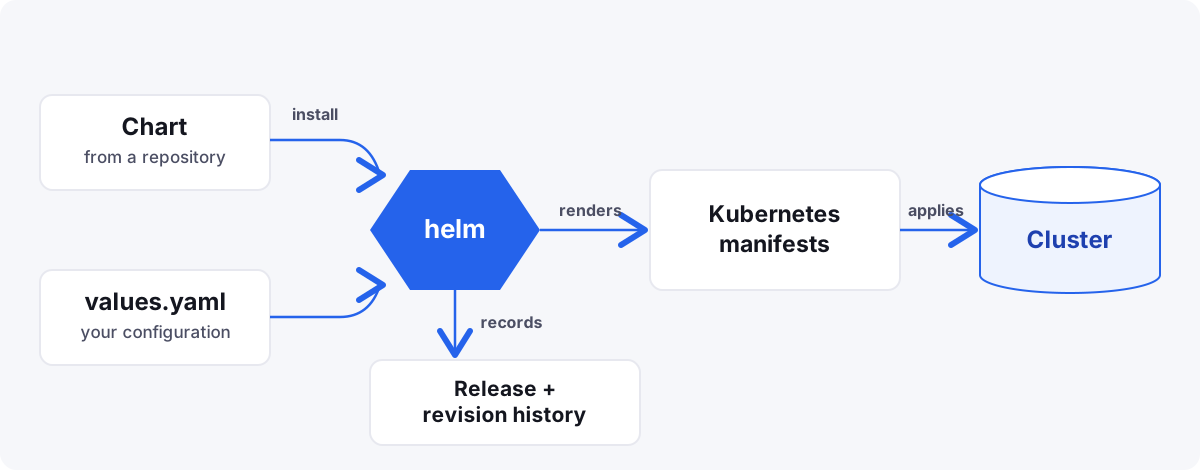
You provide a chart and your values; Helm renders the final manifests and applies them, while keeping a history of every release so you can upgrade and roll back with a single command.
What we’ll build
By the end of the series you’ll have taken the Book Info app — a productpage frontend
plus details, ratings, and reviews services — and turned it into a clean,
reusable Helm chart that deploys to multiple environments from a single source of
truth.
Code for this series. All the charts and manifests live in _resource/helm-series, one folder per chapter.
In the next chapter we’ll install Helm and get our very first release running on a cluster.





